Design
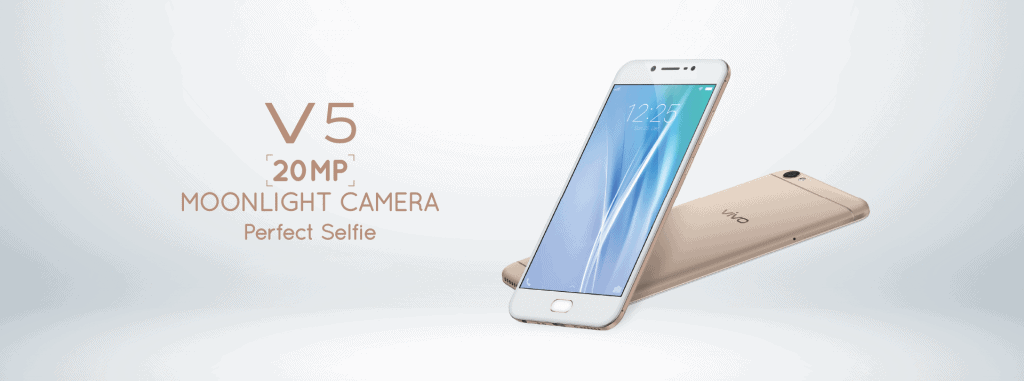
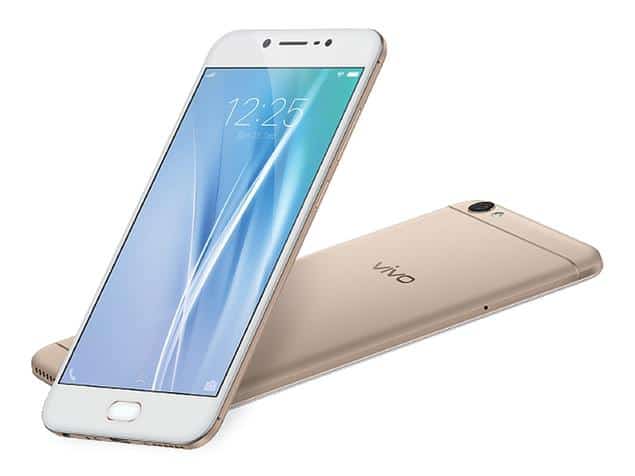
Overall, the Vivo V5 has a pretty eye-catching design with a metal-plastic back cover, 2.5D tempered glass and metal frame. On the back, the two horizontal stripes are innovated along with the prominent “vivo” logo, which sets the tone for this smartphone.
On the front side, the Vivo V5 is equipped with a 5.5-inch HD screen with IPS panel, for brightness and good color contrast. The screen is not thick but it can not be called ultra thin. In addition, this screen is equipped with tempered glass Corning Gorilla Glass. Right below the display is the built-in Home key that features fingerprint recognition at 1/5 of a second.
In addition to the above characteristics, the design of the speakerphone on the lower edge instead of the back is a plus for Vivo V5. This design gives the music experience no restriction when the user places the computer upside down on a table or cushion, pillow. The bottom edge of the machine is equipped with a microUSB port and a 3.5mm headphone jack. The left and right sides still contain familiar components such as the power button, volume up and down buttons, and SIM card slot, integrated memory card.
Compared to most other mid-range smartphones, the navigation keys on the Vivo V5 have been removed from the screen by the manufacturer, tucked neatly on the bottom. In particular, these keys have backlight for use in the dark – which many mid-range smartphones are oblivious to making it difficult for the user’s experience.
Display
Screen Size and Resolution
So the Vivo V5 comes with a 5.5-inch IPS LCD display, and the resolution is 1280×720 pixels. That setup lands around 267 PPI, aka pixels per inch. When the phone was released, a 720p screen was kinda normal and still fine for a lot of mid-range devices , but nowadays it really feels behind compared with the Full HD, 1080p panels that were starting to show up more and more in the same class.
Color Reproduction and Brightness
Even though it s not the highest resolution, the display actually manages pretty solid color reproduction. Colors look vibrant, bold, and overall kind of punchy, so media looks lively rather than dull. The IPS panel helps with wide viewing angles, so you don’t get crazy color shift if you tilt the phone. Brightness is decent for indoor use, yet if you re outdoors under direct sunlight, the screen can struggle a bit, and it becomes harder to read or check things on the display , especially in bright glare.
Sharpness and Detail
Because it s 720p, the sharpness isn t on the same level as Full HD screens. If you look closely you can spot some pixelation, particularly with small text or high-resolution photos and graphics. Still, for day to day stuff like web browsing, streaming videos, or scrolling through social media, it works well enough, and most people will probably feel it s a satisfactory viewing experience.
Touch Sensitivity
So the touch response on the Vivo V5’s display feels really smooth and responsive, like there is no lag or stuttering that you can easily notice. It also supports up to 10-point multitouch, which is honestly more than enough for most everyday things, even for gaming, plus typing and all that stuff.
Eye Protection Mode
Another feature that stands out on the Vivo V5 screen is the Eye Protection Mode. It lowers the blue light output, to help ease eye strain, specially if you’re using the phone for a long time, or when you are in dim light. You see this option more and more on modern phones, so having it on the Vivo V5 is a pretty nice inclusion, especially if you tend to browse, scroll, or read at night.
Performance
The Vivo V5 is powered by MediaTek’s 64-bit 8-core processor, 4GB of RAM, 32GB of internal memory (up to 128GB of additional microSD card support). Marked by AnTuTu Benchmark, Vivo V5 reached nearly 40,000 points – this is a pretty good score for a mid-range smartphone.
With the above configuration, it can be seen that V5 has a bit more RAM than some competitors at the same price ($ 259), such as OPPO F1s or Huawei GR5 2017. Actual use, Vivo V5 for speed Fast activation, no snatching or lag.
The operation when surfing on the Facebook application or the default web browser is pretty smooth. Especially in the test of heavy Asphalt 8 gaming experience (setting the screen resolution is average), V5 does not have any problems, of course the warm up after a long time of processing tasks This heavy weight is unavoidable.
Camera
In addition to the 20MP resolution (Sony IMX376 sensor, f / 2.0 aperture), the Vivo V5 front camera is equipped with a “moonlight self” flash for selfie images in low light or backlight. Morning, accompanied by Beauty Face 6.0.
Practical snapshot from the 20MP camera on the V5 with flash in low light, showing color in pleasant tone, no shading. However, comparing night shots (using flash) and daylight shots outdoors (natural light), night shots lack the sharpness and detail.
In general, the flash at the front camera will provide some support for selfie photography at night but with the distance from the camera to the face not too far away. In the daytime, both the front and back cameras provide good, high-definition shots.
BLU VIVO 5 Smartphone -5.5″ 4G LTE GSM Unlocked – 32GB +3GB RAM – Silver: Buy it now
BLU VIVO 5 Smartphone -5.5″ 4G LTE GSM Unlocked – 32GB +3GB RAM – Gold: Buy it now
Pin
Battery life is one of the most important factors for a mobile device. Particularly for Vivo V5, the battery is a plus point of this product. Vivo V5 gives continuous video playback of 11 hours 41 minutes, but does not specify the brightness of the screen as well as the volume setting.
In evaluation using the PC Mark tool, Vivo V5 for 10 hours 29 minutes of continuous operation. Compared to competitors in the segment, V5 proved superior. However, V5 is not equipped with fast charging technology is a pity.
Software
Operating System
The Vivo V5 runs on Funtouch OS 2.6, and it is based on Android 6.0 Marshmallow. Funtouch OS is Vivo’s personal Android skin, so it adds a bunch of distinctive functions and little improvements that you might not see elsewhere. Still, it strays quite far from the plain stock Android vibe, and that could bother some people, depending on what they’re used to.
User Interface
Funtouch OS feels pretty unique, with vivid shades, fluid motions, and a very adjusted interface. One of the clearest differences is that there’s no app drawer, all apps sit straight on the home screens, kind of like iOS. For users who like the traditional Android layout, with that separate app drawer, this may take a bit of time and maybe a little patience.
The quick settings area also works differently. Instead of swiping down from the top, you swipe up from the bottom, again it resembles iOS. That could make you blink at first, if you’re used to the usual Android behavior, but after a while it turns into a matter of habit and personal taste.
Customization Options
Funtouch OS gives users a decent set of personalization choices. You can switch themes, wallpapers, typefaces, and more. There’s also a theme store with a lot of picks, and some themes can basically flip the whole experience, from app icons to the system colors. Plus, you can tweak the home screen plan, including the grid size, and the way icons are arranged, which is nice if you like things to feel tidy.
Pre-Installed Apps
The Vivo V5 arrives with a bunch of pre-installed apps, a mix of Vivo stuff and third party developers too. Some of these apps are actually pretty handy, like Vivo’s iManager , which is basically for tuning the phone’s performance and handling security tasks. But yeah, there are others that feel like clutter, or bloatware, depending on how you look at it. The good thing is, in most cases you can uninstall the pre-installed apps you don’t really use.
Software Features
Funtouch OS has a few software features meant to make the day to day experience smoother. A couple of the more noticeable ones are:
Smart Split : this one lets you run two apps side by side on the same screen, so multitasking feels less painful. For instance, you can play a video while replying to a message, without constantly swapping apps around.
App Clone: with App Clone you can make extra copies, of select apps, such as social platforms, so you can log into two separate accounts on the same device , at the same time.
Gesture Controls: Funtouch OS includes gesture options like double tap to wake , swipe up to unlock, and also drawing certain letters on the screen to open apps quickly.
Smart Wake: this feature sorta wakes the phone with different gestures, like you can swipe up on the display to unlock it, or draw a particular shape to pop up the camera, or just open another app.
Eye Protection Mode: like i said earlier, it cuts down on the blue light, so your eyes feel less strained during long sessions, honestly.
Connectivity
Network and SIM Support
The Vivo V5 has 4G LTE on both of its SIM slots ,which is pretty important if you’re the kind of person who needs quick mobile data all the time. It also comes with dual SIM dual standby, so you can keep two SIM cards active at once, without needing to manually swap things around every time.
On the network side, the Vivo V5 generally gives solid reception and quick data speeds, as long as you’re in a zone with decent signal coverage. Voice calls sound clear too, and there’s good noise cancellation, so your chats stay crisp ,even when there’s some stuff going on in the background.
Wi-Fi and Bluetooth
For Wi-Fi, the Vivo V5 supports 802.11 b/g/n. That ends up covering many of the usual Wi-Fi setups, but it doesn’t support the faster 5GHz band. So, it can connect without much trouble, however you might not enjoy the top end speeds you’d get from 5GHz networks.
Bluetooth 4.1 is supported as well, which helps you pair wireless headphones, speakers, and other Bluetooth gadgets with a steady link. In day to day use, the connection holds up pretty well, with fewer sudden drops and less interference than you’d expect.
GPS and Navigation
The Vivo V5 comes with GPS, A- G P S , GLONASS and BDS, for, accurate positioning and navigation. In real use , the phone seems to do its job well, you get quick satellite lock, and the location trail stays pretty steady. So whether you’re on Google Maps or another navigation app, it generally gets you where you need, from point A to point B without too much hassle.
Other Connectivity Features
There is also USB OTG (On- The-Go) support, so you can attach external USB things like flash drives, keyboards, or even game controllers. For some users this is a small but real convenience, especially if you need to shift files fast or just want extra expansion for the device, you know.
Advantage:
– Elegant design.
– Strong day to day performance.
– Photos look great in bright, high-definition conditions.
– Flash light for the front camera.
– Fingerprint sensor feels responsive and sensitive.
– Solid battery life.
Disadvantages:
– The cover is plastic.
– Night photos aren’t as detailed as daylight shots.
– No fast charging tech.
– If you insert a memory card, you have to give up a SIM card slot, which is annoying, to be honest.
Related Posts





Tech Reviewer & Product Analyst
Định Bia has spent over 10 years testing consumer electronics with a focus on smart technology. He work as a product advisor at Biareview where he helped customers find the right devices for their needs. He personally tests every product featured on this site using a consistent evaluation framework covering quality, durability, and value. All reviews are based on experience, not influenced by the manufacturer.