Vivotek’s three IP Cameras come in a variety of designs that are suitable for indoor surveillance purposes, provide day and night visuals and power over PoE.
1. Vivotek IP8151
Pros: Discrete lens; Beautiful picture.
Cons: No automatic rotation function.
The Vivotek IP8151 is a built-in fixed-mount camera, metal rectangular body, removable stand, desk, wall or ceiling mount.
The camera’s rear ports include a network port, microphone port, audio output port, BNC video out port, power port (12V adapter included) and I / O ports. The back of the camera body is an SD / SDHC memory card slot, which helps to store photos and videos. Vivotek IP8151 also supports Power over Ethernet (PoE) technology over the network cable.
The IP8151 is removable with a focal length of 3.1-8mm, aperture of f / 1.2, a cable that connects to the rear body of the camera, zoom lever and custom focus. The camera uses a 1.3-megapixel CMOS sensor that supports resolutions of up to 1280×1024 pixels for crisp, beautiful images, and noise-canceling even in low-light environments. The device uses an infra-red auto-removal lens for day and night dialing. Vivotek IP8151 supports 4 simultaneous video streams in 3 encoders H.264, MJPEG, MPEG-4, 30 fps. The camera also supports the DDNS protocol for remote access via the Internet.
The IP8151 uses the Installation Wizard 2 to automatically detect the device’s IP address and allow it to connect to the camera with a web browser (the plugin must be installed). From this HTML console (two basic and advanced levels), users can perform full functions to configure and manage the camera. The camera offers motion detection that allows for three zones: tampering detection, event , Pan-tilt-zoom.
In addition, you can also use the Vivotek-specific ST7501 software to control and monitor the camera. This software package (version 1.6) includes LiveClient utility for centralized IP camera management (supports up to 32 devices), scheduler recording and storage settings; Playback utility records playback of recorded videos (16 channels simultaneously), screen capture function, support for 64X fast and 1 / 8X slow motion, EXE, 3GP, AVI.
Technical Specifications
Image Sensor:
- 1/3″ progressive scan CMOS sensor
- Maximum resolution of 1280×1024 pixels (SXGA)
Lens:
- Vari-focal lens with focal length ranging from 2.8 to 12 mm
- F1.2 to F2.5 aperture
- Horizontal viewing angle of 29° to 95°
Video:
- H.264, MPEG-4, and MJPEG compression formats
- Frame rate up to 30 fps at full resolution
- WDR (Wide Dynamic Range) Pro technology
Audio:
- Two-way audio support
- External microphone input and speaker output
- Audio compression: AAC, G.711, G.726
Connectivity:
- 10/100 Mbps Ethernet
- Supports PoE (Power over Ethernet)
Other Features:
- Removable IR-cut filter for day and night functionality
- Built-in microSD/SDHC card slot for local storage
- Multiple event triggers and event management
- ONVIF compliance for interoperability with other devices
Storage and events
There’s a microSD slot, so the camera can record to its own card. If the network goes down, you don’t lose anything. The footage is still on the card when things come back up.
You can set it to react to motion, sound, or someone tampering with it. It can start recording, send an email, or set off something wired to it, like an alarm siren. Most small setups won’t use all of that, but it’s there.
Installation
It’s PoE, on a 10/100 Ethernet port, so you won’t need an outlet near the camera. Everything you need to mount it on a wall or ceiling comes in the box. Basic setup in the browser is easy. Getting WDR and the event rules tuned properly takes longer, so set aside an afternoon.
Where it fits
It’s best in shops, offices and banks, where backlit entrances and the need to aim precisely at a counter or door are common. It’s fine at home too, in a hallway or the living room, and it’ll ping your phone if it picks up movement while you’re out. A warehouse or factory can get more out of it. Aim it at the loading dock or along a production line, and a supervisor can talk to the team on the floor through the speaker. Keep it under a roof, though. It’s an indoor camera, and anything exposed to the weather needs a different model.
Strengths and weaknesses
Its strengths are WDR Pro, the adjustable lens, two-way audio support, local recording and flexible event handling. Few basic cameras offer that combination.
Its weaknesses are a higher price than basic network cameras, settings that take some learning, no Wi-Fi, and a resolution that’s modest by today’s standards. Next to a 1080p or 4K camera, 1.3 MP shows less detail, and WDR Pro doesn’t change that.
Verdict
The IP8151 is not the camera to buy for maximum resolution. Buy it when the scene is hard: bright doorways, mixed lighting, or a spot you need to frame exactly. There, WDR and the vari-focal lens make up for the modest pixel count. If none of that applies to your space, a cheaper 1080p camera will probably serve you better.
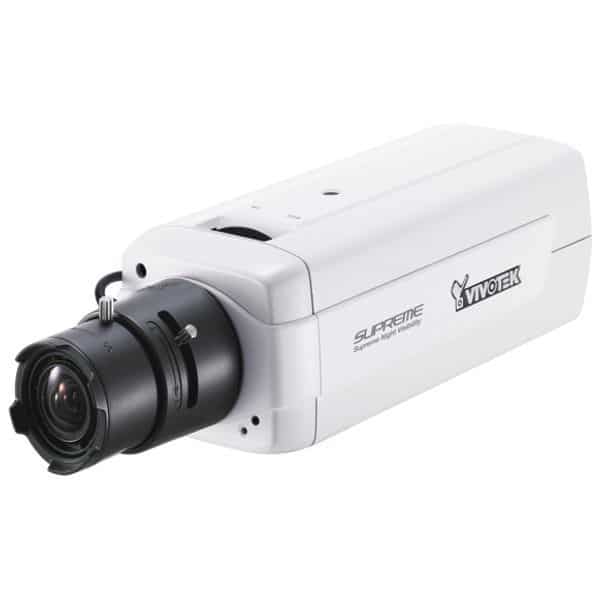
Vivotek IP8151 Supreme Night Visibility WDR Enhanced Fixed Network Camera: Buy it now
2. Vivotek FD8134
Pros: Clear picture; IR light turns night.
Poor: The lid must be opened when the lens is rotated.
The Vivotek FD8134 is a fixed dome design, suitable for wall or ceiling mounting for indoor surveillance purposes. Plastic lens cover is transparent, removable from the body easily by hand.
Built-in integrated lenses with 8 infrared LEDs (within 10m of operating range) and an automatic infrared filter for day and night dialing. Tested at Test Lab, FD8134 delivers high contrast black-and-white images with less distortion. However, the defective camera is only allowed to manually rotate the lens (must remove the cover), without the automatic rotation or through the software.
The lens of the f / 1.8 aperture camera has a fixed focal length of 3.6mm. The camera’s 1/4″ CMOS image sensor supports up to 1280 x 800 pixel resolution, 4-channel H.264, MJPEG, MPEG-4 video, and 30 fps. Picture quality is clear, standard color. Inside the camera also equipped with MicroSD / MicroSDHC card slot for storing images and video.
The communication interfaces of the camera are externally wired by cable system, including ethernet, power supply (12V adapter) and input / output signals. The FD8134 uses PoE power over a network cable, which simplifies the installation and removal of power wires, but requires a PoE (802.3af) switch.
The Vivotek FD8134 also utilizes a web-based control interface, with functions such as motion detection, 3-zone setup, tampering detection, Up to 400% configuration, remote access through DDNS service … Vivotek FD8134 also comes with Installation Wizard 2 to automatically detect the IP address of the camera; ST7501 software package for control, monitoring and recording.
Technical Specifications
Image Sensor:
- 1/4″ CMOS sensor
- Maximum resolution of 1280×800 pixels (HD)
- Progressive scan technology
Lens:
- Fixed focal length of 3.6mm
- F1.8 aperture
- Horizontal viewing angle of 56 degrees
Video:
- H.264, MPEG-4, and MJPEG compression formats
- Frame rate up to 30 fps at HD resolution
Audio:
- Two-way audio support
- Built-in microphone and speaker
- Audio compression: G.711, G.726
Connectivity:
- 10/100 Mbps Ethernet
- Supports PoE (Power over Ethernet)
Other Features:
- IR LEDs for night vision up to 10 meters
- Built-in microSD/SDHC card slot for local storage
- Motion detection and tamper detection
- Compact design for discreet installation
The FD8134 is a small indoor dome, the kind you put up when a big camera would look wrong on the ceiling of a shop or an office hallway. Resolution and field of view aren’t its strengths. Still, for something this size, there’s a fair amount inside.
Image quality
It uses a 1/4″ CMOS sensor at 1280 x 800. Colors look right in daylight, and you can recognize someone from the other side of a room. Progressive scan also helps with movement. Someone walking past the shelves still looks sharp, without the jagged edges older cameras used to leave.
At night, the built-in IR LEDs light things up to about 10 meters, even in a room with no light at all. That’s plenty for most offices, shops and homes.
Coverage
This is the main limitation. The lens is fixed with a horizontal view of about 56°, which is fairly narrow. It works for a doorway, a corridor or a till. For a large open floor you’ll need more than one camera.
Audio
The microphone and speaker are both built in. Staff can hear what’s going on and speak back without extra hardware. The sound is clear enough for talking to a visitor at reception or telling a customer the shop is closing. Don’t expect it to fill a large room.
Storage and alerts
There’s a microSD slot too. If the network goes down, the camera just keeps recording to the card.
When something moves in frame, it starts recording and sends you an alert. It also notices if someone tapes over the lens or knocks it out of position. For a shop owner, that’s probably the more useful of the two, since the first thing a shoplifter tends to do is deal with the camera.
Compression
You get H.264, MPEG-4 and MJPEG. Stick with H.264 unless you have a reason not to. The files are much smaller and you won’t see the difference. MPEG-4 and MJPEG are mainly for older recorders.
Installation
One Ethernet cable carries power and data over PoE, on a 10/100 port. Screw it to the wall or ceiling with the parts in the box, then open a browser to set it up. If you’ve set up a home router, you’ll manage this.
Where it fits
In an office it can cover the entrance, the corridors and shared spaces without looking like surveillance. In a shop it’s small enough to go unnoticed by most customers, and the speaker lets staff warn someone behaving suspiciously without walking over. At home it covers the front door or the living room, and motion alerts tell you if something moves while you’re out.
Strengths and weaknesses
For such a small camera, the feature list is long. You get night vision, two-way audio, a card slot and tamper alerts in one housing, and PoE keeps the install tidy.
The downsides come down to the lens. It’s fixed and narrow, so you can’t adjust the view, and wide rooms need extra cameras. There’s no Wi-Fi either. And 1280 x 800 looks modest next to 1080p or 4K models.
Verdict
If you need a discreet indoor camera that can see in the dark and let you talk to whoever’s in front of it, the FD8134 does that well at a low price. Just measure the room first. With a 56° view, it suits doorways and corridors better than open spaces.
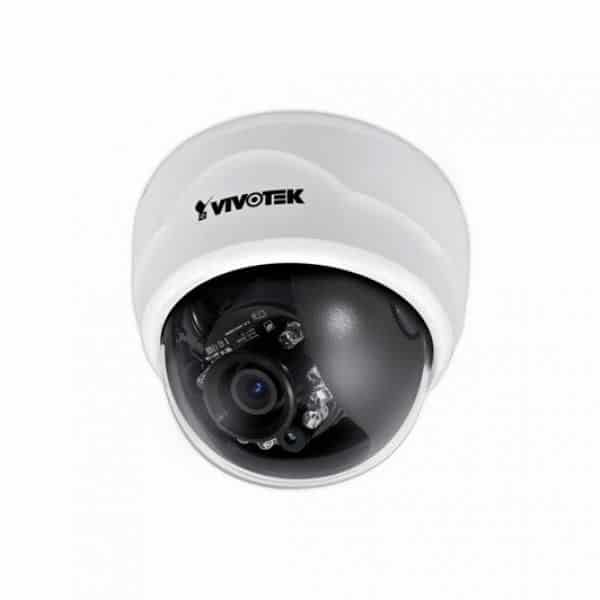
Vivotek FD8134 Surveillance/Network Camera Color – CMOS – Cable: Buy it now
Vivotek FD8134V H.264 Vandal-proof IP66 Dome Network Camera: Buy it now
3. Vivotek MD7530D
Pros: Shell is waterproof, dust and impact.
Poor: The lid must be opened when the lens is rotated.
The Vivotek MD7530D also has a more compact but compact dome design that is suitable for surveillance in harsh environments such as on ships and vehicles. The MD7530D’s protective cowl and base are made of durable metal, resistant to shock, impact, dust, heat and damp. The built-in lens cover is covered with transparent plastic.
You must remove the camera cover with the dedicated screwdriver supplied when you want to adjust focus or rotate the lens up and down 90 degrees. The MD7530D uses a wide-angle lens, a f / 2.0 aperture and a fixed 2.8mm focal length. The camera’s 1/4″ CMOS image sensor supports 640×480 pixel VGA resolution, 2-channel video streaming with 2 MJPEG encoders and MPEG-4, 30 fps. Picture quality is clear but not really sharp. Inside the camera also equipped with MicroSD / MicroSDHC card slot for storing images and video.
The MD7530D interfaces are also out wired, including ethernet, power supply (12V adapter), microphone and I/O port. The MD7530D also supports PoE power over the network cable.
You can choose to use the Web interface or the Vivotek ST7501 software suite to set up features such as motion detection, tampering detection, digital zoom, Configure remote access via DDNS service … Vivotek MD7530D also comes with Installation Wizard 2 to automatically detect the IP address of the camera.
Technical Specifications
Image Sensor:
- 1/4″ CMOS sensor
- Maximum resolution of 640×480 pixels (VGA)
- Progressive scan technology
Lens:
- Fixed focal length of 2.9mm
- F2.0 aperture
- Horizontal viewing angle of 70 degrees
Video:
- H.264, MPEG-4, and MJPEG compression formats
- Frame rate up to 30 fps at VGA resolution
Audio:
- Two-way audio support
- Built-in microphone and speaker
- Audio compression: G.711, G.726
Connectivity:
- 10/100 Mbps Ethernet
- Supports PoE (Power over Ethernet)
Other Features:
- IP67-rated weatherproof housing
- Vandal-resistant casing
- IR-cut filter for day/night functionality
- Built-in microSD/SDHC card slot for local storage
- Motion detection and tamper detection
Vivotek built the MD7530D to ride around in buses, trains and delivery vans, and you can tell. It’s compact and sealed up tight. The resolution is low for a fixed installation, but inside a moving vehicle it gets the job done.
Build
With an IP67 rating, dust can’t get in, and the camera will survive a short dunking in water. The casing is vandal resistant too. On a late-night bus, someone will eventually take a swing at it, so a tough shell is worth more here than a sharper picture.
Image quality
The sensor is a 1/4″ progressive scan CMOS at VGA resolution (640 x 480). That’s low by any current standard. You’ll see who got on and roughly what they did, but you won’t read small print or pick out fine detail at the back of a long carriage. Progressive scan does help with motion, which is useful when both the vehicle and the passengers are moving.
The fixed lens covers about 70° horizontally. That’s enough for a taxi or a van, but on a full-length bus you’ll probably need one camera at each end.
An IR-cut filter switches the camera between day and night modes. In daylight colors are good. At night it depends on how much light there is: cabin lights or streetlights give you a usable picture.
Audio
The microphone and speaker are built in, so a control room can listen in and speak to passengers or the driver directly. In a vehicle, that can be as useful as the video, whether it’s a driver reporting a problem or an operator calming things down.
Storage and alerts
Vehicles lose their network connection all the time, in tunnels, depots and rural stretches. The microSD slot deals with that: the camera records to its card and you still have the footage afterward.
Motion and tamper detection are both included. Tamper alerts matter more here, since a camera that’s been covered or knocked out of position on a night bus is worth knowing about right away.
Compression and connectivity
It supports H.264, MPEG-4 and MJPEG. Use H.264, since the bandwidth savings matter a lot over a mobile link. Power and data run over one PoE cable on a 10/100 port, which keeps wiring inside the vehicle to a minimum. Setup is through a web browser.
Where it fits
It’s a natural fit on buses and trains, where it can watch the passenger area. For taxi, truck or delivery fleets, it gives the operator a record of what happened inside each vehicle. In stations and transport hubs it can work as a durable camera in areas where anything less sturdy would get damaged.
Strengths and weaknesses
It’s tough, sealed and small, and it includes two-way audio, local recording and tamper alerts, which is the right set of features for a vehicle.
The resolution is the obvious weakness. VGA is well below the HD and Full HD cameras now common in transport. The lens is fixed, and there’s no wireless option.
Verdict
Pick the MD7530D if the camera needs to survive a vehicle and staying connected is a problem. If you need to identify faces clearly at a distance, look for a newer mobile camera with at least HD resolution.
Related Posts

Tech Reviewer & Product Analyst
Định Bia has spent over 10 years testing consumer electronics with a focus on smart technology. He work as a product advisor at Biareview where he helped customers find the right devices for their needs. He personally tests every product featured on this site using a consistent evaluation framework covering quality, durability, and value. All reviews are based on experience, not influenced by the manufacturer.