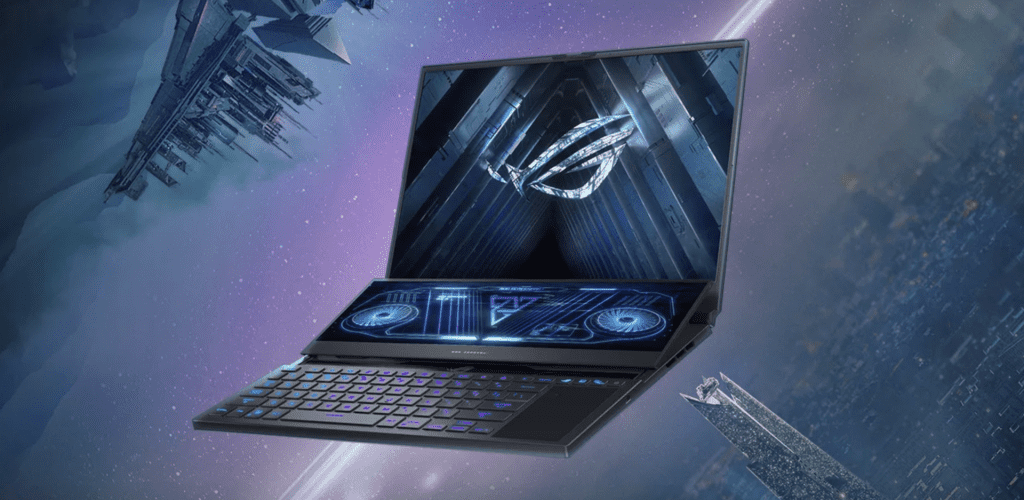
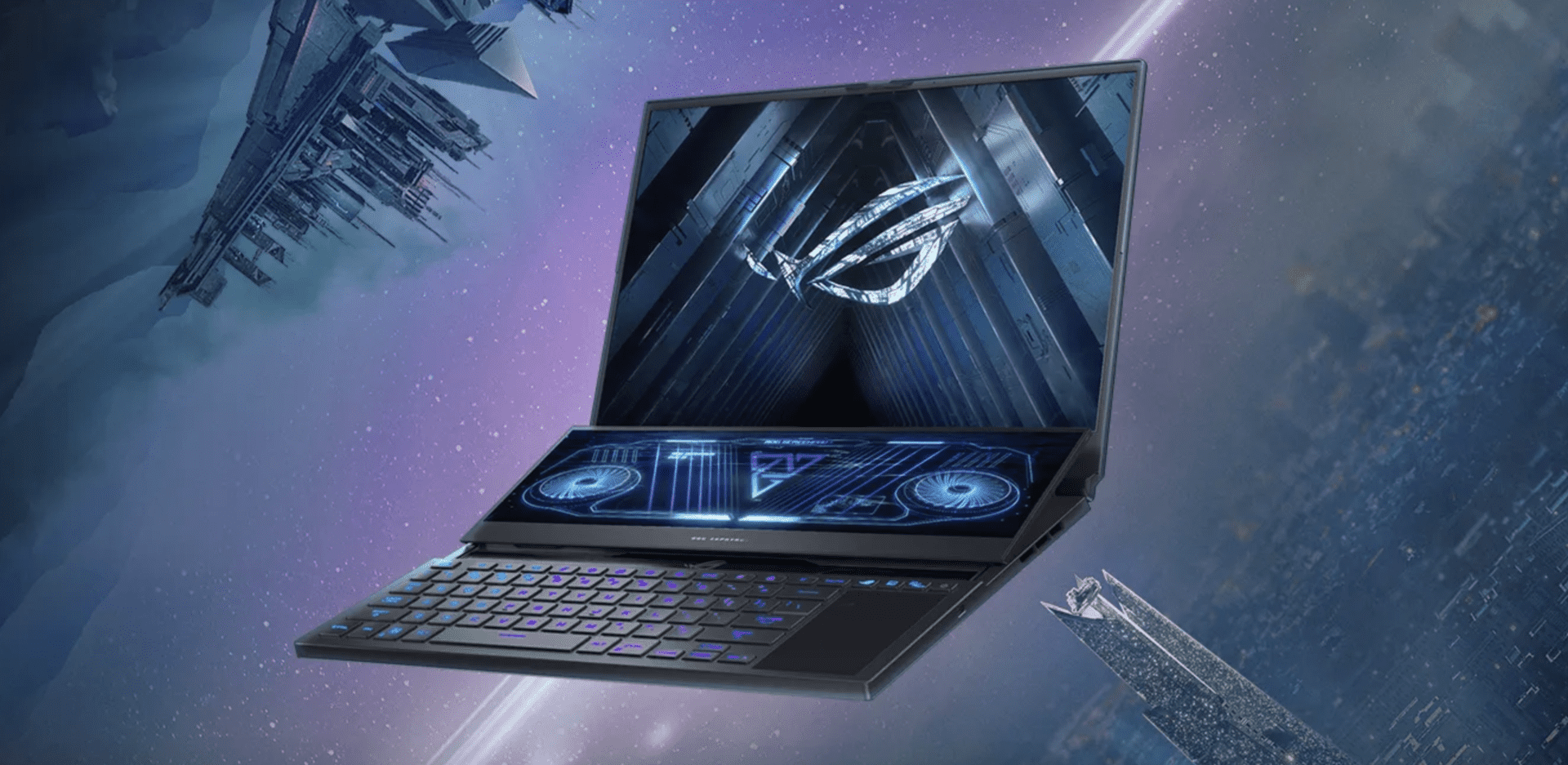
ROG Zephyrus Duo 16 is one of ROG’s most innovative and innovative products in 2022, with 14.1-inch ScreenPad Plus secondary display technology, 4K resolution, multi-touch support, and a pen stylus, which enhances work productivity and gaming experience.
Thanks to the new 4-way hinge mechanism, the ScreenPad Plus screen will automatically raise an angle of 13 degrees when the device is opened and close to the main screen, creating the feeling of using two nearly borderless screens. The AAS Plus 2.0 cooling system utilizes up to 28.5mm of free space between the screen and the chassis to help increase the amount of cool air into the system by 30% compared to other gaming laptop designs.
In addition to the improvements to the secondary screen, the main screen of ROG Zephyrus Duo 16 has also been upgraded to a 16:10 aspect ratio, thin screen borders, and a 91% coverage ratio of the front area, for working space more widely.
In terms of technology, the 16-inch main screen on ROG Zephyrus Duo 16 uses a super bright Mini LED panel that can provide a maximum brightness of up to 1,100 nits, comes with a resolution of 2K 165 Hz, meets the VESA DisplayHDR standard 1000 with 512 local dark areas, for an impressive HDR experience. In addition, the product also meets the 100% DCI-P3 color standard, suitable for graphic designers who need high color accuracy.
Thanks to AUO’s AmLED technology and ROG Nebula HDR Engine, ROG Zephyrus Duo 16 can control backlighting with precision on and off for local dimming and good contrast. This combination of software and hardware will help deliver true-to-life images and minimize the halo phenomenon.
In terms of performance, ROG Zephyrus Duo 16 has a maximum CPU option up to AMD Ryzen 9 6900HX Series with NVIDIA GeForce RTX 3080 Ti GPU. With such a configuration, ROG’s most advanced gaming laptop can handle all the heaviest tasks. In addition, Zephyrus Duo 16 also owns up to 64 GB of DDR5 RAM with a clock speed of 4,800 Mhz and a PCIe Gen 4×4 SSD of up to 4 TB.
With a huge stack of configuration equipment, the cooling system on the machine is also kinda heavily invested by ROG, especially when you use the new generation Thermal Grizzly Conductonaut Extreme liquid metal thermal paste. Because of that, the CPU temperature on the ROG Zephyrus Duo 16 can drop by as much as 15 degrees Celsius, which makes it 17x more effective than regular glues. This, in turn, helps the CPU and GPU stay stable and perform better , while also pushing the TDP up to 150 W so you actually get the most out of it. On top of that, the ROG Zephyrus Duo 16 comes with a built in MUX Switch feature that tunes performance and battery life.
The product is also connected with the virtual NumberPad keyboard concept on the trackpad, and yeah each key has an RGB LED, with a travel distance of up to 1.7 mm. There’s also a 6 speaker audio system, including two dual force-canceling woofers, Dolby Atmos support, high quality Hi-Res audio, and AI Noise Cancellation which does two-way noise reduction tech.
Even though it brings in a bunch of technologies and it has two separate screens, the Zephyrus Duo 16 still fits inside a 15-inch laptop body, so mobility stays optimized for users.
Performance
Processor and Graphics
Under the hood, the Asus ROG Zephyrus Duo 16 is pushed along by Intel Core i9 processors, giving kind of uncompromising performance for playing games and the kinda intensive multitasking that people do. For graphics, it comes with NVIDIA GeForce RTX 30-series graphics cards, like the RTX 3080, and that means ray tracing support plus AI assisted graphics rendering too. Basically these parts are there to keep gameplay smooth and the overall speed up, even when demanding titles get… well, demanding.
Memory and Storage
For memory, the laptop can take as much as 48GB of DDR4 RAM, so multitasking stays pretty steady and the memory-hungry apps still feel responsive, even when theres a lot going on. About storage, you get PCIe SSD options, capacities can go as high as 2TB. There are fast read and write speeds too, and you also end up with enough room for games, big media libraries, and your creative work or whatever you do most days. Users can tune configurations, so the setup matches what they actually need , not just what’s on paper.
Keyboard and Trackpad
Opti-Mechanical Keyboard
The Zephyrus Duo 16 includes an Opti-Mechanical keyboard with per-key RGB illumination, it gives tactile feedback and quick key activation for gaming and long typing sessions, which is pretty nice. The layout is roomy, with dedicated macro controls and shortcuts that you can customize through the Asus Armoury Crate software. The RGB lighting patterns can also get synced with other Asus Aura Sync peripherals, for that more unified look , like one cohesive gaming ecosystem instead of random lights everywhere.
Precision Touchpad
A precision touchpad works alongside the keyboard, giving more accurate pointer control and backing multi touch swipes. the smooth top layer helps you move around more naturally, so navigation feels easier and productivity tasks get done faster. It also supports Windows gestures and lets you tweak settings, so the whole experience stays fluid whether you are gaming or just doing everyday computer stuff.
Cooling System
Active Aerodynamic System Plus (AAS+)
For keeping temps in check during long gaming sessions , the Asus ROG Zephyrus Duo 16 includes a more advanced cooling setup. The AAS+ concept uses extra vents and airflow paths, which helps push heat out better and keeps the internal areas cooler. You get dual n-Blade fans , plus liquid metal thermal compound that together boost cooling effectiveness, helping the laptop hold steady even when workloads get heavy.
Self-Cleaning Cooling
Asus also added a self cleaning cooling mechanism, it pushes dust grains and small debris away from the heatsinks. the point is to stop grime accumulation that can quietly reduce thermal performance later on. This approach helps extend the lifespan of internal parts, while also keeping performance consistent, even if your environment is less than ideal or you game for long periods.
Battery Life
Optimized power keeping
With its strong, high-performance setup, the Asus ROG Zephyrus Duo 16 comes with a fairly large battery , so it can last through longer gaming marathons and also day to day productivity work. Asus says you can reach around 10 hours on a single charge , but it depends on how you use it, like brightness, workload and different settings. There s also rapid charging, which lets people top up the battery faster, meaning you can jump back into games or get back to working without waiting forever.
Connectivity Options
Overall connection coverage
The Zephyrus Duo 16 really leans into flexibility when it comes to ports and links. You get several USB options (Type-C and Type-A), plus an HDMI out so you can hook up monitors or even projectors for presentations. For a stable connection, there s an Ethernet port for wired internet. There is also a headphone and microphone combo jack, useful if you want one connector instead of two. On top of that, Thunderbolt 4 support is included , which helps with fast data movement and external GPU hookups, making it more adaptable for both gaming rigs and professional workflows.
Wireless Connectivity
Wireless options, no hassle
For the air side of things, the laptop includes Wi-Fi 6E (802.11ax) together with Bluetooth 5.2. This combination is meant to keep connections quick and dependable, especially when you re gaming, streaming, or doing VR type tasks. Wi-Fi 6E can deliver lower delay and more available bandwidth , which helps reduce lag and keeps things smoother. Bluetooth 5.2 then supports common wireless gear like headsets, controllers, and other small smart devices, so pairing tends to be easier and everyday use feels more convenient, and yeah it keeps the whole setup feeling versatile.
Audio and Camera
Immersive audio experience
On the Asus ROG Zephyrus Duo 16, audio feels more immersive thanks to premium speakers that are tuned with Dolby Atmos technology. You get clear dialogue, stronger bass ,and those spatial audio effects that make games sound more “around you” ,not just in front. There’s virtual surround sound too which helps for gaming and also for watching multimedia, so it stays pretty good for day to day listening as well.
HD webcam
There is a built in HD webcam for high-definition video calls, streaming, and basically any kind of online meetups. The camera image quality stays crisp and detailed, so video conferencing looks solid and users can communicate clearly with teammates, stream audiences, or join virtual events. It also works reliably for video creation, live broadcasts ,and collaborative projects, which makes it versatile for both professional use and personal stuff.
Software Ecosystem
Asus Armoury Crate
Asus Armoury Crate works like a centralized control center for system performance, RGB lighting effects and device related settings. With it, users can tune gaming profiles ,keep an eye on hardware metrics, and change fan speeds based on what you’re doing. Armoury Crate also helps with software updates, plus driver installations, so the laptop stays current with the newest features and optimizations.
ROG GameVisual, plus GameFirst VI, you know the general idea.
One more set of utility software s helps, including ROG GameVisual which adjusts visual settings in a genre-aware way, or according to content preferences, so it kinda fits what you’re actually playing. Then there’s GameFirst VI, it puts network traffic first for gaming apps, so online sessions run smoother and latency stays lower. Together these tools improve the overall gaming experience, they tweak performance parameters, and they try to make the most of system resources so you get a better gaming performance, even when things get intense.
Security Features
Biometric Security
Security is boosted by a built in fingerprint sensor that sits in the power button, giving you quick biometric login. It lets you get into the laptop fast, while still keeping user data, and privacy, protected from unauthorized access. Biometric authentication becomes this extra defense layer for both personal use and professional tasks, which in turn gives peace of mind when you’re dealing with sensitive information, all that stuff you don’t want exposed.
Webcam Privacy
Privacy is covered too, with either a physical camera shutter, or a software based webcam cover. This blocks possible privacy issues, and it also stops unwanted access to the webcam. With these privacy additions, people often feel more relaxed when the camera is not in use. And it helps keep confidentiality steady, during video calls, streaming sessions, or even more personal activities , when you just want the device to remain quiet.
Portability and Durability
Portable Design
Even with its strong specs , the Asus ROG Zephyrus Duo 16 is still surprisingly portable , for a gaming laptop it sort of makes sense. It tips the scales at about X kg (X lbs) and is only around X mm thin. The smaller chassis feel plus an ergonomic layout helps it work well for gaming on the move, or just building a mobile kind of setup at home. The light body construction also makes it easier to slide into a backpack or laptop bag, so it fits gamers who want flexibility, and not just raw power.
Durable Construction
Asus has put together the Zephyrus Duo 16 using sturdy materials and practical assembly methods, so it can handle the usual pressure from gaming plus frequent travel. You might find a chassis with reinforced edge work, durable hinges , and even MIL-STD-810H military-grade certification aimed at shocks, vibrations, and harsh temperature swings. All these reliability upgrades aim to keep the device going longer, and steady, even during heavy sessions or when it’s used across different places.
Conclusion
Overall , the Asus ROG Zephyrus Duo 16 feels like a flagship gaming laptop , kind of mixing a fresh look with serious performance and a bunch of advanced touches for gamers creators and professional users. Between that dual screen layout, the high refresh rate displays, solid Intel processors, NVIDIA RTX graphics and that wide range of connectivity, the Zephyrus Duo 16 manages both play and work stuff surprisingly smoothly. The ScreenPad Plus side of the equation also boosts multitasking , giving extra display space for creative work, streaming, or keeping tabs on in-game stats and resources.
ASUS ROG Zephyrus Duo 16 (2022) Gaming Laptop, 16” 165Hz IPS Type WUXGA 16:10 Display, NVIDIA GeForce RTX 3060, AMD Ryzen 7 6800H, 16GB DDR5, 1TB SSD, Windows 11, GX650RM-ES74: Buy it now
ASUS ROG Zephyrus Duo 16 Gaming Laptop, 16” 165Hz ROG Nebula HDR QHD 16:10 Display, NVIDIA GeForce RTX 3080 Ti, AMD Ryzen 9 6900HX, 32GB DDR5, 2TB SSD, Windows 11 Pro, GX650RX-XS97 (Renewed): Buy it now
ASUS ROG Zephyrus Duo 16 Gaming Laptop, 16” & ROG Strix Arion Aluminum Alloy M.2 NVMe SSD External Portable Enclosure Case Adapter, USB 3.2 Gen 2 Type-C (10 Gbps): Buy it now
Related Posts


Tech Reviewer & Product Analyst
Định Bia has spent over 10 years testing consumer electronics with a focus on smart technology. He work as a product advisor at Biareview where he helped customers find the right devices for their needs. He personally tests every product featured on this site using a consistent evaluation framework covering quality, durability, and value. All reviews are based on experience, not influenced by the manufacturer.