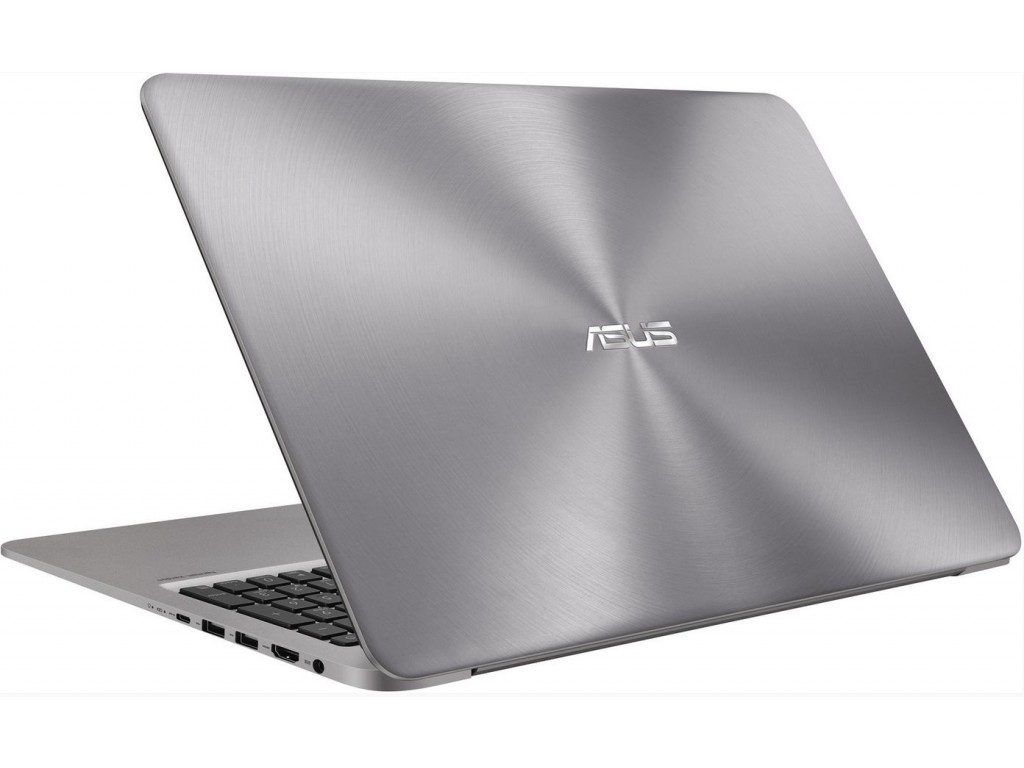
Luxurious design
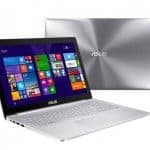
Owning a simple, modern design language, the rounded edges provide a soothing feel, the high quality aluminum alloy casing with solid metal design minimizes the use of carrying screws. Again the seamlessness of the product.
With a three-rounded measurement of 323 x 223 x 18.35 mm and a weight of just 1.45 kg, the Asus UX310UA exemplifies its elegant elegance. The advantages of the material will also make the lighter, Better heat dissipation and less fingerprints. The lid is a unique metallic ring with concentric rings. This design was inspired by the Asus Zen lineup.
The back of the unit is simpler with four rubber mounts at the four corners, along with two H / K strips placed front of the product towards the end user, which gives a better audio experience.
Obviously, with the hinges, the back edge will be the thickest of the machine. With a squeeze design that fades forward, the actual feel of the handset is thinner than the 18.35 mm.
You are wondering not to see the heat dissipation of the machine, this is a plus of the UX310 when Asus has subtly hide it behind the hinges. This creates a unified design of the product
To ensure the quality of the design, as well as the weight and thinness of the product, manufacturers often prefer to remove some less important components such as optical drives and VGA ports. However, on the UX310, Asus not only removed these two connections, but also added Ethernet (RJ-45) ports.
This will be a bit difficult when you work in a Wifi-free environment that uses a Lan network. However, as Wifi has become so popular today, not having an Ethernet port will not have much impact.
The left side includes power port, USB 3.0 port, HDMI, USB Type C and Combo audio jack.
The edge must have two USB 2.0 ports, an SD card slot, and a status light.
The Zenbook UX310UA is available in a bunch of setups, and it includes FullHD (1920 x 1080 pixels) resolutions all the way up to 2K QuadHD (3200 x 1800 pixels) with a 276 ppi pixel density. The 13.3-inch Full HD panel uses an IPS type, for a wide viewing angle of 178 degrees, the screen surface is coated with an anti glare layer , and also brings a brightness advantage. So you get better visibility outdoors, or just in bright rooms.
The ZenBook UX310 ’s widescreen screen shows 72% NTSC , 100% sRGB , and 74% AdobeRGB . Basically , in plain words it means this notebook can display a broader gamut of colors with steadier precision , and a more vivid tone than a normal monitor.
Besides a quality display, Asus also equips the UX310 speaker system from Harman / Kardon (the famous sound brand with products that deliver great audio experience).
The H / K’s real-world experience for sound quality is good, volume and reproducibility are more detailed than most laptops in the segment. Although the bass is not very clear but the sound is very good and vibrant.
Keyboard and Touchpad
The Zenbook is equipped with a chiclet keyboard, which supports handy LEDs when working in poor lighting. In addition to the relatively small size of the navigation keys, the rest of the keys are large in size, reasonable key distances and deep enough (1.6 mm) keys for easy and fast data entry pallet.
The touchpad of the machine has a large contact surface, beveled Diamond Cut the mouse pointer moves accurately, gentle due to the moderate friction. Capability supports multitasking, zooming or zooming at a good level.
Connectivity and Ports
The Asus UX310UA has a pretty solid set of ports and connectivity choices, good for everyday people and what not. If you look at the left side of the laptop, you’ll see a USB 3.0 socket, HDMI , a USB Type-C port and then that 3.5mm headphone microphone combo jack. On the right side there are two USB 2.0 ports, an SD card reader , and the power connector.
Having a USB Type-C port is honestly a big plus. It gives you more room to maneuver for charging, moving files, and even attaching an external display or two. The USB 3.0 connection is there for quicker data transfer with external storage devices, while the HDMI port makes it easy to hook up an extra monitor or projector without drama. And the SD card reader is rather handy for moving photos or videos off a camera and onto the system.
On the wireless side, it supports Wi-Fi 802.11ac along with Bluetooth 4.1 so you get dependable connection for both internet use and peripherals. The Wi-Fi overall holds up well, with steady signal and quick enough speeds for web browsing, streaming , and online teamwork sessions.
Audio Quality
The audio quality on the Asus UX310UA is decent, really thanks mostly to the built in stereo speakers and the SonicMaster kind of technology. You’ll notice the speakers are on the bottom, so the sound comes out downward but still manages to feel clear and fairly crisp for everyday stuff. Sure, it probably won’t give you deep bass, or max out at super loud volumes, but it’s honestly enough for casual watching, music, and even video calls.
If you want a more richer, or more immersive experience , it’s better to plug in headphones or use external speakers. The headphone microphone combo jack helps it work with a lot of different audio gear, so music and movies tend to sound better with the right setup.
The built in microphone does a solid job for video calls and voice recording, it captures voice with only minimal background noise. Together with the HD webcam, the Asus UX310UA becomes a pretty fitting choice for virtual meetings, and online classes.
ASUS ZenBook UX310UA 13.3-Inch HD Backlit Keyboard Laptop (Intel Core i7-6500U Dual-Core 8GB DDR4, 256GB SSD, Windows 10, Gold): Buy it now
2016 ASUS ZenBook UX310UA-WB71 13.3″ Anti-glare Full HD Laptop Intel i7-6500U, 2.5GHz, 8 GB Memory, 256 GB SSD, Backlit Keyboard, Bluetooth, HDMI, Win 10: Buy it now
ASUS UX310UA ZenBook 13.3 Inch Full HD Laptop PC Flapship Edition Intel Core i7-6500U 8GB DRR4 256GB SSD Windows 10 Rubedo Gold: Buy it now
ASUS ZenBook UX310UA (i5-6200U, 16GB RAM, 1TB SATA SSD + 1TB HDD, Intel HD, 13.3″ Full HD, Windows 10) Laptop: Buy it now
ASUS ZenBook UX310UA (i5-6200U, 16GB RAM, 1TB HDD, Intel HD, 13.3″ Full HD, Windows 10) Laptop: Buy it now
Stable performance
The Zenbook UX310UA has maximum configurable options up to the Core i7 (6th) and Ram up to 16GB DDR4 2133MHz, along with two SSD and HDD memory for flexible and high-speed storage. The version we have here is fully codenamed Asus Zenbook UX310UA – FC208T with the detailed configuration as follows.
The Intel Core i3 6100U processor is Intel’s 6th generation SkyLake processor for superior performance and battery life. The “U” usually means that the 7.5W – 15W processor is designed for lightweight, thin devices to optimize battery life.
The Intel HD Graphics 520 onboard GPU GT2 graphics card has 24 cores in the Skylake CPU instead of the 4400 or 4600 HD cards with only 20 cores that only help to handle 3D applications. Better yet, the clock speed at 1050MHz supports DirectX 12 and 3DMark support is better than the HD 5500. Using the built in Windows 10 64 bit drivers and getting full support from the manufacturer, the overall machine performance should be compared with the HP Envy 13 D000NG (Intel Core i5 6200U, Intel HD Graphics 520, 4 GB RAM DDR3L, Samsung SSD 256GB) at around 999 Euro.
The benchmark results show that, despite using the Intel Core i5 CPU, the difference between the HP Envy and the Asus UX310UA (Core i3) is not much. Specifically Envy 13 outperformed the PCMark 7 score, but in the remaining benchmarks UX310UA only lost at acceptable levels. This score is partly due to the fact that Asus products use DDR4 RAM with a 2133MHz sweep frequency, and it also demonstrates Asus’ efforts to enhance the user experience.
Also, because of the same SSD, the data transfer rate of both products is high. While Asus has faster read speeds, HP is showing faster data write speeds.
Software and Features
The Asus UX310UA is running Windows 10, so you get this sort of familiar , pretty user-friendly operating system that works with tons of apps and a wide bunch of peripherals. Windows 10 ends up being a solid , flexible base for work and play too, and it comes with things like Cortana, Microsoft Edge, and the Microsoft Store which all help the overall experience stay smooth.
A big plus of Windows 10 is how well it connects with Microsoft services like OneDrive, Office 365, and Skype. With that you can reach your files and applications from basically anywhere , which boosts productivity plus makes collaboration feel less tedious. On top of that, the laptop can handle lots of third party software, ranging from office style productivity and creative tools to entertainment , and even gaming options.
The Asus UX310UA also arrives pre-installed with a bundle of necessary apps, including Windows 10 itself, Microsoft Office (trial version), and some Asus utility software. Together these cover a lot of everyday requirements for most users, from email and web browsing through note taking and task management.
Security and Privacy
Security is a critical thing for pretty much any computing device, and the Asus UX310UA kind of really stands out here, in a way. With Windows 10 you get the built in antivirus and malware protection via Windows Defender, so the laptop stays guarded, at least against most common threats. Plus, when Microsoft pushes regular updates and security patches, that helps keep the system steady and keeps user data safer over time , not just for a day.
There’s also a fingerprint sensor built right into the touchpad. It adds this extra security layer, so you can log in faster and more securely with just a simple touch. Like in other words, that biometric login method makes it much harder for strangers or unauthorized users to reach the system, in the first place.
And for privacy, the device includes a webcam shield. So when you are not using the camera you can just cover it, which is kind of simple but still very effective. It reduces the chances of privacy issues or unwanted webcam access, even if that situation ever came up.
Upgradeability and Maintenance
The Asus UX310UA is designed to be portable and compact, so you shouldn’t expect a lot of upgrade magic. The RAM and storage are usually soldered onto the motherboard, which means swapping them later is not really practical. Still, the SSD can be replaced, or upgraded if you decide you need more capacity or quicker storage speeds, so there is some breathing room there.
For maintenance, the bottom panel can be taken off by removing a few screws. That gives access to the internal parts. From time to time, cleaning the cooling fan and the vents can help keep performance consistent , and it also helps prevent overheating. Just be careful when you handle internal components, because damage can happen if you’re not gentle.
- Advantage
Metal design, lightweight, luxurious.
The FullHD display gives sharp images.
Harman / Kardon Sound Technology.
Keyboard with handy LEDs.
- Disadvantages
Few connections.
Price is slightly high.
General comment
An impressively compact, slim laptop with a chassis made of luxurious aluminum alloy and elegant. If you are looking for a portable laptop for Windows 10 visual experience and for work or play, the Zenbook UX310UA will be a great candidate.
Related Posts



Tech Reviewer & Product Analyst
Định Bia has spent over 10 years testing consumer electronics with a focus on smart technology. He work as a product advisor at Biareview where he helped customers find the right devices for their needs. He personally tests every product featured on this site using a consistent evaluation framework covering quality, durability, and value. All reviews are based on experience, not influenced by the manufacturer.