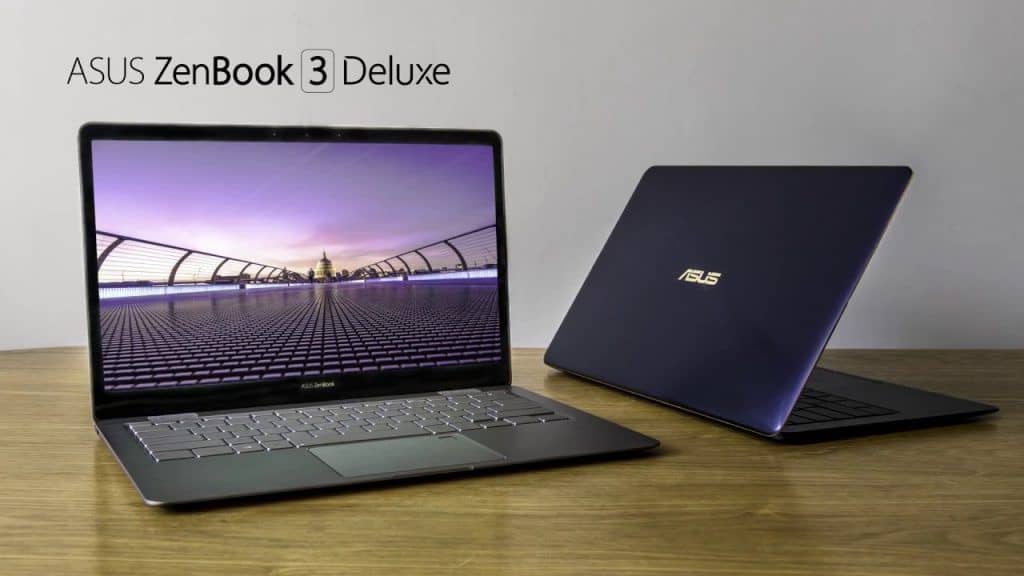
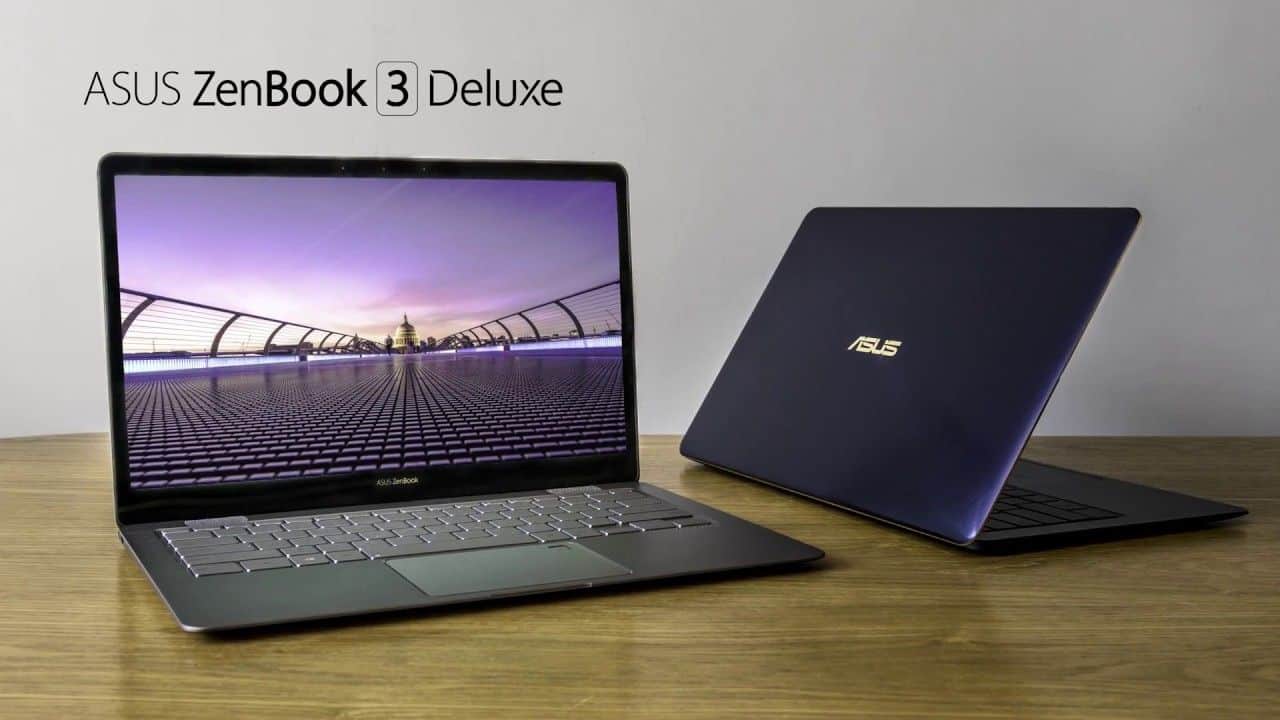
Asus ZenBook 3 Deluxe is a lightweight ultra-thin laptop was first introduced by Asus CES show in the CES 2017. Currently, the Asus ZenBook 3 Deluxe is available in Vietnam market code-named UX490UA.
Compared to its ZenBook 3 predecessor, the Asus ZenBook 3 Deluxe also brings this slim, lightweight kind of design that it feels like, it weighs just 1.1kg, and the thickness is only 13mm. That said, the Asus ZenBook 3 Deluxe has been enhanced a bit by the manufacturer, with a bigger 14-inch screen size, so it’s not exactly the same as before. While the ZenBook 3 Deluxe is only limited by the Asus resolution, but with the larger frame design plus the slimmer bezel frame, the ZenBook 3 Deluxe looks as good as the rest. 13 inch laptop on the market.
Available at Test Lab – Biareview is a ZenBook 3 Deluxe model with internal power built from Intel Core i7-7500U (Kaby Lake), 8GB of RAM (onboard) and the ability to upgrade upto 16GB. The ultra-thin laptops also come equipped with 802.11ac Wi-Fi, Bluetooth 4.1, 512GB PCI Express (PCIe), three USB Type-C ports, and two Thunderbolt 3 ports.
ZenBook 3 Deluxe laptops are still equipped with 3.5mm lane, but unfortunately they are no longer using the design of SD memory card reader. Asus has confirmed that the keyboards on the ZenBook 3 Deluxe have been sort of slightly enhanced, hitting 1.2mm, and that should promise a better feel for users who do a lot of typing, work with text, basically. The touchpad on the Asus ZenBook 3 Deluxe is also paired with a modern, touch sensitive fingerprint scanner like it had before, so nothing too wild changes there.
New version of ZenBook 3 ultra-lightweight laptop is also equipped with battery capacity of 46Wh with super-fast charger and the promise for the duration of use 10 hours, although the difference in capacity compared to people The ZenBook 3 is only 2Wh.
From actual experience, Test Lab figured out that the Asus ZenBook 3 Deluxe still keeps a sleek, slim , stylish kind of look. Like the previous model, the Asus ZenBook 3 Deluxe also does not pick up fingerprints on the back of the screen even after long periods of use, so it stays cleaner longer. The back of the machine is more fingerprint sensitive, but Test Lab found these “traces” can be easily “blurred” easily with the cleaning device attached to Asus.
As noted in the review of the Asus ZenBook 3, the Test Lab really enjoys and also feel satisfied with the hinge design of the product because users can easily open the screen with just one finger. Screen closing on the Asus ZenBook 3 also looks professional and refined from the manufacturer. With the Asus ZenBook 3 Deluxe, the Test Lab can also open the screen with one finger. Unfortunately, the “wet” feel of the hinge on the ZenBook 3 Deluxe and the weight of the body does not seem to be enough to hold the entire bottom of the screen in the same way Asus did on the Asus ZenBook 3.
Performance
Under the hood the ZenBook 3 Deluxe is run by up to an 8th Generation Intel Core i7 processor and it’s paired with 16GB of LPDDR3 RAM. in practice this kind of setup helps keep things smooth across lots of stuff, say daily web browsing, office activities, all the way to more demanding workflows like picture refinement and lighter video editing.
For storage, you can get up to a 1TB PCIe SSD. it gives plenty room for both files and apps, while also keeping booting quick and letting data show up fast. the raw speed of the SSD is really handy if you regularly deal with bigger files or if you just want the whole system to feel snappier.
On the graphics side, the ZenBook 3 Deluxe uses Intel UHD Graphics 620. This integrated graphics solution is fine for normal use, and maybe some casual play, but it really isn’t meant for heavy gaming or serious pro-grade graphic creation.
Battery Life
Battery life matters a ton for ultraportables, and the ZenBook 3 Deluxe holds up well here. It comes with a 46Wh lithium-polymer battery, and ASUS claims up to about 9 hours in typical conditions. of course real results can wiggle around depending on what you’re doing, but most people should be able to get a solid day of work from one charge.
It also supports fast charging. the laptop can reach up to 60% charge in around 49 minutes. that’s great when you need a quick recharge during short pauses, instead of waiting around for a long time.
Keyboard and Trackpad
The ZenBook 3 Deluxe comes with a full-size backlit keyboard, with 1.2mm of key travel. Even though the laptop is pretty slim, typing on it feels surprisingly comfortable. The keys are well spaced , and they deliver a nice tactile response, so extended typing sessions are still easy to handle.
Also, the glass covered precision trackpad stands out. It feels smooth and reacts fast, and it follows Windows Precision Touchpad (PTP) requirements, so tracking stays accurate and multi-finger gestures work the way you expect. On top of that there’s a built in fingerprint sensor, for secure logins and a convenient Windows Hello setup.
Fortunately, with the Asus ZenBook 3 Deluxe, it’s hard to get familiar with the keyboard, especially when dealing with long texts or having to constantly reply to emails that have been completely eliminated. Simply because the Asus key stroke increased slightly, eliminating the feeling of “uncomfortable” because of the shallow keys. In addition, the key response is better while the noise level is still negligible. More importantly, Asus has “insight” when choosing the navigation key cluster (4 arrow keys) instead of picking up a termite and adjacent adjacent sensitive keys like Shift / Ctrl.
As mentioned, the Asus ZenBook 3 Deluxe also has a fingerprint on the touchpad. Practical experience shows that this fingerprint sensor has good sensitivity, compatible with both Windows Hello, help users unlock Windows very fast.
In terms of picture quality, the 14-inch frame on the Asus ZenBook 3 Deluxe has good brightness, brilliant colors and sharpness even with only the option of Full HD resolution. In terms of resolution, the Asus ZenBook 3 Deluxe actually loses its competitors with 4K screens like HP Specter x360 13, or Dell XPS 13. Fortunately, color quality tests are The 14-inch color reproduction of the ZenBook 3 Deluxe is absolutely blameless, in other words, the color reliability of the ultra-thin Asus laptops is as good as expected.
On the hardware side, it is easy to see that Asus almost requisitioned all the main components from the ZenBook 3 for the Deluxe version. This means that the ZenBook 3 Deluxe also has the power to do multitasking, handle office tasks, and even simple everyday photo and imaging needs in the home.
Like the ZenBook 3, the ZenBook 3 Deluxe’s processor performance and performance have been reduced in part to ensure heat dissipation. Fortunately, this reduction does not leave any visible signs of actual use with everyday tasks such as word processing, spreadsheets, image processing, and entertainment with high quality movies.
About the ability to communicate ZenBook 3 Deluxe, Asus equipped with 3 USB Type-C (2 lane side “wing” must support Thunderbolt 3). In terms of features, the Asus ZenBook 3 Deluxe with this interface is generally attractive because it promises to accelerate the transmission of up to 40Gbps, output images to two 4K UHD monitors and charge for other devices. The Asus ZenBook 3 Deluxe is also certified to be compatible with the ROG XG Station 2 discrete graphics dock, which delivers superior graphics performance while gaming or using VR as a desktop PC. However, if you are an anthropologist, you will feel uncomfortable with the lack of familiar communication as well as the card reader. Fortunately, the Asus ZenBook 3 Deluxe comes with a USB Type-C via HMDI and USB Type-A connector.
Connectivity and Ports
Given its thin profile, the ZenBook 3 Deluxe offers a surprising array of connectivity options. It includes:
- 2 x Thunderbolt 3 (USB-C) ports
- 1 x USB 3.1 Gen 1 (USB-C) port
- 1 x 3.5mm headphone jack
The Thunderbolt 3 ports are honestly kind of the headline here, giving ultra-fast data moving, support for outside 4K screens, plus you can charge the laptop too. Yet, because it relies on USB-C, some people will likely end up hunting down adapters for older peripherals , and that’s a small annoyance.
Asus seems to anticipate that though, by putting a USB-C to USB-A adapter in the box, along with a mini dock. The dock adds an HDMI connection, a USB 3.0 port, and also another USB-C port so you’re not constantly unplugging stuff.
Audio
Audio performance is another place where the ZenBook 3 Deluxe really stands out. You get a four-speaker arrangement, tuned with Harman Kardon, which makes sound come out clean and kind of immersive. The speakers are placed in a smart way , so whether you’re streaming movies, playing music, or doing video calls, the result feels noticeably more “there” than you’d expect from something this thin.
The audio system is helped by Asus’s SonicMaster tech, which mixes hardware and software enhancements to deliver fuller and more detailed sound. Sure, the slim design naturally limits the deep bass, but overall the audio quality is very strong for a device with this kind of size.
Software and User Experience
Out of the box, the ZenBook 3 Deluxe ships with Windows 10 , so the experience is familiar and relatively easy to get used to. Asus also bundles a few of its own utilities, including Asus Splendid for display color handling, and Asus Battery Health Charging which is meant to help preserve battery lifespan.
One especially useful thing is the MyAsus app. It covers system diagnostics, software updates, and customer support , plus it adds extras like screen mirroring and file transfer between the laptop and mobile devices. That stuff ends up making day-to-day productivity smoother.
Portability and Durability
One of the ZenBook 3 Deluxe strongest points is that the light weight build makes it pretty easy to carry around, like commuting, traveling, or working from a different spot. And yeah, the sturdier construction helps it handle what comes with everyday use so it stays dependable, kinda like a sidekick for people who are always on the move.
On top of that, the box includes a protective sleeve which kind of makes the whole “take it anywhere” idea feel more real. It lets you move the laptop more safely, and it shows Asus is paying attention, even to the small things.
Use cases
The Asus ZenBook 3 Deluxe works for a bunch of situations, it’s not stuck in one lane:
Professionals: Because it’s light, runs strong, and offers long battery life , it fits business folks who need a dependable device for meetings, slide work, document tasks, and the rest.
Students: Its mobility, a solid keyboard, and good overall performance make it suitable for taking notes, drafting assignments, and doing research without too much hassle.
Creative users: It’s not exactly a top tier creative workstation , but the display quality plus the performance are enough for simple photo and video editing, the everyday kind.
Travelers: The compact footprint, durable body , and extended battery mean it’s an excellent pick for regular trips, when you want something reliable while you are on the go.
Pros and Cons
Pros
Premium Design : Sleek aluminum chassis with a sort of distinctive spun-metal finish
Impressive Display : Vibrant 14-inch Full HD screen with narrow bezels, looks very clean
Strong Performance : Up to 8th Gen Intel Core i7, 16GB RAM, and a 1TB PCIe SSD that feels responsive
Portability : Lightweight and slim build, it s easy to keep with you
Good Battery Life : Up to 9 hours of use, plus fast charging support too
Excellent Audio : Quad-speaker setup tuned in by Harman Kardon, pretty solid
Secure Login : Built-in fingerprint sensor with Windows Hello support, fast and reliable
Cons
Limited Ports: It leans heavily on USB-C ports so older peripherals might need a few adapters
Integrated Graphics: Sort of not ideal for heavy gaming or demanding professional graphics work
Reflective Display: Brightness is ok, but in direct sunlight there can be glare, which is annoying
Conclusion
The Asus ZenBook 3 Deluxe is pretty much a standout ultraportable laptop that blends premium design , with strong performance. It has this smooth,light construction which makes it a handy companion for pros, learners, and people who are always moving, needing something reliable and also stylish.
The laptop’s high resolution screen, the keyboard that feels good during longer typing sessions, and the audio quality that actually impresses, they all add up to a nicer day to day experience. Battery life is long enough that it keeps going, even when your routine gets kinda demanding. Still, with its reliance on USB-C ports and built in graphics, the ZenBook 3 Deluxe ends up feeling like a very compelling choice for pretty much anyone looking for a solid ultrabook.
Overall, the Asus ZenBook 3 Deluxe is a solid option if you want a premium ultra portable laptop that doesn’t cut corners, on performance or on style. Whether you’re doing office work while traveling, making content, or just relaxing with multimedia, it gives you a satisfying experience in a sleek and polished form.
ASUS UX490UA-XS74-BL 14-Inch Zenbook 3 Deluxe Notebook Core i7, 16GB RAM, 512GB SSD, Fingerprint Sensor, Windows Pro, Royal Blue: Buy it now
ASUS ZenBook 3 UX390UA-XH74-BL 12.5-inch Ultra-Slim Lightweight Laptop ( Intel KabyLake Core i7 7500U 2.7GHz Processor, 16GB 2133Mhz DDR3, 512GB SSD, Windows 10 Professional 64bit): Buy it now
CUK ASUS ZenBook 3 Deluxe UX490UA Ultrabook (Intel i7-7500U, 16GB RAM, 1TB NVMe SSD, Windows 10 Pro, 14″ Full HD) 2.4 lb Ultra Thin Lightweight Business Ultrabook Laptop Computer: Buy it now
ASUS ZenBook 3 Deluxe, UX490UA-XS74-BL (i7-7500U, 16GB RAM, 512GB NVMe SSD, 14″ Full HD, Windows 10 Pro) Ultrabook – Royal Blue
by Asus: Buy it now
Related Posts


Tech Reviewer & Product Analyst
Định Bia has spent over 10 years testing consumer electronics with a focus on smart technology. He work as a product advisor at Biareview where he helped customers find the right devices for their needs. He personally tests every product featured on this site using a consistent evaluation framework covering quality, durability, and value. All reviews are based on experience, not influenced by the manufacturer.