Design and Build Quality
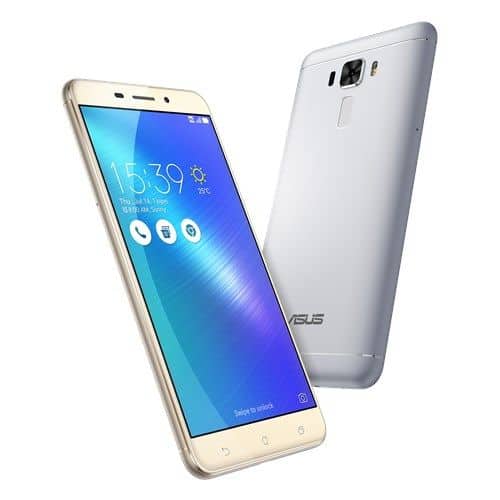
The Asus ZenFone 3 Laser has a sleek modern kind of look, honestly it felt like a real step forward from the ZenFone 2 Laser. It’s put together with a metal body, so the whole thing gives off that premium vibe, kind of surprising considering the price range when it launched. The metal back uses a matte finish, which looks classy but also helps with grip, so you get less of that whole accidental drop feeling.
In terms of size, it comes in at 149 x 76 x 7.9 mm and weighs about 150 grams, so it’s not heavy in the hand and it’s pretty easy to manage day to day. The slimmer profile along with those rounded edges makes it more ergonomic than you’d expect, and yeah it stays comfortable even if you’re using it for a while. The power and volume buttons sit on the right side, and the placement is intuitive enough, plus they give solid tactile feedback which is always a plus.
Up front the ZenFone 3 Laser gives you a 5.5-inch display, and the side bezels are pretty slim. The top frame keeps the front camera, the earpiece, and those sensors, while the bottom edge contains the capacitive navigation buttons , only… they unfortunately are not backlit. That means in dim light, they’re harder to spot and you end up fumbling a bit.
The back of the device is basically where the standout part lives: a laser autofocus module, which sits right beside the camera lens, and yes it kinda makes the whole layout feel more intentional than usual. Under that camera area , there’s a fingerprint sensor, rectangular and a bit sunken in, so by touch it’s really easy to spot. The sensor itself feels fast and responsive, unlocking the phone in a fraction of a second, pretty reliably too.
Moving to the lower edge, you’ll see a microUSB port for charging and moving data , and there’s a single speaker grille right next to it. That choice of microUSB, instead of the newer USB-C, got criticized back then, because a lot of rivals had already shifted over. On the top edge, there’s a 3.5mm headphone jack, and honestly this is now getting more rare on newer phones, but for many people it’s still a must-have.
All things considered, the design and the build quality of the Asus ZenFone 3 Laser are quite strong for a mid-range phone. The metal body, the slim profile, and that ergonomic feel make it pleasant to handle day to day, even if it misses a few of the modern design touches you’ll see on more recent smartphones.
Display
The Asus ZenFone 3 Laser comes with this 5.5-inch IPS LCD panel, and it runs at 1920 x 1080 pixels. That works out to about 401 ppi, roughly. Back when it launched, Full HD was basically the norm for mid-range phones, so you got a pretty decent middle point between visual sharpness and battery efficiency.
In day to day use the screen feels bright, lively, and not dull, with solid color reproduction and wide sightlines. The IPS tech helps keep the colors more faithful even if you tilt it around a bit, so it’s fairly nice for videos, and yea also for playing games. Outdoors it’s good enough for general use, however if you’re in direct sun, glare shows up and then the text can get tougher to read.
Another thing people notice is the 2.5D curved glass. It makes the look feel smoother and a bit more premium, and swiping through menus ends up feeling more natural, rather than harsh. Under that you have Corning Gorilla Glass 3, which gives a fair amount of protection from scratches and small falls, but it still can’t compare to the latest Gorilla Glass variants you see in newer devices.
The touchscreen itself is responsive, accurate, and supports multi-touch input up to 10 fingers, so it’s very handy for gaming, and other touch heavy tasks. Asus also adds a “Bluelight Filter” option in the display menu. It cuts down blue light output, which can mean less eye strain if you’re staring at the screen for long periods , especially late at night.
However, while the display is mostly good, it isn’t really without some downsides. The contrast levels are decent but, not as deep as the ones you get from AMOLED panels, so the blacks look more like dark grays. Also, the color accuracy is fine, though it could use better calibration right out of the box, because colors can end up looking slightly oversaturated, from time to time.
Still, with all that said, the screen on the Asus ZenFone 3 Laser delivers a solid viewing experience for its price. It’s sharp, bright, and big enough to actually enjoy media content, so it ends up being one of the better displays in the mid range smartphones from that time period.
Performance
Under the hood, the Asus ZenFone 3 Laser kinda runs on the Qualcomm Snapdragon 430, an octa-core chipset that clocks in at around 1.4 GHz. You also get either 2 GB or 4 GB of RAM, depending on which version you picked up, plus the device comes with 32 GB of built in storage. There is microSD card support too, so you can expand things up to 256 GB, pretty handy, for photos and more.
The Snapdragon 430, well it’s mostly a budget focused chipset, so it’s not exactly a powerhouse or anything but it still gets the job done for daily stuff like web browsing and social media, plus some light gaming too. The octa-core design helps a bit with multitasking, especially when you’re on the 4 GB RAM option, although on the 2 GB model things can feel cramped if you try to run more demanding apps, or keep too many things open at once.
For real-world use the ZenFone 3 Laser feels pretty solid with basic activities. Apps usually load in a pretty reasonable way and the interface feels smooth enough while you’re just moving around, scrolling, and ducking into menus. But once you push it harder like gaming for longer stretches or bouncing between weightier apps, the Snapdragon 430 limitations start to show up. Titles such as “Asphalt 8” and “Modern Combat 5” are playable, but you really end up lowering the graphics settings to keep things running smoothly. If you go for more demanding games, or you play for a long time, you may notice frame drops and every now and then a bit of stutter, not constant but definitely there.
On the graphics side the Adreno 505 GPU takes care of things and it’s fine for that mid-level gaming experience. It’s comfortable with casual games and older 3D titles, no big fuss. But when you try graphically intense games, especially those that came out after the phone launched, it tends to struggle, and performance can dip more than you’d hope.
Benchmark outcomes point to a mid-range kind of performance on the phone. With AnTuTu, the ZenFone 3 Laser lands roughly around 43,000–45,000 points, so it winds up pretty solidly in the budget to mid-range bracket. I mean, it may not feel flashy when you compare it with what we see nowadays, but back then it was pretty competitive for the price you’d actually pay after release.
A spot where the ZenFone 3 Laser kind of really does well is heat handling. The metal frame helps with heat dissedation, and even if you push it during long gaming sessions, or you know for heavy day to day usage, it stays nicely cool to the touch. That sort of steadiness seems tied to the Snapdragon 430 efficiency, plus the overall build choices in the device.
So overall, the Asus ZenFone 3 Laser performance is fine, for most people who just want a handset for everyday things and casual usage. It isn’t really a machine for power users or hard core gamers, yet it still manages to “hold the line” within the mid-range space, and delivers a dependable, smooth experience that fits its intended users.
Software
The Asus ZenFone 3 Laser runs on Android 6.0.1 Marshmallow right away , out of the box, and on top there is Asus’s custom ZenUI 3.0 skin. ZenUI is pretty famous for lots of personalization and extra utilities, and honestly it can be a double-edged deal, depends on what you like.
With ZenUI 3.0 you get a pile of added options, lots of tailoring, that set it apart from “vanilla” Android. The whole look feels very different, like there are colorful icons, special typefaces, and several theme choices, so people can adjust the vibe of the phone. The launcher also gives deep controls for the home screen, including icon packages, scroll behaviors and even grid dimensions, so you kinda decide the whole layout for yourself.
One of the more noticeable bits is the “ZenMotion” gesture control. It lets you reach apps and functions faster by sketching particular gestures on the display while the phone is sleeping/off. Like drawing a “C” can pull up the camera , and an “M” can jump to the messages. Those gestures aren’t fixed either, you can tweak them, which adds a small layer of ease for users who like quick shortcuts.
Another useful feature is “ Game Genie ”, a gaming enhancement tool that gives in-game extras , like a screen recorder , a performance booster, and even a “ Do Not Disturb ” mode so you don’t keep getting bothered while you’re playing. It is kind of a thoughtful add on for gamers , because it helps you tune up the whole gaming experience without too much fuss.
Asus also loads a bunch of pre-installed apps , often called “bloatware” , and yeah this has been a sore spot for a lot of users. Some of those apps , like “Mobile Manager” for system optimization , and “ZenFit” for health tracking, actually do come in handy, but others can feel redundant or simply not needed for certain people. The good news is that most of them can be disabled or removed if you really want.
ZenUI 3.0 brings in “SnapView” too, which lets users set up a separate , password protected workspace for private apps and documents. This can be especially helpful if you share your device, or if you just want a neat separation between work and everyday personal stuff.
Even with all the rich feature set, ZenUI still has a few quirks to it. The extensive customization can, sometimes, turn into this cluttered and kinda overwhelming layout, especially if you’re the type of user that likes the clean, no-fuss feel of stock Android. On top of that, the extra layer of tuning can mess a bit with overall performance. So you might see occasional lags or slowdowns, particularly on the lower RAM model. There’s also the feeling that the software is slightly bloated, mainly because of the amount of pre-installed apps, some of which are probably never used by the average person.
A big critique of the ZenFone 3 Laser right at launch was that it came with Android 6.0.1 Marshmallow. At the time, Android 7.0 Nougat was already out, so that choice didn’t exactly land well with everyone. Asus did eventually push the Nougat upgrade for the ZenFone 3 Laser, but the rollout was kind of slow, and the phone didn’t get as many software refreshes as a few competitor devices. This delayed support can be a deal concern for users who care a lot about newer security patches and the latest features.
Still, despite the downsides, ZenUI 3.0 sort of brings a bunch of real functionality, plus plenty of settings for folks who like tweaking their device until it “feels” right. Overall, the whole experience stays pretty smooth, and those extra tools like motion gestures and Game Genie are honestly pretty good touches that nudge day to day usability forward.
Camera
Ok so one of the big selling points of the Asus ZenFone 3 Laser is definitely the camera, especially that laser autofocus thingy that says it focuses fast and accurately. The device comes with a 13 MP rear camera with an f/2.0 aperture, plus a dual-LED ( dual-tone ) flash, and yeah the laser autofocus system included. On the front, there’s an 8 MP camera, also with an f/2.0 aperture, made more or less for selfies and video calls, that sort of everyday use.
Rear Camera
With the 13 MP rear sensor, the ZenFone 3 Laser can produce decent pictures when lighting is pretty good. Most of the time the photos look sharp, and the color and contrast are pretty solid. The laser autofocus really does what it claims, it helps the camera lock focus quickly, even when the situation is more difficult. Because of that it’s easier to snap fast-moving subjects, or grab shots in darker environments, where older contrast-detection autofocus systems can sometimes have a harder time.
The camera app also includes a bunch of shooting modes, like Auto, Manual, HDR, Beautification, Super Resolution, Low Light, and several others. The Manual mode is honestly a standout, letting users tweak things such as ISO, white balance , shutter speed , and focus, so photography folks get more control. Meanwhile Super Resolution combines multiple frames and stitches them into one higher-resolution photo, which can help when you want extra fine detail , but it does mean you should keep the phone steady to reduce motion blur.
With good lighting, the camera mostly does well, it ends up grabbing clear and vibrant images. But when it gets dim, performance starts to slip a bit. Sure, the laser autofocus does help with focusing in low light, still the pictures come out noisier than you’d hope, and the fine detail level drops quite a lot. There’s also the Low Light mode, it kind of mends the situation because it switches things to 3 MP and also stretches the exposure time, though it doesn’t really fix everything, not completely.
Then there’s HDR mode, which is pretty handy for scenes with strong contrast because it balances highlights and shadows better. However, every so often it goes a step too far and over-processes the shot, so the final image can end up looking a bit unnatural, like too much of everything at once. The dual-LED flash is also there to light up subjects when you’re in the dark, and it can work, yet the reach is limited, and it tends to produce that harsh smartphone flash vibe.
Front Camera
The 8 MP front camera on the ZenFone 3 Laser is able to capture decent selfies, specially when the lighting is on your side. The Beautification mode has a bunch of tweaks—things like smoothing skin, enhancing eyes, and adjusting facial features—so it’s fun to mess with, even so the output can look artificial if you push it too far, or use it again and again.
The front camera also brings HDR along, which is useful when the background is a lot brighter than the subject, like selfies against a bright sky or even near a window. The front camera quality is ,basically enough for video calls and social media shares, but like the rear camera it has a hard time in low light. In those moments noise shows up more, and the image just looks worse overall.
Video recording
The Asus ZenFone 3 Laser can record video up to 1080p resolution at 30 fps. The actual video look is decent, with solid color accuracy and decent clarity when the lighting is good. The laser autofocus system is helpful here too, it helps keep focus on moving faces and objects, so for recording it feels like a real plus.
That said, there’s no optical image stabilization, OIS. Because of that, the footage can turn shaky, especially if you’re walking around or recording while moving. The camera app does offer electronic image stabilization ,EIS which helps a bit, but it can’t match OIS, and in darker scenes or during heavy motion it becomes pretty limited.
All in, the camera experience on the Asus ZenFone 3 Laser is pretty dependable for a mid-range phone. The laser autofocus part really stands out and makes it a step above several rivals in the same price band. Sure, it’s not perfect, especially in low-light, but it delivers a balanced mix of features and day to day results for what you pay.
Battery Life
The Asus ZenFone 3 Laser comes with a non removable 3000 mAh battery, pretty much in line with what you’d expect for a phone in this category. Considering the mid range parts, plus the Snapdragon 430 efficiency, the real world battery performance is, honestly, pretty decent.
Day to day, the ZenFone 3 Laser can run a full day on one charge pretty easily, especially if your usage is moderate. Think web browsing, social media scrolling, videos, and some occasional gaming here and there. If you’re more relaxed about it, like lighter browsing and fewer apps running in the background, you can push it to a day and a half or even close to two days. Still, if you’re a heavy user, and yeah, gaming or lots of multimedia tends to eat power, then you may end up looking for a charger before the day is actually over.
Charging is where it feels a bit behind. The phone sticks to standard 5V/2A charging, so it doesn’t have the faster Quick Charge features you see on more premium models. Because of that, going from 0% to 100% typically takes around two to two and a half hours, which feels slow by current expectations. To make it worse, it uses microUSB instead of USB-C, so both charging convenience and data transfer speeds are not quite as quick, not as smooth.
The ZenFone 3 Laser comes with a power-saving mode, you can turn it on to help extend battery life when it’s kinda running low. In practice it dials down background activity, reduces screen brightness, and it places a cap on performance, just to conserve energy overall. There’s also an “Ultra Power Saving Mode” and it goes even further by only allowing essential things, like calls and messaging. That can be pretty handy in emergency situations, when you want to stretch battery life as far as possible.
All things considered, the battery life of the Asus ZenFone 3 Laser is adequate for most users. You’ll generally get enough charge to see you through a typical day, and those power-saving modes give you options if you’re trying to make it last. Still, the absence of fast charging and the fact it uses a microUSB port are noticeable downsides when it comes to charging speed and convenience.
Connectivity and Audio
On the connectivity side, the Asus ZenFone 3 Laser gives you that usual mix of options which was pretty standard around that time. It supports 4G LTE, 3G, and even 2G networks so the network compatibility tends to be solid in most regions.
It also gives you dual SIM support, with a hybrid slot that sort of lets you go with two SIM cards at once, or swap it so it takes one SIM card plus a microSD card for extra storage which is kind of handy day to day really.
For wireless connectivity, the ZenFone 3 Laser includes Wi‑Fi 802.11 b/g/n and it works on both 2.4 GHz and 5 GHz bands. Still the lack of Wi‑Fi ac support can feel a little annoying, mainly if you already have a fast connection at home, you know. But in fairness the Wi‑Fi performance is typically solid, steady, and it just does the job. Along with that you also get Bluetooth 4.1, which helps for wireless audio as well as data transfers, plus GPS for location needs, and FM radio that keeps being sort of a familiar, still-liked thing in a lot of areas.
What I really like is the 3.5mm headphone jack, because it’s a lifesaver for anyone who still uses wired earbuds or has put money into better sound equipment. Through the headphone port the audio is clear enough and the sound quality is pretty decent, but yeah if you’re an audiophile chasing the absolute top fidelity, you might end up wanting more.
As for sound from the device itself, there’s just one speaker placed at the bottom. It’s loud enough for casual videos, clips, and hands free calls, yet it doesn’t deliver much depth or richness. Also, at louder levels the speaker can start to sound strained or a bit distorted, so it feels more like a for-short-while solution rather than a “long listening” habit.
The ZenFone 3 Laser also ships with a set of sensors, including an accelerometer, gyroscope, proximity sensor and compass. These don’t just sound technical, they actually help the day to day experience, like screen rotation, step counting, and navigation support.
One area where the ZenFone 3 Laser kind of falls short is the whole NFC support thing. While NFC isn’t exactly a must-have for everyone , it can still be pretty handy for mobile payments , quick file transfer, and even pairing up with certain accessories. Without it, some people might feel it’s kind of a deal-breaker especially those who lean on mobile payment systems like Google Pay .
Overall, the connectivity and audio side of the Asus ZenFone 3 Laser is… satisfactory, for a mid-range phone. It misses out on a few newer connectivity options, like NFC and Wi-Fi ac, though it still covers the basics well . That said it tends to deliver a steady, dependable experience for most users.
ASUS ZenFone 3 Laser 5.5-inch Glacier Silver [ZC551KL] Laser auto-focus, 13MP Rear / 8MP Front camera, IPS FHD display, 2GB RAM, 32GB storage: Buy it now
ASUS ZenFone 3 Laser 5″ Factory Unlocked Phone – 32 GB – Gold (U.S Warranty): Buy it now
Related Posts





Tech Reviewer & Product Analyst
Định Bia has spent over 10 years testing consumer electronics with a focus on smart technology. He work as a product advisor at Biareview where he helped customers find the right devices for their needs. He personally tests every product featured on this site using a consistent evaluation framework covering quality, durability, and value. All reviews are based on experience, not influenced by the manufacturer.