Design
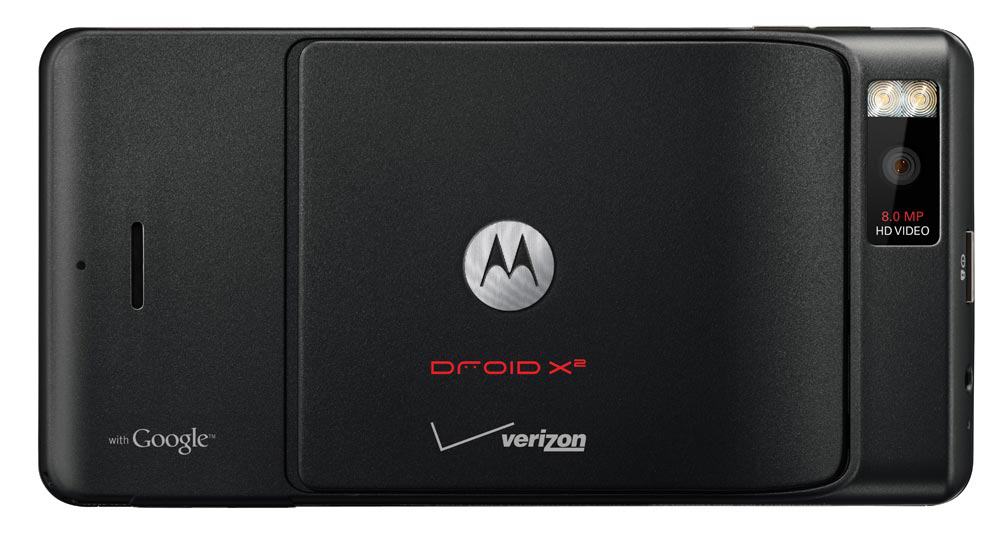
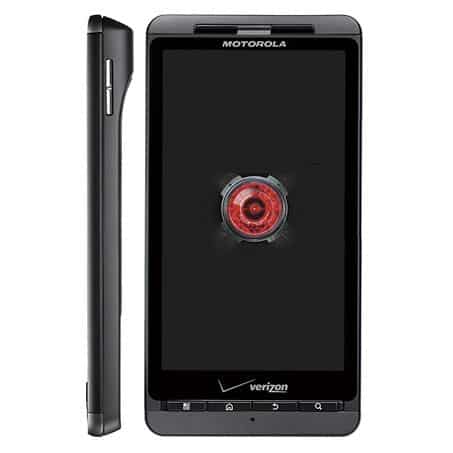
As for design, the Motorola Droid X2 put on a completely black casing. Dimensions are 4.3 inch, horizontal viewing we can see this smartphone is quite thin. However part of the machine set the camera up slightly convex. This design is accepted whether or not, depending on the preferences of each user. Besides the four main buttons a bit small, which can cause discomfort for those already familiar with big buttons.
The back of the machine and 2 LED flash camera, the battery cover is placed in the middle of the speakerphone also be pushed down to the bottom. Overall, the Droid X2 is a very masculine smartphone by fairly rigid lines and full-body black.
Build Quality:
Motorola has always seemed to care about the sturdiness side of things, and the Droid X2 really doesn’t back off. The device feels solid in hand, like it’s put together with proper intent, not flimsy stuff, a mix of good plastics plus metal parts. Nothing really creaks or flexes when you press on it, which is honestly what you want. The buttons also feel firm, they click and react , and the whole fit and finish looks pretty impressive.
It weighs in at 155 grams, so it gets that “substantial” sort of feel without becoming a brick. The distribution is also pretty even, so you can hold it for a while without your wrist complaining. The only thing that might annoy someone is the raised camera module. When it sits on a flat surface, it can wobble a little. Still, it’s a small issue ,and it doesn’t really ruin the bigger picture of the build quality.
Durability is kind of the heart of all this. The construction is robust, and the materials selected do their job for day-to-day life. The display is shielded by Corning Gorilla Glass ,which helps guard against scratches and small, accidental taps. Sure, the Droid X2 isn’t as rugged as some newer phones built for extreme conditions, but it’s absolutely able to handle the occasional drop or bump without turning into a disaster.
Display
Screen size, and resolution thing: the Motorola Droid X2 has this 4.3-inch TFT screen, running at 540 x 960 pixels. That works out to about 256 PPI , so roughly pixels per inch. At the time it felt like a big jump from the earlier Droid X, which went with a less detailed display. With the bigger screen plus that higher resolution, the Droid X2 kind of stood out right away when it launched.
Also, the qHD (Quarter High Definition) setup of 540 x 960 was a pretty clear upgrade compared to the WVGA (480 x 854) resolution a lot of phones were using around 2011. More pixels meant text that looked sharper, images that were clearer , and just a more detailed viewing experience overall. The screen has a 16:9 aspect ratio too, which is basically ideal for films and games, because it lines up with the widescreen layout that most media uses nowadays.
Color Reproduction and Viewing Angles:
The TFT display on the Droid X2 actually gives pretty solid color reproduction, you get vibrant and relatively accurate hues. They’re not as punchy or saturated as what you see on AMOLED displays, but honestly it still looks good , and the whole picture feels natural to the eye. The screen manages a broad range of colors with not much trouble, so you don’t really spot obvious color banding or weird distortion.
Still , the viewing angles are kinda limited on the Droid X2. If you look at it from really off to the side, the colors shift, plus the brightness drops a bit, so it becomes harder to read and see what’s on the screen clearly. This is one of those classic TFT constraints, specially for displays from this kind of time period. It’s not as wide as modern IPS or AMOLED panels, but for day to day use , it’s fine enough—stuff like browsing websites, reading emails , or watching videos works without too much frustration.
Brightness and Outdoor Visibility:
For brightness, the Droid X2 display is decent, like it stays usable across different lighting, indoors it looks bright enough to be clear even under fluorescent lamps. But if you’re in direct sunlight, the phone becomes harder to read , mainly because of glare and reflections that bounce around. Basically the brightness level just isn’t strong enough to beat bright outdoor conditions , and that’s a downside if you use the device outside a lot.
Also the glossy surface adds to the visual charm, it makes the colors look more lively, but it also increases reflections. So you get that tradeoff where it looks great indoors, and then outside it’s not as friendly. A matte screen protector might help cut down the glare, though it could also reduce the screen’s overall crispness and perceived brightness.
Touch Responsiveness:
The touch sensitivity of the Droid X2’s display is generally good, accurate and responsive input mostly straight away. The capacitive touchscreen supports multi-touch gestures, letting you do pinch-to-zoom as well as a bunch of other moves, which in practice makes everything feel smoother. The screen takes light touches pretty well and there is minimal lag between what you tap and what shows up on the display.
That said though, if you compare it with modern smartphones the touch responsiveness of the Droid X2 can feel a bit less polished. Some of this comes down to the older display technology, and also the lower processing power inside the device. Still, for its era, the Droid X2 delivered a decent touch experience, more than enough for everyday use.
Configuration
Similar to the previously leaked information, the Motorola Droid X2 comes with a Tegra 2 dual-core processor running 1 GHz, and yes, it is basically about twice the performance of the first Droid in that lineup. But the RAM is only a modest 512 MB, which is pretty similar to what you saw on the original Droid too. The Droid X2 can basically be described as one of the phones with a lower configuration among devices that still relied on today’s dual-core chips. Limiting the amount of RAM also raised worries about running memory-hungry applications, like games, widgets , and anything that wants a bit more breathing room.
Motorola Droid X2 No Contract Verizon Cell Phone: Buy it now
Motorola Droid X2 MB870 Android Smartphone Huge touch display, 8-megapixel camera for Verizon: Buy it now
Performance
Processor and RAM
The Motorola Droid X2 is powered by a dual core 1 GHz NVIDIA Tegra 2 chipset ,so it was one of the first smartphones that really showed up with a dual-core processor. Back then, this felt like a real jump in performance compared to the single core processors that were still pretty common in phones. The Tegra 2 chipset was built to deal with more demanding stuff, like high-definition video playback, gaming, and yes multitasking, all with better efficiency than before.
It also includes 512 MB of RAM ,which in 2011 was pretty normal for a higher end smartphone. Even if that memory amount sounds small by today’s standards, it was enough for the Droid X2 to run Android 2.2 (Froyo) and most of the apps people were using at the time.
Everyday Performance
Day to day, the Motorola Droid X2 gives you a pretty smooth, responsive kind of experience. The dual core chip brings plenty of muscle for regular activities such as web browsing, social feeds, email ,and messaging without much hassle. Apps usually start up fast ,and the device can move between tasks with limited waiting.
Like a lot of phones from that period, the Droid X2 starts showing its age when you try heavier apps or heavier multitasking. If you run several apps at the same time, things can get slower ,and the phone may have trouble with more graphically demanding games, or other software that wants a lot of processing. The 512 MB RAM is kind of the main bottleneck here, because it limits how many apps can stay active in the background and still feel fluid.
Gaming Performance:
The NVIDIA Tegra 2 chipset was one of the first mobile processors that got marketed around its gaming abilities,so the Droid X2 kind of rides on that idea. The device can run all sorts of games, from pretty basic casual stuff to 3D titles that look a bit more demanding. The Tegra 2’s graphics unit (GeForce ULP) gives you a decent level of visuals, most of the time with steady frame rates, and decent texture or detail for games from that time.
Still, the whole gaming ride on the Droid X2 has some catches. With just 512 MB of RAM , some games might hit a ceiling, and you can end up noticing stutter here and there, or slower loading when things get heavy. On top of that, the storage situation isn’t exactly roomy either (8 GB built in, and roughly 4.5 GB usable). So a microSD card starts to feel like more of a need than a nice extra, especially if you want bigger games or a lot of videos/music.
Software Performance:
When the Droid X2 launched it came with Android 2.2 (Froyo), and later it was updated to Android 2.3 (Gingerbread). Day to day, the interface feels fairly fluid, though there’s occasional hiccups, a bit of lag, or minor stalling. Android 2.3 brought a bundle of tweaks, like stronger system efficiency, better power control, and a refined user experience. It wasn’t the newest Android release around then ,but it still worked as a solid base for the Droid X2, providing a reasonable balance of speed and usability overall.
One of the key parts of the Droid X2’s software was Motorola’s custom user interface, sorta branded as MotoBlur. MotoBlur came with a bunch of upgrades on top of the standard Android feel, like social network linkage, widgets you could actually tweak, and home screen layouts that were a little different, almost quirky. Still, MotoBlur was kinda polarizing among folks, because it was often described as resource-heavy. In day to day use this could show up as slower overall behavior, and yep, sometimes weaker battery endurance than what a cleaner Android setup might deliver.
On the multitasking side, the Droid X2 did pretty okay, but the RAM situation was limited. So when you tried to keep multiple apps running, the phone would sort of hit a wall. This became obvious especially when swapping between apps that really chew through resources—then background apps might get shut, just to free up enough space. It wasn’t always dramatic, but you could feel it if you were bouncing around a lot.
Browser Performance:
The Droid X2 had a fairly stock Android browser, giving what was a decent web experience for the time. With the dual-core processor, pages tended to load smoothly and scrolling felt reasonably fluid, even when websites got more complex than before. Flash support was also there, so users could view Flash media directly inside the browser, which at the time felt like a big deal.
But once websites started getting more ambitious with heavy graphics and richer media, the Droid X2’s hardware limits became easier to spot. Bigger pages, full of multimedia, could slow things down, and because browser memory wasn’t exactly generous, switching tabs might trigger reloads. Even with all that, the Droid X2 could still handle everyday browsing pretty well, like checking email, skimming news, and jumping into social media without too much hassle.
Camera Capabilities
Rear Camera
The Motorola Droid X2 has a rear camera that sits at 8 megapixels , and back when it came out it was kind of seen as high-end. It comes with autofocus, plus a dual-LED flash too, and together they help quite a bit when the lighting is weak. You also get 720p HD video capture, which, at least in 2011, was a pretty notable thing for a phone.
As for how it looks in practice, in bright environments the photos usually turn out sharp and loaded with fine texture, with colors that stay fairly true. The autofocus system feels decently quick so you can take shots without a big pause. The dual-LED flash works well enough for near-range scenes in low-light , even if sometimes it gives off too much light and makes the subject look overexposed.
Still, once you move into darker situations the results can get pretty underwhelming. The images may show more grain, or a kind of noise, and the camera has trouble keeping tiny details when the room is dim. And because there’s no optical image stabilization, (OIS) shaky hands lead pretty easily to motion blur, unless you hold the phone very still.
Camera Interface
The camera app on the Droid X2 is, honestly, pretty straightforward and not hard to figure out. You get basic settings for white balance, exposure, and various scene modes, nothing overly complicated. There are also different shooting modes you can switch to, like panorama, macro, and burst capture. It’s not stacked with the newer, advanced tools you see on today’s models but it still gives enough control for casual photos, without feeling restrictive.
One of the kinda notable things about the Droid X2’s camera is that it can do panoramic photos. Basically, you can grab a wide-angle scene by stitching multiple images together ,and yeah this was still pretty new for smartphones back then. The end result usually looks pretty solid, but sometimes you end up with those annoying visible seams, or a little weirdness in how things get stretched ,distorted, or lined up.
Video Recording:
The Droid X2 also shoots 720p HD video and that really stood out when it first came out. It can capture high-definition footage at 30 frames per second, so motion looks smooth and the detail is there. In brighter places the video quality is generally good, with realistic colors and a decent kind of dynamic range.
Still though, in low-light situations it doesn’t hold up as well . The video can end up grainy, or just not very crisp, and because there’s no optical image stabilization, handheld clips can be shaky quite easily. The dual-LED flash can double as a video light when things are dark, but it’s only really useful up close. Plus it can throw in harsh lighting, so faces and surfaces may look a bit unforgiving.
Overall, the Droid X2 camera setup was pretty impressive for a smartphone in 2011. Sure, it has limitations, especially after dark, but in everyday use it’s more than capable of producing solid photos and videos. If someone cared about multimedia features ,the Droid X2 offered a genuinely compelling camera experience.
Battery Life
Battery Capacity
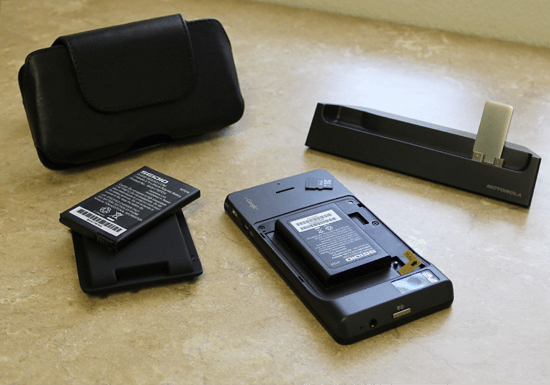
The Motorola Droid X2 comes with a removable 1540 mAh battery. Now, 1540 mAh might sound kind of modest next to today’s phones , but back in 2011 it was pretty normal for a high-end handset. Since it was removable, people could just keep a backup battery on hand, which at the time felt very normal, like a practical little safety net.
Battery Life Performance
Overall, the Droid X2 gives decent stamina for its time. If you use it in a moderate sort of way, it can still stretch to a whole day on one charge. That usually covers web browsing, social media scrolling, texting, plus some casual or occasional gaming. But if you’re the type that spends hours doing more demanding stuff, like video playback or long gaming sessions, then the battery will drop faster, so, you may end up needing to recharge before night comes.
Android 2.3 also brought some upgrades to power control , which helps the phone run a bit longer than it did on the earlier Android 2.2. Still, with that limited capacity, heavier use can turn into a “need a charger” situation, or at least carrying a spare battery if you really plan to keep the device going all day.
Charging Time:
The Droid X2 charges using a typical micro-USB port, basically the same charging norm for smartphones back then. In practice, charging is pretty average, like, it usually takes around 2 to 2.5 hours to go from a depleted battery to a full one. There’s no fast charging here, and well that option wasn’t really common in 2011, so you kinda need to expect and plan longer charging windows.
Power Management Features:
The Droid X2 comes with a few power management tools that help stretch battery life a bit. You can tweak options like the screen brightness, screen timeout, and even background data usage, in order to conserve energy. There’s also a battery usage monitor that shows what apps and services are draining the most power. With that, users can spot power hungry apps early and close them, which should help the overall endurance.
Connectivity
Network and Call Quality:
The Motorola Droid X2 is made for CDMA networks and works on Verizon’s 3G network, within the United States. It supports EV-DO Rev. A, which delivers faster data speeds than older 3G standards. Even though the Droid X2 doesn’t include 4G LTE, since that was still kinda early for rollout during the period, it still tends to provide steady 3G connectivity for browsing the web, email, and downloading apps.
When it comes to call quality , the Droid X2 does really well, you get pretty clear crisp audio while on calls. The earpiece sounds loud and clean, and the microphone seems to grab the users voice effectively , even when you are in noisy places. It also brings along noise cancelling tech, so it cuts down on the annoying background noise… which means the person on the other end can hear you more easily.
Wi-Fi and Bluetooth
For wireless stuff, the Droid X2 supports Wi-Fi 802.11 b/g/n so you can hook up to Wi-Fi networks for quicker browsing. In day to day use , the Wi-Fi feels steady, with solid signal and dependable connections. On top of that, there’s also Wi-Fi hotspot support, letting you share your mobile data link with other devices, tablets , or laptops.
As for Bluetooth, you get Bluetooth 2.1 with EDR, which helps with connecting stuff like headsets speakers and even in-car systems. Sure Bluetooth 2.1 doesn’t have all the newer fancy functions , and it won’t deliver the faster data transfer you see on newer Bluetooth versions. But honestly, for basic wireless pairing and everyday audio streaming it is more than enough.
GPS and Navigation
The Droid X2 includes a built in GPS receiver, so location tracking and navigation work in a dependable way. There’s A-GPS as well, Assisted GPS uses data from the cellular network, which improves accuracy and helps you lock onto satellites sooner. GPS performance is fairly reliable, with accurate positioning, and navigation stays smooth when you use apps like Google Maps.
The big 4.3 inch screen plus the higher resolution makes navigation more pleasant, because maps look detailed and easy to read. The phone includes a digital compass too, this helps direction based apps and services feel more accurate, especially when you’re moving around.
Other connectivity options:
So the Droid X2 has a microSD card slot, and it lets users add more room, like up to 32 GB. Honestly this can be really handy if you’re the type that saves lots of photos and videos, or installs more apps, since the built in storage is only around 8 GB, so yeah.
It also includes a micro-USB port for charging and data transfer and there is a 3.5mm headphone jack for audio output. Having that classic headphone socket is a nice thing, because it means you can plug in your preferred headphones or earbuds right away, no little adapter nonsense needed.
Operating system and other features
Motorola Droid X2 comes with Android 2.2 Froyo. However, it’s been suggested that it will be updated to Gingerbeard, hopefully sooner rather than later, maybe in the shortest timeline they can manage.
The Droid X2 additionally supports HDMI connectivity, so you can send images out to a TV or a projector. There’s also that microSD card slot again, because it’s mentioned more than once for a reason, users can increase storage if they want to. And while 4G has been showing up as a common checkbox on newer phones lately, Droid X2 doesn’t support that newer network technology.
Epilogue
Motorola Droid X2 is a good device, dual-core processor, large qHD screen and high resolution. However, for comparison Android with rivals such as HTC Sensation or Samsung Galaxy S II, the Droid X2 is still missing a lot. Although the Droid X2 upgrades are remarkable, but it seems to stand in the ranks of modern dual-core smartphone, the Droid X2 “show” weakness of the low RAM capacity.
Related Posts


Tech Reviewer & Product Analyst
Định Bia has spent over 10 years testing consumer electronics with a focus on smart technology. He work as a product advisor at Biareview where he helped customers find the right devices for their needs. He personally tests every product featured on this site using a consistent evaluation framework covering quality, durability, and value. All reviews are based on experience, not influenced by the manufacturer.