
Table of Contents
Design
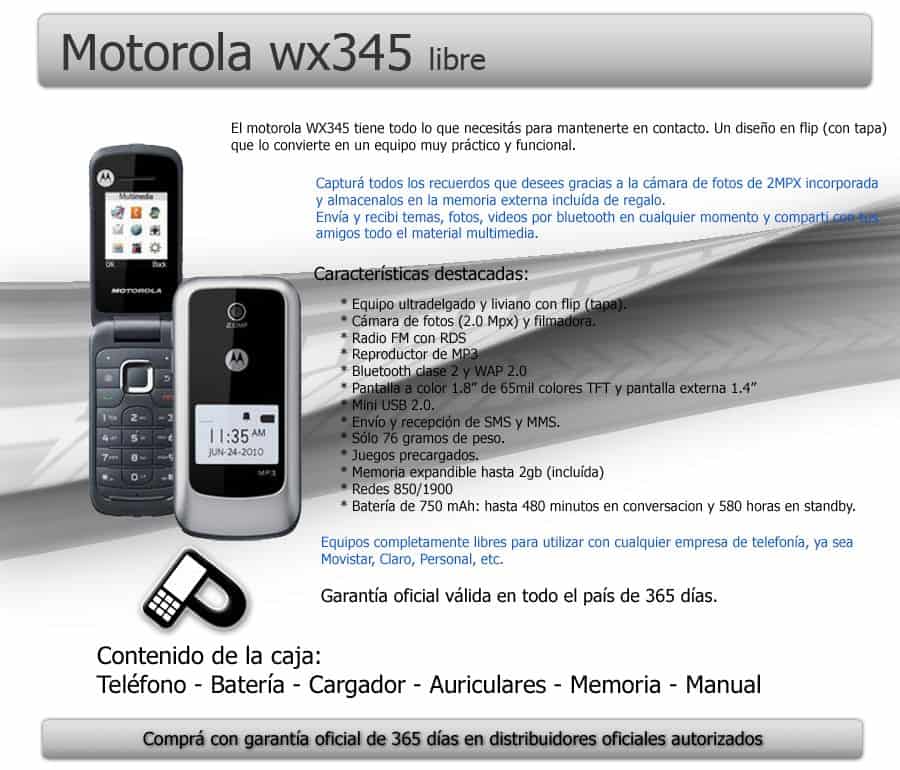
Motorola WX345 is a sample of the most simple flip phone from Motorola to date. WX345 size 9.5 x 4.7 x 1.67 cm with simple design and soft, made of plastic casings and machine only 2 silver and red versions. When folded, the outer WX345 has a small monochrome screen, displaying the required information such as date, time, battery life, etc. … help users track. Above the screen is a 2 megapixel camera, 2 sides has microUSB charging slot, volume button and 3.5mm headphone jack.
As it turns out, we can see a fairly bright 1.8-inch screen, with the ability to display 65,000 colors and a resolution of 128×160. This resolution may sound quite “disastrous” if compared to the screen of modern products, but with a basic phone, the resolution WX345 which is entirely satisfactory. WX345 also has a microSD memory card slot supporting up to 32GB, but under the battery, this design is quite inconvenient when you have to remove the battery, memory card to plug into.
WX345 keyboard design reminiscent of the keyboard on the Nokia’s cheaper phones, with soft rubber coated keys, a bit rough, feels very real press. For those who have ever felt enjoy messaging phones such as the Nokia 1110i, Nokia 1208 will find that feeling in Motorola WX345.
Motorola kinda has this reputation for making devices that are durable and well built, and the WX345 really doesn’t break that pattern. The plastic body feels solid enough that it should handle everyday stuff , like little bumps and wear over time. Also, the clamshell setup is one of those simple but clever touches because when the phone is closed, the main screen is basically shielded. That means less risk of scratches or screen damage , which is a pretty common headache with a lot of newer smartphone designs.
The keypad buttons feel firm and they respond fast, with decent tactile feedback when you press them. And for a feature phone, that matters a lot, since the physical keypad is the main way you actually input things. The navigation keys follow the same idea, they’re well put together and they let you steer through the menus in a pretty accurate way.
What really stands out though is the WX345’s overall durability. It has that “I could take a couple drops, or random knocks” vibe without instantly looking wrecked, so it feels like a dependable option for people who want longevity and toughness in a device. The battery cover sits snug on the back, and when you need to open it, it comes off without too much fuss, so getting to the battery the SIM card, and the microSD card slot is straightforward.
So, overall the design and build quality on the Motorola WX345 really match the brand’s focus on sturdy, reliable hardware. Between the clamshell protection and the tough plastic frame, it comes off as a practical choice for anyone who mainly needs a dependable phone for plain communication tasks.
Functions
WX345 only equipped with basic features of a mobile phone: listen to the call, adding Bluetooth connectivity and music player, web browser with WAP. Music software on WX345 does not really stand out, but also enough to meet the needs of users are not too hard. The sound quality on the WX345 only inadequate solutions by Motorola WX345 player.
Contacts in WX345 can store 500 phone numbers, temporary enough for regular users.
WX345 has Airplane Mode so you can use the phone while on a plane and capable FM tuner. A small note that you can only turn on when you plug in headphones FM.
Only equipped with a 2 megapixel camera so users can hardly expect the ability to capture beautiful images of WX345. Pictures taken with the WX345 has a relatively low resolution, color pale and blurred, the contrast of the image also belongs to the low. Machine has many different modes depending on the image quality desired by the user. WX345 can shoot video but the quality is pretty bad.
Display
Screen Size and Resolution:
The Motorola WX345 comes with a 1.8-inch TFT display, resolution 128 x 160 pixels. Honestly this kind of screen, size and that resolution was pretty much the norm back when these “feature phones” were a thing, it gives you enough space for the everyday stuff , like reading messages , moving through menus, and tossing a quick look at photos. Of course the pixel density is on the low side, so text and pictures don’t look as crisp as on newer smartphones, but for what the phone is meant to do it still works , you know.
Then there’s also a smaller external monochrome display with 96 x 32 pixels. That extra screen is mainly for peeking at the time, checking battery status, and seeing call alerts, without actually needing to open the phone. It’s sort of a simple design, but it ends up being surprisingly useful because you can stay on the go and still get the info you need, no big deal.
Color output and viewing angles:
On the WX345, the TFT panel manages decent color reproduction, though the results are kind of constrained by the limited resolution and the small footprint. The colors aren’t super bright or true compared to higher-end devices, yet they’re totally fine for the basic tasks the phone aims for in the first place. The viewing angles are also a bit restricted, so when you look from the side, or at any awkward angle, colors and brightness may look different. That behavior is pretty typical for older TFT screens, and for the target audience it’s not really a dealbreaker.
Brightness is also a mixed story. Indoors it holds up well enough, but outdoors in strong light it has trouble. When you’re in direct sunlight the screen gets washed out, and the low resolution makes it harder to read properly. Still, if someone mostly uses the phone indoors, or in shade, the display should feel more than adequate.
User Experience:
The display on the Motorola WX345 gives a simple, pretty straightforward feel, like it just works. The interface is laid out with big, easy to read icons and text, so it tends to be friendly for users of all ages. Moving through the menus feels natural too, with the D-pad and those soft keys, kind of a familiar and comfortable way to interact with the phone.
Sure the screen is small compared to newer devices, but it still fits the phone’s overall design spirit. The screen size and resolution seem right for what this model is really about, communication plus basic multimedia, not advanced applications and not high definition media binge watching.
The ability to tune and battery life
Catching good waves is a highlight for the Motorola WX345. Reception is usually steady, and signals are pretty full even under the normal, everyday conditions. Voice quality is clear and stable, but the noise filtering is not that great , so people can run into trouble when you’re speaking in a crowded place.
Because the device has limited features and that small screen, battery endurance is fairly strong. In standby mode the unit can keep running nonstop for about 31 days, and continuous talk time can reach up to around 9 hours.

User Interface and Software
Operating System:
The Motorola WX345 runs on a proprietary operating system made by Motorola, and yeah it’s pretty much what youd expect for feature phones from that era. It feels light and tuned for the phone’s limited hardware, so the whole thing leans toward smooth everyday use rather than anything fancy. The experience is kept pretty straightforward, like you can get to calling, texting and even multimedia play back without having to dig around too much.
Navigation:
Using the user interface is mostly intuitive, mainly because of the layout and that physical keypad. On the main screen there’s a menu that sort of works like a grid of icons, each one stands for a particular function or app. You move around through those icons using the D-pad, and the center button acts as the select key. Below the display the soft keys change depending on where you are, so sometimes they bring up an options menu , other times they just pull you back to the previous screen.
The overall UI design is friendly, even if someone isnt super tech-savvy. Icons are on the bigger side and easy to recognize, the text shows up in a clear font you can read without squinting. The colors stay simple and uncluttered too, so you’re not distracted by visuals, but more by what the phone can actually do.
Features and Functionality:
The Motorola WX345 includes the usual basic feature-phone set. For example:
Phonebook: This part lets you store up to 800 contacts, which is more than enough for most people. Each contact can hold several phone numbers and extra details, like an email address too.
Messaging: This messaging app supports SMS plus MMS, so users can send and receive text messages , but also multimedia messages with photos , audio, and video stuff. The physical keypad makes typing messages kinda easier, though it can take a little while to get used to it if you’re used to a touchscreen keyboard instead.
Call Logs: The call logs keep a record of incoming calls, outgoing calls and missed ones too, which is a handy way to review recent communication activity without much fuss.
Calendar and Organizer: The phone comes with a basic calendar and organizer app. You can set reminders, arrange appointments, and manage tasks from there. It doesn’t have the advanced options you would see on a smartphone calendar , but honestly it is enough for everyday scheduling needs that are simple.
FM Radio: The WX345 includes an FM radio, and it basically needs a wired headset because the headset functions like the antenna. The radio app is pretty straightforward, it lets you scan for stations and then save your favorites , easy.
Media Player: There’s also a basic media player onboard, with MP3 audio playback and 3GP video playback. Because the screen is small and the resolution isn’t that great , video watching isn’t really that enjoyable. Still, for music it works well enough , so it does the job.
Customization:
The Motorola WX345 has limited customization options compared to newer smartphones, still users can tweak it a bit, you know. It lets you change the wallpaper, choose different ringtones, and adjust a bunch of settings to match your preferences. The choices are basic, but they are sufficient for a feature phone, and that’s mostly what matters here.
Performance
For the most part, the user interface feels smooth, not much lag or delay when you move through the menus. The operating system is on the lighter side so the phone still stays responsive even though the hardware is basically modest. Still, it’s not magic , if you try to juggle several tasks at once the whole thing can start to drag a bit and get less snappy.
Summary
As a low-end phone it’s kind of hard to expect the sky from the Motorola WX345. The music side of the device can not really, you know, stand out or hold your attention for long, it mostly helps you pass time while you’re waiting around. The small screens are a drawback and the overall display quality doesn’t impress either.
That said, for folks watching their spending, this product can fit the bill. In the US, the Motorola WX345 is offered by the service provider network as a free distributed model to the user, with only the first activation fee being $ 35.
And even though it’s positioned in the cheap segment, it comes with useful extras like Bluetooth, camera, an Mp3 player, a WAP browser, a pleasant-looking design, and it also has a good keyboard. So overall, the WX345 feels pretty confident for the price range it’s aiming at.
Related Posts





Tech Reviewer & Product Analyst
Định Bia has spent over 10 years testing consumer electronics with a focus on smart technology. He work as a product advisor at Biareview where he helped customers find the right devices for their needs. He personally tests every product featured on this site using a consistent evaluation framework covering quality, durability, and value. All reviews are based on experience, not influenced by the manufacturer.