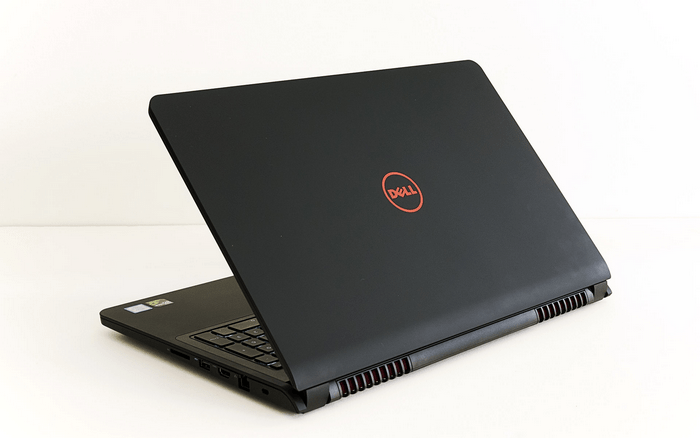
In addition to the Alienware “alien” machine dedicated to the few who are passionate about technology and gaming, Dell also extends its gaming laptops to the popular segment, with hardware configuration and, in particular, cost compete with more users.
Specifically the Inspiron 15 7559 it’s priced around $ 1000, set up with the Skylake Core i5-6300HQ, GeForce GTX 960M discrete graphics 4GB of GDDR5 memory, and 8GB of DDR3 1600 MHz memory bus, plus a 15.6 inch Full HD resolution. In a way it’s also viewed as more of a heavyweight compared to what you typically see in the gaming laptop segment , like the Acer Aspire V 15 NitroBlack Editio, Asus ROG GL552J, MSI GL72 6QD or even the Lenovo Ideapad 700.
The fact that most laptops are primarily designed for learning or working needs of users. So manufacturers often emphasize the CPU factor, choosing between Core i5 or Core i7 for mid-range or high-end products. Computing power and overall performance, Core i7 is higher than Core i5, but in terms of graphics processing capabilities in the game, this is not necessarily true.
With gaming laptops, the graphics card seems like the most important factor, and honestly it mostly decides your overall gaming feel. So it’s worth thinking about whether you want to pay more for a stronger processor, or rather invest in a better graphics card, because that tends to make a more direct difference. A higher-speed or multi-core CPU will be capable of handling multimedia demos, data encryption or video decoding, or even video editing, but will not benefit game graphics.
Advantage
Overall performance and good graphics handling.
High battery life
Built-in LED background keypad is handy
Flexible hardware upgradeability
Smooth heat dissipation, effective operation
Defect
Average sound quality
Keyboard sensitivity, touchpad is not really good
Design
The product looks quite nice, sporty styling and stylized lines, expressing the charm of the design. Unlike previous products, the noticeable change of the Inspiron 7559 is to switch to a reddish black tones. The large rubber base, which runs horizontally across the body, has a more anti-slip effect and better shock absorption.
With “measurements” of 38.5 x 26.1 x 2.52 cm and weighing about 2.57 kg, the Inspiron 7559 is not as thin as the Acer Aspire V 15 or HP Star Wars Special Edition. However, the product still shows the trend of thin design that companies apply, not only for ultrabook but also with standard laptop today.
The plus point in Dell’s new laptop design is its discrete processor and discrete cooling system, which makes for efficient cooling and noise reduction in operation. The air is drawn through the grille on the underside of the body, which, after cooling the internal hardware, pushes out through the wind chimes on the back and left. This brings more comfort to the user than the old radiator design.
In terms of sound, though, there’s a subwoofer on the underside that produces a resonance effect that boosts the bass. However, in fact, the sound quality of the Inspiron 7559 is not really different from other 2.0-powered laptops; Poor detail, still on the midrange, high pitch and lack of depth of bass. They do not have enough “power” to show good sound effects, which the game manufacturers care less than the image.
Keyboard and touchpad
Dell’s gaming-style gaming keyboard retains its traditional, full-size design, and is split into two distinct parts, including the left qwerty keypad and the right numeric keypad, for the general population, financial data entry or when playing games
The practical use of the key feels good, comfortable operation with soft keys with short movement, the distance between the keys should be suitable for users with large hands, integrated LED background makes it easy. Easily locate the keys needed in poor lighting. In terms of keyboard sensitivity is not very good but still enough to surf quickly on the keyboard when typing text.
About the touchpad well-behaved user, large size and smooth feel due to low friction makes the mouse pointer moving accurately, the functions of scrolling, zooming and rotating pictures are easier to implement. Two built-in mouse functions bring seamlessness to the overall product.
Unlike conventional laptops, touchpads are used for pointing at work or study because they do not achieve the required reliability or ease of control when playing games, especially in game genres first-person shooter (FPS). For gamers, a laser mouse connected via USB is always a good choice for mobile entertainment needs.
Communication port, hardware upgradeability
Without compromising on design thinness, the Inspiron 7559 fully supports today’s popular connectivity including standard HDMI 1.4a output, three USB 3.0 ports, an SD card reader, and a built-in headphone jack. Micro case These interfaces are distributed on both sides of the body to avoid entanglement when connecting to many other peripherals.
Note that Dell gaming laptops do not come with optical drives nor have VGA output ports for analog video. However, with the development of technology and changing user habits, these things do not seem to affect your use.
The ability to upgrade is appreciated despite having to remove the entire protection cover underneath. You can easily add more RAM, upgrade your hard drive to replace the battery, or even your processor and graphics card. Actually with the above hardware configuration of the Inspiron 7559, you should add extra SSD as the system partition and transfer the existing HDD as the secondary drive to store the data.
This will significantly improve overall performance and at the same time be more reliable for better shock-absorption, shorter boot-up times and faster startup applications.
Screen
The Dell Inspiron 7559 comes with a 15.6-inch, 1,920-by-1,080-pixel display. IPS panels help minimize color distortion, and you get 178 ° viewing angles both across and up down. There is an anti-glare coating on the outside of the screen surface, so the experience stays fairly comfortable in a variety of lighting environments even if the room is not ideal.
After testing it in an office setting, the images look bright, detailed, and the sharpness feels solid, with moderate brightness that generally does not cause eye fatigue during long stretches of work on documents , texts. That said, the brightness level is just medium, so outdoors, or under strong light, the picture suffers a noticeable drop in clarity and overall visibility.
Dell Inspiron i7559-7512GRY 15.6 Inch UHD Touchscreen Laptop (Intel Core i7 2.6 GHz 6th Generation Processor, 1 TB HDD, 16 GB RAM, 128 GB SSD, NVIDIA GeForce GTX 960M, Windows 10): Buy it now
Dell Inspiron i7559-5012GRY 15.6″ UHD (3840×2160) 4k Touchscreen Laptop (Intel Quad Core i7-6700HQ, 8 GB RAM, 1 TB HDD) NVIDIA GeForce GTX 960M, Microsoft Signature Edition: Buy it now
Dell Inspiron i7559-2512BLK 15.6 Inch FHD Laptop (6th Generation Intel Core i7, 8 GB RAM, 1 TB HDD + 8 GB SSD) NVIDIA Gaming GeForce GTX 960M: Buy it now
2016 Newest Dell Inspiron 15 7559 15.6″ FHD Gaming Laptop PC, Intel i7-6700HQ Quad Core Processor, 16GB RAM, 1TB HDD+8GB SSD, NVIDIA GeForce GTX 960M 4GB GDDR5, Backlit Keyboard, Windows 10: Buy it now
2016 Dell Inspiron 15 7559 15.6″ FHD Gaming Laptop PC, Intel i7-6700HQ Quad Core Processor 3.5GHz, 16GB RAM, 1TB HDD + 8GB SSD, NVIDIA GeForce GTX 960M 4GB GDDR5, Backlit Keyboard, Windows 10: Buy it now
Performance evaluation
Overall, the performance of the test configuration is good. With the power of the GeForce GTX 960M midrange graphics card, it’s enough to help you experience adventure, or take part in a pinup match of 1080p resolution with the highest quality graphics. Can even exceed 60 fps, the gamer’s optimal threshold if you reduce the graphics quality to Medium.
Specific Alien vs. The highest predator is 80.6 fps (frames per second) and down to 47.4 fps with Very High graphics quality. The Tomb Raider, a game developed in part based on AMD Gaming Evolved technology, also reached 104.2 fps with Medium graphics quality and dropped to 71.6 fps with one higher level of graphics quality. Finally, the Thief 4, a statue in the stealth action category also reached 46.9 fps with average graphics quality and reduced to 35.7 fps when the highest quality graphics.
With the PCMark 8 overall performance rating, the Inspiron 7559 scored 3,248 points on the Home test and 3,908 on the Creative test, which is a bit higher than the Acer Aspire V 15 Nitro Black Edition (Core i7-4710HQ, Graphics GeForce GTX 860M) in turn is 3,173 points and 3,630 points. Note that the comparison is only relative so you can easily imagine the power of the laptop changing over the newer hardware configurations.
In the 3DMark Cloud Gate performance measurement, Dell’s laptops scored 31,348 Graphics, 4,259 Physics, and 12,989 overall performance. Similar to the Cinebench R15, which tests the CPU’s 3D rendering capabilities and integrated graphics, the result is 128 cb in a single core test, 464 cb in a multi- Core and rendering speed of 17.31 fps on OpenGL test.
Battery life
About the battery life of the PCMark 8 Home, the machine runs in High Performance mode and the screen brightness is reduced to 40% (equivalent to battery life), showing the continuous use of the machine at about 3 50 minutes with a single charge. This also fits the fact that the Inspiron 7559’s battery has a capacity of 74 WHr, significantly higher than the Aspire V 15 Nitro Black Edition’s 52.5 WHr and 48 WHr of the Asus ROG GL552J. It should be added that H-series chips have the same performance advantage and higher power consumption. Specifically, the Core i5-6300HQ’s TDP comes in at 45W, compared with the Core i5-5300U, and then the 6300U is only 15W. This kind of also means that when you check similar hardware, the battery life on laptops using H series chips tends to be worse than on the M or U series.
Heat dissipation
Aside from the performance evaluation tools, there are also tests for how the machine handles heat, in an office environment, where the average temperature sits around 28 degrees Celsius. In everyday use, office apps or light games, the system stays pretty quiet . Even when you run 3DMark Cloud Gate, the active cooling setup still looks effective, because the CPU gets to a peak temperature of 71 degrees Celsius and the GTX 960M lands at 69 degrees Celsius.
Related Posts



Tech Reviewer & Product Analyst
Định Bia has spent over 10 years testing consumer electronics with a focus on smart technology. He work as a product advisor at Biareview where he helped customers find the right devices for their needs. He personally tests every product featured on this site using a consistent evaluation framework covering quality, durability, and value. All reviews are based on experience, not influenced by the manufacturer.