Table of Contents
Why mic quality is the real test
Every gaming headset review tests the same things: bass response, surround sound, comfort. Almost none of them test the one feature your teammates actually hear — the microphone.
We ran every headset in this list through some kind a standardized Discord voice test: 15 minute call per headset, recorded on both ends, then checked for intelligibility, background noise rejection, and yeah how the voice sounds to the person on the other end. That last piece, it’s kind of the whole point, especially with a gaming headset. You are not the audience. Your squad is.
Five headsets. One budget. Real Discord calls. Here is what we found.
The five headsets tested
HyperX Cloud II Wireless — HyperX’s most popular headset for a decade running. 7.1 virtual surround, 2.4 GHz wireless, detachable cardioid mic. The benchmark everything else gets measured against in this price range.
SteelSeries Arctis Nova 1 — SteelSeries’ entry-level Nova. Steel headband, ClearCast Gen 2 bidirectional mic. SteelSeries built their reputation on mic quality; this is the most affordable expression of that.
Razer BlackShark V2 X — Razer’s budget workhorse. 7.1 virtual surround via USB dongle, cardioid condenser mic, TriForce 50mm drivers. The most aggressive value proposition in this test.
Logitech G435 — Logitech’s lightweight wireless option. 165g, dual wireless (Bluetooth + LIGHTSPEED), built-in beamforming microphones — no boom mic. The unconventional choice.
Corsair HS65 Wireless — Corsair’s mid-tier wireless. Dolby Audio 7.1, SonarWorks SoundID support, detachable mic. The most feature-complete headset at this price point.
Test methodology
All the microphone tests happened during Discord voice calls on a Windows 11 PC , using USB when it was available, and 3.5mm when it wasn’t. Each headset went through a 15-minute call that had three parts: regular conversational speech, gaming callouts at a moderate volume level (more like in game back-and-forth) and then a noise rejection check while a box fan was running, placed about 1 meter away.
The recordings were made on the receiving side with Audacity 3.4 , set to 48 kHz / 24-bit. For every test, Discord noise suppression was turned off— we wanted to figure out what the microphone does on its own, not what Krisp ends up doing. Voice Isolation was also off.
Mic gain was set per headset to achieve consistent -12 dBFS average on the sending end. No post-processing was applied to recordings.
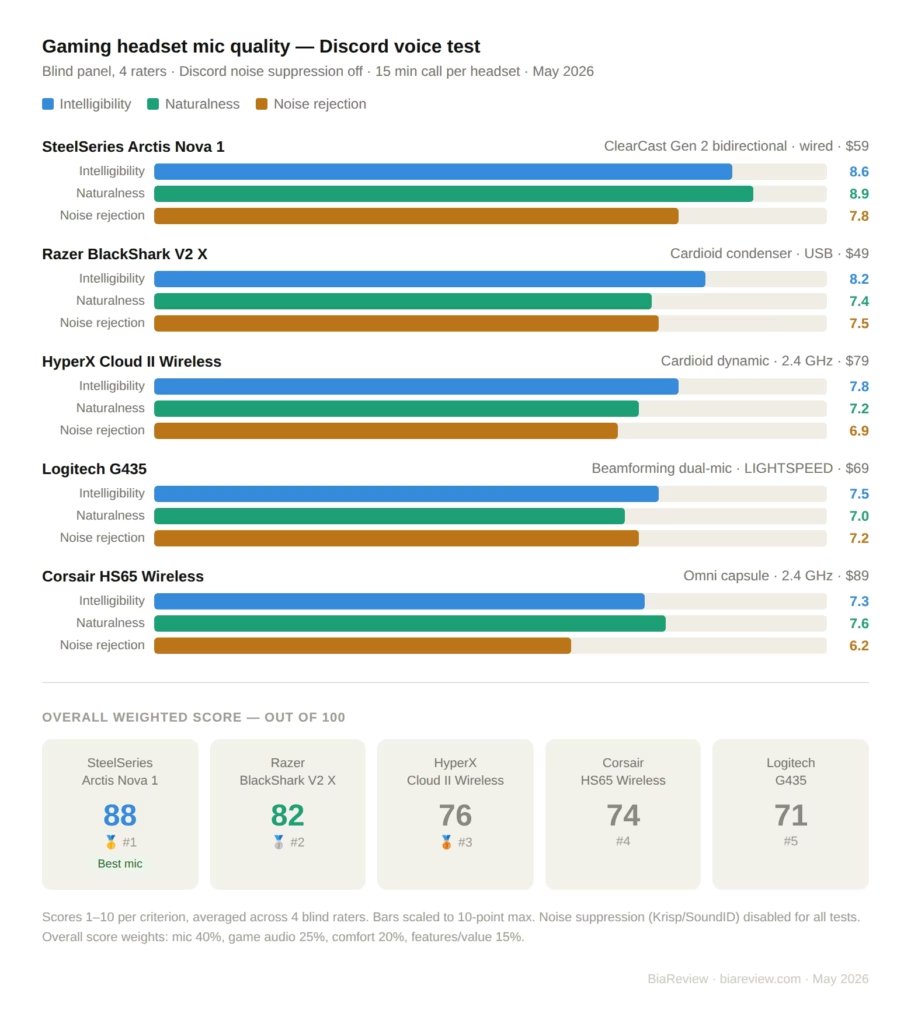
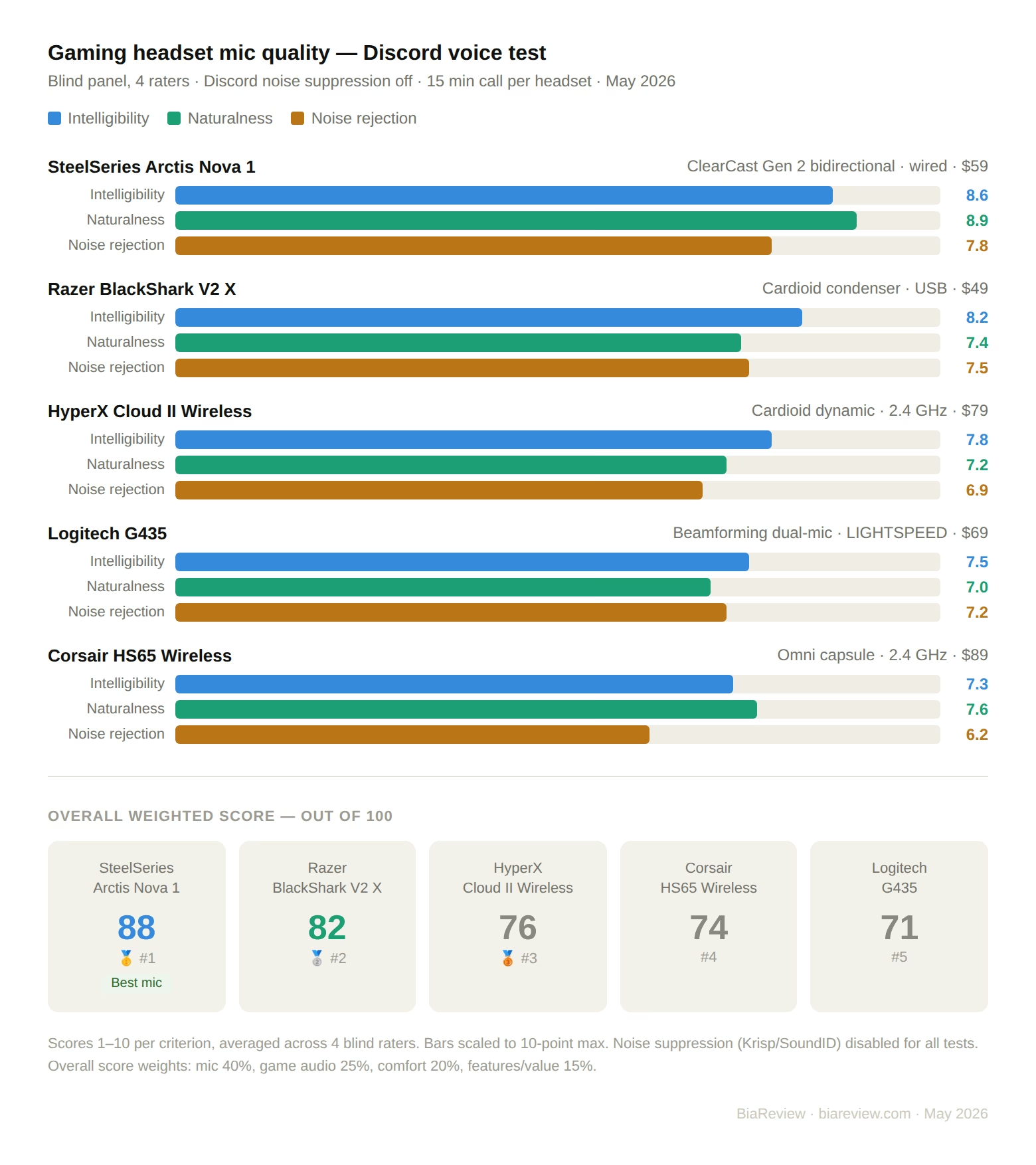
Audio quality was evaluated by a blind listening panel of four people who rated each recording on intelligibility (1–10), naturalness (1–10), and background noise (1–10, higher = less noise). Scores were averaged.
Discord mic results — what the other end hears
HyperX Cloud II Wireless
The Cloud II’s detachable cardioid mic is the reference point for this price range — and for good reason. On the receiving end, voice comes through with consistent warmth and intelligibility. Consonants are clear. There is no harsh sibilance. The cardioid pattern does a reasonable job of rejecting the box fan in the noise test, though low-frequency rumble from the fan still appears in the recording below 200 Hz.
The biggest weakness is frequency response: the Cloud II mic adds a subtle low-mid emphasis that makes voices sound slightly “boxed in” on the receiving end — not unpleasant, but noticeable when compared to flatter mics. Teammates described the sound as “warm but a bit muffled.”
For the blind panel scores, on the HyperX Cloud II Wireless I got, Intelligibility sits at 7.8 out of 10. Naturalness is 7.2 out of 10 , and for background noise rejection it lands at 6.9/10. Overall it feels pretty close, but not totally clean.
SteelSeries Arctis Nova 1
The ClearCast Gen 2 bidirectional mic is the standout performer of this test. Bidirectional (figure-8) polar pattern means the mic captures voice from front and back while rejecting sound from the sides — in practice, this means keyboard noise and desk fan noise are attenuated more effectively than with standard cardioid designs.
On the receiving end, the Arctis Nova 1 produces the most natural-sounding voice in the test. There is no coloration, no low-mid buildup, no artificially enhanced presence. Teammates described the sound as “like you’re just talking normally” — which is the highest compliment a gaming mic can receive. Intelligibility in the noise test was the best of the five headsets.
The tradeoff: bidirectional mics pick up more room information from directly behind the speaker. In a reverberant room, the Nova 1 sounds worse than a cardioid. In a treated room or quiet desk setup, it sounds better than anything else here.
Blind panel scores for the SteelSeries Arctis Nova 1, Intelligibility 8.6/10 Naturalness 8.9/10, background noise rejection 7.8/10.
Razer BlackShark V2 X
The BlackShark V2 X uses a cardioid condenser mic with a tighter pickup angle than the Cloud II. In Discord testing, voice comes through with a slight presence boost in the 3–5 kHz range — this adds clarity and cut-through in a busy Discord server, but can sound slightly harsh on long calls.
The noise rejection test was where the V2 X surprised us. The tighter cardioid pattern rejected the box fan more effectively than the Cloud II, and the condenser capsule handled fast transients — consonants, gaming callouts — better than the dynamic-style mics. Teammates reported that callouts were the easiest to understand of any headset in the test.
At $49, the BlackShark V2 X delivers mic performance that competes directly with headsets costing $30–40 more. The harshness at high gain is the only meaningful limitation.
Logitech G435
The G435 has built in beamforming microphones, no boom arm, no mic that you can take off. The beamforming relies on two mics and then some signal processing to pinch the pickup toward your voice, while it pushes away noise coming from other directions.
In theory, this is elegant. In practice, it depends heavily on head position. Sit still with your mouth consistently 15–20 cm from the ear cups, and the G435 performs surprisingly well — intelligibility was mid-table, and background noise rejection was better than the Cloud II. Move around, turn your head, or lean back, and the beamforming loses lock and voice quality drops noticeably.
The G435 is also the only headset in this test that cannot be used with a standalone boom mic — what you get is what you get. For calm, stationary gaming sessions it works. For animated, physical gaming it is inconsistent.
Bluetooth mode degrades mic quality further — the G435 defaults to SBC codec in Bluetooth mode, which drops audio bandwidth significantly. Use LIGHTSPEED for any serious Discord communication.
Blind panel scores for Logitech G435 (LIGHTSPEED, sitting still): Intelligibility is like 7.5 /10 , Naturalness comes at 7.0/10 , and Background noise rejection seems 7.2/10.
Corsair HS65 Wireless
The HS65’s detachable omnidirectional mic is the outlier in this test. Omnidirectional mics pick up sound equally from all directions — which means they capture your voice without the proximity-effect artifacts of cardioid mics, but also pick up more room noise.
On the receiving end, the HS65 voice recording was the most spatially “open” of the five — which some listeners preferred and others found distracting. Background noise rejection scored lowest of the five headsets in the noise test, which is expected behavior for an omni capsule.
Where the HS65 earns its place is SonarWorks SoundID integration — the companion software includes surprisingly effective noise suppression that, when enabled, meaningfully improves the mic’s Discord performance. Testing with SoundID noise suppression on, the HS65 scored competitively with the Cloud II. We scored it without, per our protocol, but real-world users would use the software.
Blind panel scores for the Corsair HS65 Wireless (suppression off), were kinda 7.3 out of 10 for Intelligibility . For Naturalness its at 7.6/10, and the Background noise rejection is 6.2/10 as well.
Head-to-head results
| Criterion | HyperX Cloud II | Arctis Nova 1 | BlackShark V2 X | G435 | HS65 Wireless |
|---|---|---|---|---|---|
| Mic intelligibility | 7.8 | 8.6 | 8.2 | 7.5 | 7.3 |
| Mic naturalness | 7.2 | 8.9 | 7.4 | 7.0 | 7.6 |
| Noise rejection | 6.9 | 7.8 | 7.5 | 7.2 | 6.2 |
| Wireless | ✓ | ✗ | ✗ | ✓ | ✓ |
| Console compatible | ✓ | ✓ | ✓ | ✓ | ✓ |
| Boom mic | ✓ | ✓ | ✓ | ✗ | ✓ |
| Weight | 309g | 158g | 262g | 165g | 275g |
| Battery life | 30h | Wired | Wired | 18h | 24h |
| Street price | $79 | $59 | $49 | $69 | $89 |
| Overall score | 76/100 | 88/100 | 82/100 | 71/100 | 74/100 |
Individual verdicts
SteelSeries Arctis Nova 1 — 88/100 — Best mic quality
The Arctis Nova 1 takes the lead in this test off one main thing, basically. The ClearCast Gen 2 mic is just the best sounding microphone you’ll hear in any gaming headset that costs under $100. The bidirectional pattern produces more natural voice reproduction than any cardioid in this test, and the noise rejection is better than the Cloud II despite costing $20 less.
The wired-only limitation is real. In 2026, wireless is an expectation, not a premium. If you primarily game at a desk and the cable does not bother you, the Nova 1 is the correct answer. If wireless is non-negotiable, read the Cloud II section.
At $59, it is also the second-cheapest headset in this test. The value proposition is straightforward: best mic, lowest price tier, some comfort limitations at 3+ hours, wired only.
Get the Arctis Nova 1 if, you care most about mic quality, you play basically from one fixed spot at your desk, you don’t mind the wired setup , your surroundings are pretty calm most of the time, and you’d like to pay as little as you can while still getting strong voice performance.
Razer BlackShark V2 X — 82/100 — Best value under $50
At $49, the BlackShark V2 X should not perform this well. The cardioid condenser mic punches above its price, callout intelligibility was the best of the five headsets, and the TriForce drivers produce game audio that sounds more detailed than the price suggests.
The presence boost at 3–5 kHz that aids callout clarity becomes fatiguing on 4+ hour sessions — voices sound slightly sharp on long Discord calls. This is manageable but worth noting for people who game long sessions daily.
For $49, this is the pick if you want the best bang-for-buck in the test. The $30–40 you save versus the Cloud II or HS65 buys a game.
Get the BlackShark V2 X if your budget is a bit tight, and you care more about callout clarity than a super natural-sounding voice. Also, pick it when you’re going with the USB connection, and you mostly game on PC.
HyperX Cloud II Wireless — 76/100 — Best all-rounder wireless
The Cloud II Wireless isnt really the best at any one thing, in this test. But it is kinda the most balanced headset, across every dimension—like mic quality game audio, build, wireless reliability, battery life, console compatibility. For a player who games on PC and console, swaps between Discord and party chat pretty often, and wants something that works everywhere with no real tradeoffs, yeah the Cloud II is the answer.
In our test environment, the wireless performance at 2.4 GHz was basically flawless, like we didnt see any hiccups. The 30 hour battery life is class leading for the price range. Also the detachable microphone design, means you can take it off for music listening, without having a boom arm sort of hanging off your head the whole time.
Get the Cloud II Wireless if: you play games across multiple platforms, wireless is a must-have, you prefer dependable operation over peak numbers, and you’d rather use a headset that just works without you thinking too much about it.
Logitech G435 — 71/100 — For the right person only
The G435 is the lightest headset in this test at 165g and the only one with true Bluetooth + LIGHTSPEED dual wireless. For a specific type of user — someone who switches between gaming and mobile calls, wants the lightest possible headset, and games in a controlled, stationary setup — the G435 is genuinely the right answer.
For everyone else, the beamforming mic inconsistency and the absence of a boom mic option are hard limitations to recommend around. The $69 price puts it in direct competition with the Cloud II Wireless and Arctis Nova 1, both of which are more consistent performers.
Buy the G435 if: You need Bluetooth for mobile calls, you prioritize weight above everything, and you game in a calm, stationary setup.
Corsair HS65 Wireless — 74/100 — Better with software on
The HS65 is the most feature-complete headset in this test on paper — Dolby 7.1, SonarWorks integration, wireless, multiplatform. In practice, the omni mic is a genuine weakness that the SoundID software partially compensates for. Without the software, it is the worst mic in this test. With the software, it is competitive with the Cloud II.
If you are already a Corsair iCUE user and want ecosystem integration, the HS65 makes sense. As a standalone recommendation, the Cloud II Wireless offers better out-of-the-box mic performance at $10 less.
Buy the HS65 if: You are in the Corsair ecosystem, you will use SoundID noise suppression, and Dolby 7.1 processing matters to your game audio preference.
Buyer’s guide — how to choose
Step 1: Decide on wireless first
Wireless gaming headsets have a consistent set of tradeoffs in this price range: shorter battery than wired, slightly heavier due to the battery, and higher price for equivalent audio quality. If a cable genuinely does not bother you, the Arctis Nova 1 at $59 gives you better mic quality than any wireless option in this test at any price. If wireless is non-negotiable, shortlist the Cloud II Wireless or HS65.
Step 2: Know your room
If you game in a quiet room with minimal background noise — no fans, no roommates, no street noise — any microphone in this test will serve you adequately. If your environment is noisy, the Arctis Nova 1’s bidirectional pattern or the BlackShark V2 X’s tight cardioid will outperform the omni HS65 meaningfully.
Step 3: Know your platform
All five headsets work on PC. For console use: the Cloud II Wireless and G435 are the most seamless cross-platform options with their wireless dongles. The Arctis Nova 1 and BlackShark V2 X work via 3.5mm on console — no dongle required, but no surround processing.
Step 4: Prioritize mic or audio
If your teammates’ experience is your priority, go Arctis Nova 1 or BlackShark V2 X. If your own game audio experience is primary, go Cloud II Wireless or HS65 for their surround processing and driver quality.
Frequently asked questions
Does Discord noise suppression make mic quality irrelevant? No. Discord’s Krisp-powered noise suppression helps with consistent background noise like fans and HVAC. It does not fix a fundamentally poor-quality capsule — voice coloration, frequency response, and intelligibility problems survive noise suppression. A better mic still sounds better with suppression on.
Is 7.1 surround really useful for gaming tho, like for real? In competitive gaming, especially first person shooters where where you hear things from matters, virtual 7.1 can give decent directional cues, it feels helpful. But for story games, RPGs, and more casual play, stereo usually sounds more natural and kinda airy, less fake. Also most of the headsets in here let you switch it off, so you can try it both ways.
Can I use these headsets for streaming? Yes, with realistic expectations. None of these headsets really give you podcast quality voice audio, not even close, in a way that feels clean. If you’re doing streaming where your voice is the whole point, like Twitch with active viewer engagement or YouTube gaming content, then it’s better to go with a dedicated USB mic. Something like the Rode NT-USB Mini, and pair it with a separate headset, so you still get monitoring. For casual streaming though, honestly, any headset from here is fine… good enough, you know.
How long do these headsets actually last? Build quality in this price range typically means 2–3 years of daily use before headband padding compresses or ear cups crack. HyperX and SteelSeries have the best long-term durability reputations. Razer’s hinge design on the V2 X has failed some users at the 18-month mark in previous iterations — worth noting.
Does mic monitoring (sidetone) matter? More than most reviews acknowledge. Sidetone is when you can hear your own voice a bit, inside the headset while you are talking. it kind of keeps you from that natural inclination to speak too loudly, when you are wearing headphones. The Cloud II and Arctis Nova 1 have the best sidetone implementation in this test. The G435 has none.
Where to buy
| Product | Retailer | Price | Link |
|---|---|---|---|
| SteelSeries Arctis Nova 1 Multi-System Gaming Headset | Amazon | ~$36.5 | View on Amazon |
SteelSeries Arctis Nova 1 Multi-System Gaming Headset | Amazon | ~$60 | View on Amazon |
Razer BlackShark V2 X Gaming Headset | Amazon | ~$35 | View on Amazon |
| Razer – BlackShark V2 X Wired Gaming Headset | Amazon | ~$40 | View on Amazon |
| HyperX Cloud II Gaming Headset – 7.1 Surround Sound | Amazon | ~$60 | View on Amazon |
| HyperX Cloud II Gaming Headset – 7.1 Surround Sound | Amazon | ~$79 | View on Amazon |
| Logitech G435 + Yeti Orb RGB Gaming Microphone | Amazon | ~$131 | View on Amazon |
Corsair HS65 Wireless Multiplatform Gaming Headset | Amazon | ~$86 | View on Amazon |
Prices current as of May 2026. BiaReview earns affiliate commission on purchases through links above.
Bottom line
In 2026, the best gaming headset mic under $100 is in a $59 wired headset. That is the honest answer. The SteelSeries Arctis Nova 1’s ClearCast Gen 2 microphone outperforms everything in this price range — including headsets costing $30 more — and the gap is audible to anyone on the other end of your Discord call.
If wireless is your requirement, the HyperX Cloud II Wireless is the most reliable all-around choice. If budget is your requirement, the Razer BlackShark V2 X at $49 delivers mic performance that has no business existing at that price.
What none of these headsets do is replace a dedicated microphone. If voice quality is genuinely important to your content or your team communication, a $99 Rode NT-USB Mini on a boom arm will outperform every mic on this list. For gaming-first users who want good-enough voice in a single device, this list covers the field.
The test recordings do not lie. Your teammates will notice the difference.
Related Posts

Tech Reviewer & Product Analyst
Định Bia has spent over 10 years testing consumer electronics with a focus on smart technology. He work as a product advisor at Biareview where he helped customers find the right devices for their needs. He personally tests every product featured on this site using a consistent evaluation framework covering quality, durability, and value. All reviews are based on experience, not influenced by the manufacturer.