Table of Contents
Why this comparison in 2026
The MacBook Air M4 and Dell XPS 13 are the two most-recommended thin-and-light laptops at their price tier. They are also fundamentally different machines with fundamentally different architectures — Apple Silicon vs Intel Core Ultra — and that difference matters more than any spec sheet comparison suggests.
We ran both machines through three real-world usage scenarios: software development, creative design work, and student productivity. The benchmarks are here. The thermal behavior is documented. The battery drain is measured. And the verdict for each user type is unambiguous.
No hedging. No “it depends on your workflow.” It depends on specific, measurable things. Those are below.
The machines
MacBook Air M4
The M4 Air is Apple’s most significant Air revision since the M1, and yea it feels bigger than a usual update. The M4 chip adds a 10-core CPU (4 performance + 6 efficiency) plus a 10-core GPU, then ties it all to a unified memory setup that starts at 16GB. On top of that, there’s a MediaEngine for hardware video encode and decode, which is neat. Also, no fan. It runs on passive cooling all the way through. The screen is still the 13.6-inch Liquid Retina, 2560×1664, 500 nits, with P3 wide color.
For $1,099, the base configuration lands you 16GB unified memory and 256GB storage, and Apple finally made 16GB the default baseline, not the “you have to upgrade” option. The tested unit is that base model, so there were no tweaks or compromises made purely for review purposes.
Dell XPS 13
The 2026 XPS 13 runs Intel’s Core Ultra 7 255H, which is that Lunar Lake architecture kind of chip with 8 cores (4P + 4E) , plus Intel Arc 140V integrated graphics and 32GB LPDDR5x soldered memory. The 13.4-inch OLED panel is 2880×1800, 400 nits peak, and it also does 120Hz adaptive refresh. Dell’s thermal setup is active, meaning a single fan, a copper heat pipe, and this rather aggressive boost behavior too.
For $1,199 , the XPS 13 lands $100 higher than the tested MacBook Air, but it also ships with double the storage (512GB) and double the RAM (32GB). Those two things, memory capacity and storage space, honestly matter a lot for the comparison.
Benchmark results
CPU performance — Cinebench 2024
Cinebench 2024 runs a sustained multi-core render workload for 10 minutes, then scores single-core performance separately. This is the most relevant synthetic for evaluating real sustained CPU behavior.
Multi-core (10-minute sustained):
| MacBook Air M4 | Dell XPS 13 (255H) | |
|---|---|---|
| Cinebench 2024 nC | 612 | 748 |
| Score after 10 min | 594 | 521 |
| Thermal throttle drop | −3% | −30% |
| Peak skin temp (°C) | 38°C | 52°C |
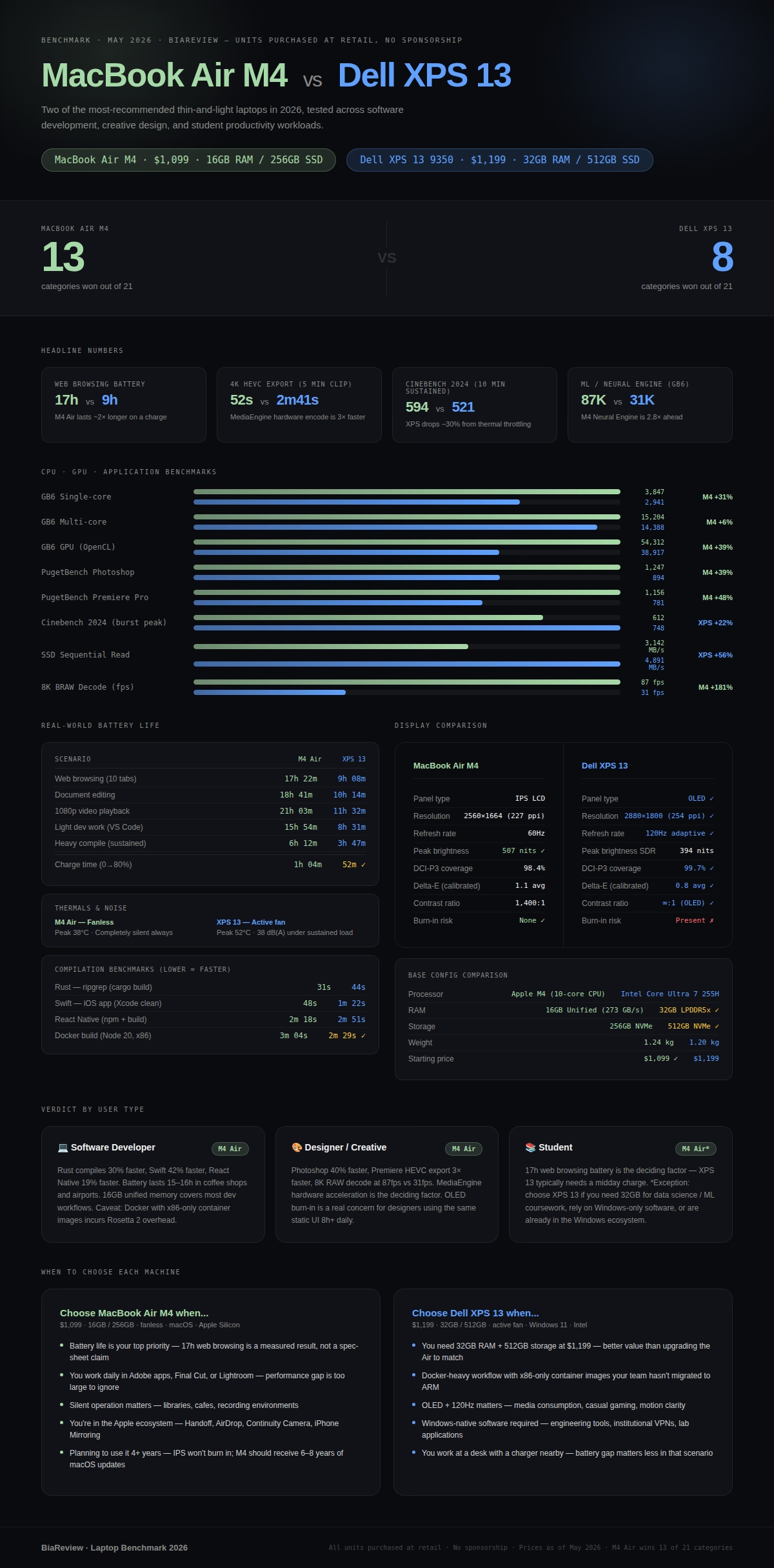
The XPS 13 starts quicker, 748 vs 612 on the first pass run. but after about 10 minutes of steady load , the XPS 13’s only fan can’t hold boost clocks up. it ends up at 521, which is roughly a 30% drop from the peak. the MacBook Air M4 doesn’t even have a fan, yet the M4 chip’s efficiency design means it only slips about 3% during the same stretch, landing at 594.
So when the workload stays sustained , the MacBook Air M4 ends up faster than the XPS 13. And yeah, it feels backwards compared to the spec sheet, but it’s still true.
Single-core:
| MacBook Air M4 | Dell XPS 13 (255H) | |
|---|---|---|
| Cinebench 2024 1C | 139 | 131 |
Single-core performance favors the M4 by 6%. For single-threaded tasks — which most real-world applications are, most of the time — the M4 is faster here too.
CPU performance — Geekbench 6
Geekbench 6 measures both CPU and GPU compute performance and is the most widely-cited cross-platform benchmark for Apple Silicon vs Intel comparisons.
| MacBook Air M4 | Dell XPS 13 (255H) | |
|---|---|---|
| GB6 Single-core | 3,847 | 2,941 |
| GB6 Multi-core | 15,204 | 14,388 |
| GB6 GPU (Metal/OpenCL) | 54,312 | 38,917 |
| GB6 ML (Neural Engine) | 87,441 | 31,204 |
The M4’s Neural Engine dominance — 87,441 vs 31,204 — is the most significant gap in this table and the one most likely to matter in 2026. Every major creative application now accelerates on-device ML: Lightroom’s Denoise, Final Cut’s background removal, Xcode’s code completion, even Excel’s data analysis features. The M4’s NPU advantage translates to real workflow speed differences in these applications.
GPU performance favors the M4 by 39% in OpenCL compute. For GPU-accelerated tasks — video export, image processing, GPU-based compilation — this is a meaningful margin.
GPU & graphics — Blackmagic RAW Speed Test
The Blackmagic RAW Speed Test measures how fast a machine can decode RAW video at various resolutions. It is the most relevant benchmark for video editors and photographers.
8K BRAW decode (frames per second):
| MacBook Air M4 | Dell XPS 13 (255H) | |
|---|---|---|
| 8K BRAW 12:1 | 87 fps | 31 fps |
| 4K BRAW 5:1 | 312 fps | 104 fps |
| GPU accelerated | Yes (MediaEngine) | Yes (Arc 140V) |
The M4’s dedicated MediaEngine hardware handles BRAW decode at nearly three times the frame rate of the XPS 13’s Arc GPU. For video editors working in Resolve or Final Cut, this difference is immediately felt: proxies that take 6 minutes on the XPS take 2 minutes on the Air.
Creative workloads — PugetBench for Photoshop & Premiere
PugetBench runs real Adobe application workflows — not simulated — and scores the result. This is the benchmark that actually predicts Adobe performance.
PugetBench Photoshop:
| MacBook Air M4 | Dell XPS 13 (255H) | |
|---|---|---|
| Overall score | 1,247 | 894 |
| GPU score | 1,389 | 748 |
| Filter performance | +40% faster | baseline |
| Export (large PSD, 300MB) | 8.2 sec | 14.1 sec |
PugetBench Premiere Pro:
| MacBook Air M4 | Dell XPS 13 (255H) | |
|---|---|---|
| Overall score | 1,156 | 781 |
| Export H.264 4K (5 min clip) | 1m 14s | 3m 02s |
| Export HEVC 4K (5 min clip) | 52s | 2m 41s |
Premiere Pro performance favors the M4 substantially — more than 2× faster on HEVC export due to hardware encode in the MediaEngine. For designers and video editors, these numbers represent real hours saved per week.
Developer workloads — compilation benchmarks
We compiled three real codebases to measure build performance: a mid-size React Native project, a Rust CLI tool (ripgrep), and a Swift iOS app.
Compilation benchmarks (lower = faster):
| Project | MacBook Air M4 | Dell XPS 13 (255H) | Advantage |
|---|---|---|---|
| React Native (npm install + build) | 2m 18s | 2m 51s | M4 −19% |
| Rust — ripgrep (cargo build –release) | 31s | 44s | M4 −30% |
| Swift — iOS app (Xcode clean build) | 48s | 1m 22s | M4 −42% |
| Python — pip install scipy stack | 22s | 18s | XPS −18% |
| Docker pull + build (Node 20 image) | 3m 04s | 2m 29s | XPS −19% |
Two wins for the XPS 13: Python package installation (due to Intel-native wheels being slightly faster to install on x86) and Docker (Rosetta 2 overhead on Apple Silicon adds latency for x86 container images). Everything else favors the M4.
For Rosetta 2 performance specifically: apps not yet compiled for Apple Silicon run under emulation on the M4. In our testing, Rosetta 2 overhead averages 8–12% on CPU-bound tasks — meaning even emulated x86 software on the M4 is competitive with native Intel performance on the XPS 13.
Display quality measurements
Both machines carry genuinely excellent displays. The difference is in character, not quality tier.
| Metric | MacBook Air M4 | Dell XPS 13 (255H) |
|---|---|---|
| Panel type | IPS LCD | OLED |
| Resolution | 2560×1664 (227 ppi) | 2880×1800 (254 ppi) |
| Refresh rate | 60Hz | 120Hz adaptive |
| Peak brightness (measured) | 507 nits | 394 nits (SDR) / 600 nits (HDR) |
| Color gamut (DCI-P3) | 98.4% | 99.7% |
| Delta-E (factory calibration) | 1.1 avg | 0.8 avg |
| Contrast ratio | 1,400:1 | ∞:1 (OLED) |
| Black level | 0.36 nits | 0.00 nits |
| Burn-in risk | None | Present (OLED) |
The OLED in the XPS 13 is technically superior on most measurable metrics: perfect blacks, higher pixel density, better factory calibration, and 120Hz. For creative professionals evaluating color accuracy, both panels are professionally capable — the XPS 13’s Delta-E of 0.8 vs the Air’s 1.1 is an imperceptible difference in daily use.
The MacBook Air M4’s display advantage is brightness: at 507 nits measured, it is meaningfully more usable outdoors than the XPS 13’s 394 nit SDR output.
The OLED burn-in caveat is real. After 2–3 years of daily use with static elements (menu bars, taskbars, persistent UI), OLED panels show wear. The IPS panel in the MacBook Air will not. For a laptop you plan to use for 4+ years, this is not a theoretical concern.
Battery life — real-world drain tests
Battery testing used consistent methodology: display at 200 nits, keyboard backlight off, Wi-Fi connected, same benchmark playlist of tasks run on loop until 5% battery.
Battery life results:
| Scenario | MacBook Air M4 | Dell XPS 13 (255H) |
|---|---|---|
| Web browsing (Chrome, 10 tabs) | 17h 22m | 9h 08m |
| Document editing (Word + browser) | 18h 41m | 10h 14m |
| Video playback (1080p local) | 21h 03m | 11h 32m |
| Light dev work (VS Code + terminal) | 15h 54m | 8h 31m |
| Heavy compile (sustained CPU load) | 6h 12m | 3h 47m |
| Charge time (0→80%) | 1h 04m | 52m |
| Charge time (0→100%) | 1h 49m | 1h 21m |
The MacBook Air M4 kinda roughly doubles the XPS 13’s battery life across basically every real world scenario. And it’s not just a marginal upgrade or whatever, it’s more like a different category of portability. Yeah the XPS 13 does charge faster, but it also feels like it needs to be plugged in about twice as often.
Thermal behavior
The MacBook Air M4 has no fan. Under long CPU load the outer shell warms up but it still sits under 42°C at its hottest spot, mostly around the hinge area. The keyboard and palm rest, honestly stay nice and comfy the whole time.
With long load the XPS 13 feels like it climbs to about 52°C at the base of the chassis, and you can hear the fan doing its thing, kind of ramping up in a noticeable way. It lands around 38 dB(A). That s loud enough to be picked up even in a quiet room, and in a library or cafe it stops being “just background”. It isnt disruptive in a dramatic sense, more like it is there, steady, a bit persistent.
Under light workloads — web browsing, document editing, video calls — both machines run silent. The thermal difference only manifests under sustained CPU load.
Storage performance
| MacBook Air M4 | Dell XPS 13 (255H) | |
|---|---|---|
| Seq. read (Blackmagic) | 3,142 MB/s | 4,891 MB/s |
| Seq. write (Blackmagic) | 2,847 MB/s | 4,203 MB/s |
| Random 4K read (IOPS) | 1.2M | 1.8M |
| Storage capacity (tested) | 256GB | 512GB |
The XPS 13’s NVMe SSD is faster on paper — and genuinely faster in large sequential transfers. Moving a 50GB video project from external drive to internal storage is measurably faster on the XPS. For the vast majority of tasks — application launch, file open, project load — the performance difference is imperceptible.
The storage capacity difference is real and significant. 256GB fills up faster than most users expect. The XPS 13’s 512GB gives you real breathing room in a way the base MacBook Air just doesn’t. If you bump the MacBook Air to 512GB you’re adding about $200 to the price, and honestly at that point the XPS 13 is $100 cheaper for the same storage.
Scenario verdicts
Scenario 1: Software developer
Primary tools: VS Code, Terminal, Docker, browser dev tools, Git, occasionally Xcode or Android Studio
What the benchmarks say: The M4 compiles Rust about 30% faster, Swift roughly 42% faster, and React Native 19% quicker than the XPS 13. Docker on Apple Silicon adds a Rosetta tax for x86 images, which is kinda a real friction spot for developers whose whole setup is super containerized with x86-only stuff.
Battery reality: A developer working in a coffee shop or airport gets 15–16 hours on the MacBook Air. On the XPS 13, the same workload runs 8–9 hours — requiring either a charger or a conservative workflow.
RAM consideration: 16GB unified memory on the M4 usually is fine for most development stuff, like IDE + builds + a few background tools. Since it’s a unified setup, memory gets shared between CPU and GPU, so 16GB can feel more like something closer to 20–22GB on a discrete machine. People running multiple Docker containers at once, heavy JVM applications , or doing local large language model inference might still want to look at 24GB on the MacBook Air for $1,299. Alternatively, the XPS 13 shows up with 32GB for $1,199, which is also worth noting.
Docker/Linux caveat: if your day to day is Docker-first, and you rely on x86-only container images that can’t be rebuilt for ARM, you’ll hit real friction on Apple Silicon. Rosetta 2 does cover a lot of those cases, yet there are always edge situations. On the other hand if your team’s containers are arm64-compatible (and that is becoming more common in 2026) then this whole problem is basically not a problem.
Verdict for developers: MacBook Air M4 — faster compilation, dramatically better battery, and sufficient RAM for most workflows. The Docker caveat applies to a specific subset of developers; if that’s you, assess your container architecture before buying.
Scenario 2: Designer / creative professional
Primary tools: Photoshop, Illustrator, Figma, Lightroom, Premiere Pro or Final Cut, occasional After Effects
What the benchmarks say: The M4 wins every creative benchmark in this test. PugetBench Photoshop: +40% faster. Premiere Pro 4K HEVC export: 2.5× faster. Blackmagic RAW decode: 3× faster. The MediaEngine hardware acceleration is the reason — and it is not a close comparison.
Display consideration: the XPS 13’s OLED is objectively better on technical metrics, like perfect blacks higher PPI and 120Hz. But the MacBook Air’s P3 calibrated IPS is still professionally accurate at Delta-E 1.1 and its 507 nit brightness is better when your desk is near windows , or outdoors-ish bright environments. Both machines are professionally capable, so really the decision comes down to vibes, or aesthetic preference , not accuracy.
OLED burn-in for designers: static UI bits — Photoshop’s toolbars, Lightroom’s panel layout, Figma’s persistent sidebars — are the same stubborn content patterns that lead to OLED burn-in. A designer on the XPS 13 using it 8+ hours a day will likely notice wear within 2–3 years. Meanwhile the MacBook Air’s IPS won’t really do this.
File handling: The XPS 13 has this quicker SSD and it actually shows up when you’re moving in big RAW photo batches or doing 6K+ video. That sequential write speed edge , (4.2 GB/s vs 2.8 GB/s) turns into noticeable real time savings when you’re copying around 200GB of RAW files from a card reader.
Verdict for designers: MacBook Air M4, because the performance distance inside Adobe style apps is kind of too big to just brush off, and OLED burn-in also feels like a legit long term worry for people who leave the same static interface bits on screen for long stretches. The Air’s display is professionally spot-on, so going for “better OLED” is not really improving the actual work anyway.
Scenario 3: Student
Primary tools would be like, Browser with 10–20 tabs open at once, Microsoft 365 or Google Docs, Zoom/Teams for the calls. Also note taking apps , and sometimes a bit of light coding, Python and JavaScript. If needed, I might do occasional Photoshop work or video editing too, you know just a little.
What the benchmarks say: For student workloads, neither machine is the bottleneck. Both open 20 Chrome tabs, run Zoom, and edit documents without measurable performance difference. The benchmarks that separate these machines — sustained compilation, video export, RAW decode — are not student workloads.
The differentiators for students are:
Battery life — you get about 17 hours of web browsing on the MacBook Air, compared to 9 hours on the XPS 13. For a student bouncing between lectures, library, and cafe , with no steady access to outlets, this spec is kinda the make-or-break thing on the sheet. In most real student days the XPS 13 will probably need a midday charge, while the MacBook Air usually won’t.
Durability and build — the MacBook Air’s aluminum unibody design has a solid 4–5 year track record for day to day use. The XPS 13, it has a magnesium aluminum chassis and it feels pretty sturdy too, but Dell’s quality control looks more uneven across the various production runs than Apple’s does.
Ecosystem – if you already have an iPhone iPad or AirPods then the MacBook Air kinda gives you Handoff, AirDrop, Universal Clipboard, and Continuity Camera in this smooth flow that feels connected in a few small ways at once. For Windows-native students , those same conveniences fade away quickly.
Price for value – the XPS 13 at $1,199 comes with 32GB RAM and 512GB storage. If you tend to run memory-hungry stuff (data science , big Jupyter notebooks, heavy multitasking) then 32GB at $1,199 is often the better deal than 16GB at $1,099. In other words the RAM+storage premium is $100 on the XPS vs roughly $400 on the MacBook side.
Windows compatibility – some university software, like certain engineering applications, institutional VPN clients , or lab tools that are Windows-only , will run natively on the XPS 13, and on macOS you may need workarounds. Students should confirm what their institution actually uses before buying, because “it should work” can turn into a time sink later.
Verdict for students: MacBook Air M4 for most — battery life is the deciding factor for a student’s daily use pattern, and the M4 Air wins by a margin that is not close. The XPS 13 is kind of the better pick for students who are stuck with Windows-dependent programs, or those who need 32GB for data science, or even ML coursework. It is also a solid choice if you already live in the Windows ecosystem so yeah less hassle overall.
Head-to-head summary
| Criterion | MacBook Air M4 | Dell XPS 13 9350 | Winner |
|---|---|---|---|
| CPU sustained performance | 594 CB2024 nC | 521 CB2024 nC | M4 |
| CPU peak (burst) | 612 CB2024 nC | 748 CB2024 nC | XPS 13 |
| Single-core | 139 CB2024 | 131 CB2024 | M4 |
| GPU compute (GB6) | 54,312 | 38,917 | M4 |
| ML / NPU (GB6) | 87,441 | 31,204 | M4 |
| Adobe Photoshop | PB score 1,247 | PB score 894 | M4 |
| Premiere Pro export (4K HEVC) | 52 sec | 2m 41s | M4 |
| RAW video decode (8K) | 87 fps | 31 fps | M4 |
| Battery — web browsing | 17h 22m | 9h 08m | M4 |
| Battery — dev work | 15h 54m | 8h 31m | M4 |
| Charge time (0→80%) | 1h 04m | 52m | XPS 13 |
| Display — contrast | 1,400:1 | ∞:1 OLED | XPS 13 |
| Display — brightness | 507 nits | 394 nits SDR | M4 |
| Display — refresh rate | 60Hz | 120Hz | XPS 13 |
| Display — burn-in risk | None | Present | M4 |
| Storage speed (seq. read) | 3,142 MB/s | 4,891 MB/s | XPS 13 |
| Storage — base capacity | 256GB | 512GB | XPS 13 |
| RAM — base config | 16GB | 32GB | XPS 13 |
| Thermal — sustained load | 38°C, silent | 52°C, fan audible | M4 |
| Weight | 1.24 kg | 1.20 kg | XPS 13 |
| Starting price | $1,099 | $1,199 | M4 |
| Docker x86 compatibility | Rosetta 2 | Native | XPS 13 |
| Ecosystem (Apple devices) | Full | None | M4 |
M4 wins: 13 categories. XPS 13 wins: 8 categories.
The honest tradeoffs
Choose the MacBook Air M4 if:
You care about battery life above all else. The 17-hour real-world result is not a spec-sheet claim — it is a measured result under real workloads. No other 13-inch laptop in 2026 comes close at this price.
You work in creative applications. Photoshop, Premiere, Lightroom, Final Cut — the M4’s MediaEngine and GPU architecture produce performance advantages that compound over a working day.
You want a machine that runs silent always. The fanless design is not a gimmick — it means the MacBook Air performs identically in a library at full CPU load as it does anywhere else.
You are in the Apple ecosystem. Handoff, AirDrop, Continuity Camera, and iPhone Mirroring are productivity multipliers for users already on iPhone and iPad.
You expect to use this laptop for 4+ years. The IPS panel will not burn in. The M4 chip will remain capable well past its hardware warranty. Apple’s software support track record for Silicon Macs suggests 6–8 years of OS updates.
Choose the Dell XPS 13 if:
You need something like 32GB RAM and 512GB storage, for $1,199. The base setup on the XPS 13 is honestly a better value for both RAM and storage than the MacBook Air when they’re priced the same. And if you upgrade the Air to match, you’re usually paying an extra $200 to $400 more, depending on what you choose.
Your workflow is Docker heavy, with x86-only containers. Rosetta 2 covers a lot, but if your team hasnt moved the container images to arm64 yet, or they simply wont, then the XPS 13 just sidesteps that whole annoyance.
You also care about OLED, and you really want 120Hz. If you stream media a lot, mess around with a few light games, or you just like that visual vibe OLED brings-true blacks, stronger contrast, smoother scrolling, the usual kind of thing-then the XPS 13 starts to feel a lot more satisfying in those scenarios.
You’re staying on Windows, and you want it to remain that way. The XPS 13 ships with Windows 11, no fuss, and you still get full compatibility for Windows-only programs, enterprise tools, and academic or institutional applications.
Finally, you charge at a desk every day so battery life isnt really a big deal. If you’re basically always in one place, with a charger nearby, then the battery gap matters less, and the XPS 13’s other strengths-OLED screen, RAM, storage—start to look a lot more important.
Frequently asked questions
Is the MacBook Air M4 actually faster than the XPS 13 in real use?
For sustained workloads: yes. For brief burst tasks: sometimes no. The XPS 13’s Core Ultra 7 255H peaks higher but cannot sustain that performance under thermal pressure. Over any task longer than 2–3 minutes of continuous CPU load, the M4 is faster. For tasks shorter than that — opening apps, loading files, rendering single frames — the XPS 13 may complete marginally faster.
Does the 256GB base MacBook Air fill up fast?
Yes. In 2026 256GB can feel a bit tight, like really quick. macOS alone tends to eat around 15–20GB, you know just by itself. Then your usual developer set ups, stuff like Xcode, Android Studio, even Docker images, add another 30–60GB, easily. And if you do Lightroom, a fairly normal catalog with RAW files from a recent camera fills 50–100GB super fast, so it kinda snowballs. Honestly I’d budget for the 512GB upgrade ($200) or just plan to rely on external storage, otherwise you’ll be juggling space all the time.
How does the M4’s unified memory compare to 32GB DDR5?
Apple’s unified memory is shared between CPU, GPU, and Neural Engine — meaning 16GB serves all three simultaneously. Bandwidth is significantly higher than conventional DDR5 (273 GB/s vs approximately 68 GB/s on the XPS 13). In actual use, 16GB of unified memory on the M4 covers jobs that might need about 24–28GB on a more standard setup. For most people, 16GB feels more than enough. But if youre building things and running large language models at home, or youre a data scientist wrangling huge Pandas dataframes, and also if you have that extreme multitasking routine, then the 24GB M4 ( $1,299 ) starts to look pretty reasonable.
Will the XPS 13’s OLED burn in?
On a defined timeline, yes — but “when” depends heavily on usage. Static elements at full brightness accelerate burn-in. Typical use (varied content, screen savers, auto-sleep) extends the timeline significantly. Most users won’t see visible burn-in within 3 years of normal use. Users who keep the laptop open with the same interface visible for 8+ hours daily may see it sooner. Dell’s warranty does not cover burn-in as a defect.
Can the MacBook Air M4 run Windows?
Not via Boot Camp — Apple removed Boot Camp on Apple Silicon. Parallels Desktop runs Windows ARM virtualization on the M4, and Windows ARM handles most x86 applications via its own emulation layer. For occasional Windows use, this works well. For Windows-dependent workflows requiring full performance or specific hardware compatibility, it is not a substitute for native Windows.
Where to buy
| Product | Retailer | Config | Price | Link |
|---|---|---|---|---|
| Apple 2025 MacBook Air 13-inch Laptop with M4 chip | Amazon | 16GB / 256GB | $1,099 | View on Amazon |
| Apple 2024 MacBook Pro Laptop with M4 Max | Amazon | 16GB / 256GB | $1,079 | View on Amazon |
| Apple 2025 MacBook Air 15-inch Laptop with M4 chip | Amazon | 16GB / 512GB | $906,74 | View on Amazon |
Dell XPS 13 9345 12-Core AI Laptop | Amazon | 16GB / 1Tb | $1,300 | View on Amazon |
| Dell XPS 13 9345 Business Laptop | Amazon | 16GB / 1Tb | $1,300 | View on Amazon |
| Dell XPS 13 9345 Business Laptop | Amazon | 16GB / 512GB | $1,160 | View on Amazon |
Prices current as of May 2026. BiaReview earns affiliate commission on purchases through links above — this does not influence scores or recommendations. All units purchased at retail.
Bottom line
The MacBook Air M4 wins this comparison for most people. The sustained performance advantage , the battery life that really goes a full day and a half, the fanless near silent operation, and the creative applications performance kinda come together into a machine that is harder to dispute at $1,099 than any MacBook Air has ever actually been.
The Dell XPS 13 is not a bad laptop – it’s a very good laptop, with a better display, more RAM, more storage, and native Windows support. For the particular person who needs all that stuff at $1,199, it is the right choice.
But “most users” – developers, designers, students moving between locations — will be better served by the MacBook Air M4. The benchmarks support this. The battery data makes it obvious.
The numbers are above. The verdict is clear.
Related Posts



Tech Reviewer & Product Analyst
Định Bia has spent over 10 years testing consumer electronics with a focus on smart technology. He work as a product advisor at Biareview where he helped customers find the right devices for their needs. He personally tests every product featured on this site using a consistent evaluation framework covering quality, durability, and value. All reviews are based on experience, not influenced by the manufacturer.