The Hardware Breakdown
Before diving into the shooting scenarios, let’s look at what these devices are physically working with.
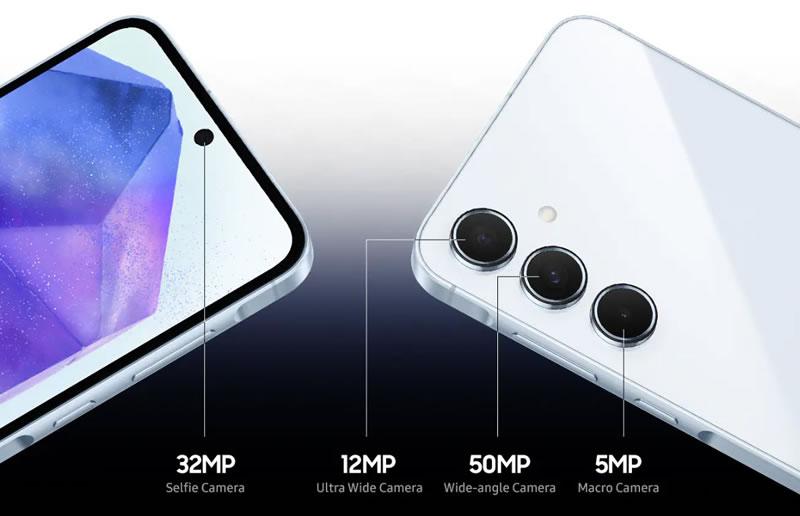
| Camera Metric | Google Pixel 9a | Samsung Galaxy A55 | Winner on Paper |
| Main (Wide) Sensor | 48 MP, f/1.7, 1/2.0″, OIS | 50 MP, f/1.8, 1/1.56″, OIS | Samsung Galaxy A55 (Larger Sensor) |
| Ultrawide Sensor | 13 MP, f/2.2, Fixed Focus | 12 MP, f/2.2, Fixed Focus | Tie |
| Macro Lens | None (Uses Main Sensor AI) | 5 MP, f/2.4, Fixed Focus | Samsung Galaxy A55 (Dedicated hardware) |
| Front (Selfie) Lens | 13 MP, f/2.2, Fixed Focus | 32 MP, f/2.2, Fixed Focus | Samsung Galaxy A55 (Higher Resolution) |
| Max Video Specs | 4K @ 60fps (Main Only) | 4K @ 30fps (All Lenses) | Tie (Framerate vs. Flexibility) |
The Hardware Nuance: Samsung kinda has the clearer physical hardware edge here, like it’s just … well, more obvious. Its main 50MP sensor ($1/1.56\”$) is pretty noticeably larger than the Pixel 9a’s newer 48MP sensor ( $1/2.0\”$ ), and a larger sensor by definition grabs more light, at least in the broad sense. Still, Google pushes back on that hardware gap, leaning on a flagship-grade Tensor G4 Image Signal Processor (ISP) and an advanced computational photography pipeline which, you know, tries to offset the whole size thing.
Real-World Scenario Testing
Scenario 1: Bright Daylight & Dynamic Range (HDR)
Trying to shoot straight into that afternoon sun flare, while also trying to keep the shadow detail intact under a tree canopy, kind of shows you how different the whole image processing philosophies are, between Google and Samsung. It’s not subtle at all , like you notice it right away.
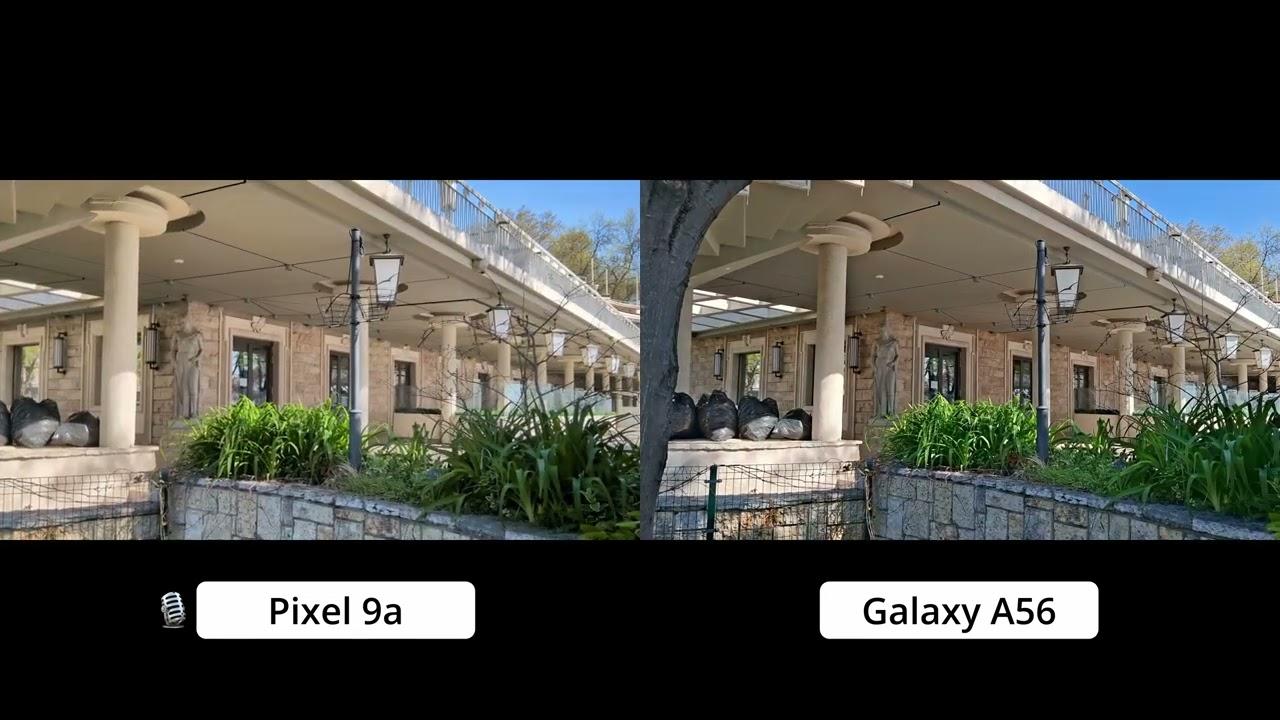
- Pixel 9a Performance: Google’s HDR pipeline seems to prefer high contrast and that more dramatic lighting feel. The shadows stay naturally deep, so the picture doesn’t end up looking washed out. Skin tones come across as very true-to-life, largely because of Google’s Real Tone tuning. The sky lands on deep blues without that artificial neon type oversaturation.
- Galaxy A55 Performance: Samsung basically leans on its larger sensor, then pulls out a bunch of neat detail from the shadows. But the processing side… you know, the software stuff, tends to go a little too far. Saturation can get cranked up more than you’d expect. Foliage greens can look hyper vivid, kind of near that unnatural line, and blue skies sometimes slide toward a cyan-ish tone.
- Scenario Winner: For color accuracy and, just general realism, Pixel 9a seems to come out on top. If you want that punchy straight-out-of-the-camera sort of look, more like, ready for Instagram, then Galaxy A55 is kind of the simpler pick—no fuss, no extra thinking.
Scenario 2: Low-Light & Night Photography
We did the testing at 9:00 PM on this dimly lit, suburban street, kind of like one of those places with no real ambience, just a single overhead sodium-vapor streetlight above us, or at least it felt like that.
- Pixel 9a Performance: Google’s Night Sight is kinda legendary for a reason. Even though the sensor is physically smaller, the Tensor G4 multi frame exposure stacking, cleans up low light noise in a really clean way. It preserves text legibility on distant signs and manages light blooming around light bulbs exceptionally well.
- Galaxy A55 Performance: The physically larger 1/1.56″ sensor gives Samsung a solid start, so the shutter can stay open for shorter intervals than the Pixel, to gather roughly the same brightness. Yet, when we reviewed our test shots there was this slight yellowish cast under streetlights, and the small details in brickwork or asphalt got a touch softened, probably because the noise reduction is rather aggressive.
- Scenario Winner: Pixel 9a. Google’s machine learning algorithms simply resolve low-light texture better, despite the smaller camera sensor.
Scenario 3: Portrait Mode & Edge Detection
We tried portrait mode by setting up a subject with complicated, messy hair, right in front of a loud chain-link fence. Honestly i t looked good though, because the background was kind of all over the place, but the subject stayed clearer than i expected.
- Pixel 9a Performance: The edge separation is, honestly remarkably precise. The Tensor G4 really does a clean job at spotting individual stray hairs and it then does a progressive bokeh effect, so the background blur gets stronger the farther something is behind the main subject.
- Galaxy A55 Performance: Samsung’s portrait mode gives a kind of pleasantly smooth complexion effect by default, and a lot of people like that part. Still, the edge detection had a rough time with the chain-link fence, it would end up accidentally blurring sections of the subject’s ear outlines and hair edges, pretty often.
- Scenario Winner: Pixel 9a wins by a wide margin, for natural depth separation that feels kind of DSLR-like.
Scenario 4: Zooming & Macro (The Missing Lenses)
Neither phone actually has a dedicated optical telephoto, like a proper zoom lens, so they both end up using digital cropping from the sensor, more than you’d really want.
- Pixel 9a Performance: Google uses Super Res Zoom to kind of intelligently upscale 2x and 5x crops. At 2x, the photos look almost the same, like indistinguishable from native optical shots. Also, Google added an AI driven Macro Focus feature to the main lens, which kind of improves the look up close. By bringing the phone within 2cm of a subject, it cleanly pulls sharp close-ups without needing a dedicated macro camera.
- Galaxy A55 Performance: At 2x zoom, images look reasonably sharp but quickly deteriorate into a pixelated, painterly mess at 5x. While Samsung includes a physical 5MP macro lens, its fixed-focus nature makes it incredibly frustrating to use—if you aren’t at the exact millimeter distance required by the lens, the shot is completely blurry.
- Scenario Winner: Pixel 9a. Google’s software-driven zoom and macro solutions easily defeat Samsung’s digital zoom and finicky physical macro hardware.
Buy on Amazon
★ Editor’s pick
Google Pixel 9a — 128GB, Unlocked
$499
Save $51
4.5 (1,641+ ratings)
- ✓ Best-in-class AI camera for the price
- ✓ Exceptional low-light & Night Sight
- ✓ 4K 60fps with Cinematic Pan stabilization
- ✓ 7 years of Android updates
- − No microSD card slot
Link may contain affiliate commission
Buy on Amazon
★ Editor’s pick
Google Pixel 9a — 256GB, Unlocked
4.5 (1,641+ ratings)
- ✓ Best-in-class AI camera for the price
- ✓ Exceptional low-light & Night Sight
- ✓ 4K 60fps with Cinematic Pan stabilization
- ✓ 7 years of Android updates
- − No microSD card slot
Link may contain affiliate commission
Video Capture Quality
Video performance is where the two phones split paths based on your shooting style:
- The Case for the Pixel 9a: If you shoot smooth, single lens video, the Pixel 9a is pretty exceptional. It does 4K at 60fps on its main camera, and the Cinematic Pan stabilization makes your walking shots feel crazy steady, mostly jitter free. Still, the ultrawide camera kind of seems like a late add-on, it brings in noticeable grain plus corner artifacts especially when the light drops.
- The Case for the Galaxy A55 is kinda clear: Samsung caps video capture at 4K 30fps, pretty much across the board. So you don’t get that buttery smooth 60fps motion, but you do get more room to move, you know like hot swap between the main lens and the ultrawide one, and also bring in the 32MP front selfie camera while you keep recording as one single video file.
Which Should You Buy?
Buy the Google Pixel 9a if:
You prioritize point and shoot reliability, true-to-life color accuracy, consistently great low light, and portrait photos. Even with weaker sensor hardware, Google’s better computational chops means you’ll rarely end up with a “bad” frame. Honestly it feels like the closest thing to a flag-ship level camera experience you can grab for under $500.
Buy the Samsung Galaxy A55 if:
You like vivid, super saturated photos that are basically ready to upload, with not a lot of fiddling first for social media, or maybe you’re the type of vlogger who needs the ability to jump between the front and back cameras while the video is still rolling. The hardware feels very capable, but then you’ll have to put up with that sort of stubborn software, where sharpening gets a bit too aggressive and the colors tip into oversaturation, way more than you asked for.
Google Pixel 9 Pro built for AI and photography
Google Pixel 10 Pro intelligent AI
Related Posts







Tech Reviewer & Product Analyst
Định Bia has spent over 10 years testing consumer electronics with a focus on smart technology. He work as a product advisor at Biareview where he helped customers find the right devices for their needs. He personally tests every product featured on this site using a consistent evaluation framework covering quality, durability, and value. All reviews are based on experience, not influenced by the manufacturer.