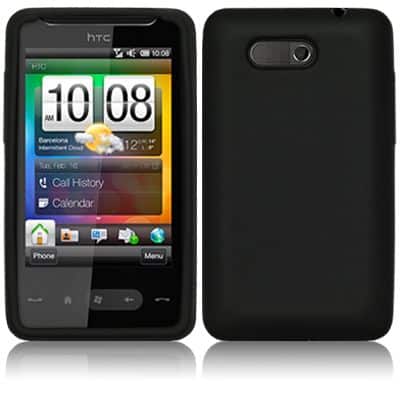
Design and Build Quality
The HTC HD Mini design feels like it’s moving toward a smaller more friendly kind of device, aimed at people who wanted something more compact, yet still didn’t wanna give up the useful bits. It kind of has that “small but not cheap” vibe, if you know what I mean.
Dimensions and Build
The HTC HD Mini comes in at 103.8 x 57.7 x 11.7 mm , and weighs around 110 grams. That means it’s pretty easy to carry and handle day to day, because it stays truly pocketable. As for build quality, it seems robust, made from a mix of plastic and metal parts, which helps it resist everyday wear. Even with the reduced footprint, the phone feels firm in the hand, and the overall construction looks , well, put together. It really shows HTC was still paying attention to the details.
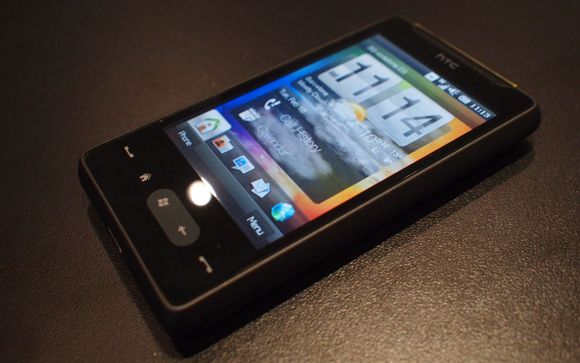
Visually, it leans into a clean, understated style. Smooth curves run around the body and it gives it a professional appearance. On the front, the 3.2-inch display basically takes the lead, and it’s backed up by physical controls for navigation, plus a camera button that’s dedicated. The whole arrangement is done in a way that supports both looks and practical use. It ends up being fairly easy for a user to live with.
Display
The HD Mini has a 3.2-inch TFT touchscreen, resolution 320 x 480 pixels. Honestly, that number can look kind of modest compared to modern phones, but for its time it was enough. Colors are decent, and the screen stays clear enough for things like simple web pages, texting, and casual media playback.
Touch response is generally smooth , you get single-touch control without much fuss. Brightness and contrast are okay for indoor situations, and it can manage outside too, but direct sun can be a problem. So overall the display is satisfactory, it matches the compact style of the device pretty well.
Design Elements
On the front of the HTC HD Mini you get that 3.2-inch screen, then the physical navigation keys kinda sit underneath it, not far at all. Those keys include the call , end call, and home buttons, and they give you that nice tactile feel so moving around is easier. Also on the side there’s this dedicated camera button, like for quick launching, you don’t have to hunt around for it.
Up top you’ll find the power button plus a 3.5 mm headphone jack. Then at the bottom it has the micro-USB port, used for charging and for data transfer too. Turning it around, the back includes a 5 megapixel camera, it uses a fixed focus lens, and there’s an LED flash next to it. Overall the shape and layout are pretty clean and functional, more about practicality, less about fancy stuff.
Display and Touchscreen
The HTC HD Mini’s display is a big deal for the design, because it directly affects day to day usability and how the whole experience feels.
Screen Size and Resolution
The 3.2 inch TFT display keeps things pretty compact but still usable. It runs at 320 x 480 pixels, so the pixel density is about 180 PPI. Sure, it’s lower than what newer phones would show, but for the time it was basically enough, text looks readable and images come through pretty clearly too.
Touchscreen Performance
The capacitive touchscreen on the HD Mini reacts well to taps and simple movements, like scrolling. In general the touchscreen is smooth, though it doesn’t have the multi touch behavior you’d expect from some newer, higher end smartphones of that period. The touch sensitivity is tuned pretty well, so inputs are usually accurate, and navigation doesn’t feel overly clunky or delayed.
Display Quality
The TFT technology on the HD Mini’s display gives you pretty solid color reproduction, and the contrast holds up in normal day light. Brightness levels can be adjusted so people can get a better view depending on where they are, like indoors versus outdoors. It’s not exactly on par with the sharper high-resolution screens you see on newer phones, but for typical tasks it still worked fine, texting, browsing, and watching multimedia content, you know, the usual stuff.
Camera Performance
The HTC HD Mini’s camera isn’t the most cutting edge for its era, but it does the job in a straightforward way for both snapshots and video recording. Nothing fancy, more like a basic setup that handles everyday needs without much fuss.
Image Quality
The device comes with a 5-megapixel camera, a fixed focus lens and an LED flash. For casual photography the results are generally decent, images come out with reasonable detail and fairly accurate colors. The fixed focus part is also kind of a constraint, because it makes it harder to get crisp photos when the subject is at different distances , so you end up staying in the comfort zone. Still, it’s adequate for day to day use.
When the lighting is good, the photos look clear and pretty lively, though sometimes there’s visible noise, and the fine details drop off more in darker scenes. The LED flash helps add some extra light for night time shots or low-light moments, but it usually can’t fully make up for the lack of a more advanced lens system, so expectations should stay realistic.
Video recording
On the HTC HD Mini you can record video at 640 x 480 pixels, basically VGA. Back then the image look decent enough, with reasonable detail and color reproduction, yes it’s not mind blowing but it does the job. Even if the recording abilities aren’t as advanced as what newer smartphones can manage, the HD Mini is still fine for casual clips, and those quick moments you don’t want to lose.
Front camera
There is no front-facing camera on the HD Mini. That was pretty typical back then, like that one small omission smartphones sometimes had. Because of this, it feels limited for video calling and self-portraits, stuff that nowadays is kind of standard, for modern phones. You can still shoot from the back, but the “face cam” style use just isn’t there.
Performance and hardware
The HTC HD Mini comes with hardware that’s meant to keep things steady, in a small body. It’s more about balance rather than raw speed, if you know what I mean.
Processor and RAM
It runs on a Qualcomm MSM7225 processor, clocked at 600 MHz, and it has 384 MB of RAM. With that setup you get enough capability for everyday basics like browsing, messaging, and running standard apps. Sure, the processor and memory won’t really charm the heavier apps or handle heavy multitasking very well, but for what the device was aimed at, it generally holds up.
Storage
For storage, the device has 512 MB of internal memory. There’s also a microSD card slot for expansion, so users aren’t stuck with just the onboard space. With a compatible card you can expand up to 32 GB, it kind of helps you stash more apps, media, and assorted files. This extra storage choice is pretty useful, and honestly it gives people a bit more room to breathe , rather than getting out of space right away.
Battery Life
So the HD Mini comes with a 1200 mAh lithium-ion battery, and honestly it gives a decent battery life for that size. In normal days, like when you’re doing phone calls , web browsing, and some media playback, it usually lasts through the day. But once you push it harder, like gaming or lots of extended video use then the battery life can drop faster. Also the device has a removable battery, so you can stash a spare battery for longer hours if you really need it.
Software and User Interface
This HTC HD Mini runs on Windows Mobile 6.5 which, for its era, still feels pretty familiar and usable. The whole setup is kind of solid in a practical way, like you can find what you need without too much fuss.
Windows Mobile 6.5 Operating System
Windows Mobile 6.5 is a mobile operating system made by Microsoft. It’s meant to be a robust platform for smartphones, so you get a base that supports different things over time. The OS includes a pretty approachable interface , plus support for applications, customization, and productivity oriented tools.
User Interface:
The Windows Mobile 6.5 interface looks like it revolves around a main/home screen where you can reach apps, alerts, and settings. There’s also a start menu for navigation and a task manager, for keeping track of what’s running. Sure, it may feel old fashioned compared to newer systems, but it still gives a functional experience, and it’s pretty intuitive for everyday users.
Multitasking:
Windows Mobile 6.5 does support multitasking , so users can jump between different apps that are already open. You get a task manager view , which sort of gives a quick picture of what’s running and it lets you shut things down or swap over to them. In practice this multitasking helps the whole thing feel smoother, but yeah, the performance can get held back , depending on the device hardware and its limits.
Customization:
When it comes to customization , Windows Mobile 6.5 is kinda more modest than what you see in newer operating systems. People can change themes, wallpapers , and even the icon look , but the depth isn’t really on the same level as later platforms. Still, even with those restrictions, the OS is pretty functional and stays user-friendly.
Applications and Software
The HTC HD Mini handles a decent lineup of applications , including ones that are pre-installed plus others you can get from outside sources. It comes with the essentials like a web browser, an email client, a media player, and some tools aimed at productivity.
Windows Marketplace for Mobile:
The Windows Marketplace for Mobile gives access to apps, games, and different kinds of content for the HD Mini. Users can scroll through options and download programs that boost what the device can do , while also making things feel more personal. The marketplace has both no-cost and paid applications, grouped across categories for different tastes and interests.
Third-Party Apps:
Besides the Windows Marketplace, people can still reach out to third-party apps made for Windows Mobile 6.5. Now the apps and software that you actually see can be different depending on the situation, but the whole open style of the platform lets you tap into a pretty wide set of applications and handy utilities, more or less.
Connectivity and Network
The HTC HD Mini comes with a lineup of connectivity choices so users can remain in touch and grab access to different services, basically.
Network Connectivity
On the network side, the device is set up for GSM connections across the 850 , 900 , 1800, and 1900 MHz bands. It also supports 3G connectivity on the 900 and 2100 MHz bands. In practice this means it should work with a lot of carriers, and that voice calls, and data transfer should stay dependable.
Wireless Connectivity
For the wireless side, the HD Mini has Wi-Fi 802.11 b/g. So you can connect to home or public hotspots for quicker internet, while also keeping data usage lower. It also adds Bluetooth 2.1, which helps with wireless pairing to accessories like headphones, and keyboard style peripherals.
GPS and Navigation
For location needs, the HTC HD Mini includes GPS features. That gives location services for navigation apps and also for those location based programs. And with the device’s link-up to Google Maps and other mapping tools, you can get access to maps plus step-by-step turn guidance. Overall the GPS tracking tends to be quite accurate, with location services that hold up for most everyday applications.
Basically, the HTC HD Mini is kind a trimmed down version of the HTC HD2 and it is aimed at people who want a tidy little smartphone, not something huge. It’s more like a neat and calm option , for everyday handling.
– Capacitive touch screen, multi point HVGA 3.2 inches , 65 thousand colors.
– Compact body, industrial look and feel.
– Windows Mobile 6.5.3, plus Sense interface.
– Qualcomm MSM7227 600 MHz processor, and RAM 384MB.
– It works on quad band GSM and also supports HSDPA 7.2Mb / s plus HSUPA 2Mb / sec.
– Connectivity side includes Wi-Fi, GPS with A-GPS, Bluetooth A2DP, and microUSB.
– Camera is 5 Megapixel, autofocus included, focus point set on the screen, and VGA video at 30 frames per second.
– microSD card slot, FM radio with RDS.
– Apps wise, it covers MS Office Mobile, YouTube, Facebook, Twitter.
HTC T5555 HD Mini Windows Mobile GSM Quadband Smartphone (Unlocked): Buy it now
User Experience and Usability
The HTC HD Mini user experience is pretty much, shaped by the hardware, the software and then the general design, so it ends up feeling like a functional smartphone that kind of balances things out for everyday users.
Ease of Use
It has a pretty compact size and those physical controls help a lot with ease of use, honestly. The 3.2-inch touchscreen, even if it is smaller than many newer phones still works well for one hand operation. So basically users can move through the interface a bit more easily, browse the web and tap around in apps without too much fuss. Also the physical navigation buttons—call, end call, and home, they give tactile feedback and in practice they simplify moving around, so overall usability feels smoother.
Physical Keyboard and Buttons
The HD Mini doesn’t include a physical QWERTY keyboard, it relies on the touchscreen for typing and input. This choice, it definitely makes typing feel less “solid” compared to phones that have full physical keyboards, but the touchscreen keyboard is responsive enough and functional for most people. On top of that, there’s a dedicated camera button on the side, which gives quick access to the camera feature, so taking photos or recording video becomes a convenient routine rather than a chore.
Multitasking and Performance
Performance is adequate for its era, powered by the Qualcomm MSM7225 processor and backed by 384 MB of RAM. Multitasking is there but it isn’t as polished as what you’d expect now—still, it lets users hop between applications and juggle tasks without a lot of noticeable stutter. The Windows Mobile 6.5 task manager also helps users manage open apps more efficiently, and that supports a better day-to-day experience.
Performance of the Application
The HD Mini works pretty well with everyday stuff, you know web browsing, email, even multimedia playback, it feels smooth most of the time. That said, when you start throwing heavier apps or more serious games at it, it can kinda stumble. Still it keeps things good enough for daily use, and the blend of hardware and software helps people do the necessary tasks without running into big performance headaches.
Customization and Personalization
The HTC HD Mini gives users several ways to shape the look and feel, sort of “make it yours.” You can change themes, update wallpapers, and swap icons around so it matches what you prefer. It’s not as broad as what you’d see on newer operating systems though, but the choices that are there still let you tune up the device’s appearance and practical feel in your own style.
Themes and Wallpapers
Windows Mobile 6.5 comes with multiple built-in themes and wallpapers, so there are plenty of baseline options for customizing the device’s look. If that’s not enough, you can also fetch extra themes and wallpapers from third party places, and then add them for extra personal flair.
Widgets and Shortcuts
On the HD Mini, widgets and shortcuts can be placed on the home screen for faster access to apps and routines you use a lot. Even if the customization range is a bit restricted compared to newer platforms, these widgets and shortcuts still make the whole experience more convenient, and a little more “at hand” when you need it.
Conclusion
The HTC HD Mini kind of marks an important step into the compact smartphone crowd for its era, giving a sort of middle ground between being easy to carry and still having real functionality. it came with a clean look, a responsive touch screen, and Windows Mobile 6.5. so, people got a rather versatile, and honestly pretty approachable, experience day to day.
When it comes to speed, the camera, and its connection choices, everything felt aligned with what its intended audience seemed to want. and then there’s the small size, plus solid build quality, which really helped its appeal. Sure, the HTC HD Mini may not have reached the same broad mainstream fame as some rivals, but its place in HTC’s range , and its effect on the smartphone market, show that it mattered in the ongoing shift of mobile tech.
The HTC HD Mini still stands out in smartphone history. it’s remembered for that mix of design, performance, and practical usability, for anyone after a compact yet capable mobile companion. even now, its legacy keeps showing up when people talk about HTC’s drive for innovation and user satisfaction, across the mobile technology landscape.





Tech Reviewer & Product Analyst
Định Bia has spent over 10 years testing consumer electronics with a focus on smart technology. He work as a product advisor at Biareview where he helped customers find the right devices for their needs. He personally tests every product featured on this site using a consistent evaluation framework covering quality, durability, and value. All reviews are based on experience, not influenced by the manufacturer.