Design and Build Quality
a. Aesthetic and Build
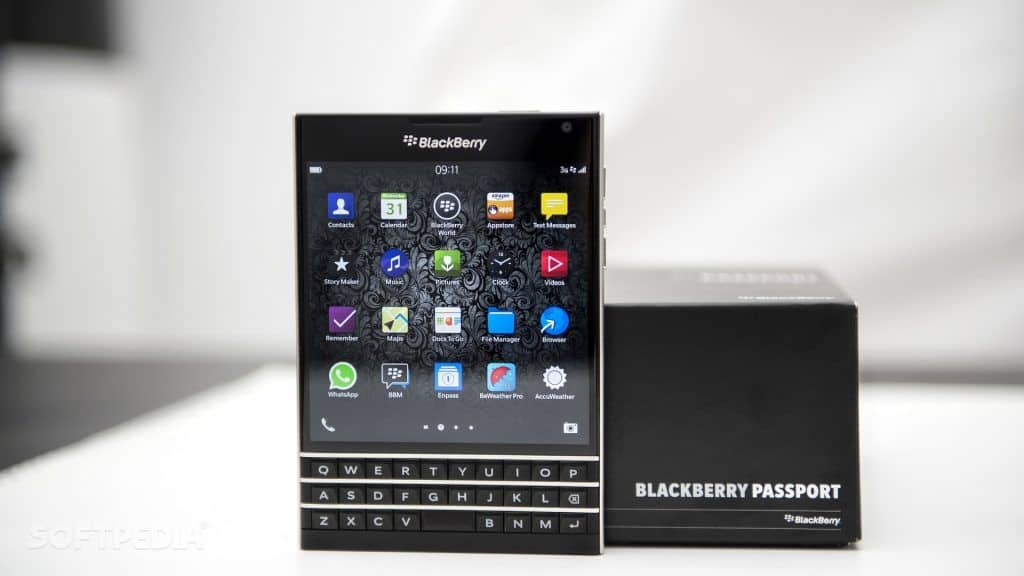
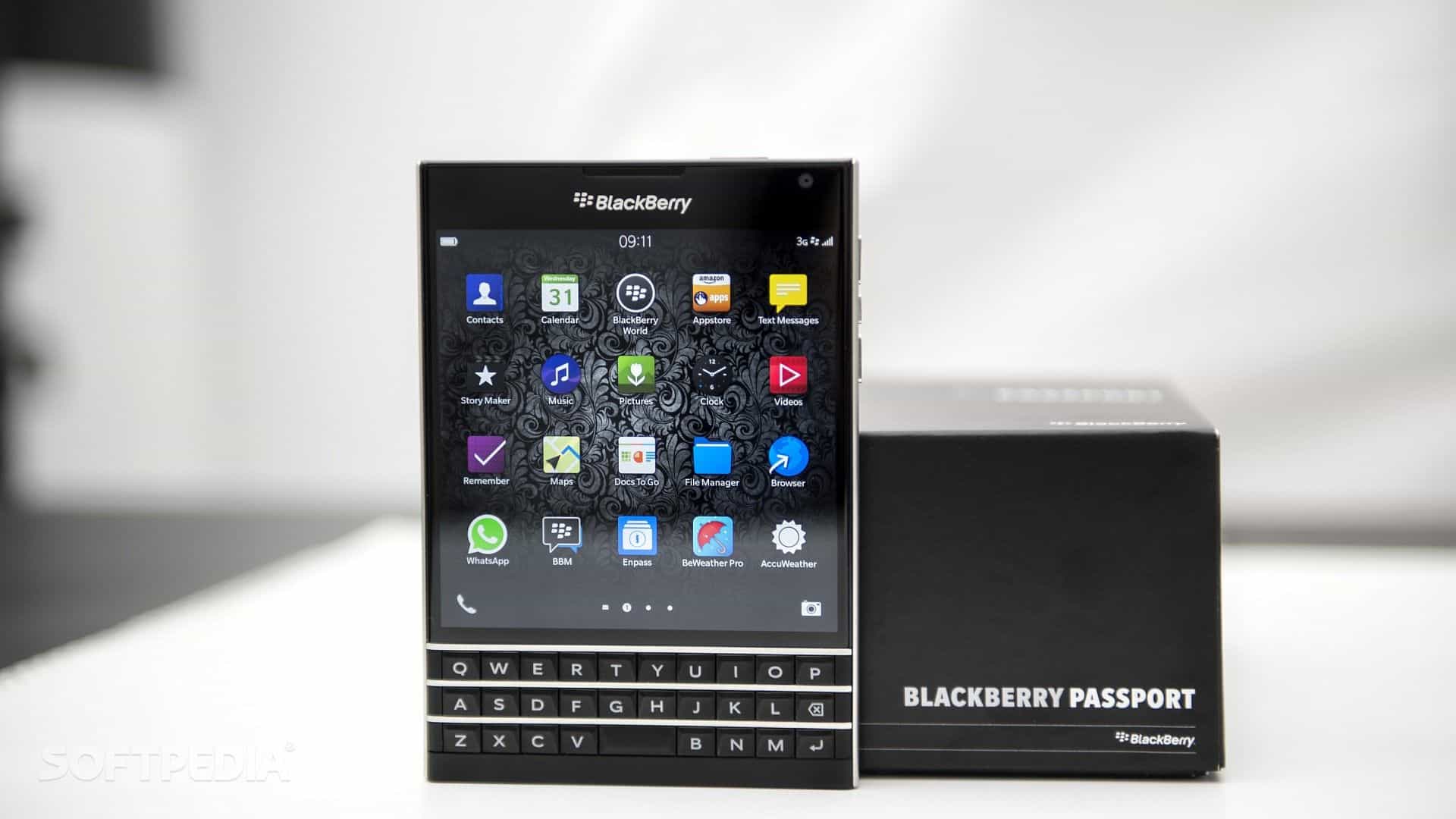
The BlackBerry Passport is kinda known for its odd, square ish design it really pops because most other phones still stick to that rectangular kind of look. This device measures 128 x 90.3 x 9.3 mm, and it weighs in at about 194 grams so yeah it feels like one of those more solid phones you really notice in the hand. That 4.5 inch display sits inside the square layout, and it builds a user experience that just feels different , visually too it stands out.
It also has a solid construction style, with a stainless steel frame that feels durable and kind of premium. The back has textured plastic covering it, which helps grip and gives you that tactile surface you can feel right away. And then there’s the physical QWERTY keyboard, it’s placed below the display. Honestly that keyboard is a BlackBerry signature, with tactile feedback and accuracy, it’s not something you see in most modern devices.
b. Build Quality and Durability
The build quality on the BlackBerry Passport is pretty exceptional, like it actually feels put together. There aren’t any loose pieces, no annoying creaks, and everything feels tightly assembled. The stainless steel frame does double duty, it adds durability, but it also makes the phone look more high-end, not just “covered in plastic”.
The textured plastic back is meant to be practical, but it still looks good. It’s designed for everyday use, so you get a comfortable grip, and the overall feel stays premium through daily wear.
Overall the Passport’s build quality really reflects BlackBerry’s tendency toward robust and reliable devices. The materials used in it are meant to handle regular wear and tear, so for a lot of users it becomes a durable option, not fragile or overly delicate.
c. Dimensions and Weight
The Passport’s dimensions and weight make it feel like a substantial thing, it can be a pro but also kind of a con depending on what the user likes. The square style and the phone’s relatively large size might come across as bulky to some people , especially those who are used to slimmer and more compact smartphones. Still, the design brings a different kind of visual charm and a non standard user experience that some users might actually enjoy.
Display
a. Screen Specifications
The BlackBerry Passport comes with this 4.5-inch square display , with a resolution that is 1440 x 1440 pixels . That unusual aspect setup gives a pixel density around 453 PPI, so the visuals end up looking sharp and kind of vibrant. For the panel it uses an LCD type, and honestly it manages colors pretty well plus it keeps the brightness steady enough.
b. Display Performance
The Passport’s display performance is honestly impressive, especially when you think about the time period it came from. The strong resolution and that pixel density help keep text and images rendered clearly, without that fuzzy feeling. The square aspect ratio also gives you more usable display space for productivity kinds of actions like reading documents and drafting emails. Overall, the sharpness plus color accuracy make it pleasant to watch different types of content
Brightness is fine for most lighting situations, but in very bright outdoor areas it may feel a bit limited. The viewing angles are typically good, and there’s usually little color shifting when you look from side positions or at slight tilts.
c. Protection and Durability
The Passport’s display gets covered with Corning Gorilla Glass 3 , which sort of helps prevent scratches and the normal daily scuffs. This glass creates a solid barrier , it resists small abrasions pretty well and keeps the screen looking sharp for longer. Even with that kind of shielding , people still really should think about adding a screen protector too, just to push the longevity further and guard against any surprise impacts.
Performance
a. Processor and Memory
b. Graphics and Gaming
On the graphics side, there’s an Adreno 330 GPU. It delivers decent visuals for the period it came out, and it manages standard gaming plus multimedia tasks without too much trouble. Still, it can start to feel strained when you throw at it heavier games and demanding applications. For laid-back play and everyday use, the experience is fine, but if someone is chasing high end gaming sessions, the device might feel a bit underpowered in that sense.
c. Benchmark Performance
When you look at benchmark results, the BlackBerry Passport does rather well for a phone from its release window. Scores come out competitively in tools like AnTuTu and Geekbench, but it won’t fully keep pace with newer smartphones that have more recent processors and GPUs. Day to day though, the overall performance stays smooth for browsing, email, and typical productivity apps.
Camera
a. Rear Camera
So the BlackBerry Passport comes with a 13 MP rear camera and an f/2.0 aperture, it’s not trying to be fancy but it does the job. There is also optical image stabilization, or OIS, which helps in cutting down the motion blur and, in general makes the photos look a bit more polished. You still get an LED flash and it can record video up to 1080p, nothing wild, but usable.
In decent light, the rear camera tends to capture crisp, detailed shots with pretty trustworthy color. Still, in darker places the quality can slip, you might notice more noise, and the fine detail kind of fades. So overall it’s fine for everyday pictures, but if someone is hunting for top tier camera results, this one could feel a little short.
b. Front Camera
For the front, there’s a 2 MP camera that you can use for selfies and video calls. The selfies look okay for what it is, like, the resolution does what it should, but it’s not anything extraordinary. It works well enough for video chat sessions and casual self-portraits, though people who want a cleaner, more high-definition front shot may end up disappointed.
c. Camera Performance
All in all, the camera performance of the BlackBerry Passport feels capable, but not exactly stand out. Rear images look good when lighting is good, while the front camera is just serviceable for basic calls and quick snaps. The phone does come with shooting modes and manual sort of settings, but it doesn’t really include the newer, more advanced camera extras you’d see on more recent smartphones.
Battery Life
a. Battery Specifications
The BlackBerry Passport uses a non-removable 3450 mAh battery. That capacity is pretty high ,and for its era it felt pretty weighty too.
b. Battery Performance
In day to day use, the Passport tends to give a very solid battery run. Usually it can roll through a full day even when you’re doing a fair mix of things like web browsing, messaging, and playing multimedia content. If you’re more into heavier tasks, the charge may still hold up enough to make it through a normal day without needing that mid day plug in thing.
Overall, the Passport’s battery life feels competitive compared with other phones from around the same release window,so it still works out fine for people who really want that longer-lasting power.
c. Power Management
There are power management tools on the Passport that help stretch battery life a bit further. You can find different battery saving options and settings meant to tune down power draw. It does not do fast charging though, but honestly the battery still covers most users pretty reliably.
Software and User Experience
a. Operating System
The BlackBerry Passport operates on BlackBerry OS 10.3. This is basically a newer, updated take on BlackBerry’s operating system. OS 10.3 brings a bunch of refinements, like a smoother, more polished user interface, stronger functionality, and extra features that weren’t there before.
b. User Interface and Features
On the Passport, the user interface is made to feel kind of snappy and honestly useful, with a big emphasis on multitasking and daily communication, like it should just work without much fuss. The BlackBerry OS 10.3 update brings in added features, among them the BlackBerry Hub, where notifications , messages, and various other updates get bundled into one space, so you do not end up bouncing between screens all the time, every single day. Also, the system includes multiple productivity tools and app options, designed for people who really care about speed and efficiency.
The physical QWERTY keyboard is, honestly, one of the Passport’s more notable parts. It gives a tactile typing vibe that a lot of users say is comfortable and accurate. On top of that, the keyboard includes touch enabled behavior, so you can swipe, move around, and do little gesture based actions which adds a better overall flow to the experience.
c. Performance and Stability
In daily use, the Passport software feels pretty stable and responsive. The operating system seems kinda tuned to mesh with the hardware, which helps keep things smooth for routine tasks, even when you are not really paying attention. Also the QWERTY keyboard makes everything a bit easier, typing and moving around feels more natural and intuitive, instead of being clunky.
d. Updates and Support
Because it is an older device, the Passport might not always get updates to the newest BlackBerry OS releases, or to newer software generally. Some users could end up running older system builds, with less support for newer applications and features. How often updates happen, and how much support you get, can differ by region and also the carrier, sometimes in ways people do not expect.
Connectivity
a. Network and signal strength
The BlackBerry Passport can run on a bunch of network bands, like 4G LTE, so it stays compatible with different carriers and network setups. In real use the performance feels pretty steady, with decent reception, and call quality that holds up more than i expected, most of the time.
b. Wi-Fi and Bluetooth
It also offers dual-band Wi-Fi, covering both 2.4 GHz and 5 GHz, which helps when you’re hopping across different wireless networks at work or home. Overall, the Wi-Fi stays stable , with fairly consistent speeds and a dependable connection.
For Bluetooth it includes Bluetooth 4.0 support, so you can sort of pair up with common devices like headphones speakers, or even smartwatches, you know. The range is decent enough for everyday situations, so audio streaming and simple data transfer feel steady, without too many strange dropouts.
c. GPS and navigation
The Passport comes with built-in GPS, and that’s handy for wayfinding and location based services. GPS accuracy is solid and dependable, so navigation apps like Google Maps tend to work smoothly. You also get fairly precise location tracking, and it’s enough for day to day trips, errands and other simple route needs.
d. Other connectivity features
The Passport has a micro-USB port used for charging and data transfer, which means you get the usual, kind of straightforward link with computers and other gadgets. The micro-USB interface keeps things standard and it behaves pretty well for everyday syncing. It also includes a 3.5 mm headphone jack , so you can plug in wired headphones for audio connections without much fuss.
Audio and multimedia
a. Audio quality
The BlackBerry Passport’s audio quality is kinda solid for its time, it gives clear enough and well balanced sound during calls, and when you’re playing media too. It has one single bottom firing speaker, so the volume works okay for casual listening, but then again it can feel a little thin in depth and texture compared to phones that run with two speakers, or even compared to dedicated audio devices. Because the speaker sits on the lower edge, putting the phone down on a flat surface can cause muffled sound , like it’s getting smothered a little.
b. Multimedia experience
The Passport’s big 4.5-inch square display helps the overall multimedia experience , since it offers plenty of room for watching videos, playing games, and viewing images. With 1440 x 1440 pixels of high resolution the visuals come out sharp and detailed. The screen’s color accuracy and contrast do a lot for comfortable viewing , although it may not feel as lively as newer AMOLED panels or modern high dynamic range (HDR) displays.
c. Media Playback
The device has a bunch of media formats supported, like MP4, MKV, and AVI for video stuff, and MP3, AAC, FLAC for audio playback. The built in media player is pretty straightforward, with the basics covered, but people can also grab extra media apps from the BlackBerry World store or from other third party sources too. The Passport handling of media feels pretty fluid, mostly no big lag or stutter even when you try different file types.
d. Camera for Multimedia
The Passport camera, it is kinda not the most advanced out there, but it does it’s job for taking pictures and recording video for multimedia needs. The 13 MP rear camera can deliver high resolution photos, and it supports 1080p video capture which is handy for sharing online, or saving personal memories. The camera screen and interface includes several shooting modes , plus adjustments like HDR, Panorama, and a set of scene modes. Together these options help make the multimedia shots look a bit better, even when the lighting is not ideal or you just want variety.
Productivity and Business Features
a. Keyboard and Typing Experience
One of the BlackBerry Passport’s best known highlights is the physical QWERTY keyboard, and honestly it feels more tactile, in a way a lot of users prefer over virtual keyboards. The keys also have touch sensitive features, so you can do things like scrolling and swiping right on the keyboard surface. That small extra layer makes day to day tasks faster, especially if you’re constantly crafting emails, or sending messages throughout the day.
b. BlackBerry Hub
The BlackBerry Hub is kind of a core thing in the Passport’s operating system, it kinda brings together notifications, messages, and updates into one common screen. You get quick access to email, texts, social media pings and even calendar things, so communication feels smoother and users can stay a bit more organized. Also the Hub links in with the device’s apps and services, which makes it a really strong way to juggle different communication channels, without having to jump around too much.
c. Productivity Apps
On the BlackBerry Passport you also get a set of productivity apps, aimed to boost efficiency and keep things in order. They include, kind of:
BlackBerry Assistant: A voice controlled digital assistant that assists with tasks , set reminders and handle different functions through voice commands.
BlackBerry Calendar: A full featured calendar app that connects with email and other services to give one centralized view of appointments, events, and also tasks.
BlackBerry Remember: More like a note and task companion , it lets users create, organize and monitor notes, to do lists, and reminders.
BlackBerry Link: A desktop syncing tool, it allows users to sync the BlackBerry Passport to a computer, for file management, backups, and system updates.
d. Enterprise Features
The BlackBerry Passport has a few enterprise features, kind of pointed at business users. Like, you get tools that help manage devices in a company setting. In general, these features include BlackBerry Enterprise Service (BES): which is a secure enterprise mobility management solution that lets admins keep centralized control over things like device policies, security, and even application management. Then there’s Secure Work Space, basically it creates a secure encrypted container for work apps and data, so it stays separate from whatever personal content you have on the phone. And BlackBerry Balance, this one helps users keep work and personal data apart, so business info stays guarded and private, instead of mixing around.
Pros and Cons
a. Pros
Unique Design: The square form factor plus the big display gives it a unusual look, also a lot of working area for productivity.
Physical Keyboard: The tactile QWERTY keyboard improves typing accuracy and speed, it’s kinda the signature move for BlackBerry devices.
Build Quality: The premium materials and sturdy build kinda add to durability, and it also gives that high end feel , you know.
Battery Life: The 3450 mAh battery is pretty big for its category and it keeps its charge for quite a while, like long enough to last through a full day even with heavy use. Nothing really dramatic happens, you know.
Productivity Features: The BlackBerry Hub, that physical keyboard, and the productivity applications… all of it together makes the Passport a pretty sturdy pick for working people, especially if you enjoy moving through tasks fast.
b. Cons
Bulky design: The square form and that substantial size might feel a bit cumbersome to some users, especially if they’re used to slimmer smartphones.
Limited app ecosystem: BlackBerry OS has fewer apps in general than Android or iOS, so it can reduce the device versatility and day to day functionality a lot.
Camera performance: It works and all, but the camera isn’t quite as polished as the ones in more recent smartphones, especially in dim light.
Outdated software: Since it’s an older device, the Passport may not get the newest software updates, and that can mess with app compatibility and the overall smoothness.
Limited support: The BlackBerry Passport could have limited support for newer apps and services too, which may influence the user experience as time goes on.
Conclusion
The BlackBerry Passport feels like a distinctive, inventive smartphone, and it really gives a kind of different day-to-day experience, especially if you’re the type that still like a physical keyboard and wants productivity tools. That square design, the spacious display and the solid build quality all help it stand out, even in the already crowded smartphone market. And honestly, the battery life, the typing flow, and those business minded features are built for people who care about quick work, and practical functionality.
But the Passport also brings some trade-offs. It’s more bulky than many phones, the app ecosystem is a bit more limited than you might expect, and the camera performance is not really its strong side. On top of that the software feels a little behind, and there’s a chance you won’t get the newest apps in a smooth way, or at least not as consistently as newer devices.
So, overall, the BlackBerry Passport is a dependable pick for users who appreciate its unusual approach and want a productivity first device. It might not outshine the latest smartphones for sheer design and raw performance, but it still works as a solid sign of BlackBerry’s effort toward innovation and user experience.
BlackBerry Passport 32GB Factory Unlocked (SQW100-1) GSM 4G LTE Smartphone – Black: Buy it now
BlackBerry Passport Factory Unlocked Cellphone, 32GB, Black: Buy it now
BlackBerry Passport SQW100-1 Factory Unlocked Cellphone, 32GB, Black: Buy it now
BlackBerry Passport Factory Unlocked Cellphone 4.5″ 32GB 13MP (White) – International Version No Warranty: Buy it now
Related Posts



Tech Reviewer & Product Analyst
Định Bia has spent over 10 years testing consumer electronics with a focus on smart technology. He work as a product advisor at Biareview where he helped customers find the right devices for their needs. He personally tests every product featured on this site using a consistent evaluation framework covering quality, durability, and value. All reviews are based on experience, not influenced by the manufacturer.