Design and Build Quality
a. A Distinctive Design
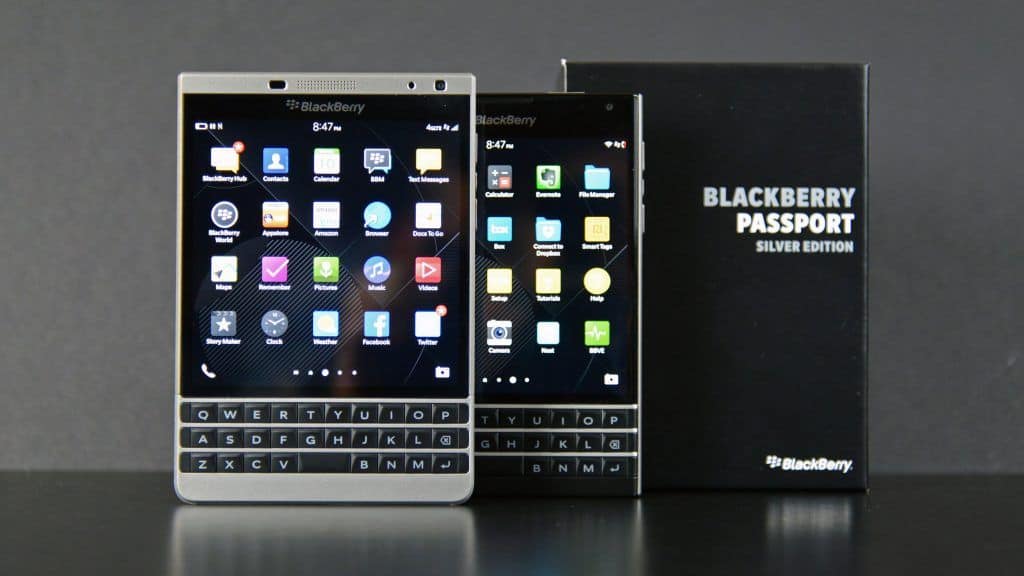
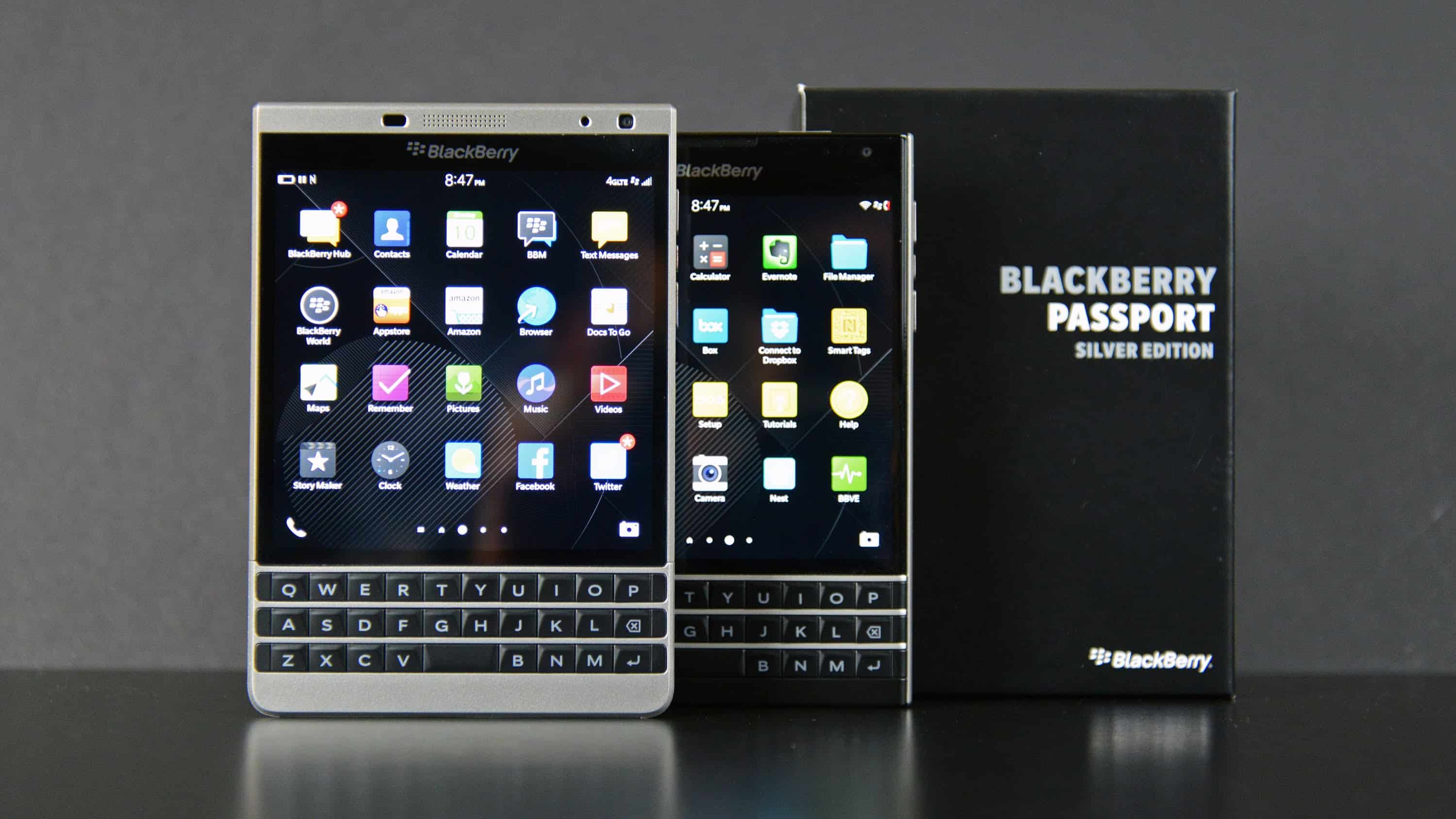
The BlackBerry Passport Silver Edition kind of pops in the crowded smartphone world, mostly because the shape isn’t the usual deal. What grabs you first is the square shaped form factor , with dimensions of 128 x 90.3 x 9.3 mm and a weight of about 205 grams. It feels unapologetically odd compared to those more standard, mostly rectangular phones. In a way, it shows BlackBerry really wanted that professional, different vibe, not just another slab.
And it’s not only for looks, I mean, there’s a reason behind the weirdness. The Passport comes with a 4.5-inch display that uses a 1:1 aspect ratio, so you get more space to view content, compared with most phones. That setup makes it better for documents, email messages, and web pages, because you’re less likely to deal with sideways scrolling all the time. The Silver Edition also has rounded edges, plus a stainless steel frame. That combo improves everyday durability and, honestly, it gives you a more premium feel when you hold it.
b. Premium Materials and Durability
When it comes to build quality , the BlackBerry Passport Silver Edition really is solid. You get a stainless steel frame which adds that extra stiffness and strength so the device can take the everyday rough and tumble without much fuss. On the back, there’s a soft-touch surface, it feels comfortable in the hand, and it keeps a decent grip. The workmanship shows all over the phone, with careful engineering and quality materials placed in the right spots, not just some rough attempt to look sturdy. It’s one of those simple things that you notice as soon as you pick it up.
One of the key improvements in the Silver Edition compared to the original Passport is how the keyboard feels in real life. It’s not just a normal “upgrade” either, the keyboard design is more or less refined. The keys are slightly recessed , so your fingers land where they should be, and typing ends up feeling a bit easier, less awkward. On top of that, the materials used for the keys are high quality, and the tactile feedback is really solid, kind of a signature thing for BlackBerry devices.
c. Ergonomics and Usability
Even though the overall look of the BlackBerry Passport Silver Edition is undeniably unique and kind of premium, there are a few comfort issues. The square shape, yes it’s great for reading and those productivity tasks, but it also makes the device a little cumbersome to grip, especially if you try to use it with one hand. The wider body can be annoying for people with smaller hands, and the weight is noticeable, particularly after a while when you’ve been using it for extended stretches.
Still, if you’re the type of user who cares about productivity, and you’re used to handling the phone with both hands for typing and navigating, then the Passport’s design actually becomes a real benefit. That physical keyboard stands out a lot, it gives a typing experience that on-screen keyboards just can’t match. And the keyboard also works as a touchpad, so you can scroll through content without having to keep tapping the display, which honestly makes day to day use feel more fluid.
Display
a. the Square 4.5-Inch Display
The BlackBerry Passport Silver Edition comes with this 4.5-inch IPS LCD display and a resolution 1440 x 1440 pixels, so you get a pixel density of about 453 PPI. The 1:1 aspect ratio is pretty much the signature thing here , and it’s what makes the Passport feel different than most smartphones. Because it’s a squared screen, it’s great for productivity stuff, it gives you a broader view of the content , so reading and editing documents, emails , and spreadsheets feels more manageable.
b. Display Quality and Performance
Overall the display quality on the Passport Silver Edition is excellent. The IPS LCD panel brings vibrant colors , solid blacks, and wide viewing angles, so it doesn’t look weird when you tilt it. With the high resolution , text and images look crisp , and it’s genuinely enjoyable for watching things and scanning info. It also holds up outdoors pretty well, with decent brightness levels that can stay usable even when there’s direct sunlight hitting the screen.
A real plus of the square display is that extra “screen surface” for multitasking. With the Passport you can keep more content on screen at the same time, which is helpful when you’re juggling multiple documents or switching between apps. Touch response is another strong point too, it feels smooth , and the navigation is quick and reliable.
c. Impact on App Compatibility
So, while the square layout sounds great for productivity , it also comes with these little annoying issues for app compatibility. A lot of Android apps are built around rectangular screens, usually 16:9 or 18:9, and then boom, on the Passport’s sort of “perfect square” display some apps might look off, or they just don’t render as they should. BlackBerry tries to fix this by letting users tweak the app’s aspect ratio by hand, though that workaround can feel a bit less than perfect depending on what you’re using, and sometimes it turns into a pretty awkward experience.
Performance
a. Processor and Hardware Specifications
Inside, the BlackBerry Passport Silver Edition runs on a Qualcomm Snapdragon 801 processor, it’s a quad core chipset that clocks at 2.26 GHz. Back when the Passport launched, this was kind of a top tier chip so the performance still holds up pretty well for daily stuff. You also get 3GB of RAM, which is usually enough for juggling multiple apps and not getting that constant lag.
For storage, the Passport Silver Edition includes 32GB of built in space, plus there’s a microSD card slot for expansion. It supports up to 256GB cards, so you can stash documents, media, and apps without constantly thinking about space. In other words , it ends up being a more versatile device for work plus entertainment, even if your usage gets a little heavy.
b. Real World performance
In real-world usage, the BlackBerry Passport Silver Edition performs…pretty admirably? Like it really does. The mix of the Snapdragon 801 processor and 3GB of RAM means the phone feels snappy, and also able to deal with a broad assortment of tasks. Whether you are browsing the web, handling emails, or running productivity apps, the Passport keeps things smooth and efficient, it just kinda goes.
But, it’s worth mentioning that the Snapdragon 801 processor, while still capable, is a older chipset, and for heavier duties it may start to hesitate, especially with stuff like gaming, or running apps that eat resources. The Passport is not really shaped as a gaming device, so if someone really cares about gaming performance, yeah they might notice the limits pretty fast.
c. Multitasking and productivity
The BlackBerry Passport Silver Edition leans into multitasking and productivity, largely because of its solid hardware and the BlackBerry 10 operating system multitasking tricks. You can run multiple apps in parallel, and swapping between them is quick, and pretty seamless too. Also the physical keyboard, and the big display, they both help keep a focused work rhythm. So composing emails, editing documents, and dealing with tasks while moving around feels less annoying, more natural.
Then there’s the BlackBerry Hub, which is a unified inbox that bundles emails, messages, and even social media notification pings. It’s kinda a standout feature that boosts productivity. With the Hub, you can manage communications from a single interface, so there’s less need to jump around between apps , and the whole workflow feels streamlined instead of chaotic.
Software and User Interface
a. BlackBerry 10 Operating System
The BlackBerry Passport Silver Edition comes with the BlackBerry 10 operating system, BB10 , and at launch it runs version 10.3.2. BB10 was BlackBerry’s attempt at making a more modern, gesture-driven OS that kinda leaned into productivity plus security, like a dual focus. The whole system is built around multitasking, with things such as the BlackBerry Hub, gesture navigation, and that constant emphasis on communication.
One of BB10’s main advantages is its smooth, almost fluid user interface. The OS feels made to be easy, or at least naturally learnable, with swipe gestures taking the place of more traditional navigation buttons. For example, if you swipe up from the bottom of the display it minimizes an app, and if you swipe to the right it brings up the BlackBerry Hub. After a bit, those movements become second nature, and you get a pretty seamless user experience.
b. BlackBerry Hub and Productivity Features
The BlackBerry Hub really acts like the heart of the BB10 productivity set. It works as one unified inbox, where emails, text messages, social media alerts, and other forms of communication get gathered into a single place, not scattered across different screens. You can open the Hub from pretty much anywhere in the OS using a simple swipe so it’s less stressful to keep up.
Beyond the Hub, BB10 also includes several work oriented features meant to improve day to day use. The physical keyboard is a good example , it offers contextual suggestions on the screen while you type. That helps with speed, and also with accuracy, even when you’re moving quickly. The OS also supports a collection of BlackBerry proprietary apps, like BBM , Docs to Go, and a file manager that ties into cloud services such as Dropbox , and OneDrive.
c. App environment and Compatibility
One of the problems faced by the BlackBerry Passport Silver Edition, is the kind of limited app ecosystem inside BB10 . While the OS comes with a native BlackBerry World app store , it still misses the huge selection of apps you normally see on Android or iOS. This downside is sort of eased by the fact that the device can actually run Android apps through the Amazon Appstore, which is pre-installed on it.
Even so the whole “Android apps on BB10” experience is mixed. Some apps work fine and stay stable , but others don’t feel right, like they aren’t tuned for the square display, or they end up having performance dips. Also there’s the issue with Google Play Services being absent, so apps that depend on Google services, might fail to work as intended. So in practice this narrows the appeal of the Passport to people who do not lean too hard on third-party apps.
Camera
a. Rear camera output
The BlackBerry Passport Silver Edition comes with a 13-megapixel back camera, f/2.0 aperture and all that, plus optical image stabilization OIS, and there’s a dual-LED flash as well. It records 1080p video at 60 frames per second, and it can also handle 720p at 60 or 30 frames per second.
When the lighting is decent, the Passport Silver Edition’s rear camera does fairly well. The 13-megapixel sensor gives crisp, detailed photos, colors that look accurate, and contrast that feels solid. The optical image stabilization helps cut down camera shake, which means clearer shots , and videos that look smoother overall.
However, in low light conditions, the camera kinda struggles a bit. The dual-LED flash does provide a bit of help, but the overall image quality might end up getting hit by noise and, honestly, a bit of detail that just… doesn’t show up. OIS helps with steadiness, but it’s not really a replacement for a larger sensor, or genuine better low-light handling. In the camera app you also get an HDR, (High Dynamic Range) mode that’s meant to improve contrast and fine texture when the lighting is rough. Still, outcomes can differ quite a lot depending on the scene
On the rear side there are multiple shooting modes too, like panorama, burst mode, and time-lapse. These options boost how flexible the camera feels, so users can catch more kinds of moments and scenes without being too limited
b. Front Camera Performance
The BlackBerry Passport Silver Edition ships with a 2-megapixel front camera, and it does the job well enough for basic selfies and those quick video calls. However the resolution is kind of low compared with modern expectations, so in selfies your face might look a bit less crisp, with fewer tiny visible details. Still , for casual snapshots and video conferencing, the front camera is usually fine. The Camera app itself also includes a handful of simple tools, like a self timer and a beauty mode, which can smooth things out just a little , in a way that’s small but still noticeable.
Battery Life
a. Battery Capacity and Performance
The BlackBerry Passport Silver Edition uses a non removable 3,450mAh battery, and honestly that’s pretty sizeable for a smartphone from back then. That battery capacity helps a lot with day long stamina, so the phone can generally push through a full day, even if you’re using it moderately to fairly heavily.
Day to day, the Passport Silver Edition shows dependable battery performance. Most users should be able to reach the end of the day with typical routines like web surfing, email handling, and streaming style media use. And because the battery is larger than average, it also makes extended sessions during travel, or those nonstop workdays, feel more manageable.
b. Battery Management and Optimization
On the software side, BlackBerry 10 comes with battery management options meant to stretch runtime. There’s a battery saver mode that cuts down on background activity and it also scales back some features to conserve power. You can also check battery use inside the settings, so you can see which apps and services are eating the most charge, sometimes it’s pretty revealing.
Beyond those built-in tools, the Passport Silver Edition keeps power consumption reasonably efficient due to hardware plus software tuning. The Snapdragon 801 processor isnt the most low power chipset around, but it’s balanced, delivers solid performance, and avoids too much extra drain, overall it feels steady.
c. Charging
The device supports standard 5V/2A charging via a micro-USB port , and the whole process is pretty straightforward. Charging speed feels fine , though it does not really bring fast charging tech into the mix, so expect a full battery to require a couple of hours. I mean , sure it is not as rapid as today’s flash charging methods , but for something of this age, it still does the job adequately.
Connectivity and Network Performance
a. Network Support
The BlackBerry Passport Silver Edition covers quite a lot of network bands, which helps it work with different carriers across the globe. On the speed side, it supports 4G LTE, so browsing , streaming, and general online activities usually stay quick enough. There is also support for 3G and 2G networks , so it should remain usable even in areas where 4G LTE coverage is spotty.
It’s also a dual SIM phone, which means two SIM cards can run at once, pretty useful if you travel often, or if you just want to keep work and personal stuff separated in a clean way.
b. Wi-Fi and Bluetooth
The Passport Silver Edition comes with Wi-Fi 802.11 a/b/g/n , so wireless internet access stays solid and dependable. Bluetooth 4.0 is supported too, so you can easily pair up with other Bluetooth-enabled gadgets like earbuds , speakers , and smartwatches.
In practice, both Wi-Fi and Bluetooth seem solid. Connections stay stable , range is fairly good too. Wi-Fi joins networks without too much delay and keeps signal strength steady, while Bluetooth links remain reliable and deliver decent audio quality for calls and media playback.
c. GPS and Navigation
The BlackBerry Passport Silver Edition comes with GPS support plus A-GPS, for navigation and all those location-based services. In general, the GPS works in a accurate and quick way,so location tracking stays dependable for apps like Google Maps and BlackBerry Maps.
The device tends to lock onto satellites fast, and it holds a steady signal,so it feels practical for driving directions ,and even outdoor activities. There is also A-GPS in the mix, which basically leans on cellular data and Wi‑Fi to push the location accuracy higher and make the satellite acquisition happen sooner.
d. Additional Connectivity Features
Besides the main connectivity options, the Passport Silver Edition adds a micro-USB port for charging, plus data transfer. It also includes a 3.5mm headphone jack, for audio output without fuss. On top of that, the phone supports USB OTG (On-The-Go), so users can hook up USB devices such as flash drives directly to the device.
Audio and Multimedia
a. Loudspeaker
The BlackBerry Passport Silver Edition has that rear facing loudspeaker, and honestly it does a decent job, with clear and audible audio for media playback as well as phone calls. It is working as expected, the audio quality is good enough, but it doesn’t really bring that extra depth or bass, which is pretty common for smartphones around this kind of tier.
Because the speaker is mounted on the back, when the phone is lying on a flat surface the sound can get a bit muffled. Still, for everyday casual listening and regular calling, the speaker performance is more than adequate.
b. Headphone Audio
The device has a 3.5mm headphone jack which is kinda a relief if you like wired headphones. The sound you get is pretty good, there’s clear audio and the frequencies feel balanced ,at least in everyday listening. It also supports standard audio formats, so overall the listening experience for music, podcasts, and other stuff is actually satisfying.
That said, if you’re an audiophile ,or you just want audio that’s on the level of dedicated sound gear, the Passport Silver Edition might fall short compared to dedicated audio devices or some higher-end smartphones with more advanced audio features. Still, for most people the sound is totally fine, more than enough for regular daily use.
c. Video Playback
The BlackBerry Passport Silver Edition’s screen, even if it’s not the absolute highest resolution, works well for watching videos. It can play both standard definition (SD) and high definition (HD) videos, and you get a decent viewing experience with sharp visuals and vivid colors.
Because the display is square, some videos may show letterboxing or get cropped ,especially if they were made for a different screen shape. It’s a small drawback, though, and it doesn’t really ruin the overall experience considering what the device can do. The built in video player is simple enough and it supports a range of video formats, so you can watch movies and TV shows while you’re out.
Value for Money
a. Price and Positioning
The BlackBerry Passport Silver Edition was basically framed as a premium device, with attention on productivity and work style features. When it launched, it sat at a higher price point than a lot of other phones out there, and that seemed to signal premium design, plus solid build quality, and all that.
Even with the bigger cost, the Passport Silver Edition still kind of pulled together this rare combination of features , so it could work alright for a smaller kind of user. The physical keyboard, the square display, and that sturdy build mattered to people who care more about getting tasks done, and remaining connected, instead of chasing every last bit of raw smartphone power.
b. Comparison with Competitors
Compared with its rivals, the BlackBerry Passport Silver Edition felt different mainly because of its unusual look and its strong productivity focus. Plenty of other smartphones could give similar results in day to day use, yet not too many matched the Passport physical keyboard setup or that square display in the way it did.
That said the phone still had trouble keeping up with more mainstream models. Those mainstream options often came with sharper high-resolution displays, faster processors, and also a wider app ecosystem. So for users who cared more about display sharpness, speed, or app variety, options from Samsung, Apple, and Google may have looked more tempting , and honestly easier to justify.
c. Long Term Usability
The BlackBerry Passport Silver Edition still feels like a solid pick for people who care about productivity and communication. It has that physical keyboard, the square screen, and the BlackBerry 10 operating system ,so the overall feel is kinda different from most phones. Even now that the market has moved on ,there are still some users who want that specific style of experience.
If productivity is the main thing ,the Passport Silver Edition basically keeps being useful. Still, the app catalog is pretty limited and the hardware is starting to feel dated ,so it might give you trouble if you need newer functions or smooth performance. But for anyone who can enjoy its odd ,distinct strengths, the Passport Silver Edition stays a standout and reliable device, even if it isnt the newest thing around.
Conclusion
The BlackBerry Passport Silver Edition kind of shows up with a bold, different take on smartphone design. That square-ish screen, the premium feel in the build, and the physical keyboard all make it stand out, kinda immediately, compared to most stuff you see out there. At the same time it doesn’t really chase the cutting edge performance, or the huge app library, like the more mainstream devices do. Still, for people who care about steady communication, getting work done, and having something that looks and feels distinctive, it lands as a pretty solid and productive option.
Its strong build quality really helps, the keyboard is flexible, and the productivity tools do what you’d expect, so it becomes a good pick for professionals and power users who enjoy this particular style. But if you are the type who cares a lot about modern features, or you want top tier specs, then the weaker app compatibility, and the overall performance ceilings, might make it feel less attractive.
In the end , the BlackBerry Passport Silver Edition keeps being a notable and unusual presence in the smartphone market, with that mix of design, everyday function, and productivity. And yeah, it still seems to click with a dedicated crowd.
BlackBerry Passport Unlocked Phone – Retail Packaging – Silver: Buy it now
BlackBerry Passport SQW100-4 Silver Edition Unlocked 32GB International Stock No Warranty – Silver: Buy it now




Tech Reviewer & Product Analyst
Định Bia has spent over 10 years testing consumer electronics with a focus on smart technology. He work as a product advisor at Biareview where he helped customers find the right devices for their needs. He personally tests every product featured on this site using a consistent evaluation framework covering quality, durability, and value. All reviews are based on experience, not influenced by the manufacturer.