Design and Build Quality
A. Aesthetics and Materials
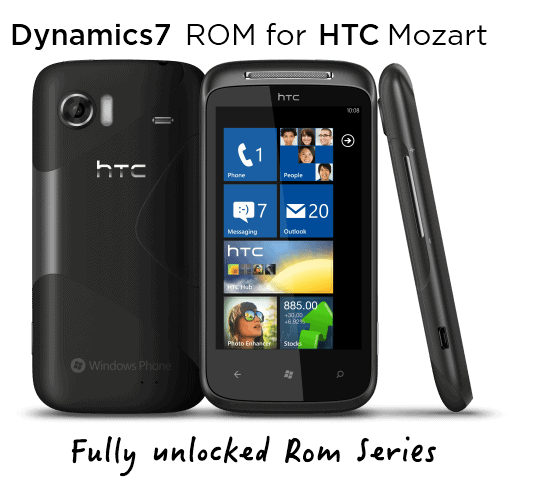
The HTC 7 Mozart is made from one single piece of anodized aluminum , so it feels premium and gives you a solid durable build, almost “real” in the hand. The unibody design is pretty sleek and elegant, with those subtle curves that sorta help it sit comfortably, even during longer use. On the back you get that matte finish , which means it’s not too slippery. It also helps with fingerprints, a thing that you usually fight with glossy surfaces, you know.
It measures 11.9mm thick and weighs 130 grams. So yeah, it’s a touch heavier than several rivals from the time, but that extra mass kinda adds to the robust feel. Its size, 119 x 60.2 x 11.9 mm , keeps it compact enough to be genuinely pocketable , something that people often ignore now with bigger devices taking over everywhere.
B. Button Placement and Port Accessibility
HTC put the physical controls in ergonomic spots, which makes it easier to operate with just one hand. On the right side you’ll find the volume rocker and also a dedicated camera button, and honestly, it’s a nice detail for photography lovers. The power button sits up top , together with the 3.5mm headphone jack. Meanwhile the micro-USB charging port is at the bottom , so cables don’t get in the way as much during use.
The buttons themselves feel tactile and responsive , with solid feedback when you press them. Their placement is easy to reach, but not so easy that you trigger accidental taps all the time.
C. Overall Durability
The unibody aluminum construction adds to the overall durability of the HTC 7 Mozart, honestly it does feel like it was meant for day to day use. The phone is made to handle regular wear and tear, and the metal chassis gives at least some protection against drops and impacts, you know the usual real life stuff. On the front, the Gorilla Glass helps shield the display from scratches and small abrasions , but it’s not completely shatterproof , so it still pays to be careful.
Still , even with all that durability, the unibody design means the battery is not user replaceable. For some people this is a downside, especially if you like carrying a spare power cell, or if you want to swap the battery later after long-term usage.
Display
A. Screen Specifications
The HTC 7 Mozart comes with a 3.7-inch S-LCD screen, with a resolution of 480 x 800 pixels. So it works out to something like 252 ppi, and honestly that was pretty competitive at the time, a decent balance between practical day to day usability and keeping it small in your pocket. The S-LCD technology was often appreciated for more faithful color output, plus it tends to handle outdoor brightness better than most standard LCD panels, you know, that usual stuff.
B. Display Performance
In day to day use, the display looks bright and fairly lively, with solid contrast and good color accuracy. Text feels sharp and images have decent definition, nothing too dramatic but also not washed out. Most lighting situations it handles pretty well, though in direct sunlight it tends to struggle a little, so reading can get tricky, depending on the angle.
Viewing angles are also pretty respectable. There’s minimal color shifting when you look at the screen from the sides which makes it easier to show something to another person , since the content stays readable without too much fading or weird tinting.
C. Touchscreen Responsiveness
The capacitive touchscreen on the HTC 7 Mozart feels pretty responsive, and it tends to be accurate too, so when you’re moving around the Windows Phone 7 interface it comes off smooth, almost fluid, i mean it’s not jittery. Things like pinch-to-zoom, plus the other multi-touch maneuvers, work in a dependable way, you tap or swipe and the screen answers fast. That overall display reactivity seems to help the user experience a lot, so interactions with the phone feel natural , and honestly more intuitive than you might expect.
Performance
A. Hardware Specifications
The HTC 7 Mozart is driven by a 1 GHz Qualcomm Snapdragon S1 processor (QSD8250), and it’s matched with 576 MB of RAM. On paper it might look modest now, but at the time the Windows Phone 7 operating system was tuned for smooth operation even if the hardware wasn’t super strong.
It includes 8 GB of internal storage, and about 7 GB is actually available to the user. Still, the inability to expand storage using a microSD card is a notable downside, specially for people who want extra room for apps, music, or photos, because there’s just no way to stretch it.
B. Real-World Performance
In day today use, the HTC 7 Mozart feels pretty smooth, like it responds fast enough most of the time. The Windows Phone 7 OS seems well tuned, and the phone gets through everyday stuff such as web browsing, social feeds, and email pretty easily. Multitasking is kind of restricted by the OS though, but you still can bounce between apps quickly , and usually without that annoying lag.
When you move into the more intense stuff, like gaming or video playing, that’s where the device starts to show its limits. Casual games are handled fairly well but if the title is more graphically demanding , frame rates might wobble a bit. Video playback is generally fine , with support for 720p HD content, however the 8 GB storage can get packed quickly, especially if you keep big media files around.
C. Battery Life
The HTC 7 Mozart comes with a 1,300 mAh battery, it’s not huge, but it’s enough for the device size and its typical power draw. On moderate use—browsing, social media, and occasional gaming or media— it can stretch to a full day on one charge.
Still, if you’re going hard, like long gaming sessions or constant video streaming, the battery drops faster than you’d want. Since the battery is non-removable, users will end up needing to bring a charger or a power bank if they plan to stay out for longer.
Camera
A. Camera Specifications
So the HTC 7 Mozart has this 8 MP rear camera, and yeah it was really a standout thing back then. It uses a back- illuminated sensor BSI , plus a xenon flash, which you don’t really see often on smartphones, even now. That xenon flash tends to be brighter than the usual LED flashes, and it becomes really handy when the light is poor, like in those dim rooms or at night.
It can also record 720p HD video, so people can film in decent high-definition quality straight from the phone.
B. Image Quality
Overall, the image output from the HTC 7 Mozart camera is pretty solid. Colors look faithful, and there’s good, usable detail, especially when you’re shooting with plenty of light around. The BSI sensor is doing a lot of the heavy lifting too, because it helps with low light. Basically it cuts down noise, and the photos end up looking clearer when you’re in darker settings.
And again, that xenon flash is kind of the highlight here. The lighting power is strong, so low-light shots can look better than on phones that rely only on LED. Still, it’s a flash so it can overdo things sometimes, and subjects might get overexposed if you stand too close.
Autofocus works but it may act a bit sluggish at times, particularly when lighting is weak. The dedicated camera button helps though, because it makes focusing and taking the shot feel faster, or at least more controlled.
C. Video Recording
The HTC 7 Mozart is able to record 720p HD videos ,which back in 2010 was a pretty solid selling point for a smartphone. Overall, the video quality stays decent, you get nice color reproduction and a fair level of fine detail. It also manages motion pretty well, although in darker scenes the video recording doesn’t look as great, there’s grain that you can spot easily and the clarity drops a bit.
There’s also a xenon flash, and yes it can function like a video light, but the impact is limited , since it’s made mainly for still photography, not for continuous illumination during recording.
Software and User Interface
A. Windows Phone 7 Overview
The HTC 7 Mozart runs on Windows Phone 7, which is Microsofts fully reworked mobile operating system. Windows Phone 7 brought in a brand new look, and its user interface is often called “Metro” , and it’s known for Live Tiles, plus a pretty minimalist kind of design style. Microsoft intended the OS to feel direct and simple, with lots of emphasis on tying into their services ,like Xbox Live, Zune, and Office.
B. User Interface and Customization
On the HTC 7 Mozart, the Metro UI feels smooth, almost effortless ,with animations and screen changes that make everything seem a little more refined than expected. The Live Tiles sit on the home screen and provide fresh updates right away, for example, incoming messages ,weather info, and calendar happenings, without forcing you to open each application.
When it comes to customization, Windows Phone 7 feels restricted compared to Android. Users mostly can swap the Live Tile colors and move them around on the home screen. Still ,that tight, clean approach is kind of the point with Windows Phone 7. It helps the interface stay simple for people who would rather have a less crowded and more straightforward experience.
C. Apps already on device, plus Microsoft tie-in
The HTC 7 Mozart shows up with a bunch of apps already installed, and it mostly leans on Microsoft’s productivity stuff. You get Office Mobile for example, so you can check and tweak Word, Excel, and PowerPoint files while you’re out, or even if you’re kind of on the move. It also links up nicely with Xbox Live, which means games plus your Xbox profile, they show up straight from your smartphone, pretty smoothly overall.
Zune, on the other hand, is the media player and store on Windows Phone 7. It brings music, videos, and podcasts you can either download or stream. The Zune connection feels pretty seamless, and you can also sync the phone with the Zune program on a PC to sort out and manage your media content, without too much fuss.
Audio and Multimedia
A. Sound quality
The HTC 7 Mozart is named after a well-known composer, and honestly it doesn’t really disappoint on sound. The device includes SRS WOW HD sound enhancement, this boosts audio clarity and gives you a fuller more immersive listening vibe. The built-in speaker is surprisingly loud and easy to understand, though sure, it doesn’t offer deep bass, which is pretty typical for small phone speakers.
With headphones it turns into a different story. The audio quality comes through as excellent, with a decent balance all across the frequency range, it really sounds good. The phone also supports a big variety of audio formats, like MP3 , WMA, and AAC, so it functions more like a flexible partner for people who care about music, and basically everything that goes along with it.
B. Video Playback
The 3.7-inch display feels pretty well suited for video playback, and it gives a sharp, vibrant kind of viewing, if you’re watching on the move. The HTC 7 Mozart also supports a range of video formats, like MP4, WMV, and H.264, so you can use the most typical files you usually see in mobile video content. In day to day use, the phone manages 720p HD videos without much trouble, and playback stays smooth , without that obvious stuttering or sudden frame drops.
Color reproduction is also on point, which really helps when you’re watching movies ,or clips. Still, compared with today’s bigger screens, the panel is a bit tiny, so some users might feel limited if they are used to larger displays. But overall the display quality is enough for casual, “quick watch” sessions while traveling and such.
C. FM Radio and Other Multimedia Features
Another extra media feature on the HTC 7 Mozart is the built in FM radio. It does need a connected headset in order to work, because that headset acts like the antenna. The FM radio app is simple and not overcomplicated, so scanning for stations and saving your favorites is pretty painless. Because of that, the phone comes off as a more flexible multimedia device, especially for folks who still like terrestrial radio.
It also includes a basic photo viewer and video player, and both tie into the Windows Phone 7 operating system’s media hub. That link , makes it easier to reach and organize your multimedia files from one central place. Overall, this adds to the device’s user-friendly feel even if you’re just trying to manage everyday content quickly.
Connectivity and Network performance
A. Cellular connectivity
The HTC 7 Mozart runs on 3G HSDPA networks, so downloads can reach around 7.2 Mbps, at least that was pretty much the norm for phones when it came out. In real use the call quality feels pretty solid, like the audio stays crisp on both sides, and the conversation doesn’t get all choppy. Signal pick up is usually strong, and the handset keeps a fairly dependable link, even when the coverage is not ideal or kinda spotty.
On top of that it also has quad-band GSM , which makes it more travel friendly than some. When you’re abroad you can shift networks fairly easily, as long as your operator offers international roaming and your plan actually cooperates.
B. Wi-Fi and Bluetooth
For wireless networks the HTC 7 Mozart includes Wi-Fi 802.11 b/g/n. That means you can join 2.4 GHz as well as 5 GHz bands, depending on what your router is doing at home or in cafés. Overall Wi-Fi performance is consistent, with stable connections and a decent radius. And yes, it can act as a Wi-Fi hotspot too , which is handy when you need to share your data with another device.
Bluetooth is Bluetooth 2.1 with A2DP support. This allows pairing with lots of accessories, for example wireless earbuds, in car audio systems, and various mobile add-ons. Bluetooth 2.1 isn’t as speedy as later generations, but it’s still enough for everyday stuff, like audio streaming and casual file transfers between nearby devices.
Htc T8698 7 MOZART Unlocked Phone: Buy it now
Unlocked HTC 7 Mozart T8699 16GB Internal Memory Smartphone with Windows Phone 7, Wi-Fi, Touch Screen, 8MP Camera, HD Video–International Version with No US Warranty (Black): Buy it now
Related Posts




Tech Reviewer & Product Analyst
Định Bia has spent over 10 years testing consumer electronics with a focus on smart technology. He work as a product advisor at Biareview where he helped customers find the right devices for their needs. He personally tests every product featured on this site using a consistent evaluation framework covering quality, durability, and value. All reviews are based on experience, not influenced by the manufacturer.