Design and Build Quality
A. Aesthetic and Ergonomics
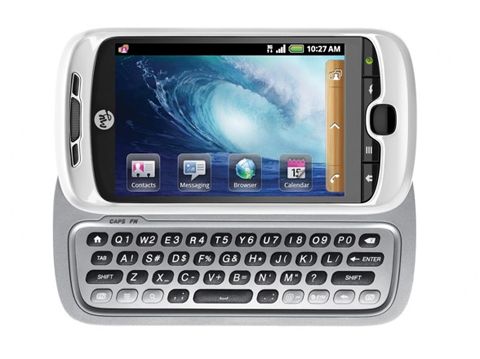
The HTC myTouch 3G Slide has a look that kind of balances day to day practicality with a bit of elegance. It’s fairly compact with a slightly curved back, so it feels good in the hand , and the soft touch plastic finish gives you a decent grip. The phone comes in several colors like black, white, and red , so you can pick what suits you more or less.
In size it measures 115.6 x 58.2 x 15.5 mm and tips the scales at about 164 grams, which makes it on the thicker side and a little weightier than what you’d expect from modern phones. Mostly this comes from the sliding keyboard setup. Still, back when it launched , it was viewed as reasonably compact , especially since you were getting a full physical keyboard in the same body.
B. Build Quality and Durability
For build quality, the HTC myTouch 3G Slide feels solid, and you can see why HTC has a reputation for durable hardware. The keyboard slide system itself feels sturdy, and it moves with a smooth action, this matters a lot since the phone depends on that mechanism every day. When the display and keyboard move into position, there’s a satisfying click, and there’s very little wobble once the keyboard is out.
Overall the device is made for regular use, and the materials used give it a more premium sort of feel than you might assume from a mid range style market. That said, the soft touch plastic rear does attract fingerprints and smudges, and over time it may start showing signs of wear. Even so , it doesn’t really ruin the durability impression or make it feel fragile in daily handling.
Display
A. Display Specifications
So the HTC myTouch 3G Slide comes with a 3.4-inch TFT capacitive touchscreen, resolution is 320 x 480 pixels , and that works out to about 170 pixels per inch (PPI). Kinda fairly normal back then, you know, for smartphones, but today , it would be judged as quite low.
B. Display Quality
About the display quality, it gives a decent viewing experience for its era. The colors look pretty vivid, and the screen brightness is enough for indoor use. Still, if you’re outside in direct sunlight it gets annoying because the screen reflects a lot, and there isn’t any higher brightness option to help, not really.
The resolution is ok for everyday things, but it does show noticeable pixelation, especially when you look close at text or pictures. For relaxed use like texting, web browsing, or watching videos, the screen is usable , yet it doesn’t deliver that crisp, high-definition kind of feeling.
C. Touchscreen Responsiveness
The capacitive touchscreen is pretty responsive, it picks up touches accurately, and gestures too. It supports multi-touch, so you can do pinch-to-zoom and similar movements, which were starting to become the norm on phones around that time. Overall the touch feel is smooth, there’s minimal lag, so scrolling around and typing stays fairly easy.
Performance
A. Processor and RAM
If you take a look under the hood, the HTC myTouch 3G Slide seems to run on a Qualcomm MSM7227 chipset. It has a single core, 600 MHz ARM11 processor, and it also includes 512 MB RAM. I mean those numbers look kinda modest right now , but in 2010 they were pretty much normal for a mid-range smartphone sort of thing.
B. Real-World Performance
In everyday use, the myTouch 3G Slide does basic stuff pretty well, like calling, texting, and casual web browsing. The interface stays mostly fluid, but sometimes it can get cranky when you do heavier things, like gaming or juggling multiple apps at the same time. That 600 MHz chip is fine enough for Android 2.1 (Eclair) which the phone shipped with, yet once apps started getting more demanding, the limited power and RAM started showing their age, faster than you’d want.
Opening apps can feel a bit slow, and if you multitask a lot, you may notice lag , or even the occasional crash, especially with memory-hungry apps. Because of that, the device feels less friendly for power users, or for anyone trying to run the newest apps and games coming out in 2010, or later.
C. Storage and Expandability
The myTouch 3G Slide offers 512 MB of internal storage, and about 150 MB is actually usable for apps plus media. Honestly, that’s extremely tight even for 2010, since app downloads and assets were smaller then but not that small.
To help balance it out, the phone includes a microSD card slot, supporting up to 32 GB of extra space. Having expandable memory is a noticeable win , because it lets you keep more photos, music, and videos locally without only depending on the built in storage.
Camera
A. Camera Specifications
The HTC myTouch 3G Slide is fitted with a 5-megapixel back camera, plus an LED flash, which sort of helps in everyday situations. There is no front facing camera, something that was pretty common with a lot of smartphones back then. Still, it kinda limits the phone in a real way for video calls, or for selfies, depending on how you use it.
B. Image Quality
Overall the camera on the myTouch 3G Slide gives decent results when the lighting is right. When you shoot outdoors or somewhere well lit, the colors look fairly accurate and the detail is okay, even if it doesn’t have a huge megapixel figure. Because it also misses more advanced image processing, the pictures can end up a bit soft, like a mild blur effect that you notice only after looking longer.
But once the light drops, it really shows. In low-light scenes, the camera performs poorly. The LED flash does brighten nearby subjects, sure, yet the images tend to be noisy and detail can fade out. Honestly the dim lighting performance is one of the weaker points, so anyone expecting crisp night-time photography, probably ends up disappointed.
C. Camera Features and Interface
On the recording side, video is capped at VGA resolution (640 x 480 pixels) and yeah, that was pretty normal for smartphones back then. The actual video quality is fine for casual moments, though it kinda misses that crisp detail and smoother motion you’d start seeing on more high-end devices.
Software Experience
A. Android 2.1 Eclair
The HTC myTouch 3G Slide came with Android 2.1 Eclair, plus HTC’s Sense UI sitting on top of it all. Android 2.1 was a meaningful step up from earlier versions, bringing things like better Google Maps, voice-to-text input, and support for live wallpapers. Then HTC’s Sense UI added some customization touches and extra tools, which in practice made day-to-day use feel a bit more polished, and more enjoyable.
B. HTC Sense UI
HTC Sense UI, on the myTouch 3G Slide , brought a few enhancements that kinda smoothed out the Android experience. One big addition was the “Friend Stream,” like a single ongoing feed that pulled together social media updates from Facebook, Twitter, and a bunch of other services , so it was simpler for people to keep track of what’s going on and stay in touch.
Also, the Sense UI had a customizable home screen , with multiple panels, sort of like quick lanes for widgets and apps. The overall look of the interface felt really polished , and honestly visually attractive, so the phone seemed more welcoming, even compared with the more basic stock Android feel.
C. Pre-Installed Apps and Customization
The myTouch 3G Slide arrived with several apps already installed, including T-Mobile’s options for account management and other support services. These were handy for some users, but they still ate up storage space, and at the same time, storage was already pretty tight.
In terms of personalization, the Android 2.1 platform put some brakes on things, but users could still tweak their home screens , swap out wallpapers, and grab extra applications from the Android Market. Still, because the internal memory was limited, most people had to be picky about what they added , otherwise everything could get crowded fast.
D. Software Updates
Sadly, the myTouch 3G Slide’s support for software didnt last very long. The phone did get an update to Android 2.2 Froyo, but then it kind of stopped there. No further upgrades came to newer Android versions, so the device’s usefulness became kinda capped, especially when more modern apps or extra features started refusing to run properly. Over time, it felt like the phone got older not just physically, but also in software terms.
Keyboard and Typing Experience
A. Physical QWERTY Keyboard
A highlight of the HTC myTouch 3G Slide is its physical QWERTY keyboard, it slides out from under the display, like it’s quietly waiting there. The whole keyboard design is solid, there are five rows of keys and one row is specifically for numbers. The spacing is good, and the keys are just a bit raised, which helps with accurate typing, even if your hands are on the larger side, or you type fast while rushing a bit.
The key feel is satisfying too, you get real tactile feedback instead of that flat screen sensation. Because it has a physical keyboard it also becomes a very practical option for people who want actual keys instead of a virtual layout , especially for lots of texting, emailing, or quick message replies when you dont want misclicks.
B. Virtual Keyboard and typing alternatives
Besides the physical keyboard, the myTouch 3G Slide also gives you a virtual keyboard for touch screen typing. It feels responsive , and it includes predictive text input, that kinda helps you type quicker. Still, people who care a lot about speed and correctness, will probably lean toward the physical keyboard when they need to enter longer passages.
Having both a physical and a virtual keyboard at the same time, gives some extra wiggle room. So the user can pick the method that fits best, depending on what they are doing. That two part setup was especially handy during the switch era in the smartphone market, when phones were moving from the physical layout to virtual ones.
Battery Life
A. Battery specifications
The HTC myTouch 3G Slide runs on a 1,300 mAh removable Li-Ion battery. At the time, that was pretty normal for mid level smartphones. Nowadays it looks small, sure, but it was built to stretch through a day of typical use, assuming the device keeps hardware and software running in a reasonably efficient way.
B. Real-World Battery Performance
In everyday use, the battery life on the HTC myTouch 3G Slide feels kind of average. If you’re doing light to moderate stuff, like calling, texting, browsing, or a bit of occasional app work , it can usually make it through a whole day on just one charge. But when you start doing heavier things, like gaming, watching video, or spending a long time on the web, the battery seems to empty faster, and you may end up needing a recharge by late afternoon, or even sooner in some cases.
A big upside for the myTouch 3G Slide is the fact it has a removable battery. That means you can bring along a spare and just swap it in if things get dicey. This kind of option shows up less and less on today’s smartphones, yet back then it was pretty helpful, especially for people who wanted longer runtime without always having a charger around.
C. Power Management Features
The phone also comes with the more basic power management controls , so you can keep an eye on battery drain and mess with settings a bit to stretch the runtime. Like, you can dim the screen brightness, stop background data syncing , and switch off Wi‑Fi or Bluetooth when you’re not using them. Those straightforward tweaks help you extend the battery , especially when the device is running low , and you really want to squeeze out a little more time.
Connectivity and how well the network works
A. Support for Network and call quality
The HTC myTouch 3G Slide does support 3G networks, and it can reach HSDPA speeds up to 7.2 Mbps , which was kinda normal for smartphones around 2010 in that price range. It also plays nice with GSM networks, so you can basically use it on lots of carriers worldwide, especially the ones built around GSM tech.
When it comes to call quality, the myTouch 3G Slide is usually pretty solid. Voice sounds clear, and the noise cancellation is decent enough for everyday chatter. The earpiece is loud, for most places, and the speakerphone also hits a good balance of volume and clarity, so hands-free conversations don’t feel weird or too faint.
B. Wi‑Fi, Bluetooth , and GPS
This phone includes the usual connectivity options. You get Wi‑Fi 802.11 b/g, Bluetooth 2.1 with A2DP support, plus GPS with A-GPS. Overall, Wi‑Fi performance feels steady, so staying connected for web browsing , app downloads, and even streaming is mostly painless.
Bluetooth seems to connect reliably, especially for pairing with wireless headsets, in-car systems, and other Bluetooth-enabled gadgets. The GPS part is also there for location based stuff, so navigation and tracking work well with apps like Google Maps, and at the time that kind of feature was a big selling point for smartphones, no question.
C. USB and other connectivity options
On the device you get a microUSB 2.0 port, mainly for charging and also data transfer. back then it was pretty much the standard port type, but nowdays most newer phones have already moved on to USB-C. the microUSB port on the myTouch 3G Slide still supports normal USB charging and data transfer speeds, although some users may notice it feels slower when compared with what newer USB generations can do.
There is also a 3.5mm headphone jack, so users can plug in wired headphones or hook up external speakers. having that physical port is pretty convenient for people who rather stick with wired audio accessories, and honestly that kind of thing is now less common in newer smartphone models.
Multimedia and entertainment
A. Music and audio performance
The HTC myTouch 3G Slide gives a decent audio experience for its period. it comes with a built in music player that handles several file formats, for example MP3, AAC, and WMA. Sound output through the 3.5mm headphone jack is satisfactory, with fairly clean audio for music and basically other media content too.
Also, the phone comes with an FM radio, and honestly that part works as a nice little add-on for people who like live radio broadcasts. The FM radio app is pretty straightforward to navigate, however it needs a pair of wired headphones to function as an antenna , so you usually end up plugging them in first.
B. Video playback and streaming
So the myTouch 3G Slide can play standard definition video stuff, and yeah it supports formats like MP4 and H.264. But, the 3.4 inch screen, with that 320 x 480 resolution, kinda puts a cap on how nice it looks. Even if the videos do play smoothly, the picture comes out a little softer, less crisp , less detailed, compared to more recent phones.
For streaming video, the device can deal with YouTube and other services that were around back then. Still, because the display is small, and the resolution is on the lower side, it feels kinda less enjoyable for longer sessions. Especially compared to newer devices with bigger, high definition panels.
C. Gaming performance
Honestly gaming on the myTouch 3G Slide is held back by the hardware. It can run basic, lighter games from the Android Market, but anything more graphically heavy might not move along at a nice pace. The 600 MHz processor plus 512 MB of RAM work well enough for simple titles like Angry Birds , yet newer or more demanding games can end up with stuttering, or slower loading.
Also, the physical keyboard doesn’t really help much for gaming, since many Android games are built around touch screens. That said, when a game needs text entry , or it depends on keyboard commands, then the keyboard can still work as a decent alternative control.
User Experience
A. Ease of Use
The HTC myTouch 3G Slide is kind of built around ease of use, like seriously especially for people moving from feature phones to smartphones. The physical keyboard is a big win for anyone who likes tactile typing, and the blend of a touchscreen plus physical keys just feels more flexible than the usual glass-only setup. Overall it works in a way that doesn’t overcomplicate things.
The user interface, boosted by HTC’s Sense UI, comes across as intuitive, and it’s easy to reach what you need—custom home screens, settings that are quick to find, and a bunch of pre-installed apps meant for daily life. Navigating the phone is pretty direct, so beginners usually won’t feel lost, but more experienced users can still get around without too much friction.
B. Customization and Personalization
Android in general, and the myTouch 3G Slide too, gives users a bunch of space to shape the experience. Folks can dress up their home screens with widgets, shortcuts and wallpaper themes. They can also swap ringtones, and notification tones, kind of tuning the whole vibe. With the Android Market, there are tons of apps and games available so the phone can match personal tastes, workflows, and small habits.
Still, there’s a catch: the internal storage isn’t very generous. That constraint can make customization stall if you install too many apps, or keep a lot of media. In practice, users can run short on space faster than they expect, so the microSD card slot becomes a near-necessity for anyone who wants real breathing space to expand their storage.
C. Learning curve
The learning curve for the myTouch 3G Slide is kind of gentle, especially if you already know the basics of how mobile phones work. Having the physical keyboard around makes typing a lot more approachable for people who still aren’t really comfortable with onscreen keyboards , and the Android operating system— even if it is a bit dated— still feels logical and pretty easy to navigate.
If someone is new to Android, or even just new to smartphones in general, the device still lands in a manageable spot, because there are tutorials plus help options you can reach through settings, and also the user manual.
Value for Money
A. Pricing and market position
When it first came out, the HTC myTouch 3G Slide was placed in the mid-range category. It aimed at giving a useful mix of features and performance without asking for the premium money you’d see on flagship models.
Later on, newer and cheaper smartphones basically moved past it, but in 2010 it still delivered solid value for money, mainly for folks who really liked the idea of a physical keyboard included.
B. Longevity and Durability
The myTouch 3G Slide looks like a pretty durable little device , with a build quality that has managed to keep up over time. Still, it has limited hardware specifications and , because of that it really doesn’t get software updates, so the overall longevity—meaning how it handles performance and how well it stays compatible with newer apps—ends up being somewhat capped.
If you mostly use your phone for calling , texting, and that kinda light web browsing then yeah, it can still do the job. But if you want a smartphone that feels steady when modern apps and services start demanding more, then the myTouch 3G Slide is probably already behind.
C. Competition and Alternatives
When it first came out, the HTC myTouch 3G Slide had to compete with other mid-range smartphones, for example the Samsung Galaxy Ace ,and the LG Optimus One. Those phones brought fairly similar core features and price levels, but with small differences in design, day to day performance, and the whole software experience.
Right now, the myTouch 3G Slide is overshadowed by a bunch of budget and mid-range models that bring better performance, sharper resolution screens , stronger cameras, and software updates that actually keep arriving. Something like the Moto G lineup , or even entry-level Nokia smartphones, can feel like a more modern and capable swap for people watching their budget, without all the same compromises.
Conclusion
So, the HTC myTouch 3G Slide was kinda a big deal back then, because it gave a pretty well balanced smartphone experience, plus you got that added bonus of a physical keyboard. It was clearly made for a wide crowd, not just people already deep into smartphones, but also those who were basically new to them, and yeah, those who really cared about the tactile comfort you get from a real keyboard, rather than glass keys or whatever.
Even though today’s phones totally outclass it in both hardware and software , the myTouch 3G Slide still feels like a solid snapshot of HTC’s design thinking and momentum during those early Android years. The overall build quality, how easy it was to live with, and the flexibility from having that physical input option… all of it helped explain why it was such a popular pick among lots of users.
But, honestly, as technology moved forward, it also became a lot less practical. The processing muscle is limited, the display is small, and the software situation, especially the lack of updates, means it’s hard to suggest as a daily driver right now. Still, if you’re a collector or just into Android history, then the myTouch 3G Slide works as an interesting little artifact from a period when physical keyboards were still a genuinely valuable feature, not just a nostalgic gimmick.
HTC T-Mobile MyTouch 3G Slide (Black) Unlocked: Buy it now
HTC myTouch 3G Slide Black T-Mobile Android Smart Phone: Buy it now
HTC MyTouch 3G Slide T-Mobile Red Android Cell Phone: Buy it now

Tech Reviewer & Product Analyst
Định Bia has spent over 10 years testing consumer electronics with a focus on smart technology. He work as a product advisor at Biareview where he helped customers find the right devices for their needs. He personally tests every product featured on this site using a consistent evaluation framework covering quality, durability, and value. All reviews are based on experience, not influenced by the manufacturer.