Design
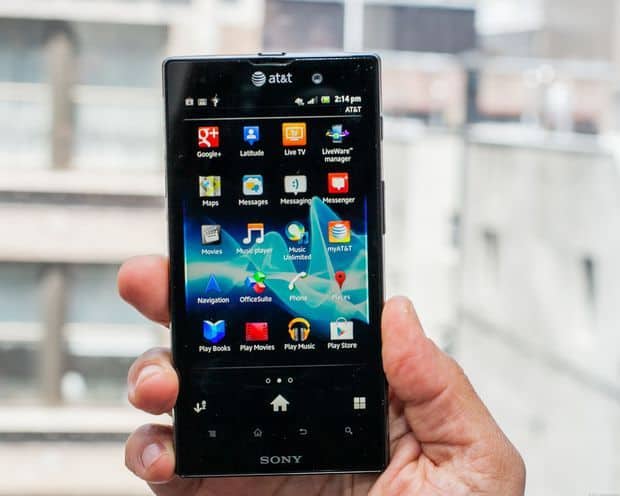
Sony Xperia ion style design Sony NXT so you will find it similar to the Sony Xperia S, Sony Xperia U and Sony Xperia P. The styling of the machine is quite eye-catching and very comfortable in your hand despite relatively large screen size. Back shell made of metal materials for solid feel and advanced.
This smart phone has 4.6 inch touch screen at a resolution of 720p HD Reality (1280 x 720 pixels) and uses technology from Sony Mobile Bravia Engine. Like the other Xperia line, the screen is made of ordinary glass (mineral glass) scratch-resistant, allowing us to use the phone under direct light of the sun.
As we remember, the first Xperia ion came out with OS Gingerbread Android 2.3. At the moment the newer version of the Xperia ion is running Ice Cream Sandwich, Android 4.0. There is still no clear word from Sony, on if this phone was updated to Android 4.1, Jelly Bean or not.
On the storage side, with 16 GB available on the unit itself , you do get enough room for applications. And if you feel like you need more space for video, music, and stuff like that, the Xperia ion has a microSD card slot, supporting as much as 32 GB. Finally , we were not too surprised by the battery spec either, since it goes up to 1900 mAh.
Display
The Sony Xperia Ion was fitted with a 4.55-inch LED-backlit LCD screen, resolution 720 x 1280 pixels, so you end up at around 323 ppi. Honestly, that screen was one of the main reasons people noticed the device, it gave visuals that looked crisp and lively, and they were pretty friendly for multimedia time.
Sony then used its own Mobile BRAVIA Engine technology to push the quality further, like it was borrowing know-how from Sony television making. This engine improved contrast, added sharpness, and boosted color saturation for what you see on the Xperia Ion. As a result the display showed richer tones and darker blacks , so it works great for watching videos, checking photos, and yes, even playing games.
The display was also coated with an anti reflective layer which helped reduce the glare and upped visibility when you were out in bright sunlight. That said, like lots of LCD displays back then, it wasn’t really as bright or as energy efficient as the OLED displays that are now basically everywhere on modern smartphones.
One downside was its relatively low contrast ratio, compared with OLED screens, which meant the blacks didn’t go as deep and the colors didn’t feel quite as vivid. Also the viewing angles were decent but not amazing, you could notice some color shifting, plus a drop in brightness when you looked from the more extreme angles.
Even so, these little drawbacks didn’t stop people from talking up the Sony Xperia Ion’s display at the time of its release, and it stayed pretty competitive with other flagship phones in the same tier.
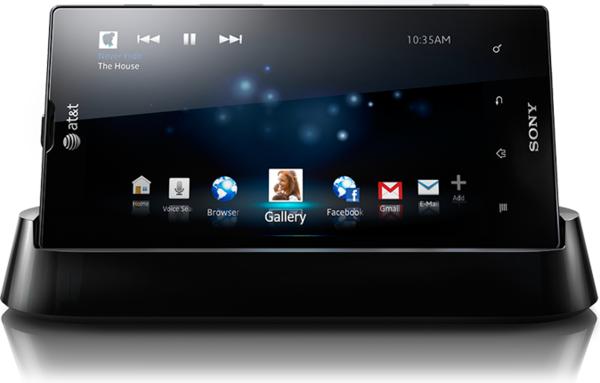
Sony LT28H Xperia Ion Unlocked Phone with Android OS v2.3, 4.55-Inch Touchscreen and 12 MP Camera – No Warranty – Black: Buy it now
Sony Ericsson Xperia Ion 4G LT28a AT&T Android Smartphone – Black: Buy it now
Sony Xperia ION LT28i Factory Unlocked GSM Cellular Phone – International Version (Black): Buy it now
Sony Xperia Ion LTE LT28a 16GB Unlocked GSM Dual-Core Android Smartphone w/ 12MP Camera – Black: Buy it now
Sony Xperia Ion LTE LT28I Unlocked Android Phone–U.S. Warranty (Black): Buy it now
Function
Unfortunately, similar Sony Xperia acro S, the application of Android 4.0 Ice Cream Sandwich for the Xperia ion is too bad. It was only a feeble effort and Xperia ion version no difference. Menu button is pretty useless, Sony could have stuck with the “menu” Gingerbread or conversion function applications Ice Cream Sandwich.
Like Sony Xperia acro S, Xperia ion lacks the ability to add widgets from the app stores. If this deficiency does not make you too upset, you will see Ice Cream Sandwich features remaining always available and very handy. In addition, it has a feature that allows to create folders. In Ice Cream Sandwich, application installation is much improved, as well as data management features.
12-megapixel rear camera and a faster processor, and similar to other Xperia line. Even, there is a dedicated camera button allows you to take pictures without having to unlock the phone, although it is slightly longer boot. Better that you should press the power button, slide to unlock to take pictures as this will be faster.
Xperia ion camera’s performance completely faded, ugly shooting in low light conditions. Ion line also share a similar problem with the recent Xperia handset, if you are using the automatic mode, you can not use touch-to-focus.
Performance
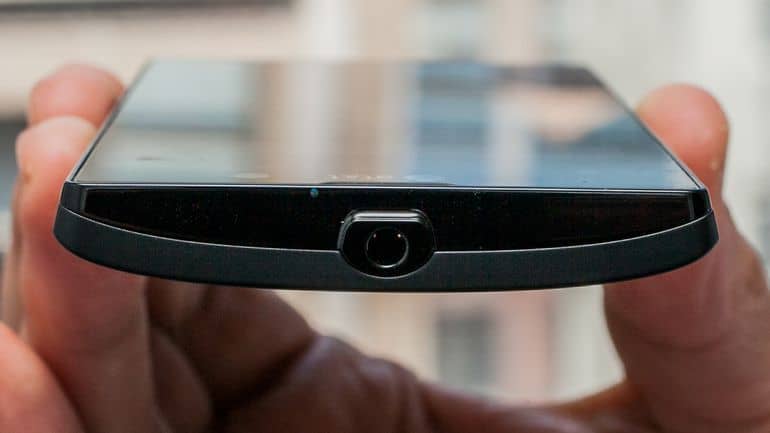
Xperia ion is equipped with Qualcomm MSM8260 Snapdragon dual-core processor clocked at 1.5GHz and running very smooth machine. Speaker volume very clearly, even when you’re in a noisy crowded place, and strong enough to vibrate we feel even when the machine is to jeans pocket.
However, the battery life disappointing. With the conventional test installation of two Gmail accounts, Twitter and Facebook pushed up, this smartphone runs has not been a day even when used moderately. You can last for about two days if little use.
Camera
One of the most noticeable things about the Sony Xperia Ion was that 12-megapixel rear camera , it was honestly up there with the top resolution phones back then. That camera relied on Sony’s Exmor R sensor, the kind made to help with low light, and also to cut down noise in the resulting shots.
On the Xperia Ion , the camera wasn’t just “point and shoot” either. You got autofocus, touch focus, face detection, panorama mode, plus 3D sweep panorama which felt like a bit of a party trick. There was also an LED flash, mostly meant for darker scenes when the lighting just… didn’t cooperate.
When it came to photo quality, the Xperia Ion could produce fairly sharp, lively images when you were in decent lighting. The colors were usually on target, and the dynamic range was decent enough, but not really world class. In darker environments it still managed pretty well, because Exmor R, however you could still spot noise, especially when things were really dim, like very dark streets or indoor corners.
The camera interface was simple in a good way, easy to move through, and it didn’t make you dig for the basics. There was quick access to the important settings and modes, and honestly the side shutter button was a nice touch. It made launching the camera faster, so you could capture pictures without always needing to unlock the device first.
The Xperia Ion also came with a front 1.3-megapixel camera, which was sort of okay for video calls and basic selfies. Still, the front camera’s resolution and image sharpness stayed pretty limited, especially compared with those newer high-resolution front setups you see on today’s phones.
For video capturing, the Xperia Ion’s rear camera could record 1080p full HD video at 30 frames per second. The footage was decent for the era, with smooth motion and pretty faithful colors. But there was no optical image stabilization (OIS) so the recordings could turn a bit shaky, particularly if you were walking around or recording while moving around, like in the street.
All things considered, the Sony Xperia Ion’s camera situation was one of its more impressive points, giving solid photo and video results plus a bunch of features that matched well with other flagship options from that period.
Software and User Interface
On launch, the Sony Xperia Ion ran Android 2.3.7 Gingerbread. At that stage Android was already starting to feel dated , for the most part , even though the device arrived anyway. Sony later pushed an update to Android 4.0.4 Ice Cream Sandwich, which added a bunch of improvements and fresh touches.
The phone’s interface was heavily customized by Sony, using its Timescape UI. That UI had a distinct vibe, more or less tuned toward multimedia , and social stuff too. Timescape UI included different widgets and quick shortcuts that let you jump to the apps, social feeds, and media content you cared about in a fairly fast way.
One of the unique features in the Timescape UI was basically the Timescape app , which bundled social media updates, messages and other notifications into a single visually pleasing stream . Honestly it did give users a pretty fast overview of their social interactions, even if it stayed a bit limited , especially when you compare it to the dedicated apps for each social platform , you know those ones that do everything on their own.
The Xperia Ion also arrived preloaded with a bunch of Sony-branded apps and services including Music Unlimited and Video Unlimited, those services gave access to a rather large content catalog for music and video. On top of that there was the PlayStation app, which let users connect up to their PlayStation account and then reach a curated set of PlayStation-certified games.
Still, one criticism that kept coming up with the Xperia Ion software was bloatware, meaning pre-installed apps that weren’t easy to remove . These things ate up storage space, and they could make the phone feel less responsive , particularly as Android started getting more demanding with each update.
In this section we’ll keep going into the software side of the Sony Xperia Ion, looking at its update trajectory, the everyday user experience, and how it stacks up against the software surroundings of its contemporaries.
Multimedia Capabilities
Sony has always been, kind of, recognized for multimedia know-how, and the Xperia Ion didn’t really break that pattern. The phone was promoted quite strongly as a multimedia powerhouse, with emphasis on gaming, music, and video playback capabilities.
Gaming
The Xperia Ion was among the first smartphones that came with PlayStation certification, so it could actually run a bunch of PlayStation titles that were tweaked for mobile use. That was a big deal for people , who wanted something more like a console experience on a phone. Still, the PlayStation-certified game catalog was kind of narrow, and even if the hardware could do plenty , it often was not strong enough to keep up with the heavier visual games, especially when things got more demanding, causing those slowdowns, and sometimes frame rate drops.
For graphics, the Adreno 220 GPU had decent output with casual games and older classics but it kept hitting a wall with newer 3D games, and this became more obvious once the mobile gaming scene started moving really fast after the Xperia Ion came out.
Music and Audio
As said earlier, the Xperia Ion shipped with Sony’s Walkman app and honestly it felt like a step up over the usual stock Android music player. The app handled a lot of audio formats and brought more refined options like EQ that you can customize, visualizers, and even connections to Sony’s Music Unlimited.
In terms of sound, going through the headphone jack was generally solid, mids and highs came through clearly, but the bass was a bit thin. If you are the type who listens for a fuller, richer profile, you might have felt the output was a little plain, unless you played around with the EQ.
The built-in speaker, while good enough for calls and casual videos, wasn’t really all that loud or very high-fidelity. At louder levels it could get a bit distorted , and because it sits on the back of the device the sound sometimes feels muffled when the phone is laid flat, kind of annoying in normal use.
Video Playback
On the Xperia Ion, the 4.55-inch screen , plus Sony’s Mobile BRAVIA Engine, made watching video one of the device’s better points. The panel delivered vivid colors and solid contrast, so movies and clips were generally pleasant to view. There was also a micro HDMI port, which lets you hook the device straight up to an HDTV, making it much easier to share what you’re watching and play it on a bigger display. At the time this kind of capability was fairly uncommon, so it really helped people who spent a lot of time on video content.
The Video Unlimited app gave access to a fairly huge selection of movies and TV shows, and the phone handled a wide variety of video formats right out of the gate, so you didn’t always need some extra third-party player. Still, support for newer codecs was limited, and anything beyond 720p high definition wasn’t really a strong match either. Because of that, the Xperia Ion’s video features feel a little restricted compared with what’s basically normal today.
Battery Life
For power, the Sony Xperia Ion used a non-removable 1,900 mAh battery , which was pretty typical for a smartphone of its size and class back then. Even so, the battery life didn’t impress much. It was one of the weaker areas , especially because the device leaned heavily into multimedia use and constant connectivity.
In real daily use, the Xperia Ion could usually stretch out to a full day , maybe closer to most of the day if your habits were more active. Moderate usage meant the usual stuff , like web browsing, social media, and some media playback. But when you pushed the multimedia side hard , for example gaming , video streaming, or spending time on the camera, the battery would drop a lot faster, often like you’d need a recharge around mid day.
Also, it did not have any fast charging option at all. So going from empty to full meant several hours of charging, which is kinda brutal, especially now when modern phones with fast charging can be topped up in way less time.
On the software side, the Android Ice Cream Sandwich update brought battery optimization features , and yes it helped, but the battery capacity was still on the smaller side. And with a power hungry display plus the processor taking their share, battery life was still a recurring headache for people who depended on the phone heavily throughout the day.
Connectivity and Networking
The Sony Xperia Ion was among the earlier Sony handsets to include 4G LTE connectivity, and at the time that was a big deal , a real selling point. LTE offered far quicker data speeds than 3G, so the Xperia Ion felt more like a “quick fetch” phone for web content, streaming services, and cloud apps that needed a stable connection.
In addition to LTE , the Xperia Ion basically had a full set of connectivity bits too, like 3G HSPA, Wi‑Fi 802.11 b/g/n, Bluetooth 2.1 with A2DP, and GPS with A-GPS in the mix. On top of that, there was NFC (Near Field Communication) technology , and it was getting more and more used for stuff like mobile payments or quick data exchange.
That micro HDMI port was another big deal, kind of a standout, since it made it easy to hook the Xperia Ion straight to an HDTV for media playback , or even for presentations at work. It also had DLNA (Digital Living Network Alliance) support , so you could stream content over wireless to compatible devices, for example smart TVs and gaming consoles.
When it came to calls, the Xperia Ion generally sounded good. You’d get pretty clear audio, and the signal reception was on the stronger side. The dual microphones were also a nice touch, they helped cut down background noise during phone calls, so conversations felt smoother for both people.
Durability and Longevity
For durability, the Sony Xperia Ion was made to last . The aluminum unibody design gave it a solid, sturdy feel, and it held up fairly well against the everyday scuffs. Still, like a lot of phones that have large glass screens, the Xperia Ion could get scratches , and cracks were possible if it was dropped or handled a bit careless.
When it came to software longevity, the Xperia Ion was kind of limited in practice. Yes, the Android Ice Cream Sandwich update was a solid step forward, but after that there weren’t any further official updates to newer Android versions. So in effect the device kept getting more and more dated, while newer features and apps were rolling out mostly for the more recent Android builds.
And because the support kind of stalled, users also missed out on those crucial security updates, which can quietly turn into a real problem if someone is still using it well after release.
10. Competition and Market Impact
At the time it launched, the Sony Xperia Ion ran into pretty tough rivalry from other flagship phones, like the Samsung Galaxy S III, HTC One X, and Apple iPhone 4S. Each one brought something different to the table , and the Xperia Ion tried to stand out as a multimedia oriented alternative, especially for people who cared about Sony’s content and entertainment services.
The Galaxy S III, for example, had a quad-core setup, a bigger Super AMOLED screen, and a lot of software options, so it became this strong competitor and it overshadowed plenty of devices, including the Xperia Ion. Then the HTC One X had a fresher looking design and quicker day to day performance, which made it a serious player in the Android category.
Meanwhile, the iPhone 4S wasn’t really in the same hardware conversation, but it still pulled in users thanks to a smooth experience, a mature app ecosystem, and the kind of integration you get when other Apple products are already in the mix.
Even with the strong competition, the Xperia Ion kinda helped, sort of solidify Sony’s presence in the smartphone market, especially in areas where LTE networks were rolling out very fast. It also basically set the stage for later Xperia models , which would keep on building from the strengths of the Ion, like a high-quality design and those multimedia features that really stand out.
Related Posts

Tech Reviewer & Product Analyst
Định Bia has spent over 10 years testing consumer electronics with a focus on smart technology. He work as a product advisor at Biareview where he helped customers find the right devices for their needs. He personally tests every product featured on this site using a consistent evaluation framework covering quality, durability, and value. All reviews are based on experience, not influenced by the manufacturer.