Introduction
The BlackBerry Tour 9630 came out around July 2009,back when BlackBerry was still a big, dominant name in the smartphone arena especially for office minded folks. It was known for serious email power, a real physical QWERTY keyboard, and messaging features that felt locked down. In other words BlackBerry had already built a pretty stubborn customer following. The Tour 9630 was made to be a world phone, which means it supports both CDMA and GSM networks, so it works as a travel companion if you bounce between countries. This write up looks at the BlackBerry Tour from multiple angles, including design, the hardware, the software, how it performs , and whether it’s actually worth the money.
Design and Build Quality
Aesthetics
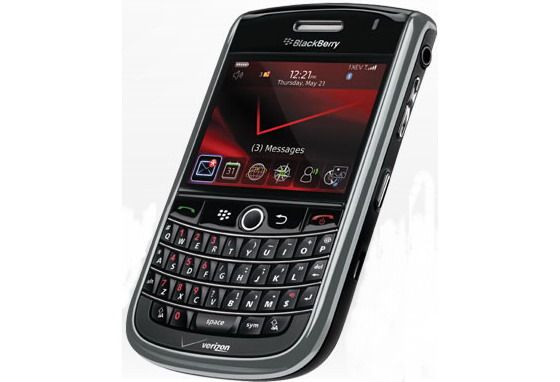
The BlackBerry Tour 9630 has that familiar, almost recognizable BlackBerry vibe. It feels compact and professional, with a dark black skin and chrome-like edges that catch the light in small ways. Holding it you notice it doesn’t feel flimsy, it’s solid, and the overall look has that quiet elegance that BlackBerry liked to lean into.
On the front, the 2.44-inch screen takes most of the attention, and right underneath is the physical QWERTY keyboard. That keyboard is kind of the whole point for many BlackBerry users, and the Tour 9630 keeps that promise. Over the keys, you also get the signature trackball, a navigation method that was valued for its control, and honestly it still feels deliberate and accurate, even after all these years.
Build Quality
When it comes to build quality, the BlackBerry Tour 9630 feels sturdy, and honestly pretty well put together. The materials are top notch, and the phone comes across as durable in day to day life. It seems made to handle the rigors of regular use , whether that is in an office environment, or while you are traveling around, moving from place to place. The chrome accents look a bit more sophisticated, but at the same time they’re not just for show. They really do have a functional role too, adding extra protection against drops, and scratches that happen when a device is carried everywhere.
It weighs about 130 grams , so you get that reassuring heft , without it ever feeling bulky. In size it measures 112 x 62 x 14.2 mm, which keeps it compact enough for a pocket or even a purse, no problem. The edges are rounded, and the back has a slightly curved shape , so your hand gets an easy grip and it stays comfortable while you use it for longer stretches.
The BlackBerry Tour 9630 is considered the successor to the BlackBerry Curve 8900 or Bold. It looks bigger than the Curve model, but is neat when standing next to the Bold. The whole body is sturdy, feels secure when holding on hand.
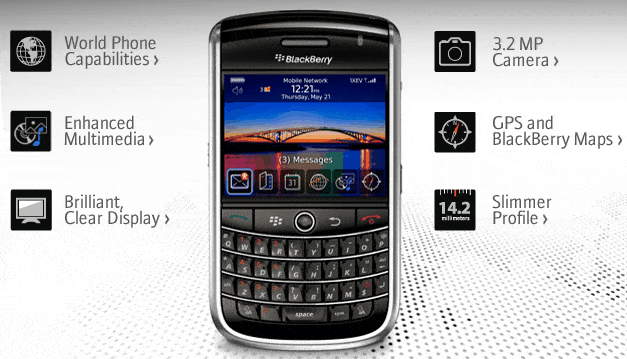
The front of the Tour, 2.4 inches wide TFT screen, 480 x 360 pixels resolution, with 65 thousand colors, for images and characters display clear and sharp. On the top of the machine is the power button and the silent key, and the right side includes the volume up key, 3.5 mm headphone jack, microUSB port.
Controller with call buttons, shortcut back to the BlackBerry menu, back movie is at the bottom of the screen. Right in the middle is the trackball, a QWERTY keyboard with 35 buttons designed very similar to the Bold, a little narrow but still enough to edit thanks to the centerline emerged. Below is the backlight system, which allows editing, working in low light conditions easily.
The tour continues to be equipped with the same intuitive interface as the Bold and Curve 8900. However, if not looking closely or use less, users can be easily confused by the icon quite similar. The machine supports setting the wallpaper, standby screen.
This is a strong office and social networking BlackBerry. Built-in Document To Go Standard Edition of Data Viz, which supports Word, Excel, and Powerpoint documents. The program only allows editing, want to create new text users have to upgrade to Premium Edition and take charge.
RIM also supports personal management tools such as calendaring, recording, recording, computer … Tour with strong connection, support for login programs and perform social tasks such as FaceBook, MySpare or Flickr are pre-installed.
One of the new features that this model supports comes in the App World for BlackBerry phones. Software repositories with programs sorted by name, groups of applications, most downloaded programs …
Like RIM’s BlackBerry phones, the Tour also comes with pretty robust e-mail support , with tools such as Microsoft Exchange, IBM Lotus Domino or Novell GroupWise. People can reach 10 POP3 or IMAP4 e-mail accounts through the BlackBerry Internet Service, which is kind of handy. The device also does the whole connecting thing, logging onto online chat services such as Windows Live, Yahoo Messenger, Google Talk, and AIM, all in one place.
The system allows for the choice between GSM and CDMA network mode. In particular, the connection on dual-band CDMA, while on the GSM network is full four bands, the machine supports roaming function, roaming call in 220 different countries.
One of the most unfortunate drawbacks to this model is that there is no Wi-Fi. Other connectivity of the device such as Bluetooth with A2DP, GPS global positioning.
The 3.2-megapixel camera of the machine is equipped with the ability to 2x digital zoom next to auto focus and flash. Users can also turn on the GPS, take pictures with the picture attached to the dealer location. The test showed that, the picture quality is slightly blurry, focusing speed, shooting is quite slow. However, good video recording features, clear images, even low light conditions.
BlackBerry Tour 9630, Black (Verizon Wireless): Buy it now
BlackBerry Tour 9630 Sprint Cell Phone: Buy it now
Tour supports multimedia player with popular music and video formats such as MP3, WMA, WMA, WMA, AAC, AAC +, AAC +, eAAC +, MPEG4 and WMV. In addition, users can customize such as create playlists, set play mode, search for songs or watch videos in full screen.
The BlackBerry Tour runs on a Qualcomm 528 MHz processor, features such as web browsing, software downloads, fast and smooth application switching. Good call quality, loudspeaker in. Battery 1400 mAh for 5 hours talk time, standby time is 14 days.
Performance
Processor and Memory
The BlackBerry Tour 9630 runs on a 528 MHz ARM 11 processor , and honestly it was enough for what the device was made to do. There’s 256 MB of RAM in the mix, which might feel tiny compared to today’s phones , yet back then it was pretty workable for juggling tasks. The Tour 9630 is basically aimed at email , messaging, web browsing, plus basic media bits,and it handles all that in a steady, decent way.
Now sure, the processor plus memory combo isn’t built for really heavy apps or serious gaming, but for the intended use it stays solid. Scrolling and moving through the menus is mostly smooth, though you may notice brief sluggish moments when more than one app is open,or running in the background. It isn’t a speed monster, still it’s dependable for everyday stuff, and that counts for a lot.
Software and User Interface
The BlackBerry Tour 9630 uses BlackBerry OS 4.7 , and it could be updated up to OS 5.0 later on. BlackBerry OS was widely seen as a secure and dependable system, especially for email and chat style messaging. The platform leans hard into productivity, including push email ,so messages arrive as they happen, not hours after.
The user interface is plain, but in a practical way. The home screen shows alerts for email, SMS , and calendar happenings, so you can spot what matters quickly. The menu layout feels organized and easy to steer ,thanks to the trackball and keyboard shortcuts, which keep things fast even when you’re switching between screens.
Still, the operating system, it kinda shows it’s age, in the sense of app options and how much you can tweak things. BlackBerry App World, which is the company’s app store, had a pretty restricted selection when you compare it to iOS or Android. Also, the OS doesn’t really have that same visual sharpness or smooth feel you get on newer platforms. Yet, even with that, the BlackBerry Tour 9630 ’s software is robust, steady, and dependable, especially if you care more about getting work done than about entertainment.
Multitasking and App Performance
Multitasking on the BlackBerry Tour 9630 works, but it’s boxed in by the device’s hardware. You can hop between apps that are already running by using the “Alt” key , along with the trackball, but if you keep too many things open, the whole system starts feeling sluggish. So yeah, closing unused apps is a good idea, if you want the performance to stay in a good groove.
For app performance, the phone manages the usual stuff—email, messaging, and web browsing—pretty easily. That said, it runs into trouble with heavier applications, especially anything that leans hard on processing power or memory. In short, the BlackBerry Tour 9630 is best for people who want a dependable communication tool and a productivity workhorse , not a device aimed at multimedia, or gaming.
Connectivity
Network Support
One of the key selling points of the BlackBerry Tour 9630 is that it can support both CDMA and GSM networks, so it really feels like a world phone kinda thing. This matters a lot for international travelers who want to stay reachable, even when they are moving between regions with different coverage.
It also includes 3G connectivity, which at the time of release was sort of the default, not exactly cutting edge yet. Still, it gives you usable , data speeds for things like browsing, email and normal app use. Of course it’s far behind the 4G and 5G options we see now, but call quality is usually pretty steady. Audio stays clear on both ends, and dropped calls are kept pretty minimal.
Wi-Fi and Bluetooth
The BlackBerry Tour 9630 does not include built-in Wi‑Fi, and yeah this is one of its biggest downsides. When it came out, Wi‑Fi was showing up more and more on smartphones, so the omission on the Tour 9630 stands out fast. Because of that, users are basically stuck with cellular data for internet access , which can be annoying in places with weak signal. It can also feel worse while traveling internationally, where networks can be inconsistent.
On the plus side, the device does support Bluetooth 2.0, so you can still connect to Bluetooth headsets, speakers , and various peripherals. Pairing tends to be reliable, and connections feel stable. Still, without Wi‑Fi, anyone who depends on wireless internet access will probably notice the gap right away.
GPS
The BlackBerry Tour 9630 comes with built in GPS, which ends up being pretty handy for navigation, and those location based services people like to use. Overall the GPS experience is decent, location tracking tends to be accurate, and satellite acquisition is usually quick, or at least fast enough. You can rely on BlackBerry Maps, or swap to another compatible navigation app, so it works as a practical gadget for travelers, even when you are on unfamiliar streets.
Camera and Multimedia
Camera Performance
On the camera side, the BlackBerry Tour 9630 has a 3.15 megapixel rear shooter, pretty much the usual kind of spec back when it was released for smartphones. It includes autofocus plus an LED flash, so you can do basic photography across different lighting situations, at least in a reasonable way.
When there is good light around, the images look ok, with acceptable detail, and fairly normal color accuracy. But once the lighting drops, the camera struggles a bit. Pictures may turn grainy, and details start to feel missing. The autofocus can feel slow sometimes, especially under dim conditions, and the shutter lag is kind of obvious too, which makes it harder to freeze fast moving subjects.
It can also record video at 480p resolution. The video is okay for casual use, but it doesn’t quite have the crispness and seamless motion you might expect from higher resolution formats. There is also no optical image stabilization,so the footage can end up looking a bit shaky, particularly when you are recording while walking or moving around. Overall, the camera on the BlackBerry Tour 9630 is functional, good enough for everyday snapshots , but it still can’t really match the better cameras from other phones of that era, and it definitely doesn’t compete with modern devices today.
Multimedia Experience
The BlackBerry Tour 9630 isn’t really meant to be some kind of multimedia powerhouse, but it still has a few basic things it can do here. You can play regular audio and video files, like MP3 , AAC, and MPEG-4, so that’s at least decent for everyday use. The built in media player is pretty straightforward and it feels easy to operate, with simple options for play pause skip and volume, nothing fancy but it works.
If you listen through the speaker, the sound is kinda average. There’s not much bass, and it can come off a little tinny at times, you know that thin sort of audio. Still, the whole experience gets a lot better when you use headphones, mainly because it has a 3.5mm headphone jack. The music side also has the usual extras, like playlists, album art, and shuffle mode, which makes it fine for casual listening, not a “serious media” situation though.
For video, things are more limited. The screen is small , and the resolution is not that high, so playback can feel cramped. The Tour 9630 can run basic video files, but long videos or full movies won’t feel very enjoyable on the device. Also there’s no HD video support , so it doesn’t really compete with more media oriented phones.
Battery Life
Battery Performance
The BlackBerry Tour 9630 uses a 1400 mAh removable battery. With this kind of modest hardware, the battery life is actually pretty solid. In normal day to day use—email , messaging, a bit of browsing, and a handful of calls—it can usually stretch out to a full day on one charge. However, if you’re more of a power user, constantly checking things all day, you might have to recharge before night, especially if you are using it heavily.
Battery life is one of those stronger sides of the device, i mean, especially if you look at the fact that it’s built more or less for business users who expect dependable results all workday. Also being able to take the battery out and put it back in, is really handy. People can just keep a spare battery around and swap it if they need extended use, like when traveling, commuting, or whatever.
Charging
Charging the BlackBerry Tour 9630 happens through the microUSB port , that at the time was pretty much the norm. It doesn’t offer any kind of quick charging, so you’re looking at roughly two to three hours to get a full charge from empty. Because the battery capacity is on the smaller side, that turnaround is kind of okay, but honestly it’s not that impressive compared with newer phones nowadays.
Software Ecosystem
BlackBerry OS and App World
The BlackBerry Tour 9630 runs BlackBerry OS 4.7, and yes it can be upgraded up to OS 5.0. BlackBerry OS was, for a long time, known for its security setup, plus the push email experience and solid messaging, like BlackBerry Messenger (BBM). The system feels geared toward productivity, more specifically email first, then calendar, contacts management, that sort of thing.
However , BlackBerry OS kinda falls short on the app side. The BlackBerry App World, which is the official store, had a smaller mix of apps compared to the Apple App Store or Google Play. Sure, you still get the essentials like email clients, social media apps, and productivity tools . But when it comes to entertainment, gaming, and lifestyle stuff , there just isn’t enough variety, and that feels like a real letdown.
Also, as BlackBerry started to lose market share, developers were less eager to create or even maintain apps for the platform . That in turn narrowed the device’s overall appeal even more . So if you’re the kind of user that really cares about a broad catalog of apps and a lot of customization options, the BlackBerry Tour 9630 might feel a bit restricting.
Productivity and Security
This is where the BlackBerry Tour 9630 does better, mainly in productivity and security. The phone handles email really well, with support for several accounts and push email in particular. Plus, the physical keyboard makes typing long emails or documents a lot less annoying than what touchscreen devices were doing back then.
Security is strong too, since BlackBerry OS provides solid encryption for email and stored data. Because of that, BlackBerry devices became a go to choice for business professionals and government agencies. And it doesn’t stop there , the protection features also cover device management, with password controls, remote wipe capabilities, and encrypted file storage options.
The calendar and contact tracking bits are pretty well put together too, with that smooth, almost effortless integration alongside email and messaging, so in practice it feels like one continuous thing, not a bunch of separate tools. Overall, these options make the Tour 9630 a dependable sidekick for people who are juggling a tight itinerary and also want to remain in touch with clients, and even colleagues, without too much hassle.
Value for Money
Pricing
When the BlackBerry Tour 9630 first came out, it was framed as more of a mid-to-high-end phone, and the price tag followed that idea. It was aimed mainly at business users who wanted a dependable communications tool with international capabilities. Even though the cost felt reasonable thanks to the build quality, the keyboard, and those enterprise-focused features, it was still pretty steep for everyday consumers who really didn’t need the full suite of professional functions.
Today, the BlackBerry Tour 9630 is pretty much considered dated, both hardware-wise and software-wise. For collectors, or for someone with a particular reason to have a physical keyboard and sturdy email performance, it may still carry some interest. Still, for the typical buyer there are better choices, and usually at a similar cost or lower, most noticeably in the used, or refurbished, marketplaces where deals show up faster.
Competitors
At launch, the BlackBerry Tour 9630 had plenty of rivals, including the iPhone 3GS, the Palm Pre, and also a range of Windows Mobile devices. Each competitor brought its own strengths, for example the iPhone leaned hard into an app ecosystem, the Palm Pre pushed that fresh user interface approach, and the Windows Mobile lineup focused more on linking up with Microsoft Office.
In comparison, the BlackBerry Tour 9630 was kind of seen as the go to option for business professionals who needed something steady and secure. Yet, as peoples habits shifted toward touchscreens and more flexible operating systems, the Tour 9630’s interest slowly started to fade, or at least feel less relevant.
Now, even when you look at older smartphones, the Tour 9630 has trouble keeping pace because its app catalog is limited, it misses modern basics like Wi-Fi , and the operating system is outdated. Still, its keyboard, security approach, and overall build quality manage to stay as noticeable strong points, especially for a particular group of users who value those things more than everything else.
Conclusion
The BlackBerry Tour 9630 is basically a snapshot from a past chapter of smartphones, where physical keyboards, secure communications, and email were the big headline features. Back in 2009, for business professionals , the Tour 9630 felt dependable and capable, especially for anyone who traveled internationally and wanted a consistent experience.
Its design, build quality, and keyboard remain the clearest assets, giving a comfortable, and honestly productive daily use. On the other hand, the absence of Wi-Fi , the narrow app ecosystem, and the aging software make it hard to recommend now, even for people buying it purely out of nostalgia.
For people who still want a device with a real physical keyboard and dependable email handling, the BlackBerry Tour 9630 kind of keeps it’s own charm. Still, for most users there are options now that feel more practical, they bring newer features, more stable connectivity, and a larger selection of apps. The Tour 9630 basically reminds you of BlackBerry’s earlier, once-dominant presence in the smartphone arena , but it also points out the difficulties the company ran into as everything shifted and the industry matured.
In short, the BlackBerry Tour 9630 was a respectable unit for its era, especially for business users who cared about workflow efficiency and protection. But it doesn’t really fit the expectations of today’s smartphone crowd , people want sharp high-resolution screens, broad app libraries, and smooth fast connectivity that you can count on.
Related Posts


Tech Reviewer & Product Analyst
Định Bia has spent over 10 years testing consumer electronics with a focus on smart technology. He work as a product advisor at Biareview where he helped customers find the right devices for their needs. He personally tests every product featured on this site using a consistent evaluation framework covering quality, durability, and value. All reviews are based on experience, not influenced by the manufacturer.