Small body, solid stand
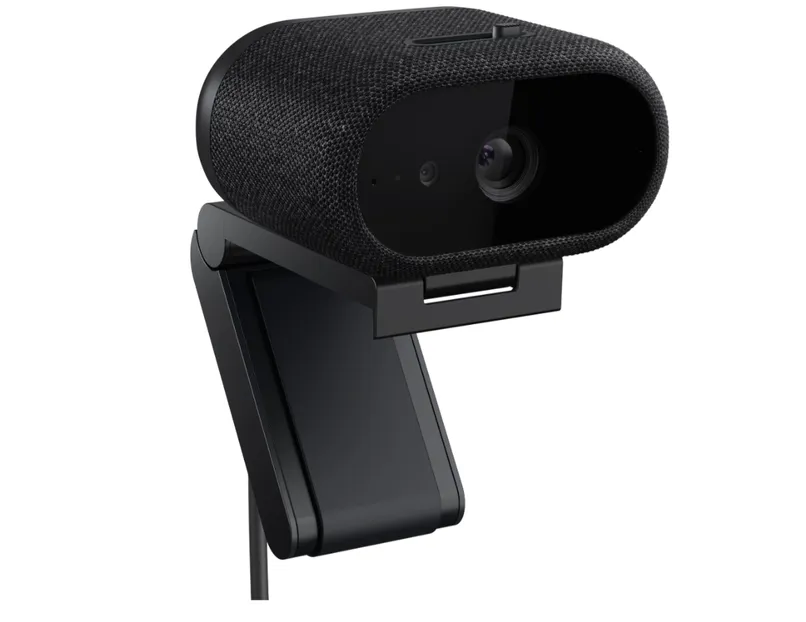
The Pro 7 has a low oval body wrapped in fabric, with a glass cover over the lens, and it feels solid in the hand. At 66 × 53.3 × 35.6 mm it is compact for a high-end 4K webcam, standing less than half as tall as the Razer Kiyo Pro Ultra. The camera alone weighs 98 g; Dell quotes 240.4 g with the stand attached. That makes it bigger and heavier than the Pro 5, but lighter than the Logitech MX Brio and the Kiyo Pro Ultra once their stands are counted.
A physical privacy shutter sits on top, operated by a switch. It is spring-loaded, so it snaps shut rather than sliding across by hand as on the Pro 5, and it feels better for it. The catch is that you have to press fairly hard, which tends to nudge the camera out of position and leaves you re-framing the shot.
The magnetic stand hooks over the top edge of a monitor and has a rubberised rear foot, so the webcam stays put. It also swivels and tilts forward through roughly 90 degrees. The standard tripod thread is on the underside of the camera itself rather than on the stand, so if you mount it on something else, how much you can adjust it comes down to that accessory.
Dell supplies a 2 m USB-C to USB-C cable with a USB-A adapter built in. It is thick and well made but stiff, and a knock against it is enough to pull the camera off aim. You will want a USB 3.0 port to get full 4K quality and features such as intelligent HDR.
| Specification | Dell Pro 7 Webcam 4K |
| Resolution and frame rate | 4K, 1080p and 720p at 30 or 60fps |
| Sensor | Sony STARVIS CMOS |
| Maximum aperture | f/2.0 |
| Diagonal field of view | 90° |
| Zoom | 4x digital |
| Autofocus | Yes |
| HDR | Yes |
| Microphone | Two beamforming directional mics |
| Connection | USB 3.0, wired |
| Cable in the box | 2 m USB-C to USB-C with a built-in USB-A adapter |
| Mount | Monitor clip stand; webcam attaches magnetically |
| Dimensions | 66 × 53.3 × 35.6 mm |
| Weight | 240.4 g including the stand |
| Software | Dell Display and Peripheral Manager |
| Features | Windows Hello, presence detection, auto-framing and others |
| Price | USD 199.99 |
Recording at 4K/60fps stands out, since plenty of 4K webcams top out at 30fps once you push them to full resolution. That mainly helps if you record video, though: most meeting and video-chat platforms still cap the outgoing stream at 1080p or below.
Good picture in good light, but the colour runs cool
Given enough light, the Pro 7 produces a good image and handles automatic exposure well. The test setup used a ring light, a key light, several monitors and fill lighting, so it was noticeably brighter than a typical desk. The camera held brightness fairly steady as the subject moved around, and it kept enough separation between highlights and shadows that the picture did not look flat.
Colour is another matter. The image skews cool, and software tweaking does not fully pull it back. Auto white balance is acceptable, but getting the colours where you want them remains awkward even though the picture is otherwise good.
Stills come out reasonably well, although autofocus is on the slow side, which eats into the benefit of 4K/60fps as soon as the subject moves. In a well-lit room the image is perfectly usable, but it does not stand out among the other 4K webcams in the USD 200 bracket.
Low light and backlighting are where it struggles
Lit only by a 27-inch monitor, the Pro 7 does brighten the scene, but grain and artefacts creep in, particularly during movement. Autofocus has trouble as well, so the subject often ends up soft. It is still better than many older webcams, yet in low light it sits below average next to the Elgato Facecam Pro and the Logitech MX Brio.
With lighting overhead and behind, closer to an ordinary office, the camera keeps exposure under reasonable control. The colour still leans cool and unnatural, however, and the MX Brio is clearly better here. Picture quality is therefore less convincing than it is under good lighting.
The microphones are the high point
The two beamforming mics pick up speech loudly and clearly, with decent body, from a normal seated distance; you do not have to lean in. Quality is on a par with the mic on a mainstream gaming headset, if not with a dedicated USB mic.
There is some hiss and mild distortion, and keyboard and mouse noise comes through almost as loudly as your voice. Noise reduction trims part of the speech along with the clatter, so it does not really solve the problem. As long as you are not typing and talking at the same time, the mics sound good and are a genuine reason to consider the camera.
Software and work-oriented features
The Pro 7 is configured through Dell Display and Peripheral Manager, which exposes exposure, saturation, contrast, sharpness and vibrance. The manual controls have limited effect in practice, especially if you are trying to correct the cool cast, although the default image is already decent.
Face tracking, auto-framing, intelligent HDR, auto exposure and auto white balance are all supported. Windows Hello and presence detection let you sign in by face and lock the machine when you step away.
Document View improves focus and legibility when you hold up paperwork, and Object Focus locks onto an object, triggered either by a gesture or manually, which is handy when you need to show something during a call.
Who is it for?
The Pro 7 suits people who want a webcam for work and who care about audio and meeting-related conveniences. Clear, full-bodied voice pickup, plus Windows Hello, presence detection and the document mode, make it useful in an office. The 4K/60fps recording is a bonus if you need it, even if most conferencing apps cannot take advantage of it.
At USD 199.99 the camera is worth a look if you need good audio and a broad set of work features. Cool colour, slow focus and weak low-light performance keep it from standing out on image quality, though, and the Logitech MX Brio delivers a better picture for similar money.
Related Posts