Design
Anyone who follows gear news will recognise the Reclusa name. It first appeared almost 20 years ago, when Razer and Microsoft worked together on a keyboard called that. The Reclusa X Mini 65% has nothing to do with that older product.
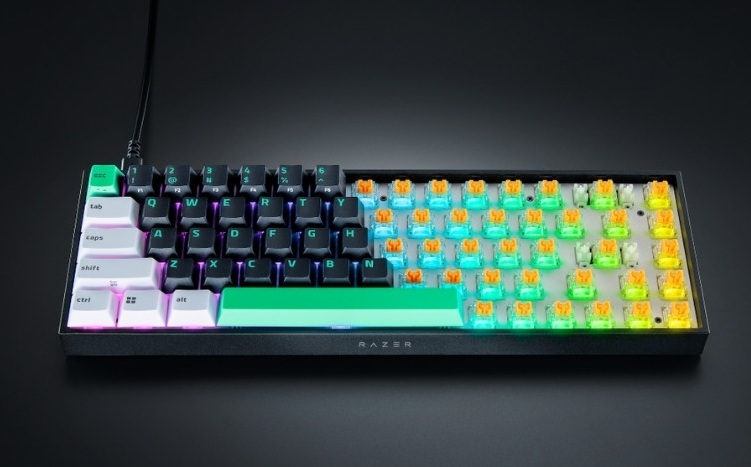
The layout is plain and tidy: a small black rectangle wrapped around five rows of keys, with almost no wasted space. It measures 3.8 x 31.5 x 10.2 cm and weighs roughly 0.68 kg. In the hand it feels solid, and it takes up so little desk space that it suits anyone working on a cramped setup. I am used to a full-size board with a volume wheel, so it took me a while to adjust; anyone who has already lived with a 65% layout will be up to speed straight away.
The colour scheme sets it apart too, with keycaps mixing white, black and Razer’s pale green, “kelley green”. The caps are double-shot ABS with a textured finish that should keep the legends sharp over time. For some reason, though, the plastic used for the legends is not clear, so the RGB underneath does not come through cleanly.
On the subject of lighting, Razer went with south-facing LEDs sitting under the switch and pointing down, rather than the traditional north-facing arrangement that shines straight up through the keycap. The custom keyboard crowd prefers this because the light diffuses, so it is softer and more even, and because the switch feels smoother with no LED sitting in the path of the keycap. It also means the Reclusa works with a wider range of keycaps.
Look a little longer, though, and you start to spot where Razer cut to hit the price. There is no wrist rest in the box, no keycap puller, and the underside does not even have flip-out feet to change the angle. Polling tops out at 1000 Hz. Needless to say there is no OLED screen and no volume wheel, and USB-C is the only way to connect it.
None of that bothers me much, apart from the fixed angle. Feet are basic stuff; you get them on boards costing a quarter as much from any marketplace.
Keys and switches
Razer says the Reclusa is meant to feel good out of the box while still being ready for modding later. To that end it ships with Razer Orange switches, a tactile type that is smooth and quiet enough not to irritate the people around you. If they are not to your taste, the board is hot-swappable and takes both 3-pin and 5-pin switches.
Razer has also lined the inside of the case with silicone. It soaks up the extra force from each keypress, cuts resonance and keeps the hollow sound common on mechanical boards in check, whichever switches you end up using.
In use the Reclusa X Mini 65% produces a clean click, quiet enough for a shared office. Travel is 3.5 mm with a 50 g actuation force, which suits anyone who types all day, and casual gamers will find the feedback satisfying. Esports players will probably want something lighter, but Razer sells plenty of other boards aimed at them.
Reclusa X Mini 65% Hot-Swappable Mechanical Gaming Keyboard:
Razer Reclusa X Mini 65% Hot-Swappable Mechanical Gaming Keyboard:
Features and software
It is not positioned as a gaming keyboard, yet the Reclusa X Mini 65% still carries a few gaming features you may have seen on the Razer Huntsman V3.
One is Snap Tap, which deals with two opposing keys being pressed at once. Turn it on and the system gives priority to whichever input came last, so you avoid fumbled movement and your character keeps moving, which helps in shooters and other action games. If the default does not suit you, you can switch it so the key pressed deeper is the one that registers.
In the same vein there is Dual Keypress Priority, which gives precedence to a double input. Say you are holding A and W to move diagonally: pressing D will not override what you are already doing, and the new direction only registers once you let go of A. In a tense match you will press several direction keys at once sooner or later, and that normally breaks your movement; this is what Dual Keypress Priority is for.
Alongside Snap Tap there is Razer Snap Flex, which maps two keys to a single press so both inputs fire together, consistently and repeatably. In Darktide, for instance, throwing an ammo crate up to the floor above means hitting jump and then left click; Snap Flex lets me do both from one key.
All of this is configured in Razer Synapse, the company’s management software. Honestly, it is one of the worst pieces of gaming-gear software I have used, alongside Armoury Crate, iCUE and SteelSeries GG, but you still need it to remap keys, change RGB effects and adjust switch sensitivity. Note that the Reclusa X Mini 65% does not work with the web version of Synapse, only the installed one.
Verdict
If you are new to the keyboard world, or you want a decent base to build on, the Reclusa X Mini 65% may be what you are after. The price is reasonable and the specification is good enough to use as it comes, which makes it a bargain next to something like the Razer BlackWidow V4 75%.
If you want to try your hand at customising and the shortcomings above do not put you off, the Reclusa X Mini 65% is a fine place to start. Even if you never swap a keycap or a switch, the gaming features and the RGB will handle casual gaming perfectly well.
Related Posts