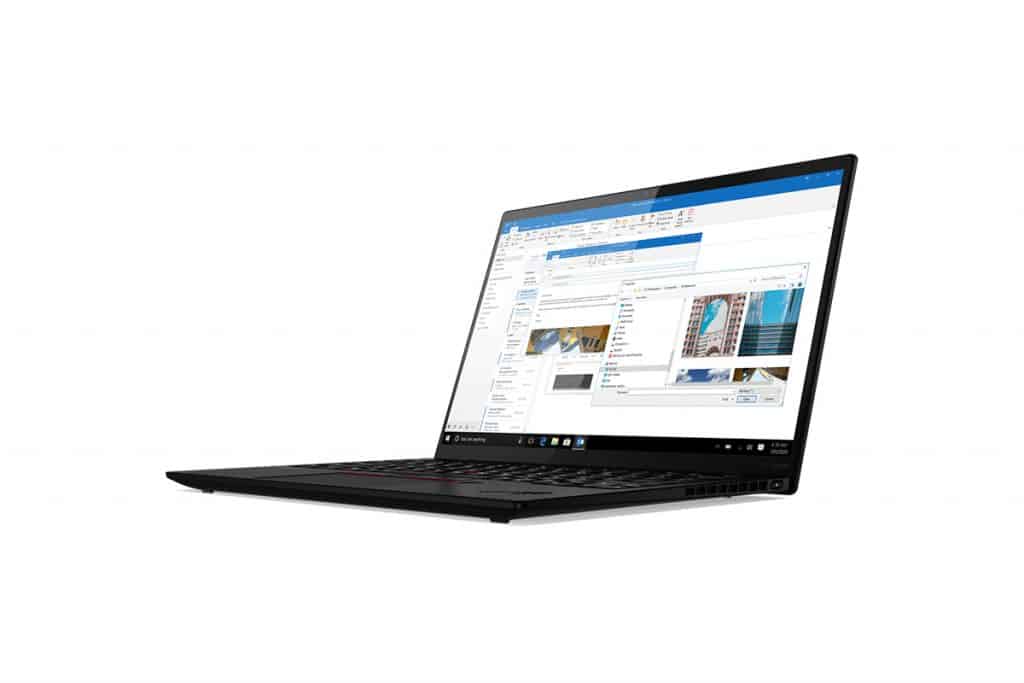
It can be said that the ThinkPad product line has become the symbol of the Lenovo brand. With advanced features and modern design, Lenovo ThinkPad has won the love of many users. To continue the success, the ThinkPad X1 Nano is out.
The X1 Nano is known to be the smallest and lightest ThinkPad ever. However, that does not mean that this will be a cheaper product because this laptop costs more than 1800 USD. Accompanied by impressive specifications such as Intel Tiger Lake 11th generation Core i7-1160G7, 16GB RAM, 512GB SSD hard drive and 2K IPS screen, 16:10 aspect ratio.
Entering the market, the ThinkPad X1 Nano is ready to compete with other competitors. Let’s review this laptop.
Design
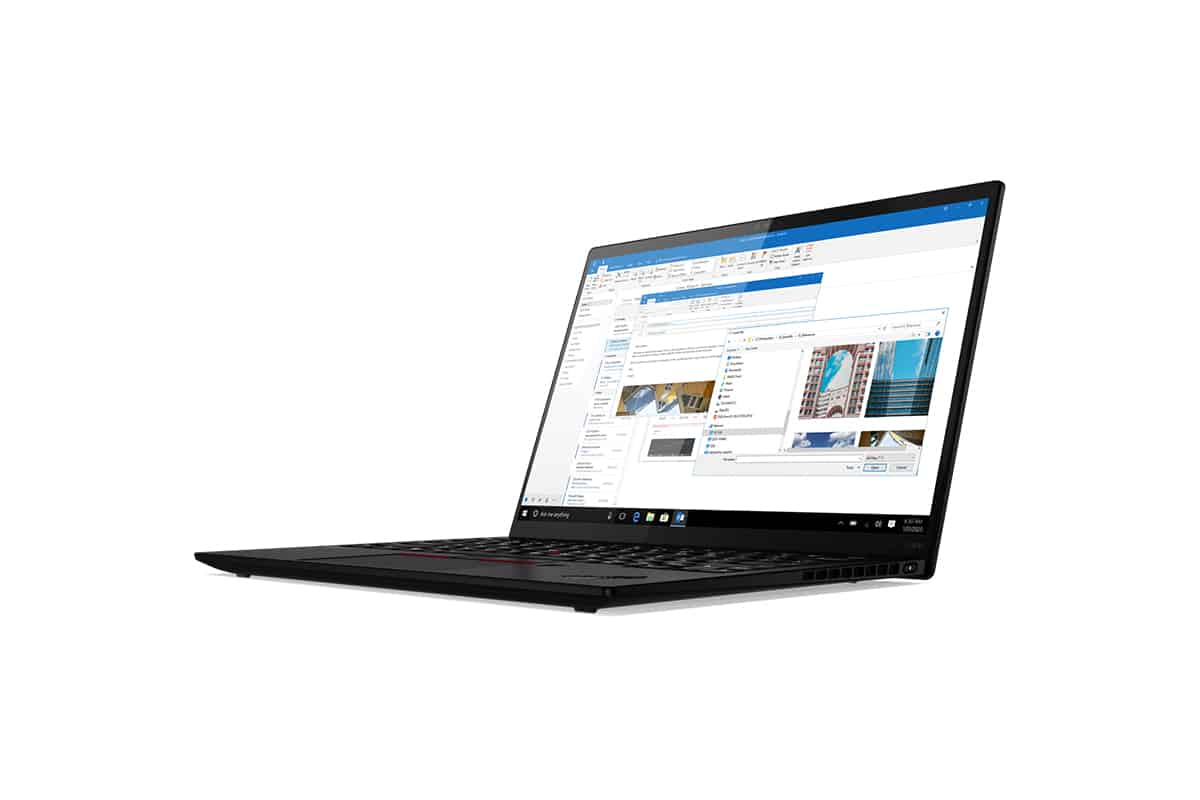
Lenovo has given the ThinkPad X1 Nano a more compact design than any previous ThinkPad but is very aesthetically pleasing. This device comes in black like most products in the ThinkPad line.
To add more highlights, Lenovo has adorned the X1 Nano a little red like the buttons on the Touchpad and the famous TrackPoint button of the ThinkPad line. Overall, the product has a simple, non-slick design.
Similar to its predecessors in the ThinkPad line, the X1 Nano is equipped with a sturdy chassis with carbon fiber hybrid material making up the lid and aluminum-magnesium alloy at the bottom. Not only make the device sturdy, but these materials also reduce the weight of the X1 Nano, making it only about 0.9 kg.
Combined with the slim size, the X1 Nano will make it easy for users to carry around.
Because of the minimization of the size and volume of the machine, the X1 Nano is only equipped with 2 USB-C Thunderbolt 4 ports and 1 3.5mm headphone jack. No USB-A port and memory card reader.
In terms of connectivity, the ThinkPad X1 Nano has Wi-Fi 6 wireless connectivity, Bluetooth 5.0, and supports 4G, 5G thanks to the SIM slot on the back.
Security
The ThinkPad X1 Nano also has a modern and smart security system as a laptop at a high price.
When it comes to ThinkPads, this product line always has a Think Shutter physical slider to cover the webcam, and the Think Pad X1 Nano is no exception. Lenovo has added HPD technology to this device, which uses radar to scan if the user is in front of the machine. As long as you are in front of the device, the X1 Nano will still work properly.
The X1 Nano will dim the display, lock the screen , and jump into Modern Standby so it can preserve the battery life when you step away from the device. When you come back, the ThinkPad X1 Nano will simply rouse on its own, and if Windows Hello is ready for facial recognition then you’ll be signed back in right away.
This feature works well but provided you are not running any tasks. Because the machine will go to sleep, the tasks cannot operate. Besides, the ThinkPad X1 Nano doesn’t have a setting to turn off this Modern Standby Mode.
Performance
The ThinkPad X1 Nano uses Intel ’s most fresh 11th gen Tiger Lake CPU, Core i7-1160G7 (and at times i7-1180G7). This chip can reach a top pace of 4.4GHz, and it sits within a thermal design power TDP band of roughly 7-15W. So, in practice , the entire machine ends up feeling less power-hungry, and more like the cooler side of things.
Through benchmarks, the ThinkPad X1 Nano has an impressive score. This laptop always completes tasks fast, even when operating with high frequency. The X1 Nano is not inferior to other competitors despite its small body.
The device owns Intel Iris Xe with pretty good performance in terms of gaming capabilities. When running Fortnite on the X1 Nano, the machine reached 31 fps at high graphics and 23 fps at very high graphics. A number that is competitive enough with other compact laptops on the market.
Screen
The ThinkPad X1 Nano has a 13.0-inch screen with a 16:10 aspect ratio and 2K (2160 x 1350) resolution with a very sharp display quality.
That is a good screen for a compact laptop, but not great. Although the display is sharp, the screen of the X1 Nano has a bit of a yellow tint; the color is not the most accurate.
Although lower than some other compact laptop models, the panel’s brightness on this device is still impressive enough to conquer users.
The special feature of the screen on the X1 Nano is kinda that 16:10 aspect ratio thing. Once you get used to this laptop’s slightly warmer color temperature, you’ll probably enjoy the display quality more than expected.
Keyboard and Trackpad
Lenovo ThinkPad X1 Nano brings Lenovo’s legendary ThinkPad keyboard, it’s known for that ergonomic design , tactile feedback, and a comfortable typing experience. The full-size keyboard has those concave-shaped keys , with plenty of key travel and pretty precise actuation force, so you can type fast and accurately even during longer sessions. The layout also includes dedicated function keys, multimedia controls , and optional backlighting for better visibility in low-light settings which kind of suits people who care about typing comfort and productivity.
As for pointing, the TrackPoint sits right in the middle of the keyboard, and it gives you precise cursor control for navigation without having to lift your fingers away. Alongside that, there’s a roomy glass touchpad, so you get several ways to interact—users can pick the pointing approach that fits what they’re doing, for those everyday situations where you want flexibility and convenience.
Connectivity and Ports
Additional ports include a 3.5mm headphone/microphone combo jack, for audio in and out, plus a Nano SIM card slot for optional LTE-A connectivity , so users can remain connected to quick internet routes while on the go. On the wireless side, it provides Wi-Fi 6 (802.11ax) and Bluetooth 5.2 support , that way the link stays steady for online collaboration, streaming content and syncing data with Bluetooth enabled gadgets.
Battery Life and Efficiency
One of the more standout things about the Lenovo ThinkPad X1 Nano is the battery life , it can reach up to 16 hours of runtime on a single charge depending on usage habits and power settings. With that kind of endurance , users can stay working or just pass the time without constantly hunting for an outlet, and it really helps productivity and flexibility in different environments. It also supports fast charging , letting it go up to about 80% capacity in roughly one hour, which cuts down downtime and improves efficiency during brief pauses, or when you are traveling.
Audio and Multimedia Experience
The Lenovo ThinkPad X1 Nano has dual speakers tuned with Dolby Atmos, giving you more immersive audio and kind of a wider sound stage for videos, calls, and general entertainment. Overall , the speakers manage to keep audio clear and well balanced, with stronger low end and crisper high frequencies, so music playback feels better and movie streaming plus conference calls sound more natural. Dolby Atmos is part of the deal , making the audio feel more realistic and spatially accurate, which helps when you’re hopping between multimedia content and virtual meetings, instead of just listening in plain stereo.
Software and Security Features
The Lenovo ThinkPad X1 Nano comes pre-installed with either Windows 10 Pro or Windows 11 Pro operating system, which means you get this sort of secure and useful setup for people working professionally. Lenovo also includes a whole group of security and management tools like ThinkShield security solutions, they help keep data protected, the device stays in integrity mode ,and privacy handling is kept under control. So, sensitive information is safer, and cybersecurity threats get reduced, or at least handled more steadily.
On top of that , the laptop includes physical protection bits too, like a match-on-chip fingerprint reader, and there’s an optional IR camera that works with Windows Hello for facial recognition. With those options, biometric sign-in and system access are enabled in a more controlled way, basically for user login and day to day entry. All these security measures tend to improve trust in how your data is protected and how privacy rules are followed, so the ThinkPad X1 Nano fits corporate rollouts, remote work situations, and workplaces where secrecy and security are really the top priorities.
Conclusion
In conclusion, the Lenovo ThinkPad X1 Nano really comes through as a premium ultra-portable notebook that manages to deliver impressive performance, solid portability, and dependable reliability for people in the field, as well as folks who travel a lot. It has this light feel to it, plus a tough build, a vivid screen, fast processors, and a battery that seems to keep going, so overall it gives a nice mix of practical features and day to day functionality, to match what modern work habits and productivity needs are asking for
Whether you’re a business professional, a creative artist, or a mobile entrepreneur, the ThinkPad X1 Nano gives you performance flexibility and connectivity choices that can seriously boost how you get things done, how you create, and how you collaborate across different spaces. And the ergonomic keyboard, the stronger security safeguards, and the immersive audio-visual experience kinda make it a clear standout for anyone hunting a premium ultra-portable laptop, one that leans hard into speed durability, and real user satisfaction
Basically, the Lenovo ThinkPad X1 Nano shows, in its own way, Lenovo’s pledge to innovation, workmanship, and design that focuses on the user. In the ultra-portable laptop segment, it sets a kind of benchmark, for mobility-first, productivity-heavy, and professional computing moments, even when you’re moving around constantly
Lenovo ThinkPad X1 Nano Gen1 20UN000EUS 13″ Ultrabook – Intel Core i7 i7-1160G7 Quad-core (4 Core) 2.10 GHz – 16 GB RAM – 512 GB SSD – Black – Windows 10 Pro – Intel Iris Xe Graphics – in-Plane S: Buy it now
2021 Lenovo ThinkPad X1 Nano Ultra-Slim Laptop, 11th Gen Intel i7-1160G7, 13.0″ 2K (2160 x 1350) IPS, Anti-Glare, 450 nits, 16 GB RAM, 512 GB PCIe SSD, Weight 1.99 lbs, Win 10 Pro – Classic Black: Buy it now
Related Posts


Tech Reviewer & Product Analyst
Định Bia has spent over 10 years testing consumer electronics with a focus on smart technology. He work as a product advisor at Biareview where he helped customers find the right devices for their needs. He personally tests every product featured on this site using a consistent evaluation framework covering quality, durability, and value. All reviews are based on experience, not influenced by the manufacturer.