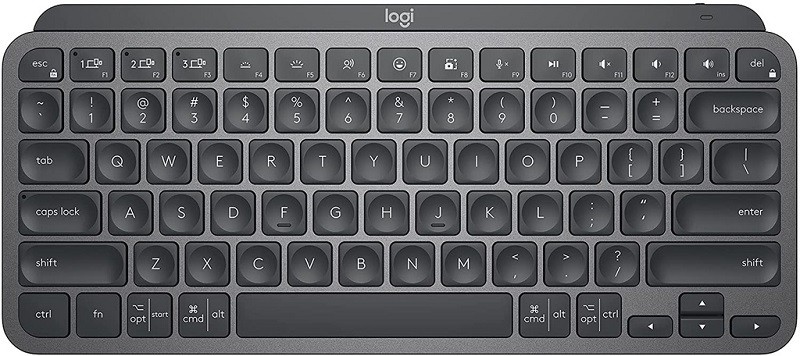
Talking about peripherals with high mobility, the first brand that comes to mind is Logitech because the products of this brand have one thing in common: easy connection, simple use, and high durability.
This product has a similar design to Apple’s recently released Magic Keyboard, but is equipped with more features and allows users to connect more cross-platform.
Connection
Not as limited as Apple Magic Keyboard, Logitech’s keyboard for users to connect to many platforms, from Windows, MAC OS, tablets, and phones. One keyboard for all devices, you can switch connections between devices with just a few basic steps.
Compact design
With the Mini layout, everything is minimalistic, making operations with commands and shortcuts easy. This design allows us to minimize the area, and increase the area to use the mouse. The design of the keys also optimizes responsiveness and reduces noise levels. The body of the key is seamless by a metal plate, so this keyboard is quite solid.
New keyboard shortcuts
Dictation Key: Dictation with any selected text (Window and macOS feature and only available in certain languages)
Emoji Key: Instantly opens your emoji window so you can choose to send the icon in seconds
Mic Mute / Unmute: Tap to turn your microphone on or off for online calls
Smart led lights
The sensor helps the keyboard detect and light up as soon as you touch it. When not in use, the led light will dim until it turns off completely, saving energy. Brightness level will adapt to lighting conditions, or manually adjust
Multi-tasking
The MX Keys Mini keyboard goes well with the Logitech MX Master 3 mouse – or Logitech Flow-enabled devices, which means it can be used on multiple devices at the same time during a session.
Rechargeable batteries
With a single charge, Logitech MX Keys Mini can be used for up to 10 days or up to 5 months without the LED on. Battery life may also vary depending on the environment and usage.
Logitech MX Keys Mini Minimalist Wireless Illuminated Keyboard – Graphite & Bolt USB Receiver: Buy it now
Logitech MX Keys Mini Keyboard and Lift Vertical Ergonomic Mouse Combo – Wireless, Backlit Keys, Bluetooth or Logi Bolt USB receiver, Quiet, Windows/macOS/iPadOS, Laptop, PC – Graphite: Buy it now
Logitech MX Keys Mini Keyboard + MX Anywhere 3 Wireless Mouse Combo – Backlit Keys, USB-C, Bluetooth, Ergonomic, Compact, Hyper-fast Scroll, Multi-OS Compatible, PC / Mac – Pale Grey: Buy it now
Logitech MX Keys Mini for Mac Keyboard + MX Anywhere 3 for Mac Wireless Mouse Combo – Backlit Keys, USB-C, Bluetooth, Ergonomic, Compact, Fast Scroll, Optimised for macOS, iPadOS – Pale Grey: Buy it now
Related Posts


Tech Reviewer & Product Analyst
Định Bia has spent over 10 years testing consumer electronics with a focus on smart technology. He work as a product advisor at Biareview where he helped customers find the right devices for their needs. He personally tests every product featured on this site using a consistent evaluation framework covering quality, durability, and value. All reviews are based on experience, not influenced by the manufacturer.