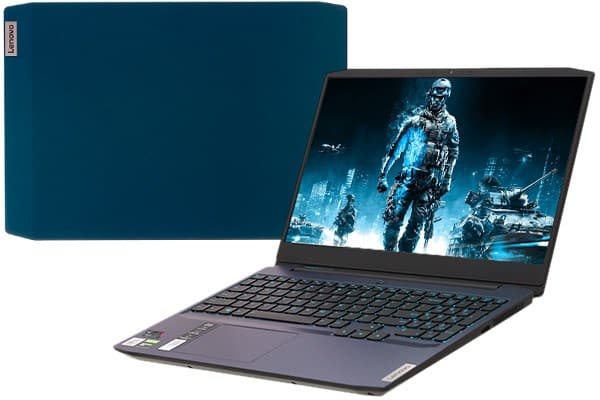
Design and Build Quality
The Lenovo IdeaPad Gaming 3 has a fairly minimalist vibe, like it prioritizes usefulness over showy looks. It comes in a matte black finish, with small blue accents here and there , especially around the keyboard area and on the Lenovo logo set on the lid. The overall appearance feels quiet and easy to live with, so it works in a gaming setup, but also doesn’t look out of place in a more professional space.
Chassis and Build
Mostly, the chassis is made of plastic, but it’s still solid, like it doesn’t feel cheap in-hand. You can notice only minimal flex on the keyboard deck and the lid, which gives the whole laptop that “it’ll hold up” feeling. The hinge mechanism seems robust, it opens and closes smoothly even with one hand , and it doesn’t give that creaky vibe you sometimes get on budget models. It may not deliver the luxury clunk or premium heft of higher-end gaming machines but honestly, for the price tier the build quality is pretty commendable.
Portability
In terms of carrying it around , it lands at about 2.2 kg (4.85 lbs) and thickness is around 24.9 mm (0.98 inches). So it’s not super light or ultra thin, but it’s still pretty workable for a gaming laptop. It keeps a decent middle ground between raw capability and being practical to move. For everyday use, it slips into most backpacks without drama, which makes it an option students and working people can actually take with them.
Display Quality
The IdeaPad Gaming 3 is offered with different display setups, including Full HD (1920×1080) and in some configs higher refresh panels. Our sample includes a 15.6-inch Full HD IPS screen with a 120Hz refresh rate. That combination ends up feeling smooth , with gaming visuals that look more fluid and a bit more engaging overall than standard 60Hz style panels.
Color Accuracy and Brightness
The IPS panel has wide viewing angles, so colors and contrast look pretty consistent even when you’re not sitting directly in front. On the other hand, the display hits about 65% of the sRGB color gamut , which is fine, but it’s not exactly amazing. For gaming and casual stuff like streaming, it’s adequate, though if you’re doing more serious photo or video editing, it may feel a bit limited. Peak brightness is around 250 nits, good enough indoors, but in a brightly lit room or if you’re out in direct sunlight , it might not hold up as well.
Refresh Rate and Response Time
That 120Hz refresh rate kinda, really stands out on the IdeaPad Gaming 3 screen. You notice smoother , almost more liquid motion when stuff moves fast in games and in those competitive moments it can be a nice little advantage. Response time also feels reasonably good, with just minimal ghosting or that motion blur thing so the whole vibe stays pretty clean overall.
Performance and Hardware
Lenovo bundled the IdeaPad Gaming 3 with a set of hardware options, for different expectations and price bands , which is a good move. Our review unit specifically comes with an AMD Ryzen 5 5600H chip, 16GB of DDR4 RAM, and an NVIDIA GeForce GTX 1650 graphics card. With that combo you get solid results for gaming , everyday multitasking, and general productivity. It’s not exactly “top tier”, but it does the job pretty consistently, no drama most of the time.
CPU Performance
The AMD Ryzen 5 5600H is a 6 core, 12 thread processor built on the Zen 3 architecture, kind of a solid pick overall. It tends to run at a base clock speed of 3.3 GHz , and it can boost up to 4.2 GHz. The CPU feels quite capable both in single threaded tasks and bigger multi threaded jobs so it fits nicely into a bunch of different situations. In synthetic benchmarks the Ryzen 5 5600H results look pretty strong, which hints it can juggle heavier workloads with out too much drama. In daily use the responsiveness comes off steady and smooth for stuff like web browsing , document editing, and even video calls.
GPU Performance
The NVIDIA GeForce GTX 1650 is kinda an entry level gaming GPU, but it still manages something pretty respectable for 1080p gaming. A lot of newer AAA titles, they can run okay on medium to high presets, and you often see solid frame rates with a fairly sharp image. Still it does not bring ray tracing support, or DLSS like the higher RTX cards, though. On the flip side, the GTX 1650 covers a bunch of popular esports titles without much fuss. Games like Fortnite, League of Legends, and CS GO work pretty comfortably , most of the time.
Memory and Storage
With 16GB DDR4 RAM, the IdeaPad Gaming 3 feels pretty smooth for day to day multitasking as well, not only gaming. You can bounce between a game, web browsing, and media playback , without hitting those irritating stutters. On the storage side , our test model ships with a 512GB NVMe SSD so you get quick reads and writes. Booting is brisk, apps open up promptly, and the whole system keeps that responsive vibe. There’s also an extra 2.5 inch drive bay included, so later if you want more storage, it is there waiting.
Thermals and Cooling
Thermals are kind of the big deal for any gaming laptop, and Lenovo tries to cover that ground here. The Lenovo IdeaPad Gaming 3 uses a dual fan cooling arrangement, with heat pipes and air vents working together, meant to move heat away more efficiently, so performance holds steadier during longer sessions.
Thermal Performance
During gaming stretches and heavier workloads, the cooling setup does a pretty decent job, it keeps things under control without too much fuss. CPU and GPU temperatures mostly remain within safe limits, although when the load gets serious the fans can become pretty audible. The keyboard area stays noticeably cooler, so it feels fine even for extended use, not like you constantly have to think about heat. The bottom section does warm up , but it’s still manageable and I didn’t notice any thermal throttling pop up.
Fan Noise
Even if the cooling is actually effective, the fans can get pretty loud once they run at full speed. You’ll hear it, but it’s not really the kind of thing that ruins the whole experience , especially if you’re wearing headphones. Lenovo’s Vantage app also helps, because you can tweak the fan behavior with different profiles, so it becomes a usable compromise between raw performance and noise annoyance, sort of.
Keyboard and Trackpad
The Lenovo IdeaPad Gaming 3 includes a full-sized keyboard, and yes, there’s also a dedicated number pad, which is nice. Key travel feels decent enough, you get that tactile kind of feedback, so typing and gaming both feel natural. The entire setup is more about comfort than it is about looks, honestly.
Keyboard
The keyboard has blue backlighting, which looks stylish and also makes everything easier to see in dark rooms. The key spacing is pretty generous, and the larger keys help you land your inputs with less drama. The arrow keys are full-sized too, which is a small win if you jump around a lot during matches. Overall, it feels comfortable, quick, and responsive enough for gaming as well as everyday productivity, basically a steady performer.
Trackpad
The trackpad feels fairly big, and it responds well enough to support Windows Precision drivers, so gestures work pretty solid. It sits in the center which makes things easier , especially when you’re bouncing between tasks. For most gamers, an external mouse is usually the go-to option , but the trackpad can still handle casual browsing, scrolling , and general day to day navigation without much fuss.
Audio quality
Audio quality really does matter in a gaming setup, and the Lenovo IdeaPad Gaming 3 still lands some solid sound, for what you pay. It runs dual speakers set along the bottom front edge, so the output is basically straight forward, no big fuss and no drama.
Sound quality
The speakers sound clear and loud, there is also a decent amount of bass. It probably wont outdo the best high end gaming laptops, or a dedicated external sound setup, but honestly it holds up well for gaming sessions, watching videos, and even video calls. Also, Dolby Audio software is included and it brings a bunch of presets, for example movies or chat, so depending on what you’re doing it tweaks things in a small but helpful way.
Headphone experience
If you want it to feel more immersive, and yeh kinda grab a solid pair of headphones is the smarter move. The 3.5mm audio jack stays steady, and the headphone sound just feels more present, with deeper bass and sharper highs. So when you’re doing focus work, or that late night kind of use, it honestly feels like the more sensible pick overall, even if you’re mostly after a quieter kind of vibe.
Connectivity and ports
The Lenovo IdeaPad Gaming 3 gives you a pretty broad selection of ports, so you can connect more gear without too much overthinking. It feels like it was made for day to day use, and also for gaming add ons, even if the layout is sometimes a bit “just enough” you know, like you get by without feeling frustrated.
Port selection
Left side:
Power connector
RJ-45 Ethernet port
HDMI 2.0 output
USB 3.2 Gen 1 Type-A port
USB 3.2 Gen 1 Type-C port
3.5mm audio jack
Right side:
USB 3.2 Gen 1 Type-A port
USB 2.0 Type-A port
Having that Ethernet port is honestly a big deal if you game and want a steady, less jumpy connection compared to Wi‑Fi. Then the HDMI 2.0 connection makes it easy to attach to an outside screen, and it supports up to 4K at 60Hz which is nice for smoother visuals. The USB Type-C option also gives flexible pairing choices, but it does not include Thunderbolt support, which is a bit disappointing though maybe not totally surprising at this price.
Wireless connectivity
For wireless, it supports Wi‑Fi 6 , so transfers are generally quicker and the link stays more stable when things get busy. There’s also Bluetooth 5.0 which lets you pair multiple wireless peripherals like headphones , mice, and keyboards with less hassle.
Battery Life
Lenovo IdeaPad Gaming 3 battery life is kinda a trade off with performance, especially with gaming laptops, and yea this one follows that pattern too. It includes a 45Wh battery , so you get a fairly middle-of-the-road runtime for its hardware level, not something “all day” or anything like that.
Everyday Battery Performance
When you’re doing normal stuff like web browsing, typing documents, and streaming media, it typically runs about 5 to 6 hours from one charge. But once you start gaming , or run heavier workloads, things fall off fast, usually around 1 to 2 hours. If you plan long gaming sessions, honestly it’s better to leave it plugged in so performance stays steadier, and nothing dips.
Charging
The device ships with a 135W power adapter , which is strong enough to power the laptop at peak performance while the battery charges. Charging is decent too, with the battery hitting roughly 50% in about 30-40 minutes, depending on what you’re doing at the time.
Software and Features
Out of the box, it has Windows 10 Home installed, which feels familiar and easy to use. Lenovo also bundles a handful of software utilities, meant to improve the overall experience a bit , and make setup and daily use less annoying.
Lenovo Vantage
Lenovo Vantage is kind of a broad software suite that lets users customize and optimize their laptop, it kind of works as a central place to keep an eye on system activity. You can tweak things like fan behavior , and set power options depending on what you are doing. There’s also the useful stuff like driver updates , network management, and battery longevity tools. Basically Lenovo Vantage gives you access to a lot of device settings and hardware monitoring, so it feels beneficial for everyday users and for gamers too.
Pre-installed Software
With the Lenovo IdeaPad Gaming 3, there are a few applications already there when you start using it. Still, compared with some other brands, it stays pretty bloatware-light , which is nice. The pre-installed items usually include:
McAfee LiveSafe: This is a trial of the antivirus software. It can help keep you safer, but it may keep nudging you toward paid plans.
Microsoft Office Trial: A trial version of Microsoft Office is added so you can test the apps before you actually decide to buy.
If you don’t want them, these can be removed pretty easily, so you get back storage space and you end up with a cleaner day to day experience.
User Experience
Overall, the user experience on the Lenovo IdeaPad Gaming 3 feels fairly upbeat. That’s mostly because it blends decent raw performance , a practical design, and a set of handy features you can actually use without too much hassle.
Day-to-Day Use
For normal, day by day things like surfing the web, streaming videos and using productivity apps, this laptop pretty much does admirably. The keyboard feels comfortable to type on , the trackpad is responsive enough, and the screen delivers clear visuals. Between its portability and battery life , it works well when you re moving around , though it kinda feels more at ease as a sort of semi portable desktop replacement, you know when you keep it around desk height most of the time.
Gaming Experience
When it comes to gaming, the IdeaPad Gaming 3 is a nice experience at 1080p. Most current titles run smoothly on medium to high settings , and the 120Hz high refresh display helps a lot, giving you more fluid and snappy gameplay. The cooling system keeps temps in check during longer matches but the fan noise can still pop up and be noticeable, especially once it starts working harder.
Pros
Affordable Pricing: The IdeaPad Gaming 3 gives you good performance at a competitive cost, so it’s easier to grab if you’re budget minded gamer or just a regular everyday user.
Solid Performance: With a capable graphics card and a strong processor, it handles games plus multitasking with out much hassle, most of the time.
High Refresh Rate Display: The 120Hz screen makes motion look smoother, and that also helps during day to day use, not only in games.
Effective Cooling System: The dual fan system keeps things at cooler temps while it’s working hard, so overall performance stays more stable.
Comprehensive Connectivity: You get a solid assortment of ports, plus Wi‑Fi 6, which makes connections feel pretty versatile.
Cons
Mediocre Battery Life: Battery runtime is only average, and it falls quicker when you’re gaming, or doing other heavy tasks.
Limited Color Accuracy: The color accuracy might not be strong enough for professional creative work where precision matters.
Fan Noise: When the workload gets intense the cooling fans can get rather loud, especially over long sessions.
Conclusion
The Lenovo IdeaPad Gaming 3 is kind of a well rounded gaming laptop that , honestly, gives a strong value for the price. You get solid performance, a smooth high refresh rate display and a keyboard that feels pretty comfortable , even after long sessions. So it works for gaming as well as everyday stuff too. Sure it does have a few trade-offs here and there like average battery life and color accuracy that is a bit limited, but those are small problems compared to the whole package.
If you are budget conscious and you need a dependable, high performance laptop, the Lenovo IdeaPad Gaming 3 feels like a smart pick. It actually delivers on what it promises, giving a decent balance between performance, features and affordability, so it lands as one of the better options in its price bracket.
Lenovo IdeaPad Gaming 3 – 2022 – Everyday Gaming Laptop – NVIDIA GeForce RTX 3050 Graphics – 15.6″ FHD Display – 120 Hz – AMD Ryzen 5 6600H – 8GB DDR5 – 258GB SSD – Win 11 – Free 3-month Xbox GamePass: Buy it now
Lenovo IdeaPad Gaming 3 15 Laptop, 15.6″ FHD Display, AMD Ryzen 5 5600H, NVIDIA GeForce GTX 1650, 8GB RAM, 256GB Storage, Windows 10H: Buy it now
Lenovo IdeaPad Gaming 3-15IMH05 81Y4002NUS 15.6″ Gaming Notebook – Full HD – 1920 x 1080 – Intel Core i5 10th Gen i5-10300H Quad-core (4 Core) 2.50 GHz – 8 GB RAM – 256 GB SSD – Onyx Black: Buy it now
Lenovo IdeaPad Gaming 3 15″ Laptop, 15.6″ FHD (1920 x 1080) Display, AMD Ryzen 5 4600H Processor, 8GB DDR4 RAM, 256GB SSD, NVIDIA GeForce GTX 1650 Graphics, Windows 10, 82EY00FDUS, Onyx Black: Buy it now
Related Posts




Tech Reviewer & Product Analyst
Định Bia has spent over 10 years testing consumer electronics with a focus on smart technology. He work as a product advisor at Biareview where he helped customers find the right devices for their needs. He personally tests every product featured on this site using a consistent evaluation framework covering quality, durability, and value. All reviews are based on experience, not influenced by the manufacturer.