Design and Build Quality
a. Premium Build and Materials
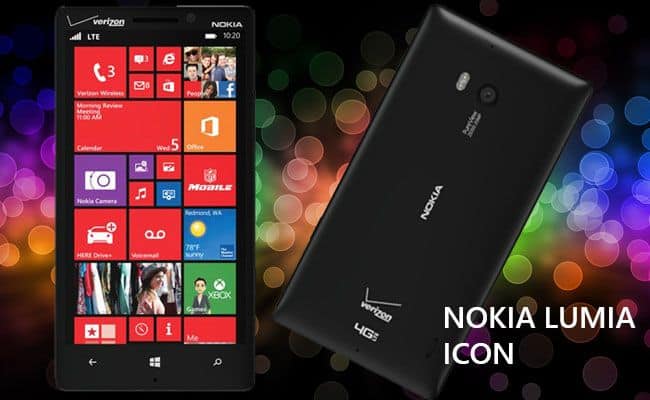
The Nokia Lumia Icon is sort of, a quiet nod to Nokia’s focus on high-quality design and build. It comes in a unibody polycarbonate shell, and even if it’s not metal, it still gives that premium feel, thanks to its solid construction and what seems like really sturdy manufacturing. The polycarbonate surface has a smooth texture, and in hand it just feels “confident” . The Lumia Icon’s look leans on clean lines, gentle curved edges, and a kind of minimal style that ends up looking a bit elegant, not loud.
On the front you get a 5-inch AMOLED display, with a slight curvature that supports the modern vibe. Then on the back there’s that camera bulge, protruding a bit, where the 20 MP PureView camera sits. All together, the design is practical, but also stylish, so yeah it stood out during its time.
b. Ergonomics and Handling
In terms of size, the Lumia Icon measures 137.9 x 71.4 x 9.8 mm , and it weighs around 167 grams, which feels like a careful middle ground between “substantial” and “still comfortable”. The phone has a bit curved edges too, plus buttons that are placed in a sensible way,so your grip feels natural. The power button, volume rocker and the camera shutter button are on the right side, so reaching them is easy, even when you’re not trying too hard.
The weight is noticeable, sure, but it’s not the kind that tires you out quickly. The curved back also helps spread the load, so it sits in your palm more evenly. That means extended use feels more steady, rather than awkward.
c. Display
The Nokia Lumia Icon comes with a 5-inch AMOLED screen, resolution 1920 x 1080 pixels, so the pixel density lands around 441 ppi give or take. It is a Full HD display that tends to show vibrant colors, really dark blacks, and strong contrast ratios , which makes it nice for videos, gaming, and daily tasks. The AMOLED screen type also helps the panel stay readable even when the sun is pretty much blasting directly at it.
On top of that the display is covered by Corning Gorilla Glass 3, adding this extra protection against scratches and small, minor impacts. The touch response feels very quick and steady too, and multi-touch is supported , so scrolling, zooming, and general interaction feel smooth.
d. Design Aesthetics
The Lumia Icon is sold in multiple colors like black, white and red. each one brings a different vibe, more or less. The bright color options along with the glossy polycarbonate body make the whole thing look current, and honestly quite attractive. On the back, the design is relatively plain, you mostly see the camera module plus the Nokia branding , nothing overly busy.
In general, the design of the Nokia Lumia Icon feels both practical and good looking, mixing premium materials with a streamlined, elegant form factor, that just sits well in the hand.
Performance and Hardware
a. Processor and Memory
Under the hood , the Nokia Lumia Icon gets its power from a Qualcomm Snapdragon 800 processor, with a quad core CPU running at 2.2 GHz, kinda 2014 style speed. This chipset goes together with 2 GB of RAM, and it ends up delivering strong performance for its time. The Snapdragon 800 was, at the time, one of the leading processors in 2014, so you’d expect fluid behavior, and usually dependable multitasking.
On the storage side the Lumia Icon includes 32 GB of internal memory. Still it does not support expandable storage through microSD, which was a pretty common limitation back then. Even so, 32 GB should work for most people, enough room for apps, media, and assorted files and such.
b. Battery Life
The Nokia Lumia Icon uses a 2420 mAh non removable battery. For its era, that capacity was pretty alright and it could last a full day with usual use, if settings aren’t pushed too hard. The phone also supports wireless charging, so you can just place it on a pad instead of messing with cords.
Overall battery life tends to be pretty good, even so it can shift a bit depending on how you use it and what you set up. The AMOLED panel helps here too, because it usually sips power when you show darker tones , dark colors means less display energy, more or less.
c. Performance and Usability
The Nokia Lumia Icon really shows strong performance in day to day stuff. With the Snapdragon 800 processor ,and 2 GB of RAM it handles multitasking, gaming and app use pretty easy. On top of that it runs Windows Phone 8.1 without much trouble, and the overall feel is responsive, kind of fluid too.
For usability, the Lumia Icon does well in different situations, like web browsing ,social feeds, and multimedia watching. It also feels dependable because of its solid build ,and the way it sits in your hand is comfortable, so for everyday use it’s a reliable pick.
Camera and Multimedia
a. Camera Performance
One of the more notable kind of things about the Nokia Lumia Icon is its 20 MP PureView back camera. That camera includes a Zeiss lens, also Optical Image Stabilization (OIS) , which is meant to reduce shake, and generally it helps you land sharper photos. In the end you can expect detailed, more punchy images even when the lighting gets kinda tricky or not so great, sometimes.
The Lumia Icon also brings camera software features like manual controls ,an HDR option, and a bunch of filters. It can record video in 1080p, so the footage comes out clear. For the front side there’s a 1.2 MP camera, good enough for simple selfies and video calls.
All in all, the Lumia Icon’s camera performance is impressive for its era, mainly because you get high resolution images, plus different shooting options to play with. The PureView approach, along with OIS, adds to better image clarity, and helps keep video steadier.
b. Multimedia Capabilities
The Nokia Lumia Icon, well it supports a bunch of multimedia formats, like MP3 , AAC, and WAV for audio, plus MP4, AVI and WMV for video playback. It also has a built-in media player that deals with these formats pretty smoothly, so you get a pretty decent multimedia experience overall.
And the 5-inch AMOLED screen, that really helps too , with colorful tones and a crisp resolution. So whether you’re watching clips, playing games, or jamming with music, the Lumia Icon tends to feel satisfying in day to day use.
c. Audio Quality
On the Lumia Icon, you get stereo speakers placed up front , which makes the sound come out clear and rather loud. They’re positioned in a way that usually doesn’t block the audio, so music and videos sound enjoyable , not muffled or awkward. There’s also a regular 3.5mm headphone jack , so you can plug in your favorite headphones if you want a more immersive listening setup.
Software and User Experience
a. Operating System
The Nokia Lumia Icon originally shipped with Windows Phone 8.1, kind of an operating system that brought a bunch of improvements compared to what came before. Windows Phone 8.1 added things like an Action Center for notifications , customizable Start screen tiles, and of course the Cortana digital assistant, more or less everywhere you’d expect it.
Overall, Windows Phone 8.1 feels smooth and pretty welcoming, mostly because that tile- based layout helps you reach apps and info without too much fuss. It also comes with built-in applications, for example Maps, Music, and Office, which really supports both work tasks and leisure time.
b. User Interface
The user interface in Windows Phone 8.1 has that tile oriented look, where users can set up the Start screen with live tiles, so quick access stays convenient for apps and details. Everything looks clean, and it tends to be rather direct, with simplicity in mind not just as a slogan but as a real design choice.
On the Lumia Icon, the interface is responsive, sort of fluid , and the transitions are noticeably smooth, along with those small animations. Those live tiles update in near real time, like notifications, or weather info, so staying aware and connected is a bit easier than on more cluttered systems.
c. Performance and Usability
The Nokia Lumia Icon seems to run pretty well on Windows Phone 8.1 , so you get this steady sort of quickness for the usual day today things. The Snapdragon 800 chip plus 2 GB RAM helps quite a bit, particularly when you’re bouncing between several apps and using more demanding programs , it doesn’t feel like it’s always fighting for breath.
In terms of usability it’s backed up by the intuitive layout, plus the hardware that feels pretty well considered. The physical controls, like the power button, the volume rocker, and even that dedicated camera shutter button, are easy to reach and use without thinking too hard. With all of that together, the overall speed and handling come across as positive, like you push through your tasks with not too much resistance.
Connectivity and Features
a. Connectivity Options
The Nokia Lumia Icon kind of comes with a bunch of ways to connect, like 4G LTE , Wi-Fi, Bluetooth 4.0 and GPS. Having 4G LTE in particular helps with quick data speeds , so things feel smoother when you’re browsing, streaming, or just downloading whatever you need.
The Wi-Fi option is pretty dependable, it basically gives access to fast internet networks. Bluetooth 4.0 lets you link up wire free with different gadgets, for example headphones and speakers. And GPS gives solid location awareness for navigation, also for location based services that need your spot.
b. Additional Features
Along with connectivity , the Lumia Icon brings extra features that make day to day use easier. One notable thing is wireless charging support, which is more convenient for people who do not want to keep using cables. It also includes NFC (Near Field Communication) so you can do contactless payments and quick data transfers.
c. Durability and Protection
Even though the Lumia Icon isn’t really sold as a rugged device, the overall build quality helps it stay protected. The polycarbonate body plus Gorilla Glass 3 are there to reduce scratches and guard against small, everyday bumps. Its firm, well made construction means it’s built to handle normal wear and tear over time.
Pros and cons
Pros
Good performance : The Snapdragon 800 processor, along with 2 GB RAM , usually keeps things running smooth for most apps and everyday chores.
Windows Phone 8.1 features: The operating system brings in a few handy things like Action Center and Cortana, so the whole experience feels a bit more guided.
Wireless charging: Having wireless charging there is genuinely convenient , and it means less fiddling with cables on your desk.
Build durability: The polycarbonate frame plus Gorilla Glass 3 protection feels sturdy enough for normal bumps and constant use.
b. Cons
Outdated hardware: Even right after release, and especially now , it feels behind newer smartphones since newer models use stronger chips and often higher RAM , than this one.
Limited storage: The 32 GB internal space might be tight for people who store a lot of music or videos, and the absence of expandable storage through microSD can be annoying.
No official Android or iOS support: Since the Lumia Icon sticks with Windows Phone , it tends to have fewer apps overall compared with Android and iOS, which can shrink choices and updates.
Missing more modern features: When you compare it with current phones , the Lumia Icon is short on things like biometric security , more advanced camera tricks, and newer connectivity options.
Nokia Lumia Icon, Black 32GB (Verizon Wireless): Buy it now


Tech Reviewer & Product Analyst
Định Bia has spent over 10 years testing consumer electronics with a focus on smart technology. He work as a product advisor at Biareview where he helped customers find the right devices for their needs. He personally tests every product featured on this site using a consistent evaluation framework covering quality, durability, and value. All reviews are based on experience, not influenced by the manufacturer.