Microsoft skipped the cloud AI trend and went practical, giving the Surface Laptop Ultra as much local AI compute as it could. The body is big and setup is fairly involved, but the standalone performance is strong enough that professionals can rely on it.
Design and display
The Surface Laptop Ultra ignores the thin-and-light trend. It has a bulky, workstation-style body and a very good display that meets the standards of professional creators.
A dense, practical slab of metal
This really is a block of metal. The 15-inch touchscreen is a size that fits in a backpack, but the laptop is dense, at about 2.04 kg and 18 mm thick. That makes it clearly thicker and heavier than the 14-inch MacBook Pro, only a little lighter than the 16-inch one, and even heavier than the Lenovo Legion 5i gaming laptop.
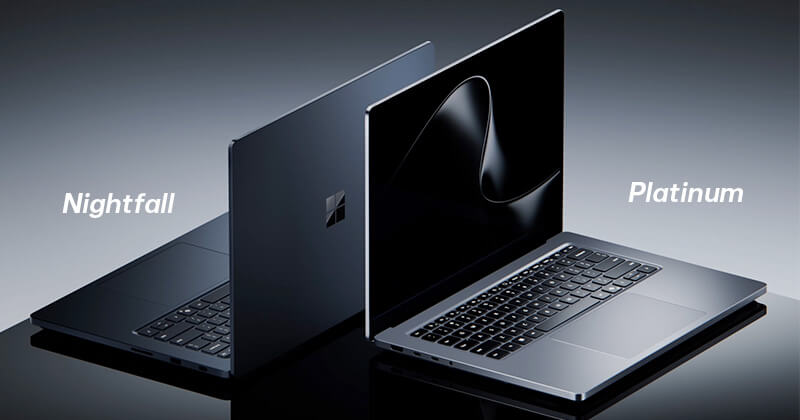
The build quality justifies the bulk. The whole chassis is solid aluminum and feels very sturdy, and the keyboard doesn’t flex when you type. The Nightfall color looks sleeker and more appealing than Platinum. All the screws are hidden under the rubber feet, so the laptop looks seamless and high end.
Ports and a better charging connector
You can do your work without carrying adapters. The left side has one HDMI port, two USB-C ports and a 3.5 mm jack. The right side has an SD card slot, one USB-A port and a dedicated USB-C port.
The best change is that the right-side USB-C port also handles magnetic charging, replacing Microsoft’s proprietary Surface Connect. It’s easy to plug in in the dark, and the laptop won’t fall off the desk if you trip over the cable. You can pull the magnetic tip off and use the port as an ordinary USB-C. Compared with Apple’s MagSafe, the one downside is that you have to pull the cable straight out instead of it popping off at an angle.
Keyboard and haptic trackpad
The keyboard is pretty good, with wide keys and well-judged travel. Typing feels like a step up from Apple’s Magic Keyboard and a bit better than HP’s edge-to-edge keyboard. Every press has a light, soft bounce. I’d only want the typing sound to be a little crisper.
The trackpad is the interesting part. It uses “Precision Haptics,” which uses force feedback to fake a mechanical click. Microsoft also adds a light buzz to system actions, like snapping windows or aligning images in PowerPoint and Canva’s Affinity app. It’s subtle and useful for graphics work, and Microsoft is working with Adobe to build it into Creative Suite more deeply soon.
A very bright screen and decent speakers
Instead of OLED, the Surface Laptop Ultra uses a 15-inch mini-LED touchscreen at 4K (3,270 x 2,180 pixels), which works out to 262 ppi. The contrast can’t match a true OLED, but the screen is still very vivid and text looks sharp. The big selling point is peak HDR brightness of up to 2,000 nits. You can work next to a floor-to-ceiling window at sunset and the picture won’t wash out.
The speakers are two boxes that fire out the sides, right next to the air vents. The sound is clear, full and easy to follow, good enough that you only need headphones for privacy. It isn’t a party speaker, and the bass lacks a bit of punch when you watch Netflix or listen to music.
Specs and performance
Behind the solid exterior is a lot of hardware. It handles heavy workloads smoothly, and it supports the argument that local compute matters in the AI era.
| Component | Spec |
|---|---|
| Processor | Nvidia N1X (ARM), 20-core Grace CPU |
| Graphics | Integrated GPU, 6,144 CUDA cores |
| RAM | 128GB unified memory |
| Storage | 1TB SSD |
| Display | 15-inch touchscreen, mini-LED, 4K (3,270 x 2,180 pixels), 262 ppi, 2,000 nits HDR |
| Ports | 1 x USB-A, 1 x HDMI, 1 x 3.5 mm jack, 1 x SD card reader, 3 x USB-C (1 magnetic charging port) |
| Thickness | 18 mm |
| Weight | About 2.04 kg |
| OS | Windows 11 |
This is the top configuration, and it costs nearly $6,000. Microsoft and Nvidia put a 20-core Grace CPU and a 6,144-core CUDA GPU on the same chip package on an ARM platform, with 128GB of shared unified memory. It’s not meant for most people. It’s built for running AI models locally and doing heavy graphics work on the machine itself.
Grace 20-core CPU performance
| Test | Surface Laptop Ultra result | Compared with others |
|---|---|---|
| Geekbench 7 (multi-core) | Behind the MacBook Pro | 44% slower than the MacBook Pro (M5 Max) |
| Cinebench 2026 (3D rendering) | Closes the gap with rivals | 11% slower than the MacBook Pro (M5 Max), 5% faster than the Asus ProArt PX13 |
| Blender render (export time) | Under 1 minute 30 seconds | About 20 seconds slower than the MacBook Pro (M5 Max) |
The table shows that the Grace CPU can’t beat Apple’s M5 Max on raw scores. In real tests like 3D rendering and Blender, though, it stays close and easily beats laptops with AMD chips from the same period. The biggest plus is power efficiency. It matches the power of the most power-hungry Intel chips right now, but stays at a steady temperature and gets very good battery life.
GPU performance on par with a discrete card
| Test | Surface Laptop Ultra result | Compared with others |
|---|---|---|
| 3DMark Steel Nomad (raw graphics) | Well ahead of thin-and-light laptops | 50% faster than the HP OmniBook Ultra 14 (Intel Core Ultra X9 388H), 37% faster than the Asus ProArt PX13, 22% slower than the MacBook Pro (40-core GPU) |
| 3DMark Speed Way (DirectX 12) | Beats mid-range discrete cards | Ahead of the Lenovo Pro 9i G11 (discrete RTX 5060) |
| 3DMark Port Royal (ray tracing) | Close to a desktop card | Only 6% behind a desktop RTX 5070 |
The integrated GPU with 6,144 CUDA cores is the high point of this laptop. In 3DMark Steel Nomad it leaves thin-and-light laptops far behind, beating the Intel Core Ultra X9 388H by 50% and the Asus ProArt PX13 by 37%. It still trails Apple’s 40-core GPU by about 22%.
It’s also strong enough to beat the RTX 5060 in the Lenovo Pro 9i G11 in the Speed Way test. In the heavy ray tracing test, Port Royal, it loses by only 6% to a desktop RTX 5070 with the same core count. That’s rare for an integrated chip.
Gaming performance doesn’t match the price
| Game | Settings and tech | Real-world performance | Compared with others |
|---|---|---|---|
| Gears of War: E-Day | High, DLSS on | Steady at about 40 fps | Needs Frame Generation to feel smoother, and the performance doesn’t justify the price |
| Star Wars: Galactic Racer | High, DLSS on | Plays stably, but loading takes several minutes | Far behind the Lenovo Legion 5i ($3,016), which gets over 60 fps at the same settings |
| Warhammer III: Total War | Benchmark settings | Similar to Apple’s | On par with the MacBook Pro |
| Cyberpunk 2077 | Benchmark settings | Slightly below the competition | MacBook Pro a little ahead |
In real tests the Surface Laptop Ultra games fairly well, especially when DLSS lifts the frame rate. But about 40 fps in Gears of War: E-Day and the long load times in Star Wars: Galactic Racer show some limits. Warhammer III and Cyberpunk 2077 land close to the MacBook Pro.
Overall, it has real graphics and gaming potential, but the actual performance still isn’t convincing for the price.
Microsoft Surface Laptop Ultra 2115 15″ Touchscreen Notebook – NVIDIA RTX Spark N1X – 32 GB – 1 TB SSD – English (US) Keyboard – Nightfall: Check Availability on Amazon
Who should buy the Surface Laptop Ultra?
The Surface Laptop Ultra is a high-end laptop built around an Nvidia Blackwell GPU, up to 128GB of unified memory and a 15-inch mini-LED display at 3,270 x 2,180 pixels. It posts impressive graphics results in many tests, especially 3D rendering and local AI work. The CPU isn’t clearly ahead of Apple’s, though, and gaming is held back in some titles by power consumption and software compatibility on ARM.
The base configuration starts at $2,600. The version with the 20-core CPU, the 6,144 CUDA-core GPU and 128GB of unified memory costs $5,800.
At that price it suits professional content creators, AI developers and anyone who needs to run AI models directly on the laptop. If you mostly do office work, basic photo editing or casual gaming, look at cheaper options and save the money.
Related Posts