Design strong, unique
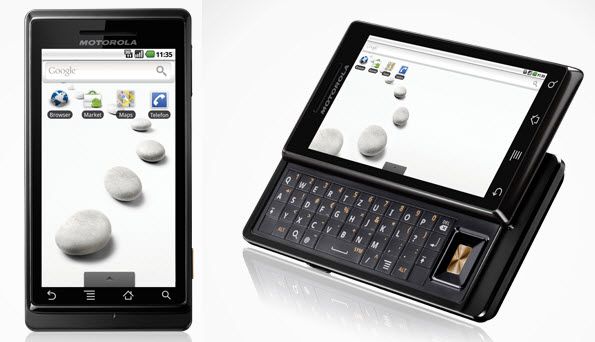
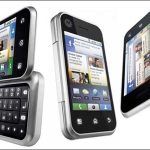
Motorola Milestone is the slider phone with the slimmest QWERTY keyboard available on the market (4.56 x 2.36 x 0.54 inch). The size of Milestone is almost the same as the iPhone except for the slimmer body. Milestone’s compact square shape impresses the user with a smartphone that is “masculine”.
With a metal shell, the weight is slightly heavier at 169 grams.
The best display in Android devices
Motorola Milestone’s screen is ranked among the best in all Android. The special design gives you the impression that the screen is not deformed even when pressed firmly on the surface. With dimensions of 480 x 854 (3.7 inches) and the ability to display 16 million different colors, Milestone allows you to enjoy the smallest detail with outstanding sharpness.
Above the monitor also has a sensor, which adjusts the brightness to suit the ambient lighting conditions. In particular, you can completely turn off this function to adjust the brightness as you like.
QWERTY keyboard
The QWERTY keyboard has a lot of advantages for users when composing and processing messages, emails or text. The keyboard is quite scientific. However, due to the design of the keys are close so the user will encounter some obstacles in the beginning.
The right side of the keyboard is a small D-pad, easy to use and very convenient if you do not want to use the touch screen. The light inside the body ensures that you can use the keyboard easily in the dark.
The Android 2.0 operating system has been improved
Motorola Milestone brings a new experience of Android 2.0. Milestone’s interface can be flexibly changed according to the user’s preferences. You can easily add a widget bar, shortcuts or change the wallpaper of one of three homescreens. The fun does not stop there, Milestone lets you switch back and forth through three screens with just one finger move on the touch screen.
In particular, Milestone’s web browser is capable of speech recognition. You just say the name of the site you want to visit, the machine will automatically move to that website.
Most of the rest of the interface is quite similar to the previous version of Android. You can access any of the applications in the menu and can easily put the application or use on the main screen.
Motorola Milestone Droid Unlocked Touchscreen Phone with 5 MP Camera, Wi-Fi, GPS and QWERTY Keyboard – Unlocked Phone – No Warranty (Black): Buy it now
Motorola Milestone XT720 Unlocked Cell Phone. 1700/2100MHZ for Tmobile 3G. 8MP Camera with Xenon flash.: Buy it now
Take a picture of 5 MP
Milestone is integrated camera phone line with the highest configuration on the market today. The user can easily activate the shooting function and it will take about 3 seconds for the camera to be ready. Milestone’s camera has made a difference thanks to many new functions and shooting modes, which are convenient for users of all levels. Picture quality is also considered the strength of Milestone, every detail, lines are clearly displayed with harmonious color.
Manufacturers equipped with double flash just below the camera lens, this device allows the camera to be in the poor light condition. However, the effective range of the lamp is only 2m.
Battery capacity
As with other smartphones with large screen sizes, Motorola Milestone also consumes more power than conventional machines. According to information from the manufacturer, Milestone battery allows continuous talk for 6 hours and keep the standby machine in 350 hours.
Performance and Hardware
Processor and Memory
So, the Motorola Milestone is running on the Texas Instruments OMAP3430 processor, it’s a single-core chipset set to 600 MHz. The idea behind this chip was basically to keep things steady, you know, a kind of performance plus power efficiency balance , so it could fit the typical tasks and apps that were popular back then.
Inside it has 256MB of RAM. For the year 2009 that was pretty decent for apps, plus normal multitasking without too much drama. With the OMAP3430 together with that amount of memory the Milestone felt smooth enough for day to day work, but when you push it toward heavier apps or lots of processes at the same time, it might start feeling strained.
Storage Options
For storage, the Milestone comes with 16GB of internal space, which is usually enough for apps, media, and assorted files. It also has a microSD card slot so you can expand memory , and those cards can go up to 32GB. Having that extra slot is honestly a handy feature if you end up needing more space than the built-in capacity gives you.
Performance Benchmarks
When benchmark testing happens, the Motorola Milestone lands in the “fine for its time” category. The results kind of match what you’d expect from a mid-range device. In other words, the OMAP3430 keeps everyday tasks and common applications running in a reliable way, even if it can’t really keep up with the performance of newer processors today.
Thermal management
The Milestone kind of has effective thermal management so it doesn’t end up overheating when it has been used for a while. During normal use it stays fairly cool, and only a little heating shows up when doing intensive tasks or when prolonged use is happening. Because of this thermal control, things stay stable , and the performance is more consistent than you might expect.
Connectivity and extras
Network connectivity
The Motorola Milestone supports different kinds of network connectivity too, including 3G and Wi‑Fi. With 3G the mobile data access feels steady enough, so users can surf the web, stream media, and generally rely on online services. When you’re in range, Wi‑Fi gives fast, fairly stable internet access while connected to a wireless network, and that part works smoothly.
Bluetooth and USB
There is also Bluetooth 2.1 support, so you can pair with compatible devices for wireless data transfer and even audio streaming. Pairing tends to go well with headsets, speakers, and other accessories. For charging and syncing , it uses a microUSB port, so it provides the typical data transfer and file movement options you’d expect from a device like this.
GPS and location services
The Milestone has built-in GPS, so users can use location based services and navigation apps, even when they are moving around. In general, the GPS performance seems accurate enough, with dependable location tracking and navigation guidance, that feels pretty steady. It also works with Google Maps and other navigation programs, which helps the location features feel more useful day to day.
Audio and multimedia
On the Motorola Milestone there is a 3.5 mm headphone jack , so you can plug in your wired headphones for music and other audio playback. The sound quality is usually pretty good , with clear and well balanced output. There is also a built in speaker , and for casual listening it does the job, though it probably won’t reach the level of more dedicated audio equipment.
Multimedia wise, the Milestone can handle a range of audio and video formats, so you can take your files with you. It includes standard playback options, like video playback and music streaming, which gives a more flexible media experience overall.
Additional Features
The Milestone, uh, comes with a couple extra things which really kinda improve how you use it day to day, you know. Like, there’s an FM radio tuner so you can hear local stations without needing internet, so it’s sort of, extra fun when you’re moving around. Then there’s a document viewer, so PDFs and Office style files are viewable right on the device, that part is pretty handy when you’re away from your computer. Also you can set up customizable shortcuts, for the apps you actually use, and for various functions too, and it basically gives fast access to the stuff that matters most, which makes everything feel more practical.
Pros and Cons
Pros
Physical Keyboard: The Milestone has that real physical QWERTY, it sorta delivers satisfying typing, tactile feedback and good accuracy which is honestly a big deal for people who type a lot and rely on it daily.
Build Quality: The device feels built solid, made with durable materials so it comes across as strong and more premium overall, not flimsy , not wobbly or anything.
High-Resolution Display: There’s a 3.7 inch screen with 480 x 854 pixels, and it keeps things looking pretty clear, sharp, for its era, which really helps for browsing and reading.
Expandable Storage: It includes a microSD card slot, so you can extend storage, gain extra space for apps, media, and other files too, pretty handy.
Battery Life: The 1400mAh battery is adequate, giving you a full day under moderate use, so performance stays dependable through the day.
Cons
Outdated Software : the Milestone not getting proper updates after Android 2.1 Éclair sort of ties it to older things, so newer apps and features may not play nice, and it just feels a bit less relevant in the smartphone market today.
Performance limitations: the OMAP3430 processor with only 256MB of RAM may find it hard with heavy applications, and also when multitasking it can slow down more than modern phones, so yeah, the response isn’t as smooth.
Display visibility: the TFT LCD screen can look dimmer in direct sunlight, plus there may be glare, so the whole viewing experience can become annoying when you’re outside.
Front Camera: the VGA front facing camera has less resolution and overall quality, compared to what people expect now from other front cameras, and that limits it for video calls , and for selfies too.
Limited Connectivity: the Milestone still works with 3G and Wi-Fi, but it might not match the expectations of users who want quicker and more advanced network connectivity options , especially today.
In conclusion, the Motorola Milestone was kind of notable smartphone back when it came out in 2009, it gave a blend of a physical QWERTY keyboard, a high-resolution display, and that solid, rugged kind of build quality. For many people it felt like a very satisfying typing moment , and it ran in a reliable way for its time. So it turned into a popular pick among users who really cared about having a physical keyboard and a durable design, not just glass and vibes.
Now sure, the Milestone probably can’t really hold up with modern smartphones, especially when we’re talking about performance, software updates, and today’s connectivity. Still, it stays as a pretty significant slice of smartphone history. Its distinct traits like the physical keyboard, plus expandable storage, keep it in the “I remember that” category for a lot of collectors and casual fans too.
Overall, the Motorola Milestone kind of represents a meaningful milestone in how smartphones evolved, showing what early Android devices could do and hinting at what was coming next in mobile tech. If someone wants to experience a bit of smartphone history, or they just like the charm of tactile keys, then the Milestone is still a solid choice, even if it’s old school.
Related Posts

Tech Reviewer & Product Analyst
Định Bia has spent over 10 years testing consumer electronics with a focus on smart technology. He work as a product advisor at Biareview where he helped customers find the right devices for their needs. He personally tests every product featured on this site using a consistent evaluation framework covering quality, durability, and value. All reviews are based on experience, not influenced by the manufacturer.