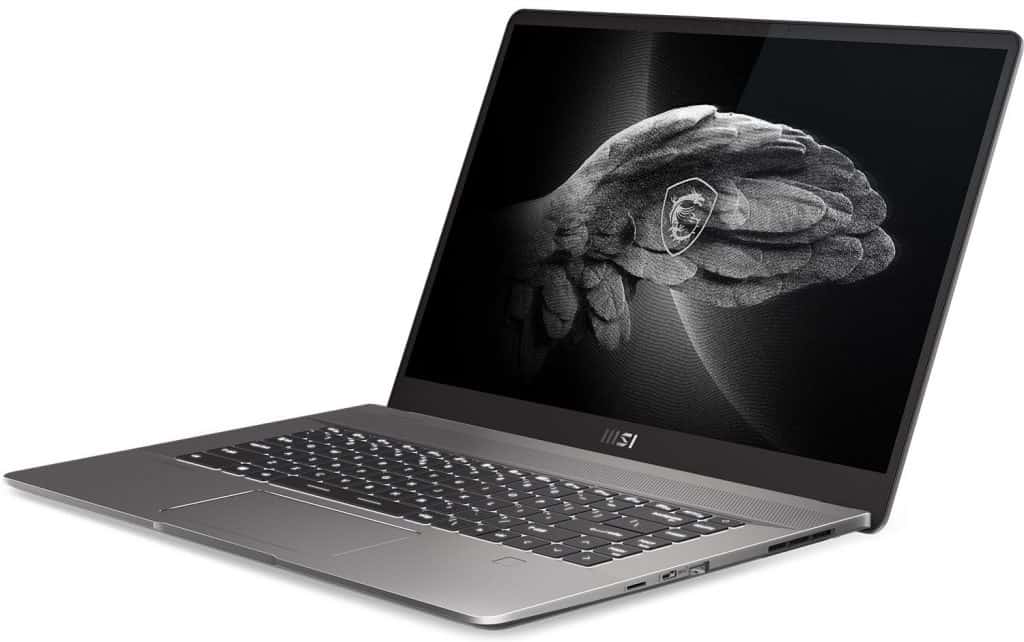
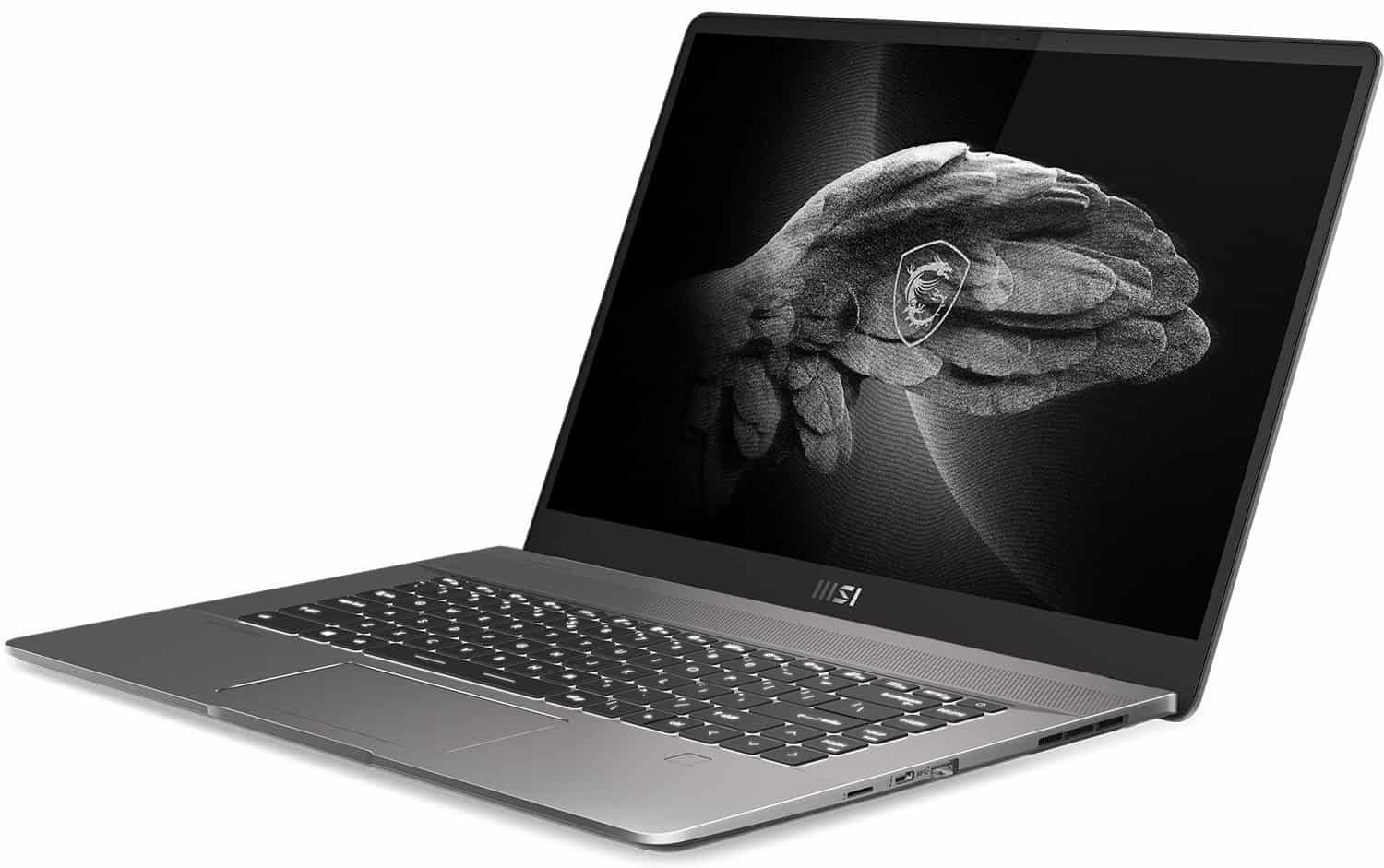
The MSI Creator Z16 (A11UET-043) is an authoritative laptop marketed for commercials but truly a hybrid device for content creators as well as gamers. While it strives to outdo both, it faces a quagmire that makes it more of a delectable average than a champion of both worlds despite its excellent performance and value.
The MSI Creator Z16 is a professional laptop that combines the benefits of a portable AAA gaming laptop with a mobile workstation, designed for commercials as an Nvidia Studio laptop. MSI already offers some of the best gaming and hybrid professional ultrabooks, but it looks like the MSI Creator Z16 was created to satisfy Apple MacBook laptops with powerful hardware optimized for creators.
Our review unit, the MSI A11UET-043 is inspired by the MacBook Pro series, but the standout feature should be the 16-inch 16:10 display, more recently the ‘Swiss Knife’ among creators. Professional creation enhanced productivity with style, and timeless design. While it doesn’t come with the design flourishes and fashion statements compared to flashy products like the Acer ConceptD series, it has some incredibly powerful internals that makes it the perfect product for many content creators.
Professional video editors , and photographers are going to enjoy the display’s touch screen quite a lot, plus the 100% DCI-P3 color range too. And if you want to casually play modern AAA games on the side you will probably appreciate the raw speed. There’s also a 120Hz refresh rate, which is supported by the Intel Core i9-11900H CPU and the Nvidia GeForce RTX 3060 graphics card.
Overall, the MSI Creator Z16 is a finely tuned innovative laptop that won’t disappoint if you buy it during the sale, but its hefty price tag isn’t too appealing, especially when you get it out there are better-optimized devices with better specs.
The MSI Creator Z16 can be described as a laptop that offers the ‘best’ of both worlds, with an appeal to creative professionals who want the power to run high-demand games as well as equally resource-intensive applications. It’s a rather innovative approach that hasn’t eliminated the idea of a gaming laptop that sports weird RGB lighting and an edgy chassis.
The only downside to being an all-rounder is that better creative workstations and standalone gaming laptops are available for much less. If you don’t mind owning a machine with a ‘gamer’ design and unique RGB lighting on the body, a device with better specs than our review model can be picked up for the price. under $2000, such as the Asus ROG Strix Scar 15 (Intel Core i9-12900H, RTX 3070 Ti), but you have to sacrifice the 16:10 aspect ratio.
Again, the only GPU option on the MSI Creator Z16 is the RTX 3060 which feels a bit impressive, and it could greatly benefit from an additional option for the RTX 3070/3080 for those who need more power than one little. MSI did not include HDMI, instead you get Thunderbolt or something like that, but honestly it’s still kind of annoying for people who use extra displays on the regular, and the A11UET-043 ends up being incompatible with devices like tablets that have to draw graphics.
Specifications
CPU: Intel Core i9-11900H processor
GPU: Nvidia GeForce RTX 3060 6GB VRAM
RAM: 32 GB
Memory: 2TB SSD
Screen: 16-inch, 16:10, QHD 2560 x 1600
Connectivity: Wi-Fi 6E, Bluetooth v5.2
Operating System: Windows 10 Pro
Camera: 720p 30fps
Dimensions: 14.13 x 10.08 x 0.64
Weight: 4.9 pounds
Design
The MSI A11UET-043 design is going to be kind of a mixed bag, but honestly there is a lot to like in this machine. It’s a plain metallic gray case with an MSI dragon on the lid, yet the whole engraving is done in a manner that is hard to spot unless you happen to catch the right light. MSI ensures everything is safe by not including any frills or bold designs, as we see in most gaming laptops. It’s a smart design approach since you now have a laptop capable of running modern AAA games, but it has the look to give you peace of mind on your desk.
Overall, the design is fine, nothing offensive but it kinda gets a bit boring when you think about what else is being offered elsewhere. The muted industrial look is nice, and honestly it’s kinda a breath of fresh air compared with those vibrant vents and flashy RGB lighting you see on a lot of gaming laptops out there.
Its build quality is solid and the chassis is made from real metal, weighs 4.9lb, and measures 14.13 x 10.08 x 0.64 inches. For that kind of size, this laptop is fully portable, and yes it will slide into a standard backpack without much fuss. The sturdy construction feels reassuring too, especially if you’re carrying a laptop daily, like for the commute. You can bring it to college, use it at work, even on cross-country flights, and it still won’t get scratched easily or anything like that.
Port selection is good, but not so good due to a glaring issue. The left side has a standard headphone/mic jack, a USB-Type C port, a USB-A port, and a power port. On the right side, you have a MicroSD reader, another USB-Type C port, and an additional USB-Type A port.
The only drawback, however, is that for some reason MSI doesn’t include an HDMI or Display Port, which is unusual given how useful they are in both creative offices and gaming environments. You’ll have to attach the devices using a thunderbolt connection via a dock, but that’s still not enough for those who need to use a graphics tablet for their projects.
The touchpad is in one respect small compared to the amount of space available on the base of the laptop. The keyboard has the same problem, it seems too small for the device itself, but typing on it is absolutely a wonderful experience. It will take you some time to get used to it from a design perspective, but it still offers a comfortable typing experience. This keyboard is powered by SteelSeries, which is known for its gaming keyboards, but aside from the RGB lighting, there’s nothing to suggest it’s a ‘gaming first’ keyboard.
MSI Creator Z16 Professional Laptop: 16″ QHD+ 16:10 120Hz Touch Display, Intel Core i9-11900H, NVIDIA GeForce RTX 3060, 32GB RAM, 2TB NVME SSD, Thunderbolt 4, Win10 PRO, Lunar Gray (A11UET-043): Buy it now
MSI Creator Z16 Fujiwara Hiroshi Limited Edition 16″ QHD+ 165hz MINILED 100% DCI-P3 Premium Professional Laptop Intel Core i7-11800H RTX3060 16GB DDR4 1TB NVMe SSD TB4 Win10PRO – Black (A11UE-226): Buy it now
MSI Creator Z16 16″ QHD+ 120hz 100% DCI-P3 Premium Professional Laptop Intel Core i9-11900H RTX3060 32GB DDR4 2TB NVMe SSD TB4 Win10Pro – Lunar Gray (A11UET-254): Buy it now
MSI Creator Z16 16″ Premium Professional Laptop: Intel Core i7-12700H RTX 3060 16GB DDR5 1TB NVMe SSD, QHD+ 120hz 100% DCI-P3, Thunderbolt 4 w/ PD Charging, Win 11 Pro: Lunar Gray A12UET-031US: Buy it now
Screen
The MSI Creator Z16 is an official Nvidia Studio laptop, sort of a badge from Nvidia that says this machine was built from the ground up with creative professionals in mind. In the Creator Z16 case, the display really leans into that idea ,more than anything else.
It has a 16-inch screen with thin bezels, similar to the MacBook Pro. Still, well beyond the MacBook Pro, the MSI Creator Z16 brings a very practical touchscreen when you’re moving through websites and apps, and that gives it a noticeable edge over Apple’s flagship.
The resolution is a bit disappointing, at 2560 x 1600 we expect something higher, be it 3072 x 1920 or even the full 4K display we see in many bright workstations created today, like the Apple MacBook Pro (M1 chip, 2021) or the Lenovo ThinkPad P15, both of which have 3840 x 2160 resolution screens.
In practical terms, having a 4K display is not a requirement for a creative machine and its inclusion would certainly push the refresh rate down but for such a high asking price, it sounds like you did not achieve the best success by trying to compromise between playing games and editing high-resolution photos and videos.
The display is bright enough, measuring around 397 nits, which is above average for a premium laptop, but the rather glossy screen makes it difficult to view the screen in brightly lit environments. You shouldn’t have any problems viewing the laptop indoors, such as in an office, just remember to stay away from open windows during the day.
The MSI Creator Z16 offers excellent color accuracy with 100% sRGB, 91% AdobeRGB, and 93% P3 coverage resulting in incredible saturation and color depth. Well, this isn’t an OLED display so you won’t get absolute sharp contrast, but it’s still a very professional-grade display.
Efficiency
Under the hood, the Creator Z16 has all the power an ad ever needs. It packs an 11th Gen Intel Core i9-11900H processor and an Nvidia 3060 CPU, which is all you need to power the most demanding applications, making it a laptop. This becomes perfect for video and photography editors. We’d easily recommend it to digital artists if it only had an HDMI port, but if you use your mouse for sculpting or rendering, you’ll find this machine much more valuable.
The 32GB RAM and 2TB SSD storage on our review unit is great for gaming and storing large files, and it’s certainly ideal for practical creative work, managing over 25 Chrome Tabs along with Photoshop, and the laptop showing no signs of slowing down, this is really what you’d expect from a device packing some serious hardware.
The RTX 3060 GPU is also the only graphics card option available across all the different MSI Creator Z16 specs we’ve seen, so either way, you’re only getting 6GB of VRAM. Again, this is enough muscle to play more recent games, fueled by Nvidia’s DLSS and Ray Tracing technologies. Again, for the price, we just wish it had more powerful mobile hardware like an Nvidia or AMD workstation, or even a more powerful model from the current RTX 30 series.
However, it does play modern games well at even high settings. For example, it averaged 44 fps in Cyberpunk 2077 at maximum settings with DLSS enabled, so the moniker of a ‘part-time’ gaming laptop is potentially entirely justifiable. It’s well-suited to running less demanding games like Valorant that will take advantage of the 120Hz display. The 720p webcam is just mediocre, but so are most laptop webcams, you should buy a better one on a device like this.
Battery life
The allure of battery life depends on whether you’re coming from a gaming or workstation perspective, lasting 6 hours 13 minutes in the PCMark 10 battery simulation and 6 hours in the looped video playback test.
As a gaming laptop, that’s quite commendable with most laptops averaging 4-5 hours, but we did see the Asus ROG Zephyrus last for more than 8 hours on a single charge. Others like the Alienware m15 R7 are hugely popular gaming laptops with solid hardware but barely get past the three-hour mark.
For a mobile workstation that’s much lower than most machines in this range, like the Dell XPS 15 and MacBook Pro-16-inch that last more than 12 hours on a single charge. So, if you plan to stay away from a power outlet, you may want to consider the Creator Z16’s battery life before you buy.
Audio and Webcam
The MSI Creator Z16 has a quad-speaker setup that supports Nahimic audio , which is kinda nice. In practice the speakers sound clear and pretty loud too, with a solid bass foundation and decent mid-range. So for movies , music, and casual gaming it works well. Still , if you do professional audio work, getting external speakers or a good set of headphones is the smarter move if you want the best sound quality.
You also get a 720p HD webcam, it’s enough for video calls and everyday streaming. The picture quality is fine, though it feels a bit underwhelming for a laptop of this caliber, you know, a 1080p webcam would have made more sense. The webcam includes an IR sensor for Windows Hello facial recognition as well, so logging in is secure and convenient in that straightforward way.
Thermals and Noise
Heat management sort of really matters on high end laptops, and the MSI Creator Z16 handles it pretty well, i guess. Its cooling arrangement runs on two fans, along with a bunch of heat pipes, all aimed at maintaining stable CPU and GPU temperatures, so everything stays controlled.
After long stretches of demanding tasks, like 3D rendering or gaming, the fans do get noticeably loud. That said, it’s pretty expected when there’s powerful hardware running full tilt. The good part is that the keyboard and palm rest area stay relatively cool , so you’re not cooking your hands while using it.
On our stress tests, thermal behavior stayed within reasonable boundaries. The CPU topped out at about 90°C, while the GPU remained under 80°C. Those kinds of numbers are pretty typical for performance-focused laptops, and they don’t suggest any thermal throttling either.
Software and Additional Features
The MSI Creator Z16 arrives with Windows 10 already on it , and there’s also an option to upgrade to Windows 11 later. MSI likewise throws in its Creator Center software, kinda like a dashboard that bundles a group of tools for squeezing extra performance out of the system, keeping an eye on system resources, and messing with the keyboard backlighting settings.
That Creator Center app feels pretty user friendly, and it gives a few different performance profiles so you can tune things, kind of trade off speed vs battery life, depending on what you’re doing. On top of that, there’s a color calibration tool too, which helps keep colors looking right across various applications, not just in one place.
One more thing, and this is kinda big, is MSI’s True Pixel technology. It’s meant to make sure each display unit is calibrated separately for color correctness. Honestly, for professionals who care about accurate color reproduction , this becomes a real advantage, since the work usually depends on precise output.
Conclusion
The MSI Creator Z16 is a top tier laptop, that really shines in most places. You can feel the balance between strong hardware , a really nice screen, and that sleek style it has. So yeah, it becomes a solid option for creative folks. The high resolution display , also known for being color accurate, helps a lot with photo and video editing, while the fast CPU and GPU can deal with heavy workloads without much trouble.
Also, the build quality and overall design are worth mentioning. It feels premium in the hand and looks professional too, not overly flashy. The keyboard plus touchpad are comfortable enough and pretty responsive , and the port selection is practical, meaning you get the connections you actually need.
Battery life could still improve a bit, sure, but for a machine like this its still in the decent range. The cooling system handles heat well, although during big demanding sessions the fans may start sounding a little loud, even if you’re working through it.
By the end, the MSI Creator Z16 gives this sort of versatile yet capable workstation vibe, that really fits creative folks. Like, if you’re into graphic design , video editing, or even 3D art, this laptop has the kind of performance and overall feature set to help you turn your ideas into actual stuff, without having to battle the device too often.
Related Posts


Tech Reviewer & Product Analyst
Định Bia has spent over 10 years testing consumer electronics with a focus on smart technology. He work as a product advisor at Biareview where he helped customers find the right devices for their needs. He personally tests every product featured on this site using a consistent evaluation framework covering quality, durability, and value. All reviews are based on experience, not influenced by the manufacturer.