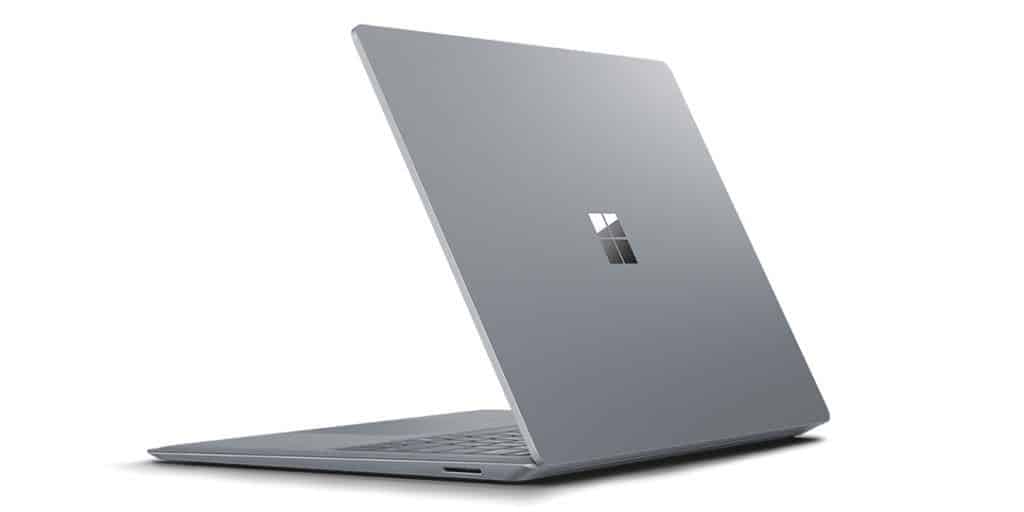
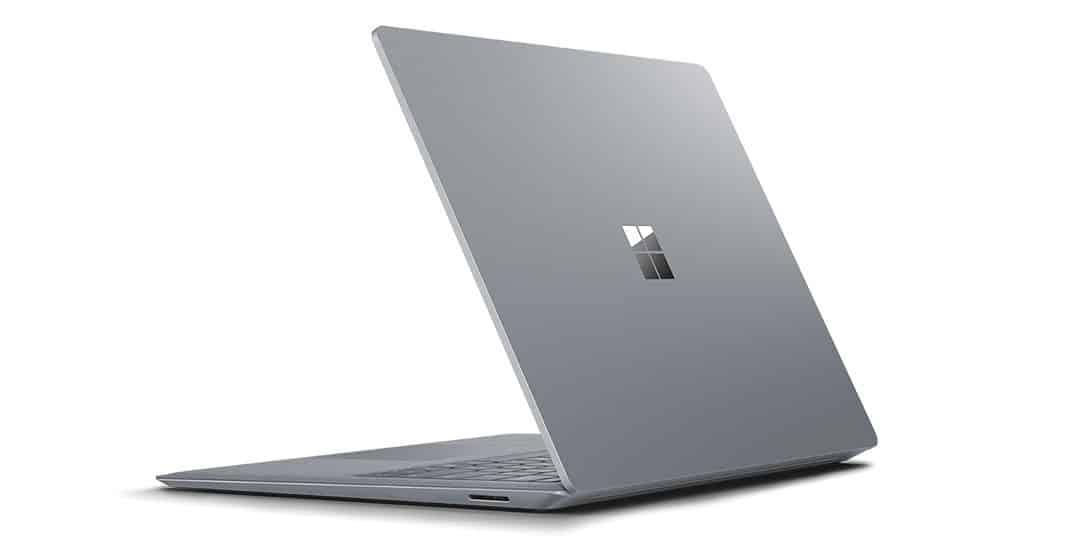
Following the success of the Microsoft Surface Book, Microsoft Corp recently unveiled the successor to the Surface Laptop and is highly praised by industry experts and is regarded as a competitor directly with Apple’s Macbook.
Take a look at some of the configuration parameters:
13.5-inch Pixel Sense Multi-touch (10 fingers)
Resolution of 2256 x 1504, pixel density of 201ppi, aspect ratio of 3: 2
Operating System Windows 10 S
Intel Core i5 or i7 CPU (7th Generation)
128GB, 256GB, 512GB Solid State Drive (SSD)
RAM 4GB, 8GB or 16GB RAM
Graphics i5: Intel HD graphics 620, i7: Intel Iris Plus Graphics 640
Rear Camera None
Camera before 720p Windows Hello (face detection)
Omnisonic Speakers with Dolby Audio Premium
USB 3.0 port, Mini DisplayPort, headphone jack, magnetic charging port
Light Sensor
TPM security for enterprise security
Battery life is 14.5 hours
Pen Surface
Weight 1.25 kg
Dimensions 12.13 inches x 8.78 inches x 0.57 inche
Design
As the best representative of the laptop running Windows operating system, so Surface Laptop is invested, take care very carefully in the design. The product has a breakthrough style, completely different from traditional laptops in the past. The design of the Surface Laptop is modern, with a shell made of high quality aluminum combined with Alcantara fabric for excellent water and dust resistance.
Not to stop there, the latest laptop from Microsoft also owns an impressive thin with the thickest is only 14.5 mm. Although not the lightest model yet, yet with a weight of 1.25kg, the user can easily carry without any difficulty.
Surface Laptop touch screen quality is very good with a height of 1.5mm three times the Macbook. The keys are good bounce, the gently pressing, noisy sound gives the user the best experience when working and entertaining. Despite its slim design, the Surface Laptop is still fully integrated with the basic connectivity. However, this product is not supported USB type C, this is a regrettable thing that this port is increasingly used more commonly.
Display
The Surface Laptop comes with a gorgeous 13.5-inch PixelSense touchscreen screen, resolution 2256 x 1504 pixels. This high-res display gives sharp, bright visuals, and colors look pretty faithful while contrast feels solid. It works nicely for photo editing, watching multimedia , and day to day productivity work too. The touchscreen is responsive, and it also takes stylus input with the optional Surface Pen, which makes it more flexible for creative chores and all that.
Touch screen
Based on the previous Surface Book, the screen is highly rated for visibility and this continues to remain on the Surface Laptop even further upgraded and improved. As one of the thinnest touch-screen displays today, the Surface Laptop offers an excellent display space to satisfy even the most demanding guests.
Although it only has a resolution of 2256 × 1504 with a pixel density of 201 PPI, which is quite lower than its predecessor Surface Book (276 PPI) or its direct rival, the MacBook Pro (221 PPI). The display quality on the Surface Laptop is honestly no less. Thanks to the more advanced Pixel Sense display technique, colors saturation and contrast on the Surface Laptop screen are very good , not just ok. The low resolution also helps the battery last longer. On top of that, Microsoft also seems to bet on the Surface Pen for it, which makes it easy for people to jot notes or sketch right on the display.
Microsoft Surface Laptop (Intel Core i5, 4GB RAM, 128GB) – Platinum: Buy it now
Microsoft Surface Laptop (Intel Core i5, 8GB RAM, 256GB) – Platinum: Buy it now
Microsoft Surface Laptop (Intel Core i7, 16GB RAM, 512GB) – Platinum: Buy it now
Microsoft Surface Laptop (Intel Core i7, 8GB RAM, 256GB) – Platinum: Buy it now
Configuration
The Surface Laptop is basically powered by Intel’s newest Kaby Lake processor, so the performance is better than the older generation and it feels more snappy. Microsoft also gives users configurable options for their actual needs , like an i5 or i7 processor, plus RAM choices from 4GB, 8GB, up to 16GB, and storage options 128GB, 256GB, or 512GB SSD. For the graphics side you get HD 620 (when you pick i5) or Iris Plus 640 (when you pick i7). Real experience, for the needs of everyday use can not completely make it difficult Surface Laptop, the task is done quickly and without the phenomenon of lag. Compared to the Nvidia GPU on the Surface Book, the Surface Laptop’s Iris Plus 640 GPU is a bit disappointing. However, for graphical needs, users can use still fine.
To bring the smoothest experience, Microsoft has equipped the Surface Laptop operating system Windows 10s. However, users can only download applications on the Windows Store. And to be able to install applications like normal PC users have to upgrade the operating system Windows 10 Pro quite inconvenient.
Face Detection
With the task of just video chatting, the camera is often not the strong point of a laptop and Surface Laptop is no exception. However, Microsoft has added to its laptops a unique feature that is the facial recognition security technology. A Macbook is also equipped with this feature but only works when it is connected to the iPhone and Apple ID.
Performance
Under the hood , the Surface Laptop has a bunch of setup choices, most of the time it comes with Intel Core i5 or i7 CPUs , with 8GB or 16GB of RAM. With that sort of setup you usually get smooth enough day to day work, plus steady multitasking , without feeling sluggish. The built in Intel HD graphics handle casual light gaming and everyday video editing pretty well, but it really isn’t designed for heavy visual work, like 3D rendering or gaming on high presets.
Keyboard and Trackpad
The keyboard on the Surface Laptop is mostly praised for how it feels in hand, it’s comfortable and gives good tactile cues. The keys are nicely spaced , and they have decent travel, so long typing sessions stay efficient. The precision glass trackpad is responsive too, it also supports Windows gestures, so moving around the interface stays fluid, plus it helps a lot with multitasking.
Connectivity and Ports
In terms of connectivity, the Surface Laptop includes:
- 1 x USB 3.0 port
- 1 x Mini DisplayPort
- Surface Connect port
- 3.5mm headphone jack
While the port selection is somewhat limited compared to other laptops, it covers the basics and supports external displays and peripherals through adapters.
Battery Life
Battery life is a strong suit on the Surface Laptop, you can get up to 11.5 hours of video playback on one charge. In real-world use it depends on the tasks , but most people should still expect that all-day endurance for everyday productivity like web browsing, editing documents, and streaming video. It also has fast charging support, so when you are low it can top up pretty quickly, no big song and dance.
Audio and Multimedia
For sound, the Surface Laptop includes Omnisonic speakers with Dolby Audio Premium, so the audio comes out pretty crisp and full. The speakers sit under the keyboard which helps keep the volume decent for multimedia, plus those casual video calls.
Software and User Experience
It comes pre-loaded with Windows 10 Home or Windows 10 Pro, which feels familiar and gives a secure operating environment. On top of that, Microsoft’s usual bundle of productivity tools and services, like Office 365 and OneDrive, makes everything feel smoother right from the start. There’s also Windows Hello, so biometric login works through the front-facing camera.
Portability and Durability
Use cases
The Surface Laptop is, kind of, the right pick for
Students : it stays light and easy to carry around campus, plus you get enough battery life to last through pretty much all day classes.
Professionals : good for business meetings, presentations and general office stuff, thanks to the clean look and steady performance .
Creatives : the touchscreen and stylus support make it practical for digital artists, and also designers who sketch directly on the screen.
Pros and cons
Pros
Premium design, sleek aluminum chassis paired with an Alcantara fabric keyboard area, kind of like a soft touch where you actually rest your hands.
High resolution display , a PixelSense touchscreen that keeps visuals crisp and the color matching feels really solid, not washed out or anything.
Solid performance: Intel Core i5 or i7 processors, with setups up to 16GB RAM, so it handles daily stuff without too much fuss.
Long battery life, up to 11.5 hours of video playback , which is honestly pretty good for being on the move.
Following the success of the Microsoft Surface Book, Microsoft Corp recently unveiled the successor to the Surface Laptop and is highly praised by industry experts and is regarded as a competitor directly with Apple’s Macbook.
Take a look at some of the configuration parameters:
13.5-inch Pixel Sense Multi-touch (10 fingers)
Resolution of 2256 x 1504, pixel density of 201ppi, aspect ratio of 3: 2
Operating System Windows 10 S
Intel Core i5 or i7 CPU (7th Generation)
128GB, 256GB, 512GB Solid State Drive (SSD)
RAM 4GB, 8GB or 16GB RAM
Graphics i5: Intel HD graphics 620, i7: Intel Iris Plus Graphics 640
Rear Camera None
Camera before 720p Windows Hello (face detection)
Omnisonic Speakers with Dolby Audio Premium
USB 3.0 port, Mini DisplayPort, headphone jack, magnetic charging port
Light Sensor
TPM security for enterprise security
Battery life is 14.5 hours
Pen Surface
Weight 1.25 kg
Dimensions 12.13 inches x 8.78 inches x 0.57 inche
Design
As the best representative of the laptop running Windows operating system, so Surface Laptop is invested, take care very carefully in the design. The product has a breakthrough style, completely different from traditional laptops in the past. The design of the Surface Laptop is modern, with a shell made of high quality aluminum combined with Alcantara fabric for excellent water and dust resistance.
Not to stop there, the latest laptop from Microsoft also owns an impressive thin with the thickest is only 14.5 mm. Although not the lightest model yet, yet with a weight of 1.25kg, the user can easily carry without any difficulty.
Surface Laptop touch screen quality is very good with a height of 1.5mm three times the Macbook. The keys are good bounce, the gently pressing, noisy sound gives the user the best experience when working and entertaining. Despite its slim design, the Surface Laptop is still fully integrated with the basic connectivity. However, this product is not supported USB type C, this is a regrettable thing that this port is increasingly used more commonly.
Display
The Surface Laptop comes with a gorgeous 13.5-inch PixelSense touchscreen screen, resolution 2256 x 1504 pixels. This high-res display gives sharp, bright visuals, and colors look pretty faithful while contrast feels solid. It works nicely for photo editing, watching multimedia , and day to day productivity work too. The touchscreen is responsive, and it also takes stylus input with the optional Surface Pen, which makes it more flexible for creative chores and all that.
Touch screen
Based on the previous Surface Book, the screen is highly rated for visibility and this continues to remain on the Surface Laptop even further upgraded and improved. As one of the thinnest touch-screen displays today, the Surface Laptop offers an excellent display space to satisfy even the most demanding guests.
Although it only has a resolution of 2256 × 1504 with a pixel density of 201 PPI, which is significantly lower than its predecessor, the Surface Book (276 PPI) or its direct competitor, the MacBook Pro (221 PPI). The display quality of the Surface Laptop is no less. Due to the advanced Pixel Sense display technology, colors, saturation and contrast on the Surface Laptop screen are extremely good. Low resolution makes the battery last longer. In addition, Microsoft also favors the Surface Pen for its, which makes it easy for users to make notes or draw directly on the screen.
Microsoft Surface Laptop (Intel Core i5, 4GB RAM, 128GB) – Platinum: Buy it now
Microsoft Surface Laptop (Intel Core i5, 8GB RAM, 256GB) – Platinum: Buy it now
Microsoft Surface Laptop (Intel Core i7, 16GB RAM, 512GB) – Platinum: Buy it now
Microsoft Surface Laptop (Intel Core i7, 8GB RAM, 256GB) – Platinum: Buy it now
Configuration
The Surface Laptop is basically powered by Intel’s newest Kaby Lake processor, so the performance is better than the older generation and it feels more snappy. Microsoft also gives users configurable options for their actual needs , like an i5 or i7 processor, plus RAM choices from 4GB, 8GB, up to 16GB, and storage options 128GB, 256GB, or 512GB SSD. For the graphics side you get HD 620 (when you pick i5) or Iris Plus 640 (when you pick i7). Real experience, for the needs of everyday use can not completely make it difficult Surface Laptop, the task is done quickly and without the phenomenon of lag. Compared to the Nvidia GPU on the Surface Book, the Surface Laptop’s Iris Plus 640 GPU is a bit disappointing. However, for graphical needs, users can use still fine.
To bring the smoothest experience, Microsoft has equipped the Surface Laptop operating system Windows 10s. However, users can only download applications on the Windows Store. And to be able to install applications like normal PC users have to upgrade the operating system Windows 10 Pro quite inconvenient.
Face Detection
With the task of just video chatting, the camera is often not the strong point of a laptop and Surface Laptop is no exception. However, Microsoft has added to its laptops a unique feature that is the facial recognition security technology. A Macbook is also equipped with this feature but only works when it is connected to the iPhone and Apple ID.
Performance
Under the hood , the Surface Laptop has a bunch of setup choices, most of the time it comes with Intel Core i5 or i7 CPUs , with 8GB or 16GB of RAM. With that sort of setup you usually get smooth enough day to day work, plus steady multitasking , without feeling sluggish. The built in Intel HD graphics handle casual light gaming and everyday video editing pretty well, but it really isn’t designed for heavy visual work, like 3D rendering or gaming on high presets.
Keyboard and Trackpad
The keyboard on the Surface Laptop is mostly praised for how it feels in hand, it’s comfortable and gives good tactile cues. The keys are nicely spaced , and they have decent travel, so long typing sessions stay efficient. The precision glass trackpad is responsive too, it also supports Windows gestures, so moving around the interface stays fluid, plus it helps a lot with multitasking.
Connectivity and Ports
In terms of connectivity, the Surface Laptop includes:
- 1 x USB 3.0 port
- 1 x Mini DisplayPort
- Surface Connect port
- 3.5mm headphone jack
While the port selection is somewhat limited compared to other laptops, it covers the basics and supports external displays and peripherals through adapters.
Battery Life
Battery life is a strong suit on the Surface Laptop, you can get up to 11.5 hours of video playback on one charge. In real-world use it depends on the tasks , but most people should still expect that all-day endurance for everyday productivity like web browsing, editing documents, and streaming video. It also has fast charging support, so when you are low it can top up pretty quickly, no big song and dance.
Audio and Multimedia
For sound, the Surface Laptop includes Omnisonic speakers with Dolby Audio Premium, so the audio comes out pretty crisp and full. The speakers sit under the keyboard which helps keep the volume decent for multimedia, plus those casual video calls.
Software and User Experience
It comes pre-loaded with Windows 10 Home or Windows 10 Pro, which feels familiar and gives a secure operating environment. On top of that, Microsoft’s usual bundle of productivity tools and services, like Office 365 and OneDrive, makes everything feel smoother right from the start. There’s also Windows Hello, so biometric login works through the front-facing camera.
Portability and Durability
Use cases
The Surface Laptop is, kind of, the right pick for
Students : it stays light and easy to carry around campus, plus you get enough battery life to last through pretty much all day classes.
Professionals : good for business meetings, presentations and general office stuff, thanks to the clean look and steady performance .
Creatives : the touchscreen and stylus support make it practical for digital artists, and also designers who sketch directly on the screen.
Pros and cons
Pros
Premium design, sleek aluminum chassis paired with an Alcantara fabric keyboard area, kind of like a soft touch where you actually rest your hands.
High resolution display , a PixelSense touchscreen that keeps visuals crisp and the color matching feels really solid, not washed out or anything.
Solid performance: Intel Core i5 or i7 processors, with setups up to 16GB RAM, so it handles daily stuff without too much fuss.
Long battery life, up to 11.5 hours of video playback , which is honestly pretty good for being on the move.
Comfortable keyboard: the keys have decent spacing, and that tactile feel is pretty satisfying, like it clicks in the right way. Not too stiff, not too loose, just pleasant.
Great build quality: it feels sturdy but still lightweight enough for day-to-day portability, so you can take it along without it dragging you down or feeling awkward in your hands.
Cons
Few ports : limited port selection, so you might need adapters for certain devices.
Integrated graphics : it’s not the best fit for heavy gaming , nor for demanding professional graphics tasks.
Conclusion
Microsoft Surface Laptop, it really shines with a premium kind of design , a high resolution screen, and overall performance that stays steady for day to day work and also more professional demands. The whole thing feels light in hand, battery life seems to hold up for a long time, and the keyboard is actually nice and comfortable to type on, so it ends up suiting students , professionals, and even creative people. Sure, the port selection isn’t the most expansive, and there’s no separate dedicated graphics card meant for heavy gaming, but in the end the complete package feels pretty persuasive if you’re looking at an ultraportable laptop.
Related Posts


Tech Reviewer & Product Analyst
Định Bia has spent over 10 years testing consumer electronics with a focus on smart technology. He work as a product advisor at Biareview where he helped customers find the right devices for their needs. He personally tests every product featured on this site using a consistent evaluation framework covering quality, durability, and value. All reviews are based on experience, not influenced by the manufacturer.