Pack.
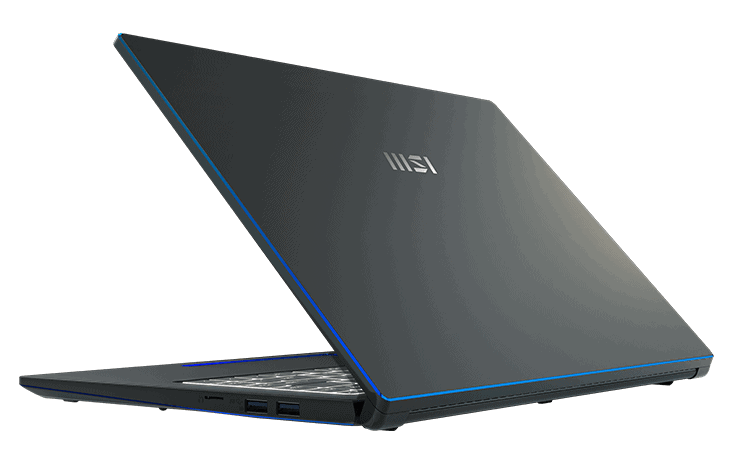
MSI Prestige 15 is placed in a genuine cardboard box, with pretty paper material, like some high-end mooncake boxes. In addition, the words on the box are pressed with gold emulsion to bring a feeling of Luxury when you touch it.
Design
The MSI Prestige 15 is kinda one of the thinnest and lightest 15-inch laptops you can get right now. It has thickness 16.9mm and weight 1.69kg. It’s really only slightly more substantial and a bit heavier than most typical 13 and 14-inch laptops. When you first hold it , there’s this clear mismatch between what you’re feeling in your hand, and what you’d expect a 15-inch laptop to weigh. Although the Prestige 15 is heavier than the LG gram 15 – 1,120g, that is still too good.
The chassis is aluminum and is bluish-gray from some angles. The edges of the screen cover are beautifully stylized diamond-cut. The build quality is generally good but there is still some room for improvement. While it doesn’t feel completely premium and solid, it is MIL-STD-810G certified for the military. That means it has some resistance to shock, vibration, temperature, dust, and pressure.
Screen
MSI calls its display True Pixel and that’s one of the highlights of this machine. The bezels aren’t the thinnest, but the brightness and colors are some of the best I’ve seen on a 15-inch laptop. MSI says it covers 100% of the AdobeRGB color space, which is factory-calibrated and Calman-certified. This version is the version using the FullHD screen, so the image is sharp at a good level, and the images and text are sharp and clear. If you need everything smooth like on a MacBook, add another $450 to have a 4k screen. Besides, it is also equipped with a 3H hard coating and 1 anti-glare layer, so glare and annoying reflections are kept to a minimum.
The webcam and microphone on Prestige 15 are of sufficient quality to use with video calls or talk while playing online games. If you need to Livestream, you should buy an external webcam for better quality.
Connection
Prestige 15 has a sufficient number of connections. On the left side, you get two USB-C Thunderbolt 4 ports with built-in PDs, so they can quickly charge other mobile devices, plus one full-size HDMI 2.0 port for driving a second display at 4k/60Hz and also a 3.5mm headphone jack. On the right side there are two USB-A USB 3.2 Gen 2 ports, plus a microSD card reader so you can use those swifter UHS-II cards. And for wireless connectivity, the Prestige 15 kind of leans on the newest WiFi 6 standard, along with Bluetooth 5.1.
Keyboard and touchpad
The keyboard is pretty good, honestly. Unlike a lot of 15-inch laptops , the Prestige 15 keyboard omits the numeric keypad which might throw some people off, especially users whose go-to app is Excel. But for everyone else it basically translates into larger keys and a less cramped layout, so it still works out. The keys are big and the whole arrangement is pretty normal, even if there is an extra column for the navigation keys. Because the arrow keys are full-sized, the right Shift key is only a bit smaller. Key travel sits at 1.5mm, the key feel is also well appreciated, and the white backlight is really bright. The only real minus point is that MSI goes for too stylized fonts , so it can feel a little harder to read.
The trackpad is about 14cm wide and 6.5cm from top to bottom. It is narrow but also wide, somehow. It feels smooth to the touch and it uses the Windows Precision driver, so the swipes and taps seem smooth, also pretty responsive. There’s a fingerprint scanner in the top left corner, and that part can get awkward for right-handed folks to reach. Overall, this is a well-made trackpad, but I just wish it had a bit more space, so scrolling downward would feel more comfortable.
Performance of the MSI Prestige 15
The MSI Prestige 15 is one of the first laptops to launch with the latest 11th Gen Intel Core i7 – 1185G7 processor, With that powerful CPU and 16GB of RAM inside, it’s a laptop built to handle heavy software. It seems to work quicky and rarely lags in any way, and it can handle multiple browser tabs , or well multiple apps at once too. MSI kind of slid in a pretty reliable discrete graphics unit here: the NVIDIA GeForce GTX1650 (Max-Q). It’s not really strong enough for MSI to call this a full blown gaming laptop, but it can still handle todays games with a steady output around 60fps . That said , if you jump into titles that need more heavy graphics requirement, the fps tends to slip down to about 42fps with Medium settings. Overall though I still feel the gaming performance is pretty decent, like it does what it’s supposed to, even if it’s not totally relentless or something.
MSI Prestige 15 15.6″ FHD Ultra Thin and Light Professional Laptop: Intel Core i7-1260P RTX 3050 Ti 32GB LPDDR4X 512 GB NVMe SSD, Thunderbolt 4, MicroSD Card Reader, Win 11 Pro: Carbon Gray A12UD-005: Buy it now
MSI Prestige 15 15.6″ FHD Ultra Thin and Light Professional Laptop Intel Core i7-1185G7 GTX1650 MAX-Q 16GB DDR4 512GB NVMe SSD Win10 – Gray (A11SC-034): Buy it now
MSI Prestige 15 Thin and Performance Driven Laptop: 15.6″ FHD 1080p, Intel Core i5- 155G7, NVIDIA GeForce GTX 1650, 16GB, 512GB SSD, Thunderbolt, WiFi 6E, Win10PRO, Carbon Gray (A11SC-048): Buy it now
MSI Prestige 15 15.6″ FHD Ultra Thin and Light Professional Laptop: Intel Core i5-1240P GTX 1650 16GB LPDDR4X 512GB NVMe SSD, Thunderbolt 4, MicroSD Card Reader, Win 11 Home: Carbon Gray A12SC-011: Buy it now
MSI Prestige 15 Thin and Performance Driven Laptop: 15.6″ FHD 1080p, Intel Core i7-1195G7, NVIDIA GeForce GTX 1650, 16GB, 1TB SSD, Thunderbolt, WiFi 6E, Win10PRO, Carbon Gray (A11SC-044): Buy it now
Temperature
Such hardware in a body just 16.9mm thick will always cause thermal problems. The Prestige 15 runs very warmly. Thanks to the slightly changed design from Cooler Boost 3, CPU and GPU temperatures are within acceptable limits, but the body will get extremely hot when running at full capacity. The top corners of the keyboard are only 50°C and very hot to the touch. It’s also 10 degrees hotter than other 15-inch laptops we’ve tested. The palm rest is also hot – the warmest of all the other 15-inch laptops. In short, you probably won’t want heavy software if you’re using this laptop on your lap.
Battery life
Battery life is commendable for a laptop with a 15-inch screen with nearly 5 hours of continuous operation.
You can extend battery life by using the “Super Battery” mode in the Creator Center app. This application dims the screen and forces the processor to run in its most efficient mode. You lose performance but use up more battery. When I ran the app I found that I was able to extend its battery life to almost 11 hours – more than double that.
Possibility to upgrade
Prestige 15 is pre-installed with 2 sticks of 8g ram, so if you want to upgrade the ram, it needs to be replaced but cannot be added. And the highest amount of ram the machine can receive is 64GB.
Prestige 15 also has 2 ssd m2 slots (1x NVMe PCIe Gen3 and 1x NVMe PCIe Gen4)
Epilogue
The Prestige 15 is a commendable attempt at creating a powerful 15-inch laptop that’s still relatively thin and light.
Performance is in line with expectations, but without the “High Performance” mode enabled, the CPU performance isn’t much better than that of a 13- or 14-inch laptop. Graphics performance is a step up but then it falls behind other 15-inch laptops with more powerful discrete GPUs. There’s the heat issue. As analyzed above, this laptop is very hot when operating at full capacity. I don’t normally use the heatsink, but with the Prestige 15, I think you might need it.
As I mentioned at the beginning, its closest competitors are ASUS’ ZenBook 15 and Dell’s XPS 15. Now, I haven’t had any hands-on experience with them yet, but in theory, the ZenBook 15 is the closest competitor since it has an identical CPU and GPU. On the other hand, the XPS 15s are more powerful machines. XPS 15 more powerful 45W CPU and a more powerful discrete graphics card. The downside is that they are thicker and heavier, but not by much so I would pick them up if I need a powerful, moderately flexible 15-inch laptop.
If portability is important to you then the Prestige 15 is, kind of, worth a close look. Not many other 15-inch laptops are this thin and this light. The LG gram 15 is lighter , but it leans on integrated graphics so performance cant really compete with the Prestige 15. While the ZenBook 15 might have near identical specs it’s thicker and more heavy than the Prestige 15. The XPS 15 could feel stronger but it’s still heavier. Both end up around 400 g more than the Prestige 15. If you are planning to tote your laptop around all day, yeah every gram does matter.
So while Prestige can be an awkward balance between performance and portability, it at least makes a niche for itself in the market.
Related Posts

Tech Reviewer & Product Analyst
Định Bia has spent over 10 years testing consumer electronics with a focus on smart technology. He work as a product advisor at Biareview where he helped customers find the right devices for their needs. He personally tests every product featured on this site using a consistent evaluation framework covering quality, durability, and value. All reviews are based on experience, not influenced by the manufacturer.