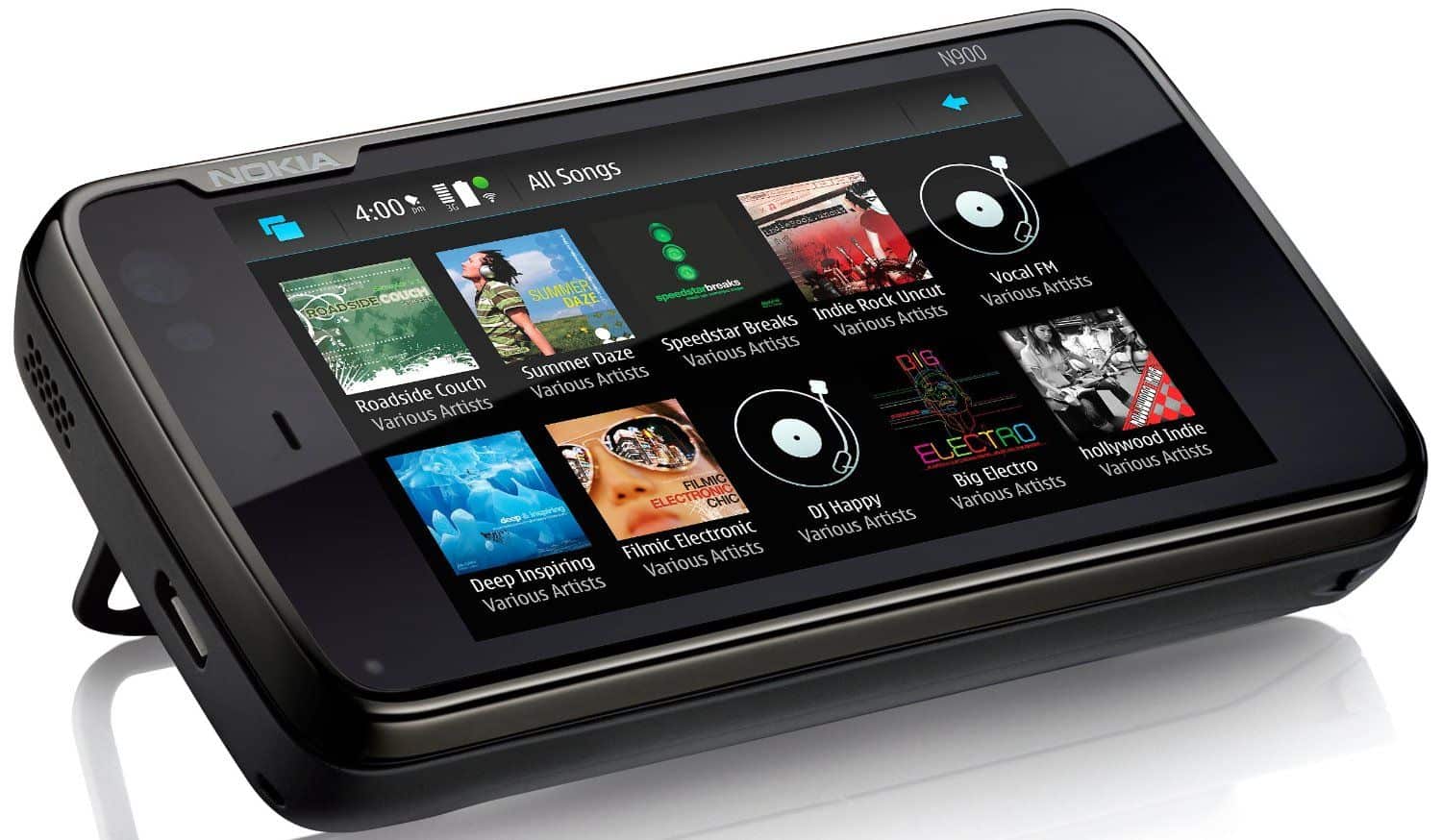
The Nokia Internet Tablet came out in 2005, from the Finnish manufacturer , and yes, it’s basically a device with a big touch screen thing going on. The earlier ones kind of set the tone, but the Nokia N900 feels different in that it’s not just smaller , it also bring in a phone mode , it supports 3G / HSDPA links, and people usually describe it as a new smartphone with a new platform compared to the usual mobile market.
So, what are the notable points of the Nokia N900
– 3.5 inch touch screen , 800 x 480 pixel WVGA resolution, resistive approach
– Microprocessor: ARM Cortex A8 600MHz, PowerVR SGX graphics , and 256 MB RAM
– Operating System: Maemo 5
– Browser: Mozilla that includes Adobe Flash 9.4
– QWERTY keyboard with 3 rows of keys, not just one big block
– 5 megapixel camera, two LEDs, autofocus, rear slider, WVGA (848 x 480 pixels) video capture, 24fps
– 3G / HSDPA connectivity up to 10Mb/s, plus HSUPA around 2M/sec
– Wireless: Wi‑Fi, GPS using A‑GPS
– Memory: 32GB
– Ports and communication: 3.5mm headphone jack, TV-out port, microUSB, microSD card slot
Design and Build Quality
The Nokia N900 really stands apart thanks to a pretty unusual design. It kinda mixes a sturdy build with a sleeker , more modern look, even if it looks like it’s doing a lot at once.
Dimensions and build
The Nokia N900 sits around 111 x 59.8 x 18 mm, and it weighs roughly 181 grams. Those measurements kind of show the whole idea , it’s more about giving serious functionality with a thick enough build, plus it carries a full QWERTY keyboard and a big touchscreen . Even if it feels a bit hefty, it’s still balanced , like it lands nicely in the hand, so it works for quick use as well as longer sessions.
As for build quality, the N900 feels genuinely exceptional, more solid than you’d expect for this class. It’s made from a mix of metal and plastic, so you get durability without losing that smooth looking finish. The slide mechanism for the QWERTY keyboard moves in a clean, dependable way, and it’s built to tolerate constant tapping and pushing, not just occasional handling.
Display
The Nokia N900 uses a 3.5 inch TFT touchscreen with a resolution of 800 x 480 pixels. Back when it launched, that screen size and that resolution were pretty much considered top shelf, giving sharp , clear visuals that look lively . It can show as much as 16 million colors, which helps with color fidelity and decent contrast.
Touch control is responsive, with support for multi touch gestures , so swipes and pinches feel natural. The resolution keeps text and photos crisp, and the brightness is usable across different lighting setups. In day to day terms, the display really shines during media playback, web browsing, and general navigation , and that tends to translate into a smoother user experience.
Design Elements
On the front of the N900 you get that noticeable 3.5-inch display , plus the front-facing camera, and then there’s also a proximity sensor. Under the screen, the physical QWERTY keyboard slides out from beneath, showing a full set of keys that give tactile feedback for pretty comfortable typing. It’s kind of a neat layout, not just “there” but it actually feels intentional.
On top you’ll find the power button along with a 3.5mm headphone jack. At the bottom sits the micro-USB port, used for both charging and data transfer, which is normal but still important. Flip it around and the back holds a 5-megapixel camera with a Carl Zeiss lens, together with a dual LED flash. Overall the look is minimalistic, with crisp lines and a professional vibe, it matches the device’s advanced features without trying too hard.
Display and Touchscreen
The Nokia N900’s screen really matters here because it’s basically part of the whole experience, the visual part, and also how you interact with things day to day.
Screen Size and Resolution
That 3.5-inch TFT touchscreen gives a comfortable area for tapping , swiping , and generally doing stuff on the go. In terms of resolution, it runs at 800 x 480 pixels, and that ends up around 267 pixels per inch, or PPI. So the visuals come through fairly sharp and detailed. The screen size and resolution make it work well for lots of tasks like media playback, web browsing , and gaming.
Touchscreen performance
The N900 capacitive touchscreen is mostly very responsive, with multi touch gestures like pinch-to-zoom and swipe actually working as expected. It feels smooth, and the tracking is fairly accurate too,so you do get a nicer overall user flow. Touch sensitivity also seems well calibrated, which makes moving through the operating system, and using apps, feel natural and pretty efficient at the same time.
Display quality
For the display, it uses TFT tech, and it brings decent color reproduction as well as solid contrast. Brightness can be adjusted, so visibility stays manageable in different light situations. This quality is especially noticeable when you watch photos, videos, or other media content. The high resolution, plus those vibrant hues, gives a pretty engaging visual vibe even for longer viewing.
Camera performance
The Nokia N900’s camera, honestly it’s one of its more standout highlights, with a variety of options for photography and video capture.
Image Quality
So the N900 has this 5-megapixel cam, with a Carl Zeiss type lens and a dual LED flash. For its era, the results look kind of impressive, it gives high quality images with solid detail and pretty decent color accuracy, even if it’s not perfect. The lens itself is said to bring sharpness and overall clarity, plus the dual LED flash does help when lighting is low, like in darker rooms or outdoors at night.
When you’re in brighter environments, the phone can take photos that feel crisp and lively, with accurate color reproduction. It also brings a bunch of shooting setups and modes, like auto, portrait, landscape, and macro , so depending on the situation you can tweak what you want, basically.
Low-Light Performance
In low-light, the Nokia N900 camera does “pretty ok” overall, mostly because that dual LED flash adds extra light. Still, even with the flash, the pictures can show some noise , and you may notice less fine detail than you would get in daylight. The low-light image quality is enough for casual use, but it won’t really compare to newer devices that use more advanced camera technologies and better sensors.
Video Recording
The N900 can record video at 848 x 480 pixels, which is VGA, and for that time it’s fair quality. Video playback tends to be smooth enough, with good detail for VGA and color reproduction that looks reasonably consistent. The device also offers standard video features, like basic stabilization and playback options. Now, the N900’s video recording isn’t on the same level as modern smartphones, but honestly for everyday use it’s still suitable.
Front Camera
The N900 has a front facing VGA camera, mainly for video calling and yeah self-portraits. It works in a basic way, the resolution is enough for relaxed video chats and quick snapshots . Honestly, the front camera performance kind of matches what it’s meant to do, so you get a decent quality for that kind of use.
Performance and Hardware
The Nokia N900 comes with hardware that’s meant to feel solid and flexible, not just for one thing but for a bunch of everyday jobs.
Processor and RAM
Inside, you’ll find a 600 MHz ARM Cortex-A8 processor. It’s not as quick as newer chips, but it can still juggle multiple tasks, and it does it pretty well. Alongside that, there is 256 MB of RAM, which helps keep things moving smoothly, even during multitasking sessions. So between the processor and memory, the phone ends up delivering enough grunt for different applications and functions.
Storage
For storage, the N900 includes 32 GB of internal space, so there’s room for apps, media, and other files. On top of that, it also offers expandable storage with a microSD card slot, letting you boost the total capacity up to 32 GB more. That extra room, sort of ensures you won’t run out too fast, depending on what you keep on the device.
Battery Life
So the N900 comes with a 1320 mAh lithium ion battery, and honestly it does a decent job for most normal days. In general you can expect it to last through a day of moderate use, like web browsing, watching media ,and making phone calls. If you start doing heavier stuff though, gaming or long video playback, the battery life can end up shorter than you hoped. Also since the battery is removable, users can grab a spare and go on longer if it becomes necessary.
Software and User Interface
The Nokia N900 runs Maemo 5, which gives a kind of distinctive and flexible overall user experience.
Maemo 5 Operating System
Maemo 5 is a Linux based operating system, built by Nokia, made to act as a strong and adaptable platform for smartphones. It’s made to feel approachable, but still gives that “powerful” vibe, with multitasking support , customization options and plenty of apps to use.
User Interface:
The N900’s interface feels sort of desktop like , with a home screen that shows widgets, quick shortcuts and an application launcher. You can also use multiple home screens, so it’s easier to arrange your workspace and reach the tools you like faster.
Multitasking:
Maemo 5 comes with solid multitasking features, so you can hop between several open applications kinda smoothly. The OS basically gives you a task manager, where you can see what’s running, and then you can shut things down or jump over to another app , without too much hassle. Overall, this helps the user experience a lot because you can juggle different chores and apps at the same time , instead of getting stuck in just one thing.
Customization:
The N900 interface is pretty flexible , with ways to tweak themes, icons, and widgets. In practice, users can make the device feel more like their own—matching it to their preferences and everyday needs. And you can modify the home screen and also the application launcher, which makes everything more nimble and easier to use. It’s one of those setups that feels adaptable, not rigid.
Applications and Software
On the Nokia N900, you can run a good mix of applications, both ones that are already there, and others you can grab later via the Ovi Store or from other third-party sources. The handset includes the key stuff , like a web browser, email client, media player, and navigation tools, so you don’t need to start from zero.
Ovi Store:
The Ovi Store opens the door to apps, games, and other content made for the N900. People can browse, then download new programs to boost functionality , and also to give the device more personality. It offers free offerings as well as paid ones, and the categories are broad enough to cover different interests , from simple utilities to more niche tools.
Third-Party Apps :
Besides the Ovi Store, users can, also reach third-party apps and software made for Maemo 5. Because the operating system is open source , it makes it easier for all kinds of programs to appear, and that really adds to the device’s flexibility, plus it gives people more ways to tune and personalize it, the experience.
Connectivity and Network
The Nokia N900 comes with several connectivity options so users can stay connected and use different services without too much hassle.
Network Connectivity
On the network side, the N900 works with GSM on the 850, 900, 1800, and 1900 MHz bands . It also supports 3G on the 900 and 2100 MHz bands. So basically it fits with a lot of carriers, and it helps keep voice calls and data transfer fairly consistent.
Wireless Connectivity
For wireless stuff, there’s Wi-Fi 802.11 b/g, which lets you join local wireless networks for quicker internet and usually less data use from mobile plans. There is also Bluetooth 2.1, and that means you can link up with common accessories like headphones and keyboards, more or less right away.
GPS and Navigation
The Nokia N900’s GPS was pretty big deal back then, it delivered solid location services and navigation functions. With Nokia Maps built in, users got a full navigation workflow, route planning included , real-time traffic info too, and points of interest shown along the way. Performance was generally dependable, and efficient , though it likely wasn’t as advanced as what came later, with newer GPS hardware and more polished mapping features.
Navigation Applications:
The device came pre-installed with Nokia Maps , sort of already there so users could download maps for offline use. This meant you really didn’t need a constant data connection all the time. It was especially handy for travelers, and also for folks in places where network coverage is weak or kinda patchy. The app offered fairly detailed maps and step by step navigation directions, so even if you were somewhere unfamiliar , it still felt like you could find your way.
User Experience and Usability
The Nokia N900’s user experience was basically shaped by the operating system, what the hardware could do, and the overall design, and that’s what made it feel usable in the first place.
Ease of Use
Putting Maemo 5 together with the physical QWERTY keyboard created a user-friendly kind of flow. The QWERTY keyboard gave a tactile typing experience, and a lot of users seemed to like it because it felt comfortable, plus it worked efficiently for messages, emails, and other text based things. Then you have the big touchscreen too, and when you combine it with the keyboard, you get a more flexible way to type, plus navigate around, without feeling locked into just one method.
Operating System:
Maemo 5 had this desktop-like interface, and the idea was to keep it intuitive, like applications and settings were easy to reach, and customization wasn’t a hassle either. You could switch between multiple home screens, and also manage open applications in a pretty smooth way, so the whole experience stayed efficient. On top of that, the operating system’s support for multitasking and personal tweaks helped the N900 feel versatile, not just for one simple job but for a bunch of different tasks.
Multitasking and Performance
The Nokia N900’s performance was, for its time, mostly smooth, with a 600 MHz processor and 256 MB of RAM giving enough punch for everyday stuff. Its multitasking really helped, users could jump between applications without too much noticeable lag or other performance trouble. The operating system’s task manager, made it fairly easy to deal with open apps , which in turn created kind of a good multitasking feel, overall.
Application Performance:
Most applications ran well on the N900, the hardware was able to cope with web browsing, media playback, and basic productivity tasks pretty effectively. Sure, some heavier apps or games might have put pressure on the device’s hardware, but in general the results stayed satisfactory for normal use, not perfect but decent.
Customization
The N900 delivered a fairly high degree of customization , so people could tune the device to their own preferences. Changing themes, icons, and widgets made the experience feel personal, and because Maemo 5 is open source, it also invited users to dig deeper and modify things, if they wanted. In that sense , customization made the N900 more appealing , plus it felt like a versatile and slightly one-of-a-kind smartphone.
Conclusion
The Nokia N900 ended up being a trailblazing device, mixing inventive design, versatile hardware, and a strong operating system. Its unusual combination , like the full QWERTY keyboard, a big touchscreen, and Maemo 5, set it apart from many phones around then. Because of that it became a meaningful contender in the smartphone scene, and it did so in a way that was pretty memorable.
The N900’s design and overall build quality, along with its multimedia abilities and day to day performance, gave users this rather compelling, and kinda versatile device. I mean it was not just about the screen or the apps really, it also felt like it moved the conversation in mobile technology forward. You can see its impact on mobile tech and the smartphone market pretty clearly, which makes it hard to ignore when talking about how mobile devices evolved. Even if the N900 didn’t reach the same mainstream popularity as a few of its competitors, the things it helped introduce in smartphone design and tech are still noticed, and honestly appreciated.
So overall, the Nokia N900 feels like a key milestone in Nokia’s own story, as well as in the wider mobile landscape too. It shows the company’s ongoing push for innovation and excellence, without sounding like just marketing. Its legacy as a pioneering device stays like a reminder that mobile computing can go further than people expect, and that smartphones keep evolving.

Nokia N900 Unlocked Phone/Mobile Computer with 3.5-Inch Touchscreen, QWERTY, 5 MP Camera, Maemo Browser, 32 GB – U.S. Version with Full Warranty: Buy it now
Nokia N900 Unlocked Cell Phone/Mobile Computer with 3.5 Inch Touchscreen: Buy it now
Related Posts

Tech Reviewer & Product Analyst
Định Bia has spent over 10 years testing consumer electronics with a focus on smart technology. He work as a product advisor at Biareview where he helped customers find the right devices for their needs. He personally tests every product featured on this site using a consistent evaluation framework covering quality, durability, and value. All reviews are based on experience, not influenced by the manufacturer.