Design and Build Quality
Aesthetics and Materials
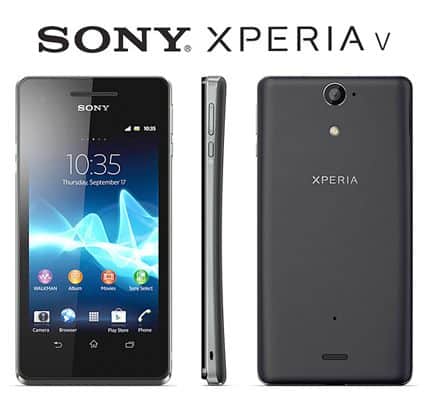
The Sony Xperia V has a design that feels sleek, but also pretty practical ,like it wasnt made only for looks. In size it measures 129 x 65 x 10.7 mm and weighs 120 grams, so yeah it stays compact and light enough that you can hold it for a while without getting tired. The casing is mainly plastic, which keeps the mass down, yet it still feels rigid and well put together. On top of that the rear cover uses a soft-touch layer, and it gives you a firmer grip, so the phone doesn’t really try to jump out of your hand.
Up front the Xperia V is pretty focused around its 4.3-inch display. The screen is framed by bezels that are kind of thick, especially compared to what we see nowadays. Above the panel there’s the Sony branding, the earpiece, the front camera, and a proximity sensor too. Underneath, you get three capacitive touch keys for navigation , Back, Home, and Menu , which sit in a familiar arrangement and are easy to reach.
A major highlight is the IP57 certification, so it’s protected against dust as well as water. Sony claims it can survive submersion at around 1 meter depth for as long as 30 minutes. Back then this kind of endurance was a big reason people paid attention, because not many phones offered that sort of defense against the elements, not even close.
Button Placement and Ports
On the Xperia V , the power button sits on the right side of the handset, alongside the volume rocker and that separate camera shutter button. The way they’ve arranged everything feels ergonomic , so it is usually easy to use the phone with one hand. The camera shutter button is especially noticeable, honestly it is a welcome addition, because it lets you open the camera and shoot pictures fast, without having to dig through the on-screen interface for every little action.
For the connections, the micro-USB port, both to charge as well as move data, ends up on the left side of the phone. Then the 3.5mm headphone jack sits up on the top edge. That micro-USB port plus the headphone jack are each shut with small flaps, and the flaps themselves kind of help keep the whole device sealed against water and dust. Of course, opening and closing those flaps can feel a bit annoying at first, but they are pretty necessary, if you want the protection to really stand up when things get messy out there.
Overall Build Quality
When it comes to overall build quality, the Sony Xperia V feels solid. It comes across as sturdy and not flimsy ,and the soft-touch back finish gives it a more premium vibe even though it uses plastic. There is also the IP57 certification , which is kind of a big deal, since it makes the Xperia V a more attractive pick for people who want a smartphone that can handle splashy situations or dusty environments.
Display
So the Sony Xperia V comes with a 4.3 inch TFT display thing, it has a 1280 x 720 pixel resolution, and that works out to around 342 pixels per inch (PPI). Back in 2012 this was pretty strong for a mid range phone, you know, it gives a crisp, clear screen for its size. It also shows 16 million colors and it uses Sony’s Mobile BRAVIA Engine 2, which kind of refines contrast and color output, so movies, photos and basically all media look more vivid and entertaining.
Display Quality
When it comes to the display quality, the Xperia V stays pretty steady overall. The high pixel density helps keep typography and images looking sharp. And yeah the HD resolution is enough for most daily stuff like web browsing, video playback, and even casual gaming. The colors are mostly correct, but sometimes they show a bit oversaturated vibe, largely because of the Mobile BRAVIA Engine 2 tuning. If you like bold , deeper colors, you might actually enjoy that effect, though if you want a more natural and calm color set, it can feel like a bit too much.
Brightness is fine indoors, but outdoors, in direct sunlight, it can have a harder time. Reflections and glare can appear and then reading the screen gets annoying. The viewing angles are decent-ish, yet if you tilt it from extreme angles, color and contrast can shift slightly , which is pretty normal for TFT panels.
Touch sensitivity and responsiveness
So the Xperia V screen is pretty responsive and accurate , it feels like it makes navigation smooth, and it’s fairly easy to tap through the interface and interact with apps. Multi-touch gestures, like pinch to zoom, seem to work smoothly too, and overall the phone kinda reacts quick to touch inputs. On top of that the display is covered by scratch resistant glass, which helps it keep a clean look even after long term use
Performance
Hardware specifications
The Sony Xperia V gets its power from a Qualcomm Snapdragon S4 Plus MSM8960 chipset, and inside it there’s a dual-core 1.5 GHz Krait CPU along with an Adreno 225 GPU. You also get 1 GB of RAM, plus 8 GB of internal storage , although only around 4.8 GB is available for you. There’s also a microSD card slot for expansion, and it supports cards up to 32 GB
When it first came out, the Xperia V hardware was still quite solid for a mid-range device, offering enough horsepower for most everyday chores , and even handling a few more demanding apps without too much drama. Still, as we’ll get into next, it does have real limits—especially once you start pushing the device with more resource hungry tasks.
Day to day performance
In daily life the Xperia V works well enough for things like web browsing, social media, messaging, and light gaming. Its dual core processor and 1 GB of RAM are basically fine for these tasks, so you usually don’t see much lag or slowdown, apps open pretty quickly too, and multitasking works, though going back and forth between a bunch of apps can make the phone feel a bit slower, especially when several apps are still hanging around in the background.
The Adreno 225 graphics unit can manage casual games, and even some older 3D titles , but it starts to wobble when you try more demanding games that want extra graphical horsepower. So if you’re chasing the newest games , particularly the ones with heavy visuals, the Xperia V might feel underpowered. Yet for most people, the gaming experience is still reasonably satisfying.
Where the Xperia V really shows its age is with newer apps and more modern websites. Since software habits and web standards have moved on , the Xperia V hardware sometimes can’t quite keep pace, and that can mean slower loading pages and occasional stutter when you’re dealing with heavier sites or using newer apps.
Benchmark performance
In benchmark tests, the Sony Xperia V lands about where you’d expect for a mid range phone from that time. It won’t keep up with high end devices, but it does hold its ground versus other phones in a similar price bracket. For instance, in the AnTuTu benchmark, the Xperia V usually clocks around 13,000 to 14,000 points, which was quite decent for a mid tier model in 2012. Still, compared to today’s smartphones those numbers look quite small, and that’s really a reflection of how much mobile technology has advanced during the last decade.
Camera
Rear Camera Specifications and Features
The Sony Xperia V comes with a 13-megapixel rear lens , plus an LED flash and autofocus. It also has a bunch of shooting options and extra tools that you can use depending on the scene. You can grab still photos up to 4128 x 3096 pixels, and it records 1080p Full HD video at 30 fps. On top of that there’s touch focus, face detection , image stabilization, plus an HDR (High Dynamic Range) mode that tries to balance the bright and darker parts better.
Camera Performance
When the lighting is decent , the Xperia V’s rear camera deliver quite good shots for a mid-range phone, i mean, it’s not bad at all. The images look crisp, there’s plenty of detail , and the colors mostly stay on point, with fairly decent contrast overall. Autofocus is usually quick and trustworthy, so getting a clear image on the spot is pretty easy. HDR mode is also useful in awkward lighting, like when a scene has both bright highlights and deep shadows, because it basically combines multiple exposures into one final photograph.
Still, once the light drops, things go downhill. The LED flash helps nearby subjects, but it’s not strong enough to brighten a wider area, so photos may look grainy, and they can end up missing fine texture. In low light you’ll also notice more motion blur, so capturing moving people , pets, or action becomes tricky if you want sharp results.
Video recording is pretty solid overall. In good conditions, 1080p Full HD footage looks smooth and detailed. Image stabilization helps calm down camera shake , so the clips feel steadier. But just like with photos, low-light video adds more noise and reduces sharpness, so the end result doesn’t look as clean as it does in daylight.
Front Camera
The Xperia V comes with a VGA front-facing camera, mostly for video calls and the basic selfies stuff. In practice, the picture quality is kinda restrained by the low resolution, so the result looks soft, and the details just don’t really show up. For talking over video it’s fine, but if you care a lot about selfie crispness, then this front camera can feel behind compared with newer phones, you know.
Software Experience
Operating System and Interface
When the Sony Xperia V first came out, it kind of landed on Android 4.0.4 Ice Cream Sandwich, not long after it got bumped over to Android 4.1.2 Jelly Bean. And yeah the handset runs Sony’s own user interface layer, right there on top of Android, so you end up with this whole bunch of Sony specific applications, little widgets, and tweak options that makes the day to day feel a bit different from the plain stock version.
Walkman and Media Apps
A big highlight of the Xperia V is how it plugs into Sony’s media world. The Walkman app, which is built in, gives a music player experience that feels pretty full, with a clear layout. You get album artwork, playlist handling, and some more advanced sound adjustments. It also brings ClearAudio+ technology, which aims to improve listening by tweaking sound behavior depending on the kind of music you’re using.
Besides Walkman, the Xperia V includes other media themed applications too, like Video and Album. The Video app is there for watching and organizing your videos, while Album gives you a neat, easy interface to view and make light edits to photos. Overall, these apps are closely linked with Sony’s services, and they kind of work together into one consistent multimedia vibe, not all scattered around.
Customization and Widgets
Sony’s custom UI gives quite a few ways to personalize the Xperia V, so it feels more like yours, and not just some default look. You can pick from multiple themes, wallpapers, and widgets, which helps you kind of shape the vibe of the home screens. There are also a couple of pre-loaded widgets, like weather readouts, clock displays, and social media updates , which you can drop onto the screens so the info is right there without too much tapping.
On the Xperia V, you’re able to use several home screens too, and each one can be adjusted with shortcuts, widgets, and even folders. Then there’s the app drawer, where all installed apps are kept in a scrollable list, so you can find things without hunting around too much. Overall the UI feels responsive, transitions and animations look smooth, but if you add too many widgets or open several apps at once, the hardware limitations show up, and performance can dip ,even if it doesn’t happen all the time.
Software Performance
In terms of software performance, the Xperia V is generally fine, but it’s not immune to the limits of its own specs. The jump from Android 4.0 Ice Cream Sandwich to Android 4.1 Jelly Bean improved things a bit, with smoother motions and better responsiveness. Still, the dual-core processor and 1 GB of RAM have their boundaries, and heavier tasks, plus newer or more demanding applications, can cause occasional lag or stuttering.
Even with that, the Xperia V stays usable for day-to-day activities like web browsing, scrolling social feeds , and handling email. Most basic actions work without much drama, but if someone expects faster processing for heavier workloads, then it may feel behind compared to newer devices, and that gap becomes noticeable sooner than you’d hope.
Battery Life
Battery Specs
The Sony Xperia V ships with a non removable, 1750 mAh battery. Back in 2012, that capacity seemed pretty decent for a mid-range smartphone, and it was supposed to last you basically a full day of usage from just one charge. How the battery actually behaves depends on the small stuff like screen brightness, signal strength, and how much you’re using apps , pretty much the usual suspects.
Battery Performance
As for battery longevity, the Xperia V usually does pretty well when things stay moderate. If you use it like a normal person—some browsing here and there, social stuff, plus phone calls—most users can get through the day without rushing for a charger. It also includes helpful power saving options, like lowering screen brightness and shutting down background apps, those tricks can stretch runtime in a practical way.
Still, if you push it harder, like streaming video, playing games, or running GPS for a while, the battery will drain faster than you’d hope. People who constantly go heavy on the device may end up recharging sometime in the afternoon, or at least early evening. Also, there’s no support for fast charging so a top up is more or less the standard kind of recharging, typically around 2–3 hours.
So overall, the Xperia V’s battery life is fine for everyday needs, but it might feel a bit limited for users who want longer sessions, or who frequently do power heavy activities.
Connectivity
Network and Data
The Sony Xperia V does include 4G LTE connectivity, which, back then, was a rather big part of the pitch, because it could deliver faster data speeds compared to 3G networks. It also supports GSM, HSPA, and LTE bands, so overall it tends to be a good match with many carriers across the world. because of that, people could use faster mobile internet for stuff like web browsing, streaming video , and pulling down downloads.
Besides 4G LTE, the Xperia V comes with Wi-Fi 802.11 b/g/n for wireless internet. day to day, Wi-Fi works pretty well, it has stable links and speeds that feel fair for online pages and media streaming. On top of that, there is Bluetooth 4.0, for pairing wirelessly with things like headsets , speakers, and even keyboards.
GPS and Navigation
The Xperia V includes GPS plus GLONASS support, which helps with accurate location tracking, and gives stronger navigation abilities. In practice, the GPS seems dependable, it typically gets satellites quickly and it can provide solid positioning for navigation apps. There’s also the pre-installed Google Maps app, and that one offers turn-by-turn directions and other location based services, so it acts as a useful navigator most of the time.
Additional Connectivity Features
The Xperia V also comes with NFC support, near field communication, which lets users do contactless payments and move files between compatible devices. It is a handy kind of feature for people that use mobile payments often , or who frequently swap information with other NFC enabled gadgets.
User Experience
Everyday Use
For day to day use, the Sony Xperia V provides a kind of balanced experience, especially for users wanting something reliable and also durable. The size feels fairly compact and the ergonomic shape makes it easier to hold, plus the IP57 certification gives that extra durability angle , for anyone who wants protection against water and dust.
The display, even if it is not the biggest or highest resolution around, still gives solid image clarity for its class. The camera delivers decent results for photos and videos, though it is not really the best choice when lighting conditions drop , like in low light.
On performance, the Xperia V is generally fine for regular tasks, but some folks may notice little bits of lag or stuttering if they try heavier apps or multitask too much. The software feel is improved by Sony’s custom UI, it brings a tidy look and some customization, however the hardware limits can throw off the smoothness, here and there, especially when the device is under pressure.
Target Audience
The Sony Xperia V is aimed at people who kind of want durability, a compact feel, and 4G LTE connection in a mid range smartphone. It really stands out for users who need a gadget that can handle water and dust exposure,so it fits active lives or places that are not exactly friendly to electronics
Also, the Xperia V’s performance in the mid tier, plus its overall set of features makes it a decent choice for those who do not chase the newest, most heavy hardware, but still want something dependable and functional in day to day use. The way it plugs into Sony’s media world and the available customization tweaks are a big plus too,especially for folks who spend time watching, listening, and setting things up the way they like.
Conclusion
Strengths
Durability: The Xperia V’s IP57 rating for water and dust resistance is pretty much the headline thing here, it gives extra protection for users who want a more rugged style device.
4G LTE Connectivity: With 4G LTE support you get quicker mobile internet speeds, and at launch this was a solid advantage.
Display Quality: The 4.3-inch HD display delivers crisp , vivid visuals, with good color handling and overall clarity considering the small size.
Media Integration: Sony’s Walkman app and other music video focused features create a richer multimedia experience, which boosts its appeal to users who care about tunes and video playback.
Weaknesses
Limited performance: the dual-core CPU and 1 GB of RAM might have issues with heavier tasks, plus newer apps too. so you might notice some random lag, and overall performance can feel kinda reduced.
Low-light camera performance: the rear camera can be weak when light is limited, which leads to photos that look a bit noisy and less crisp. details kinda get muddled.
Small screen size: the 4.3-inch display is fine for a lot of everyday things, but it can feel small compared to bigger panels on newer devices. this may impact multimedia time and even web browsing.
Battery life: the 1750 mAh battery works well enough with moderate use , but for people who push the device more often, it could end up not lasting long.
Final Verdict
The Sony Xperia V , feels like a solid mid-range smartphone with a pretty decent mix of features , plus that “rugged enough” durability people actually want. You get water and dust resistance too, and the 4G LTE connectivity is there as well, so it works as a practical pick for folks who need something sturdy and reliable. The display quality really holds up, and the media integration is a strong point—like you can just settle in and use it without much fuss. Also, the device isn’t too big, the compact shape and ergonomic design kinda help a lot with day to day comfort.
That said, the Xperia V does have some limitations. The performance is limited compared to what you’d expect now, and in low-light situations the camera can be a bit underwhelming. Plus , the screen size is small enough that some users might feel cramped by it. It was competitive back when it launched, sure, but smartphone tech has moved on, so in today’s market it feels less relevant. If someone is chasing a more modern experience—higher power, better features, and all the latest improvements—then newer devices make more sense.
All in all , the Sony Xperia V is still a noteworthy option if durability and media integration matter most to you in a mid-range phone. Just remember that its performance and camera quality won’t match current expectations , so those factors should be weighed carefully if you’re judging it for what you need right now.
Sony Xperia V LT25i Unlocked Phone 13MP Camera, 8GB Internal, Android OS, Water Resistant – International Version – Black: Buy it now
Related Posts






Tech Reviewer & Product Analyst
Định Bia has spent over 10 years testing consumer electronics with a focus on smart technology. He work as a product advisor at Biareview where he helped customers find the right devices for their needs. He personally tests every product featured on this site using a consistent evaluation framework covering quality, durability, and value. All reviews are based on experience, not influenced by the manufacturer.