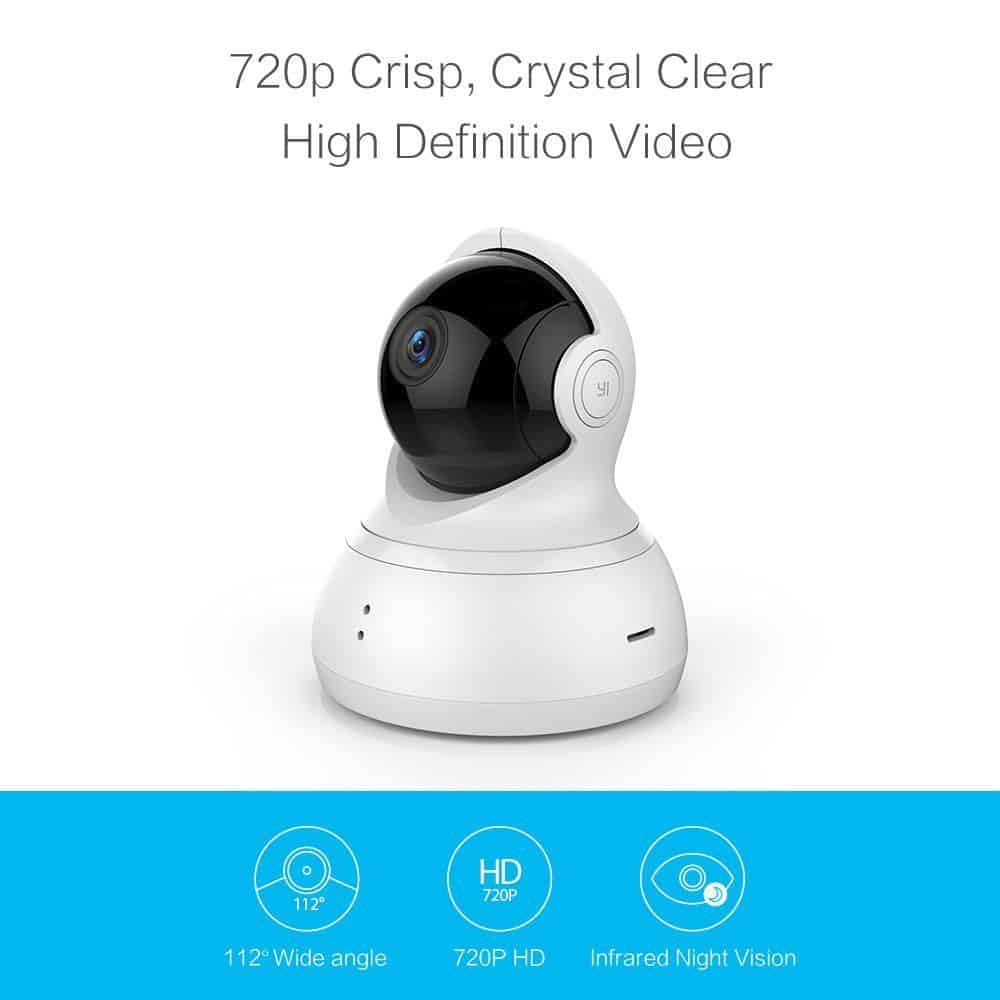
Some Essentials related to Yi Dome 720:
Resolution: 1280×720
Viewing Angle: 112°
Horizontal Angle: 345°
Vertical Angle: 115°
Sensor: 26nm
Infrared Sensor For the Dark with 8 LEDs
PTZ Motion Detection Sensor
Encoding: H.264
Wifi: 802.11bgn 2.4GHz
On exterior design:
Camera Yi Dome 720 is quite beautiful to design and has much importance in a way. Yi Dome 720 has a wide-angle lens camera with a viewing angle up to 112 °, and rotates horizontally camera cluster by 345 ° , then 115 ° vertically.
This camera is much wide angle lens that records video and takes detail panoramic shots that produce an overall panoramic view so that almost no blind spots are applicable to the camera angles. You may use the Yi Home application on the smartphone and simply adjust the rotation.
Auto masking is set to “On/Off” mode, which means that the lens rotates automatically upward and under to avoid recording unnecessarily.
At the back of a microSD card slot, microUSB and reset button.
MicroSD card slot (supports up to 32GB) will provide storage for about 4 days at 720p recording in continuous mode.
The two sides of the two speakers with the ability of recording and playback for two-way audio, which allows us to monitor the sound at the scene or click speak on the app and play the sound directly on the camera for people around.
There are two LEDs on the front of the camera and we can also turn it off in the Yi Home app. The lens of the camera is protected by transparent glass which is light scratch resistant.
YI Dome Camera Pan / Tilt / Zoom Wireless IP Indoor Security Surveillance System 720p HD Night Vision, Remote Monitor with iOS, Android App – Cloud Service Available: Buy it now
About the interface on Yi Home app:
The interface on the Yi Home app is very simple yet easy to use: one has control over the camera angles from the app, secure a photo or video as needed, and save photos and videos to the app installer directly. You can also control the camera to either automatically rotate continuously at 360° or rotate through the highlighted eight positions that are stored in bookmarks, with settings for full-day automatic tracking or customized time-lapse for easier monitoring.
The Yi Dome 720 can work independently, without a memory card. Only the 10-second video recordings will be stored upon detecting motion in front of the lens within view for internal review, should there be any need. These videos will go to Yi Cloud Storage for free and can be kept for up to 7 straight days. It is quite easy to watch live video on the cloud. The prior video has all been encrypted so that some technical security would exist against interference with video content or theft.
The set for video/image quality:
In terms of video quality, Yi Dome 720 video recording and snapshot at 1280x720pixel resolution are definitely superior compared to conventional CCTV cameras on the market. Yes, it is the case that 20fps video recording is somewhat unsmooth but good enough to see motion and zoom the details when necessary. The motion sensitivity can be set very high for detecting even the slight motion present in the frame with much greater ease.
User Experience
Setup and Installation
Setting up the Yi Dome 720 is easy enough. The manual covers the Wi-Fi and app setup, and the Yi Home app walks you through the rest — nothing here requires much technical know-how.
You can set it on a shelf or mount it with the included bracket. The head itself motorizes, so once it’s up you can pan it around to find the right angle instead of getting stuck with wherever you first stuck it.
Yi Home App
The app is really the whole experience here — runs on iOS and Android, and packs in enough without feeling like a mess to navigate:
- Live View — watch and pan/tilt the camera in real time
- Recorded Playback — pull footage from the cloud or a microSD card
- Motion Detection — set zones, tune sensitivity
- Two-Way Audio — talk through the camera’s speaker and mic
- Privacy Mode — flip recording on and off
Most people will find their way around it without much trouble.
Wyze Cam Pan vs. Yi Dome 720
Wyze Cam Pan is the obvious comparison — same price range, same basic feature set. Both are 720p, both pan and tilt, both have night vision. Where they split:
- Video quality: Wyze looks a touch better — more color depth, sharper overall, even at the same resolution on paper.
- Motion tracking: Wyze has it, the Yi doesn’t. That means Wyze can actually follow a subject moving through frame instead of just alerting you that something moved.
- Price: Wyze is typically a bit cheaper.
Yi Dome 720 against TP-Link Kasa Cam Pan
TP-Link Kasa Cam Pan is another company which is pretty commendable at doing the same thing in pan and tilt cameras. The following are a few of the things on which they compete:
Video Quality: Both these love-up quality video but the Kasa Cam Pans audio and clarity are 1080p as compared to Yi Dome 720’s 720p.
Smart home integration: The Kasa Cam Pan connects into the smart home cloud of TP-Link through Kasa easily and opens the more powerful smart home features.
Price: Kasa Cam Pan is costlier than Yi Dome 720. The reason being it has higher resolution and added features to those mentioned in Yi Dome 720.
Yi Dome 720 with Amazon Cloud Cam
Naming an Amazon Cloud Cam in the home security market is just too rare. Comparing it with Yi Dome 720:
Video Quality: Video captured by this camera is in 1080p resolution, so, it gives very sharp and detailed images compared to Yi Dome 720.
Cloud Storage: More flexible plans for cloud storage are now available through Amazon, but costlier than Yi Cloud.
Smart Home Integration: It is very much compatible with Alexa, which makes it easily adaptable into smart home capability.
Advantages
Affordable Price: The Yi Dome 720 comes with a great number of features for a price that is not too attractive.
Pan and Tilt Functionality: Pan and tilt functionality is good because it generally provides plenty of coverage with as few blind spots as possible.
Night vision: Great night vision capabilities provide 24/7 coverage.
Two-Way Audio: Built-in microphone and loudspeaker built-in make easy communications.
Privacy Mode: A physical lens cover provides peace of mind when privacy is needed.
Flexible Storage Options: Cloud and local options available, which lets users select what best fits their needs.
Disadvantages
720p Resolution: Fine for most uses, but the 720p resolution is subpar since competing models give you 1080p and higher resolutions.
Limited Smart Home Integration: Works with Alexa and Google Assistant but isn’t quite as integrated as it might be with other systems.
Speaker Volume: The volume of the speaker may be less than enough during noisy environments.
Conclusion
The Yi Dome 720 proves itself very versatile with regard to applications, therefore offering very good prospects for profit. With its pan-tilt functionality, motion detection reliability, and nighttime coverage, it becomes a strong competitor in home security markets. Though not much resolution-wise nor advanced in the smart home integration category compared to some other competitors, it definitely leads in security features offered for a lower price.
General View
The Yi Dome 720 proves very good in providing every possible feature against the least amount of money spent. This is the perfect option for someone looking for a competent, good security camera at an affordable price. The pan and tilt capabilities give extensive monitoring coverage; night vision capabilities ensure 24/7 coverage for your space. Two-way audio and privacy mode give added conveniences and security, making it an impressive option for home and office security.
The Yi Dome 720 is very impressive, as far as online video quality and motion detection go. While the resolution is limited to 720p, that is generally acceptable for home security purposes, and any such restrictions are offset by its clear images during the day and at night. The customizable motion detection settings and activity zone settings make this device known for its catch of important moments, rather than false alarms.
The Yi Home app is easy to get around — live view, playback, two-way audio, all pretty intuitive once you’re in there. It also plays nice with Alexa and Google Assistant, so if you’ve already got a smart home setup, you can just talk to the camera instead of digging out your phone.
Considerations and Recommendations
If it is the best in class, on a consideration note, if video quality in higher resolution is a very big concern, then cameras that may suit your needs in the 1080p or 4K resolution category may be the Wyze Cam Pan or the Amazon Cloud Cam. For people looking for smart-home features, cameras such as the TP-Link Kasa Cam Pan may be a better fit for integration with smart-home ecosystems.
Where storage is concerned, the user does need to weigh the cost and benefits of cloud storage versus local storage. Offering cloud storage and local storage options makes the Yi Dome 720 quite flexible so that users can opt for either option, depending on their wallets. The cloud option is reasonably priced, but some users gravitate towards microSD as a one-time purchase for local storage.
Final Thoughts
If you want a budget camera that doesn’t feel budget, the Yi Dome 720 is worth a look. Pan and tilt, decent night vision, an app that doesn’t fight you — that’s really the whole pitch. It won’t out-spec the pricier options, but it covers what most people actually need without draining your wallet. It presents fantastic functionality and convenience and caters to all your needs, whether you want to secure your home or monitor your office.
As technology advances and new features are continually added to security cameras and related technologies, it is advised to keep up with recent news. Well, Yi Dome720 holds its ground beautifully in this competitive market, giving worthy value for its money. If a solid, versatile, and efficient security solution is what you need, then the Yi Dome720 should certainly be on your shortlist.
Related Posts

Tech Reviewer & Product Analyst
Định Bia has spent over 10 years testing consumer electronics with a focus on smart technology. He work as a product advisor at Biareview where he helped customers find the right devices for their needs. He personally tests every product featured on this site using a consistent evaluation framework covering quality, durability, and value. All reviews are based on experience, not influenced by the manufacturer.