- Lenovo IdeaPad U410 – 14 inches, priced at $ 799
Design and Build Quality
This one goes for clean and minimal — slim, aluminum lid, plastic for everything else. It’s 339 x 235 x 21mm, 2.1kg, light enough that you won’t think twice about carrying it.
It’s mostly plastic underneath, but it doesn’t feel cheap. The aluminum lid does most of the visual work here. It’s not going to compete with a metal unibody laptop costing twice as much, but for the price, nothing about it feels like a corner was cut.
Display
14 inches, 1366 x 768 — modest even for its time, but sharp enough for docs, browsing, video. The anti-glare coating earns its keep; you can actually use this thing near a window without fighting reflections.
Colors are fine for normal stuff. Don’t try to edit photos on it. Brightness holds up indoors, gives up outside in direct sun.
Performance
Our unit had a Core i5-3317U, third-gen Intel, with an i7-3537U as the step-up option. It won’t win any races, but browsing, writing, juggling a handful of tabs — all smooth. RAM tops out at 8GB, which is the config worth getting if multitasking matters to you.
Graphics are Intel HD 4000, integrated — handles video and light gaming, nothing more. Storage is a 500 or 750GB spinning drive, so you get plenty of space but slower boots than an SSD would give. Know that tradeoff going in.
For actual daily use — browsing, writing, streaming — it doesn’t stumble. Ask it to edit video or run a real game and you’ll feel the HDD and integrated graphics holding it back. Normal stuff, though, it handles fine.
Keyboard and Touchpad
Chiclet keyboard, good spacing, real travel — typing on it is comfortable. No backlight, which matters if you type in the dark a lot, doesn’t matter much if you don’t.
Touchpad’s large, tracks multi-touch gestures cleanly, and the click buttons feel solid rather than mushy.
Connectivity
Two USB 3.0, one USB 2.0, HDMI, Ethernet, a combo audio jack. Covers fast transfers, older accessories, an external monitor, and wired networking — everything you’d actually reach for.
Wi-Fi is 802.11b/g/n, Bluetooth 4.0. Connection stays steady, pairing with a mouse or headphones is painless.
Audio
Bottom-firing stereo speakers, fine for calls and background music, won’t wow you. No real bass, typical for this price bracket. The software EQ helps a bit but isn’t turning these into real speakers.
Battery Life
48 WHr battery, 6-8 hours in real use — gets you through most of a workday. Power Management utility lets you dial back performance if you need more runtime than that.
Cooling and Noise
Quiet at idle, stays cool under normal load. Push it and the fan gets louder, but it’s still not the loudest thing in its class.
Conclusion
The U410 is a good budget laptop, plain and simple — decent looks, reliable performance, nothing that’ll wow you and nothing that’ll disappoint you either. If you just want something affordable that gets the job done, it’s a fair pick.
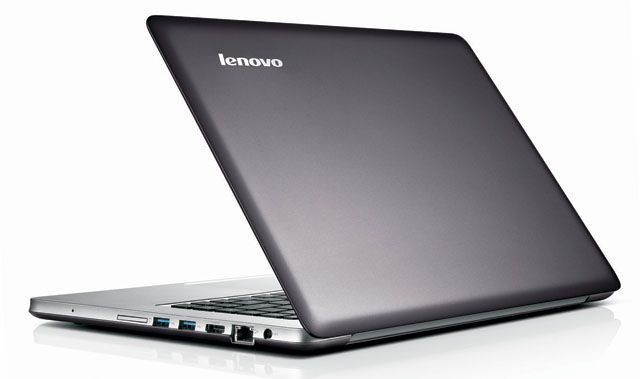
Lenovo U410 14.0-Inch Ultrabook (Graphite Grey): Buy it now
- Acer Timeline Ultra M5 – 14 inches, priced at 680 – 780 USD
Design and Build Quality
Acer’s going for that premium-ultrabook look here, brushed aluminum on the lid and palm rest, without the premium price tag attached. It’s 333 x 228 x 20mm, 1.8kg, light enough you won’t notice it in a bag.
Metal outside, plastic inside, and it doesn’t feel cheap despite that. It’s not going to fool anyone into thinking it’s a $1,500 ultrabook up close, but for daily use it holds together fine.
Display
15.6 inches, full 1920×1080 sharper than the HD panels you’d expect at this price. Video, photos, text documents all look genuinely good. Colors and brightness are solid enough for normal use, though this isn’t the screen for serious photo editing, and it washes out some in direct sun. Viewing angles are decent, and the anti-glare coating actually cuts down glare rather than just claiming to.
Performance
Review unit came with a Core i5-3317U, third-gen Intel, i7-3517U as the upgrade path. Good balance of speed and battery efficiency. RAM’s 4GB or 8GB — get the 8GB if you actually multitask.
Graphics are Intel HD 4000, integrated, fine for regular stuff, not built for gaming. Storage’s a 500 or 750GB spinning drive — lots of room, slower than an SSD, know that tradeoff going in.
Normal use — browsing, office work, streaming — this thing doesn’t stumble. Ask more of it and the HDD and integrated graphics show their age. For what most people actually do with a laptop, it’s solid.
Keyboard and Touchpad
Chiclet keys, good spacing, real travel comfortable for long typing sessions. No backlight, which is only an issue if you’re regularly typing in the dark.
Touchpad’s large, tracks gestures cleanly, click buttons feel solid rather than hollow.
Connectivity
Two USB 3.0, one USB 2.0, HDMI, Ethernet, combo audio jack — a genuinely complete port lineup for this class of laptop. Wi-Fi’s 802.11b/g/n, Bluetooth 4.0, both reliable, pairing is painless.
Audio
Bottom-firing speakers do fine for calls and casual listening, nothing more. Don’t expect bass or depth — that’s the norm at this price. The EQ software helps a bit, doesn’t turn them into real speakers.
Battery Life
48 WHr battery, 6-8 hours real-world covers most of a workday. Power Management utility lets you dial back performance for extra runtime when needed.
Cooling and Noise
Quiet at idle, cool under normal use. Push it harder and the fan gets louder, though it’s still on the quieter side compared to other laptops in its class.
Conclusion
The Timeline Ultra M5 does what a mid-range ultrabook should looks good, performs reliably, doesn’t cost a fortune. It won’t outshine a premium machine, but for everyday computing, it’s a fair, dependable pick.
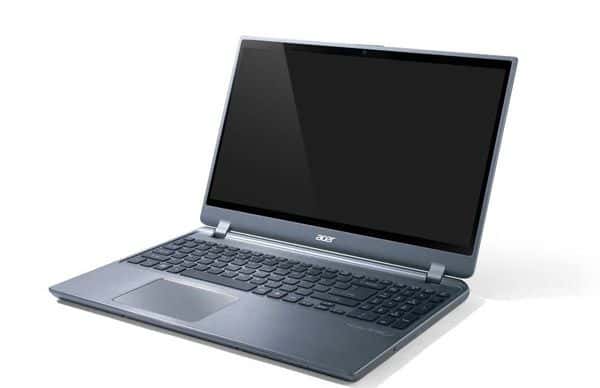
- Sony Vaio T13 – 13 inches, price 769 USD
Design and Build Quality
Sony went all-aluminum here, comes in silver, black, or red. It’s 331 x 227 x 18mm, 1.6kg, light enough you forget it’s in your bag.
Feels premium in hand. The aluminum shell gives it real stiffness, and the plastic bits inside don’t feel like an afterthought.
Display
13.3 inches, 1366 x 768 not Full HD, so competitors with sharper panels exist, but it’s clear enough for browsing, docs, and video. Smaller screen keeps the whole machine compact without making it hard to actually use.
Color and brightness are fine for normal stuff, not for design work, and it fades some in direct sun. Viewing angles are solid, anti-glare coating actually works.
Performance
Review unit runs a Core i5-3317U, third-gen, i7-3517U as the upgrade path. Good balance of speed and battery life. RAM’s 4GB or 8GB get 8GB if you keep a lot open at once.
Graphics are Intel HD 4000, integrated, fine for regular use, not for gaming. Storage’s a 500 or 750GB spinning drive lots of room, slower than an SSD, know that tradeoff going in.
Normal use browsing, office work, video, this runs smoothly. Ask more of it and the HDD and integrated graphics start showing their limits. For what most people actually do, it’s dependable.
Keyboard and Touchpad
Chiclet keys, good spacing, real travel comfortable for long sessions. No backlight, which only matters if you’re typing in the dark a lot.
Touchpad’s large, tracks gestures cleanly, buttons feel solid.
Connectivity
Two USB 3.0, one USB 2.0, HDMI, Ethernet, combo audio jack, SD card reader — a genuinely solid lineup for something this size. Wi-Fi’s 802.11b/g/n, Bluetooth 4.0, both reliable.
Audio
Bottom-firing speakers do fine for calls and casual listening, nothing more. No real bass, standard for this size laptop. EQ software helps a little.
Battery Life
4-cell battery, 5-7 hours real-world covers a decent chunk of a workday. Power management utility lets you trade performance for more runtime if needed.
Cooling and Noise
Quiet at idle, cool under normal use. Fan gets louder under load, still reasonably quiet compared to the competition.
Software and Extras
Sony throws in VAIO Care for maintenance, VAIO Update for drivers, an Office trial, and some media apps depending on region. Some of it’s genuinely useful. Some of it you’ll uninstall the first week — typical bloatware situation, eating storage you’d rather have back.
User Experience
Day to day, it’s smooth and consistent browsing, office work, media, no complaints. Portability’s the real standout: slim and light enough that you stop noticing you’re carrying it. Interface is straightforward, nothing to relearn.
Potential Drawbacks
Don’t buy this for gaming the integrated graphics just aren’t there. No backlit keyboard is a genuine annoyance if you work in low light often. And the HDD, while roomy, is slower than an SSD, with not much room to upgrade later.
Conclusion
The Vaio T13 does what it sets out to do — sleek, portable, reliable for everyday use. Skip it if you need gaming performance or fast storage. For regular computing, it’s a solid, dependable pick.
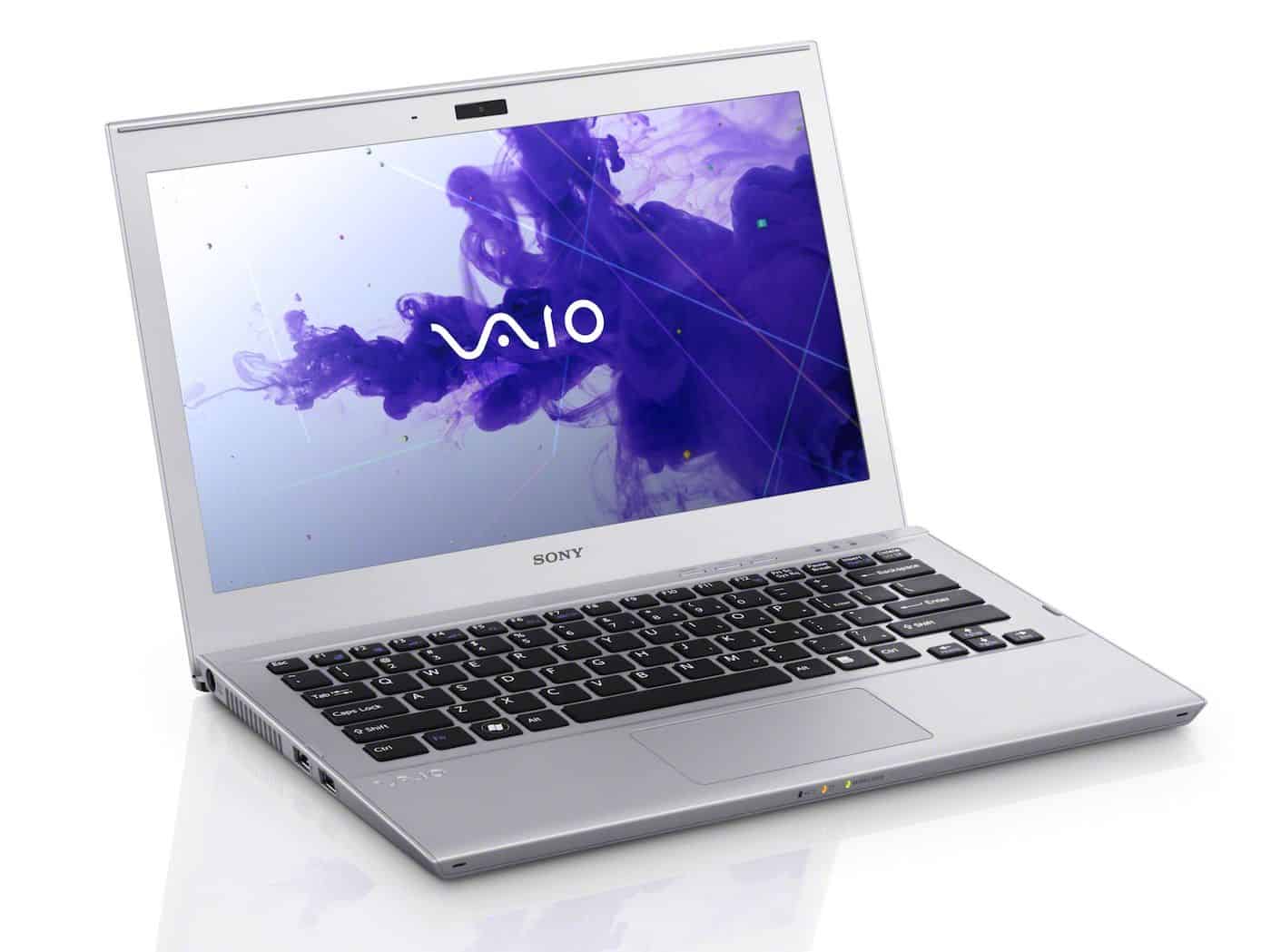
Sony Vaio T Series 13 Touchscreen Ultrabook SVT13136CYS Intel Core i5-3337U Dual Core 1.8GHz with Intel Turbo Boost Technology up to 2.7GHz: Buy it now
- Lenovo IdeaPad U310 – 13.3 inches, priced at $ 749
Design and Build Quality
Slim, modern, aluminum, the U310 goes for the same understated look most ultrabooks were chasing around this time. It’s 327 x 220 x 18mm, 1.7kg, easy to forget you’re carrying it.
Feels solid in hand. Aluminum shell holds up fine, no creaking or flex under normal handling.
Display
13.3 inches, 1366 x 768 not Full HD, so you’ll find sharper screens elsewhere, but it’s clear enough for browsing and docs. Small size keeps the whole thing compact.
Colors and brightness are fine for regular use, not for serious graphics work, and it fades some in direct sun. Anti-glare coating does its job.
Performance
Review unit’s got a Core i5-3317U, third-gen, i7-3517U as the upgrade path. RAM’s fixed at 4GB — enough for normal multitasking, though some competitors give you 8GB as an option here.
Graphics are Intel HD 4000, integrated, fine for regular stuff, not gaming. Storage’s a hybrid setup — 500GB HDD plus a 32GB SSD, so you get decent capacity and noticeably faster boots than a plain HDD.
Normal use browsing, office work, media — runs smoothly. It’s dependable for standard stuff, not built for anything heavier.
Keyboard and Touchpad
Chiclet keys, good spacing, real travel. It’s backlit too — genuinely useful if you type in dim rooms, and one of the better features on this machine.
Touchpad’s large, tracks gestures cleanly, buttons feel solid.
Connectivity
Two USB 3.0, one USB 2.0, HDMI, Ethernet, combo audio jack, SD card reader — a solid lineup. Wi-Fi’s 802.11b/g/n, Bluetooth 4.0, both reliable.
Audio
Bottom-firing speakers handle calls and casual listening fine, nothing more. No real bass, typical for the size. EQ software helps a little.
Battery Life
4-cell battery, 6-8 hours real-world — covers most of a workday. Power management utility lets you dial back performance for more runtime.
Cooling and Noise
Quiet at idle, cool under normal use. Gets louder under heavier load, still reasonably quiet compared to the competition.
Software and Extras
Lenovo throws in Solution Center, Energy Management, a McAfee trial, an Office trial. Some of it’s useful. Some of it you’ll uninstall the first week — the usual bloatware situation.
User Experience
Day to day it’s smooth — browsing, office work, media, no complaints. Portability’s the real strength: light enough you stop noticing it’s there. Windows 8’s touch layout is a nice bonus if you actually use it.
Potential Drawbacks
Skip it for gaming — the integrated graphics just aren’t there. The hybrid storage helps boot times but isn’t as consistently fast as a full SSD. RAM and storage aren’t easy to upgrade later, so buy the config you’ll want to keep.
Conclusion
The U310 does what a good everyday ultrabook should — looks sharp, stays portable, performs reliably for standard tasks. Not for gaming, not for heavy upgrades down the line, but for regular computing, it’s a solid pick.
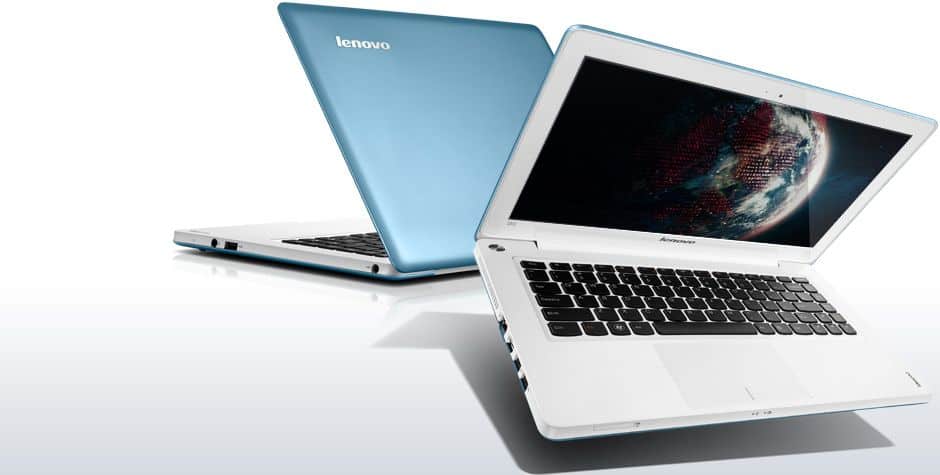
Lenovo IdeaPad U310 Intel Core i5 8GB 500GB HDD 24GB SSD 13.3″ Touchscreen Ultrabook Graphite Gray (59381114): Buy it now
- Toshiba Satellite U845 – 14 inches, priced at $ 749
Design and Build Quality
Clean, minimal, aluminum, the U845 looks the part of a pricier ultrabook. It’s 315 x 215 x 20mm, 1.8kg, light enough you won’t think twice about carrying it around.
Feels solid in hand, no flex or creak in the aluminum shell. Built like it’s meant to last through daily use, not just look good on a shelf.
Display
14 inches, 1366 x 768 — standard, not Full HD, but clear enough for browsing and docs. The extra inch over the smaller 13-inch ultrabooks gives you a bit more room to work with.
Colors and brightness are fine for indoor use, not for professional work, and the anti-glare coating actually cuts down glare rather than just claiming to.
Performance
Review unit’s got a Core i5-3317U, third-gen, i7-3517U as the upgrade path. RAM’s 6GB, which is a nice step up from the 4GB you get on cheaper configs — makes a real difference with a bunch of tabs and apps open.
Graphics are Intel HD 4000, integrated, fine for regular stuff, not gaming. Storage’s a hybrid — 500GB HDD, 32GB SSD, boots and everyday responsiveness are noticeably better than a plain HDD setup.
Normal use — browsing, office work, media, this runs smoothly, and multitasking doesn’t slow it down. Dependable for what most people actually do with a laptop.
Keyboard and Touchpad
Chiclet keys, good spacing, real travel — comfortable for long typing sessions. No backlight, which only matters if you’re regularly typing in the dark.
Touchpad’s large, responsive, tracks gestures cleanly, buttons feel solid.
Connectivity
Two USB 3.0, one USB 2.0, HDMI, Ethernet, combo audio jack, SD card reader — a genuinely complete lineup. Wi-Fi’s 802.11b/g/n, Bluetooth 4.0, both reliable.
Audio
Bottom-firing speakers handle calls and casual listening fine, nothing more. No real bass, typical at this size. EQ software helps a little.
Battery Life
4-cell battery, 6-8 hours real-world gets you through most of a workday. Power management utility lets you trade performance for more runtime.
Cooling and Noise
Quiet at idle, cool under normal use. Fan gets louder under load, still reasonably quiet next to the competition.
Software and Extras
Toshiba throws in Service Station, Disk Management, Media Controller, and a McAfee trial. Some genuinely useful. Some you’ll uninstall the first week, the usual bloatware story.
User Experience
Day to day it’s smooth — browsing, office work, media, no complaints. Portability’s the standout: light enough you forget it’s in the bag. Windows 8’s touch layout is a nice bonus.
Potential Drawbacks
Skip it for gaming — integrated graphics just aren’t there. Hybrid storage helps boot speed but isn’t as consistently fast as a full SSD. RAM and storage aren’t easy to upgrade, and there’s no backlit keyboard — a genuine annoyance if you work in low light often.
Conclusion
The U845 does what a good everyday ultrabook should looks sharp, stays portable, performs reliably. Not for gaming, not for heavy upgrades down the road, but for regular computing, it’s a solid, dependable pick.
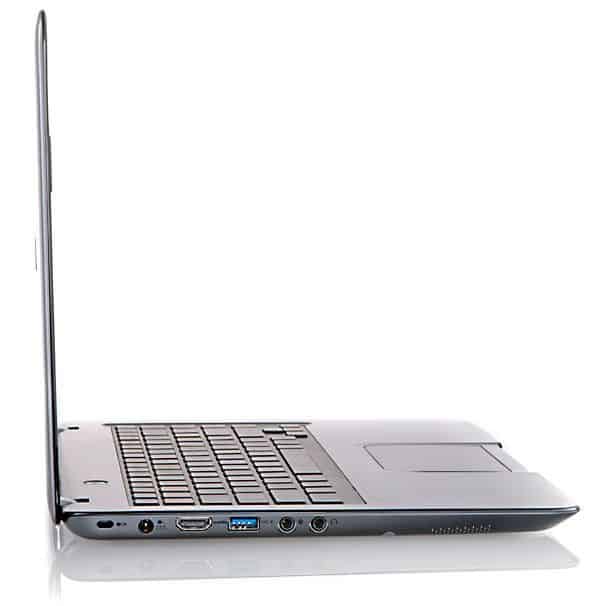
Toshiba Satellite U845-S404 14.0-Inch Ultrabook (1.7GHz Intel Core i5-3317U Processor, 4GB DDR3, 500GB HDD, 32GB SSD, Windows 7 Home Premium) Sky Silver: Buy it now
Related Posts



Tech Reviewer & Product Analyst
Định Bia has spent over 10 years testing consumer electronics with a focus on smart technology. He work as a product advisor at Biareview where he helped customers find the right devices for their needs. He personally tests every product featured on this site using a consistent evaluation framework covering quality, durability, and value. All reviews are based on experience, not influenced by the manufacturer.