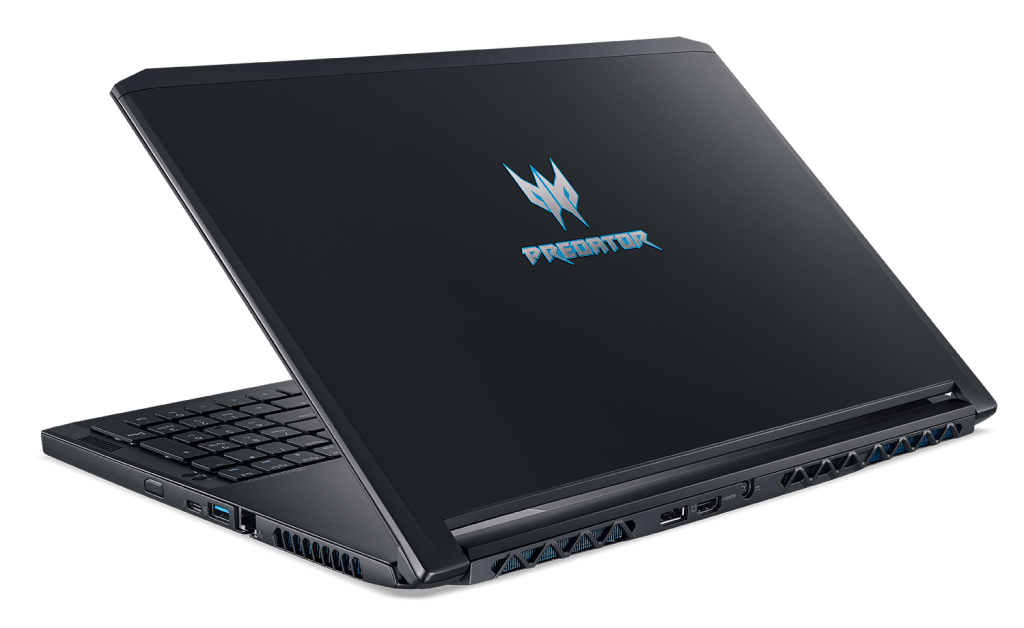

The Predator Triton 700 is one of those “ultra-thin” gaming laptops, and yeah its mostly down to the new Max-Q approach from Nvidia, which helps the Triton stay impressively slim, under 20mm , and it clocks in at around 2.6kg.
Design and Build Quality
The Acer Predator Triton 700 manages to pull off this sleek look that feels modern, a bit aggressive in a quiet way, but still kinda minimalist in general. The chassis uses high grade aluminum, so it feels solid and sort of premium when you hold it. On top of that, the black matte finish, with sharp angular lines and blue accents it just comes off more composed than most gaming rigs, yet it still keeps the whole gamer vibe. The Predator logo on the lid also lights up, so you get this recognizable signature effect without it going full circus flashy, you know.
Now the Triton 700 has a design move that is hard to miss. The keyboard is placed at the bottom of the chassis, so instead of the usual setup, the upper area is taken by a big glass panel. That glass panel acts like a touchpad too, and it also acts as a window, showing part of the cooling system, which sounds fancy because it is. The whole idea is to improve heat management and give a very distinct visual style. But, as you might expect, it also affects day-to-day usability, and we’ll get into that when we talk about the keyboard and trackpad.
In terms of build quality, the Triton 700 is excellent. The aluminum frame feels tough, and there’s very little flex around the lid and keyboard deck. The hinge itself is smooth and solid, so opening it is easy, even with just one hand. All in all, the Triton 700 gives off that “durable and well-made” impression you’d want from a high-end gaming laptop, and it delivers.
Display Quality
The 120Hz refresh rate is honestly one of those headline things for gamers , because in fast-paced titles it gives a clear edge. Motion looks more fluid and the controls feel more immediate. On top of that, G-Sync support syncs what the GPU is outputting with the display’s refresh rate. That means less tearing, fewer visual glitches, and usually a lower sense of input lag, which is what most people want.
Brightness is ok for indoor use , but in very bright rooms or direct sunlight it can struggle a bit. The matte finish does help reduce glare though, so visibility stays better across different light setups. Overall the Triton 700’s screen feels like a solid balance: color accuracy, high refresh, and G-Sync support… basically a good match for gaming and multimedia consumption, without turning into a major compromise.
Combination of Max-Q and GTX 1080
Acer first showed the Predator Triton 700 at Computex 2017, and for the first time this laptop was launched there. With Max-Q technology in place, the Triton 700 ends up with a noticeably thinner build than many current gaming laptops that everybody compares it to as “elders.”
Also, the new model’s design looks kind of close to the Acer Predator 21X, but it is more compact, and that’s the difference you feel right away. With a $3900 price tag, this is still Acer’s high-end gaming product line today, so the dominant color mood in this Predator line isn’t black with red accents, it’s more blue-black instead.
Performance & Hardware
The Acer Predator Triton 700 comes with really strong hardware, kind of a must have if you want peak gaming results. In the unit we checked out, you get an Intel Core i7-7700HQ CPU, 16GB of DDR4 memory, and an NVIDIA GeForce GTX 1080 Max-Q GPU. So yeah , this setup gives plenty of muscle for heavy games as well as resource-heavy apps, even when you have a lot going on at once.
That Intel Core i7-7700HQ is a quad-core chip, with a 2.8GHz base speed and a boost that can reach 3.8GHz. It performs nicely in multi-threaded tasks, which is why it works well for gaming while also streaming, plus all that background juggling. With 16GB of DDR4 RAM on board, the Triton 700 stays responsive, even if you keep more than a few applications open, and tons of browser tabs too.
Then the NVIDIA GeForce GTX 1080 Max-Q is basically the highlight, delivering desktop-style capability inside a laptop sized body. The Max-Q approach helps the machine stay thinner and lighter, even if it doesn’t fully keep the absolute top level desktop behavior. Still, the GTX 1080 Max-Q handles modern AAA games at high detail, and it tends to keep frame rates smooth enough to feel great. It’s one of those rare “near desktop” graphics options inside a gaming laptop.
For storage, the Triton 700 uses a 512GB NVMe SSD, which means fast read and write response. That translates into quick startup, and faster game loading screens, not just a small improvement either. Overall, when you pair the capable CPU , the Max-Q graphics, and the speedy NVMe drive, you get a laptop that feels strong for both gaming and work related stuff, without it turning into a slowdown marathon.
Cooling system
To show off its cooling system, Acer has used Gorilla glass above the keyboard so that users can see the AeroBlade 3D cooling system of the device. Beneath the glass, users can see 3 of the five cooling pipes of the cooling system. Acer promises users that this cooling system will work 35% better than previous versions. The air intakes will be located on the top and bottom of the Triton 700; the heat sinks will be located on the two sides of the machine and the back.
In addition to helping users see the components inside the Triton 700’s cooling system, the glass is also used as the device’s touchpad. Although the touchpad is placed at the top, it will make you feel difficult to get used to, but being a “gamer” when “trying hard,” the game will almost certainly not “live” without a mouse next to it.
Keyboard and Trackpad
The keyboard placement on the Acer Predator Triton 700 feels kind of off, it sits at the bottom of the chassis. I mean it’s not the usual approach, and yes, this design choice helps cooling efficiency, but it also reduces user comfort a bit. The keyboard itself is a full sized mechanical type setup with RGB backlighting, it gives a tactile, almost snappy typing feel, and the response is pretty solid. The keys have a nice amount of travel and they make a satisfying click, so it works well for gaming, but also for writing sessions or long typing tasks.
Still, that low position can get annoying over extended use, mostly because there isn’t really a palm rest to lean on. So you might end up tweaking your typing posture, or you’ll probably want an external wrist rest, even if only occasionally, to keep things comfortable. On top of that, the layout is unconventional enough that it may take a while to acclimate , especially if you’re coming from standard laptop keyboards that feel more centered.
Above the keys there’s a glass panel that acts as a touchpad, and it uses Precision Touchpad technology for accurate and responsive control. It works well as a track surface, but having it perched over the keyboard is a little unusual, and it can require some re learning. Also the glass collects smudges and fingerprints pretty easily, so visibility can get worse if you touch it a lot. Because of that, quite a few users will likely still prefer an external mouse for gaming and for detail heavy work.
Connectivity and ports
So the Acer Predator Triton 700 gives you quite a few ways to stay connected, for different peripherals and accessories , really. In the box it includes
1 x USB 3.1 Type-C (Thunderbolt 3)
3 x USB 3.0 Type-A
1 x HDMI 2.0
1 x DisplayPort
1 x RJ-45 Ethernet port
1 x 3.5mm headphone jack
1 x 3.5mm microphone jack
Having a Thunderbolt 3 connector is a pretty big deal, because it supports fast data movement, lets you drive an external screen, and yes it can also work with external GPUs to get extra performance. Then the mix of USB ports means most devices are likely to be plug and go, like gaming mouse setups, keyboards, and external storage drives too.
For extra screens, the HDMI and DisplayPort outlets make it easier to run a multi-display arrangement which can boost productivity, and also just makes games look better, in general. And the RJ-45 wired Ethernet is there for a steadier connection, which matters a lot in competitive gaming. Overall, the Triton 700 basically covers a broad port selection, so it tends to fit the needs of gamers as well as power users, without much fuss.
Audio and Multimedia Experience
The Acer Predator Triton 700 comes with a sturdy sound arrangment, dual speakers included, and also Dolby Atmos. In practice, the audio sounds pretty clear and immersive, with solid volume and very little distortion, at least most of the time. Dolby Atmos adds that extra spatial layer, so it becomes a bit easier to locate audio details while gaming , like footsteps and gunshots, kinda as if the noise is coming from around you.
If you want something more enveloping, you can always hook up external speakers or headphones , either through the 3.5mm headphone jack or by using Bluetooth. There is also a built in microphone, which is fine for voice chats and video calls. Still, if you’re aiming for competitive play, getting a separate microphone or a dedicated gaming headset is usually the better route, since the communication stays sharper and cleaner.
Overall, the Triton 700 display paired with its powerful audio system makes it a solid pick for multimedia nights. Be it movies, streaming shows , or actually playing games, the laptop manages to deliver a satisfying audio-visual vibe, rich and pretty enjoyable.
Battery life and portability
Battery life can be kind of a problem on high-performance gaming laptops, and the Acer Predator Triton 700 doesn’t really escape that, not fully. It comes with a 4-cell 4670mAh battery, and in normal, everyday use you might get roughly 3-4 hours. Once you’re actually playing games though, things drop fast… more like 1-2 hours, depending on how heavy the title is and what kind of settings you use.
So yeah the endurance is pretty brief, but that’s basically what you should expect when you combine serious performance, a high refresh rate screen, and all that power. The Triton 700 is kind of built for being used while connected to power, so having the charging brick nearby is a good idea if you plan on long sessions.
On the other hand, portability feels like a strong point. The design is slim and lightweight for its class. It’s 18.9mm thick, and weighs about 2.4kg (5.3 lbs), which puts it among the more carry-friendly gaming laptops out there. It should slide into a backpack without too much hassle, letting you move your gaming rig around when you need to.
Mechanical keyboard “thin.”
In a slim format like this, you just won’t have the same sort of room to “tuck” in a “place” type mechanical keyboard the way you might see on the Predator 21X or 17X. The Predator Triton 700 comes with a fresh thin mechanical keyboard, and it also includes a customizable RGB backlight . To get the backlight going, you’ll need to use the known PredatorSense software.
Inside PredatorSense, you can tune the backlight too, and not just that—you can also set the cooling fan color, plus pick the fan speed mode , like auto, maximum , or custom. There’s also GPU one-touch overclocking, options labeled Normal, Faster, Turbo. Users can keep an eye on CPU and GPU activity, system temperature, and loading speed as well.
Connector
On the Predator Triton 700 there’s a built-in Thunderbolt 3 port , which is the USB-C type, with data transfer up to 40 GB/s.
Beyond that, you get 2 USB 3.0 ports, 1 USB 2.0 port, an HDMI 2.0 output and a DisplayPort. For networking, the device uses Killer DoubleShot Pro, covering gigabit Ethernet plus Wireless-AC.
Software and User Experience
The Acer Predator Triton 700 arrives with Windows 10 already installed , so the operating system feels familiar and easy. Acer also bundles its own utility apps to make daily use smoother, including the PredatorSense application. PredatorSense helps you watch system performance, control fan speeds, mess around with RGB effects, and even build gaming profiles , pretty quickly actually.
Another pretty notable thing is the Killer DoubleShot Pro technology, like it really shoves gaming traffic ahead of the other network stuff, to cut down latency and make online play feel smoother. The laptop also works with Acer’s TrueHarmony technology, which should beef up sound quality, so everything lands more immersive in a sort of natural way.
On top of that, Acer basically toned down the bloatware on the Triton 700, and honestly that gets appreciated because the system stays tidy and performance focused. There are a couple of helpful apps already in there, but for the most part it doesn’t feel cluttered, or stuffed with extra software that can slow things down.
Overall, the Triton 700 software experience feels polished, and it’s clearly built with gaming in mind. The included utilities offer useful features without tossing a lot of unnecessary options at the user, which is kind of the whole point, right.
To wrap up, here are some of the main highlights on the Predator Triton 700:
– MAXQ DESIGN HELPS TRITON 700 STAY ON LONGER, EVEN DURING TRAFFIC LOADS, WHILE STILL KEEPING THE POWER OF A HUGE CONFIGURATION.
– GORILLA TEMPERATURE GLASS, A MOUSE DRAGON IS PLACED ABOVE THE KEYBOARD, it makes a difference for all gaming laptops currently on the market.
– THE FAN SHOWS THROUGH THE GORILLA TEMPERATURE GLASS, and the LED color is adjustable, unique and different.
– ALL EXTERIOR AND INTERNAL COLOR USES ALUMINUM ALLOY, to stay strong and to help efficient heat dissipation for the Triton 700
Right now, Max-Q tech has only been used on a handful of higher end products. The Predator Triton 700 is among the first laptops pushing this new approach, though at around $3900, which is kinda reasonable depending on what you compare it to. Still, the price definitely isn’t easy for everyone who wants to get the Predator Triton 700.
Acer Predator Triton 700 PT715-51-732Q Ultra-Thin Gaming Laptop, 15.6” FHD 120Hz G-SYNC, i7-7700HQ, Overclockable GeForce GTX 1080 8GB MAX-Q Design, 32GB DDR4, 512GB SSD (256GBx2), RGB Mech KB: Buy it now
Related Posts







Tech Reviewer & Product Analyst
Định Bia has spent over 10 years testing consumer electronics with a focus on smart technology. He work as a product advisor at Biareview where he helped customers find the right devices for their needs. He personally tests every product featured on this site using a consistent evaluation framework covering quality, durability, and value. All reviews are based on experience, not influenced by the manufacturer.