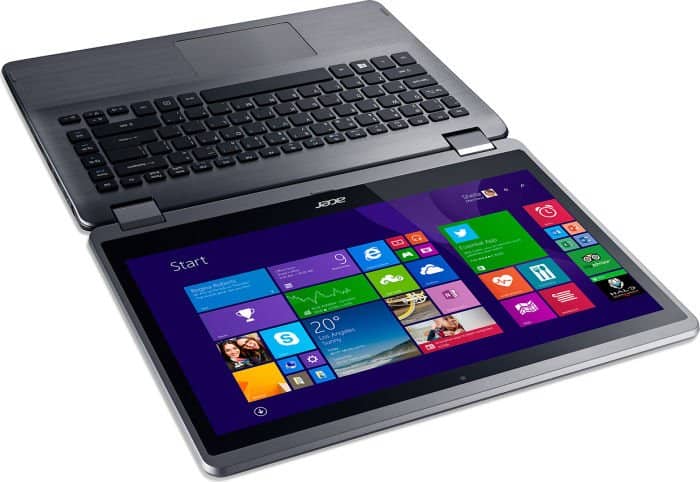
Not only possessing a charming slim and light design, but the Acer Aspire R14 also has a unique 360-degree flip screen design and powerful configuration.
In terms of design, the Acer Aspire R14 has a good overall design with a sturdy chassis and hinge, so switching between laptop, Tablet or V-tents makes it feel solid and easy.
In the Tablet position, the screen folds very close to the body and holds firmly, not the distance like other 360-degree flip machines. This is achieved because Acer cleverly uses a small magnet for holding force.
The keyboard of the device has a slightly short key travel but feels good when typing. The touchpad is responsive and accurate.
It’s kind of implied by the name , the Acer Aspire R14 ships with a 14-inch display, and it supports 10-point touch, plus it offers Full HD (1920 × 1080) resolution so the picture looks sharp, with good color saturation, though honestly it can feel a little too bright when you use it outside.
On top of that, the laptop includes BluelightShield technology which gives you 4 display modes, kinda to help guard the user’s eyes against harmful blue light.
In particular, Acer has also worked with Microsoft to ensure that the Aspire R14 is optimized for Windows 10. The noticeable point is that the machine is equipped with up to 2 digital microphones to eliminate background noise and improve the level accuracy of the words captured, Cortana’s virtual assistant worked well, reacting quickly and accurately.
This 2-in-1 hybrid is equipped with the latest 6th-generation Intel Skylake processor with two versions Core i5-6200U and Core i7-6500U, Intel Graphics 520, optional 4GB / 8GB RAM and SSD hard drive 128GB offers great performance for most everyday tasks.
The test version runs Core i7-6500U with 8GB of RAM for fast Windows boot times, almost instant application opening times, and runs very smoothly. The overall performance of the machine measured up to 4,307 points PCMark 8 Work and 3,392 points on the PCMark 8 Home Score test. This shows that the machine is “very strong”, capable of meeting most of the daily needs of users.
Although there are no discrete graphics, Intel’s integrated graphics card on the 6th generation Core I processor is enough for you to fight most online games, or mid-range games offline at low to medium settings depending on the game. This is reflected in the number of frames achieved up to 34.41 frames/sec in the OpenGL 3D rendering test with Cinebench R11.5 and 1,584 points with 3DMark 11 Performance.
And despite the strong configuration, but the Acer Aspire R14 still works quite cool, during the test. The hottest point on the machine is also only at 39 degrees C, most of the rest are below 30 degrees, so it is not uncomfortable for users.
Acer also takes care of the spiritual needs of the user when equipping the Dolby Audio system with a very good sound quality compared to the thin and light models in the same segment. Through trial, I feel the volume easily “fill” the office with clear, powerful bass and treble.
The USB 3.1 standard USB type-C port onboard provides twice the speed of USB 3.0, great for future devices. But unlike Apple’s MacBook, the device retains the USB 3.0 interface on the machine for easy compatibility with other peripherals.
Another strong point of Aspire R14 is the battery life is enough for you to work all day working without having to struggle to find a charger. The device can surf the web over Wi-Fi continuously for nearly 9 hours before running out of battery.
In short, with the advantage of a rotating touchscreen display, solid luxurious design, good multitasking ability, long battery life, and attractive price; Aspire R14 is not a bad choice for most users, especially the office world.
Acer Aspire R14 R5-471T-50UD Intel Core i5 2.3Ghz 8GB RAM 256GB SDD Win10Home (Renewed): Buy it now
Acer Aspire R14 R3-471T-53LA 14-Inch HD Convertible 2 in 1 Touchscreen Laptop (Silver): Buy it now
Acer Aspire R 14 Convertible, 14″ Full HD Touch, Intel Core i5, 8GB Memory, 256GB SSD, Windows 10 Home, R5-471T-50UD: Buy it now
Design and Build Quality
Aesthetic and Form Factor
The Acer Aspire R14 comes with a sleek, kind of modern vibe that catches the eye right away. Its outer shell is made from brushed aluminum, so it feels more premium than you might expect. The dark gray finish, plus those small understated accents, adds a bit of class. At roughly 0.73 inches thick and around 4 pounds, the Aspire R14 is fairly light and easy to move around, especially for a 14-inch 2-in-1 that you can toss into a bag when you’re always heading somewhere.
360-Degree Hinge
A big highlight here is the 360-degree hinge. It lets the laptop shift into several setups , laptop mode, tent mode, stand mode, and tablet mode. That kind of flexibility makes the whole device feel more useful day to day, whether you are typing something, pitching a slide deck, or just watching something later. The hinge itself seems sturdy and smooth too, you can switch angles without that annoying wobble or instability you sometimes run into.
Build Quality
For its mid-range pricing, the overall build quality of the Acer Aspire R14 is honestly impressive. The aluminum frame feels solid, and like it can handle normal daily bumps and minor wear. The keyboard deck area and the palm rest region show very little flex , which makes typing feel stable and reliable. In general, the Aspire R14 gives off a durable, dependable feeling, and that matters a lot since this is the sort of device people typically bring along quite often.
Display
Full HD Touchscreen, kinda the main thing here… the Aspire R14 comes with a 14-inch Full HD (1920 x 1080) IPS touch panel, delivering sharp , lively visuals. The resolution matters a lot for everyday use, text stays crisp , and pictures show up with pretty fine detail. IPS tech also means wide viewing angles, so colors stay steady and vivid even if you look from a bit off to the side.
Touch Responsiveness
On top of that, the touchscreen feels quick and cooperative, it gives that smooth , fairly intuitive experience. While you’re moving around inside Windows 10, doing touch gestures, or getting a stylus involved, it reacts accurately to what you do. It’s one of those setups that fits creative folks, students, or basically anyone who likes touch interaction instead of relying only on a mouse.
Brightness and Color Accuracy
Brightness is generally fine for most indoor spaces, though in super bright rooms or outdoors it may feel a little weak. Still, color accuracy is quite solid: the screen covers a good slice of the sRGB color gamut. So for work where decent color reproduction counts, like photo editing , or content creation, the Aspire R14 does a respectable job.
Performance
Processor and Memory
The Acer Aspire R14 runs on a selection of Intel Core processors, and most setups kind of seem to land on Intel Core i5 or Core i7 models from the 6th and 7th generation families. Alongside up to 8GB DDR4 RAM, the Aspire R14 can handle a broad blend of daily tasks without too much fuss or pause. This combo, meaning a solid CPU along with enough memory, usually means smooth multitasking so you can jump between apps without that big, sudden lag, or stutter.
Storage Options
When it comes to storage, the Aspire R14 shows up with different choices, including standard hard drives (HDD) and solid-state drives (SSD). The SSD versions tend to shine, with quicker startup, faster app opening, and an overall more responsive feel than the HDD layouts. Storage capacities vary, often from 256GB up to 512GB, so there’s room for documents, photos, downloaded media and all those small programs you collect over time.
Graphics Performance
For graphics, the Aspire R14 leans on integrated Intel HD Graphics. These are generally tuned for daily needs like web use, watching videos, and light gaming sessions. It probably won’t survive heavy AAA titles, or long, intense visual workloads, but for casual play, streaming HD content, and handling basic graphics software for non professional work, the integrated graphics are still more than fine.
Battery Life
Real-World Battery Performance
Battery life really matters for any portable machine, and in practice the Acer Aspire R14 does pretty well. In day to day use , like browsing the web, working on documents, playing media, and doing light multitask stuff, it can usually last about 8 to 10 hours on one charge. That means it’s a dependable choice for getting through a full day of study, meetings, or writing, without needing to stay glued to a nearby outlet.
Power Management
The laptop power management parts, like adaptive brightness and power saving modes, sorta help stretch battery life more . Users can adjust the power settings a bit, so performance and battery longevity stay in that middle ground depending on what they’re doing. On top of that, fast charging tech means the battery gets refueled quickly, so there’s less waiting around and the laptop is basically ready again, when you actually need it.
Keyboard and Touchpad
Typing Experience
The Acer Aspire R14 comes with a backlit chiclet style keyboard, which gives a pretty comfy and effective typing feel. The keys seem spaced out well ,and you get a solid amount of key travel plus tactile feedback. The backlight is handy for low light work, it improves visibility without being too intense or distracting. In general, the keyboard works nicely for longer typing runs, whether it’s for drafting papers, coding for a while, or just casual browsing.
Touchpad
The touchpad on the Aspire R14 feels roomy and quick to respond ,with support for multi-touch gestures and accurate tracking. The surface is smooth, so moving the cursor is kinda effortless, and the built in click buttons feel dependable and, honestly , really satisfying. Since the touchpad reacts fast and evenly, things like scrolling, zooming, and highlighting text land where you expect, which makes the whole day to day experience feel smoother.
Connectivity and Ports
Port selection is fairly solid on the Acer Aspire R14, it kind of nails a decent mix for most day to day uses, you know. There are ports for basically everything you might want to plug in, and it feels like the choices were thought out. The laptop comes with:
2 x USB 3.0 Type-A ports
1 x USB 2.0 Type-A port
1 x USB 3.1 Type-C port
1 x HDMI port
1 x SD card reader
1 x 3.5mm audio jack
With this set up, you can attach many different peripherals, like external hard drives, USB devices, and even hook it to an outside display. For audio, the 3.5mm jack makes it easy to use headphones or speakers too. The USB Type-C option stands out , because it tends to bring faster data transfer, plus more flexibility for modern accessories, which helps it feel more future ready.
Wireless connectivity
On the wireless side, the Aspire R14 supports the more current standards, including Wi-Fi 5 (802.11ac) , and Bluetooth 4.2. In practice, the Wi-Fi link stays stable, it should give you smooth internet for streaming, video calls and general web browsing. Meanwhile Bluetooth support is useful for connecting wireless gear, like mice, keyboards, or earbuds headphones, so overall usability just feels more comfortable day by day.
Audio and Webcam
Audio quality
Honestly the Acer Aspire R14 has a pretty commendable audio quality, mostly because of its dual stereo speakers and Acer TrueHarmony. The speakers sound clear and fairly balanced, and there’s enough volume for most indoor situations. Sure the bass is not as deep as what you would get from dedicated external speakers, but the overall vibe stays satisfying for streaming, video calls ,and that casual music listening you do in the background.
Webcam
Now for the webcam , the built-in one in the Aspire R14 is a 720p HD setup , which is honestly adequate for video conferencing and everyday check-ins. The image quality is decent, with fairly solid color rendering and low light performance that is, let’s say, okay. But if you’re doing professional video capture, or streaming where tiny details really matter, you’d probably want to go with a different webcam—one with higher resolution, and a sharper overall look.
Software and User experience
Windows 10
The Acer Aspire R14 arrives with Windows 10 pre-installed ,so it’s a familiar and easy to navigate operating system. Windows 10 brings a bunch of useful improvements too, like stronger security, a smoother interface, and access to tons of apps via the Microsoft Store. Also, the OS feels well tuned for touch use ,so it matches the Aspire R14’s convertible style really well.
Pre-Installed software
Like a lot of laptops, the Aspire R14 shows up with a bunch of pre installed software and utilities. Some of it is handy, for example Acer Care Center, and Acer Quick Access, you know, for system checkups and quick settings changes. But other stuff might end up feeling like bloatware or simply too much, Users can remove anything they do not need, to free resources , and also make room on storage for more important files.
Pros and cons
Pros
Versatile design: The 360 degree hinge makes it pretty easy to switch between various modes, so it feels a bit more flexible and useable for the day to day.
Solid build quality: The aluminum chassis gives a more premium look and feel, while also keeping it durable and that helps a lot.
Vibrant display: The Full HD IPS touchscreen delivers crisp visuals and the colors stay fairly true most of the time, which is nice.
Good performance: With Intel Core processors and enough RAM, it handles daily tasks without too much fuss.
Long battery life: You can get up to 10 hours on a charge, plus there is fast charging support.
Ample connectivity: There’s a decent set of ports, including USB Type-C , HDMI and even an SD card reader.
Comfortable keyboard: The backlit chiclet style keyboard makes typing feel satisfying.
Responsive touchpad: The precision touchpad supports multi touch gestures, so navigation feels smoother and more natural.
Cons
Integrated Graphics : the gaming feel and heavy visual work can get held back because the GPU is integrated, so don’t expect miracles.
Bloatware : there might be a handful of pre-installed apps, not everyone needs all of that , sometimes it just feels extra.
Brightness Levels : in very bright rooms or outside, the display brightness can struggle a bit, like it just can’t push through glare.
Webcam Quality : the 720p webcam is fine for everyday use, yet for professional streaming or recording you might want something a step better.
Speaker Bass Response : audio is usually clear enough, but the bass punch could be stronger , which is noticeable for bass driven music or immersive games.
Limited Upgradability : because it’s compact and kind of streamlined, upgrading internal parts like RAM and storage may be harder than on more standard laptops.
Related Posts


Tech Reviewer & Product Analyst
Định Bia has spent over 10 years testing consumer electronics with a focus on smart technology. He work as a product advisor at Biareview where he helped customers find the right devices for their needs. He personally tests every product featured on this site using a consistent evaluation framework covering quality, durability, and value. All reviews are based on experience, not influenced by the manufacturer.