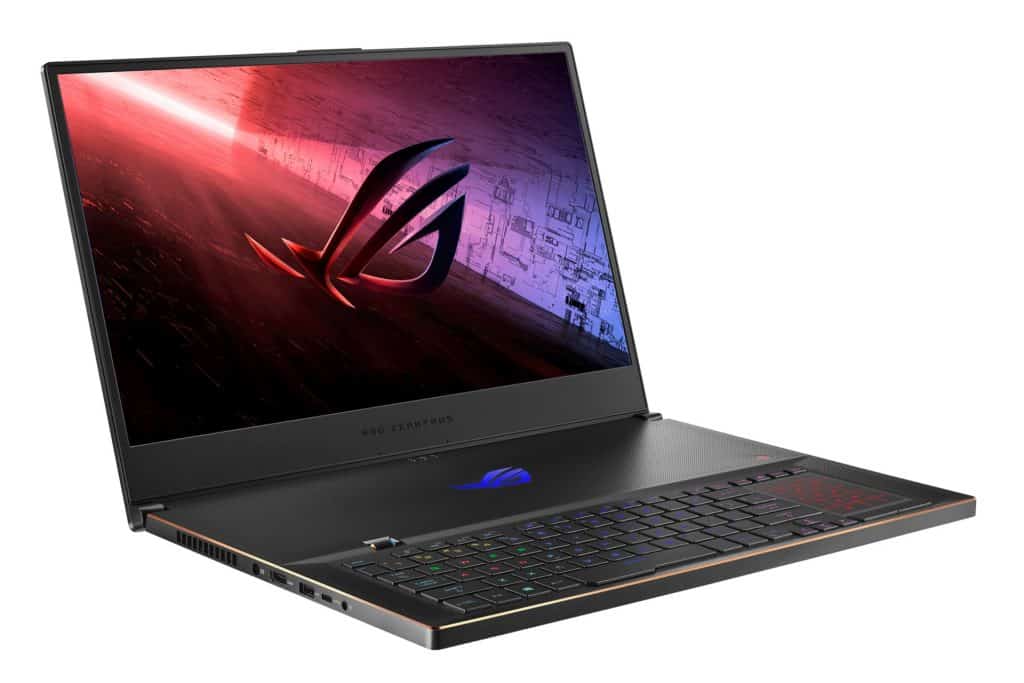
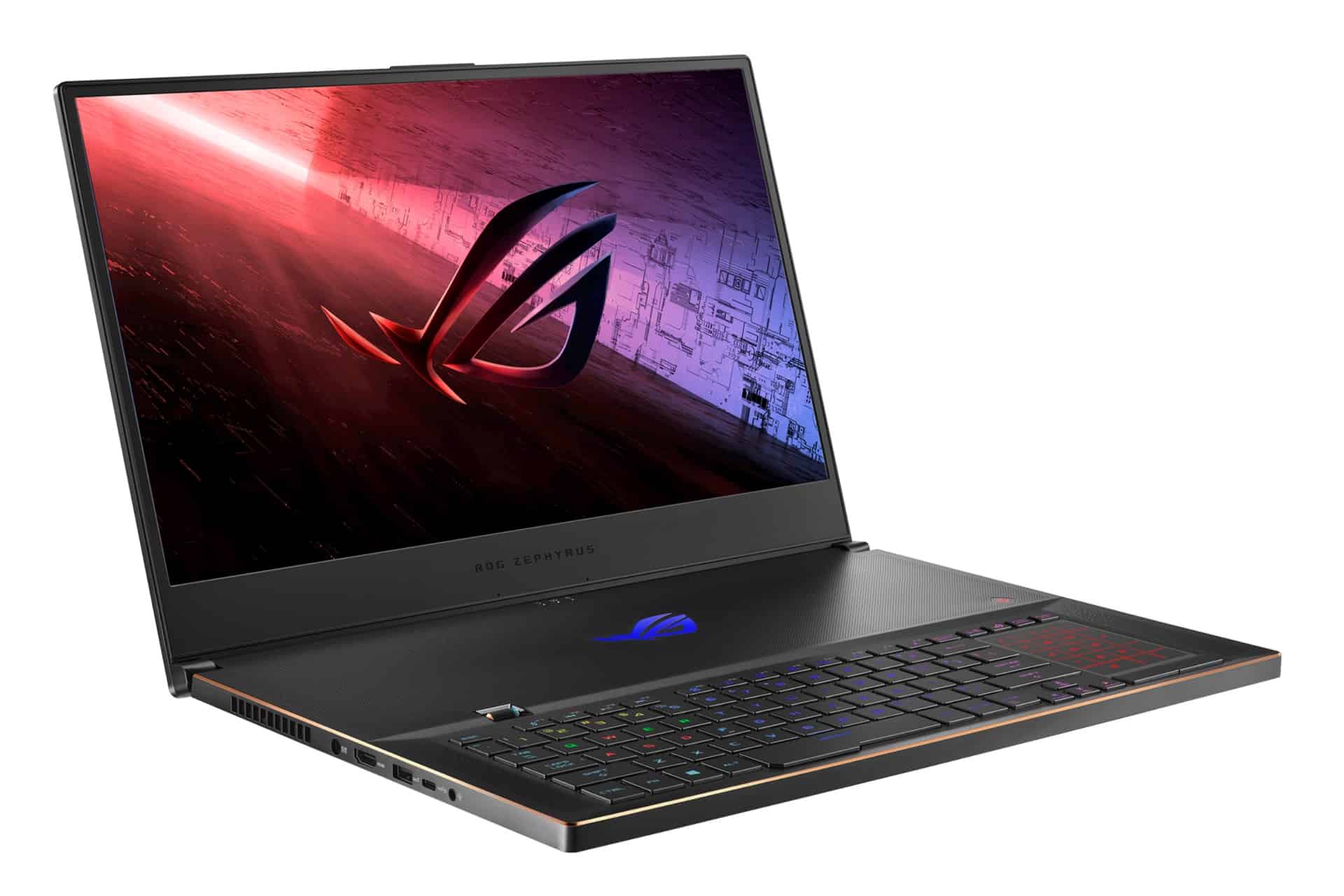
In the way ASUS product positioning for gaming laptops, the Zephyrus series launched in 2017 plays a very special role, because it is different from leading product lines like ASUS ROG The Flow X13 or ROG Mothership is highly experimental, Zephyrus series models are its “mainstream” commercial products in the high-end segment.
Therefore, this product line is always “carefully” with annual configuration upgrades along with a number of limited editions such as the recently launched ASUS Zephyrus G14 Alan Walker model.
In May, ASUS announced a new generation upgrade version with 11th-generation Intel CPUs with two versions of Zephyrus M16 and S17 in the world market, but due to the complicated epidemic situation, it was not always possible to buy a new version. Until recently, these two thin and light gaming laptop product lines have officially landed in the Asian market.
With a slight upgrade in terms of configuration, ASUS ROG Zephyrus S17 GX703 is not too different from the GX701 version launched last year.
The case is still made of aluminum alloy with the usual sharp machining of Zephyrus series laptops with the outer surface is electrostatically painted with diagonal lines and a diamond cut logo that divides the shell into two halves.
Visually, the overall size of this new version is almost unchanged compared to last year’s version, although ASUS says this year’s laptop model has been slightly shrunk compared to the previous version, only in size 394.9×264.3×19.9mm compared to 399x 272×18.7mm.
The weight of the machine remains the same at 2.6kg, quite light for a gaming laptop with a screen size of up to 17.3″.
The back is designed with many air intake holes for active and passive heat dissipation. Plus, this cover is easy to open for storage upgrades.
Open the bottom cover of the ASUS ROG Zephyrus S17, striking the viewer’s eye is a massive heatsink system with 6 separate heat pipes, which conducts heat from the CPU and GPU to two cyclone fans.
This design combined with liquid metal thermal paste provides strong heat dissipation, and is more impressive in the group of high-end gaming laptops today.
The machine board is quite small in size, but is still neatly arranged with upgradeable details such as memory slots, M.2 slot for SSD hard drives all on the back. Users can expand 2 more M.2 SSD hard drives in addition to the available hard drive from the manufacturer.
Proceed to open the machine, the most impressive thing for the writer is that the keyboard is slightly lifted to 5 degrees, creating a 12mm air intake from the top, helping to increase the amount of air for the cooling system similar to other models.
This raised angle also creates an extremely comfortable hand feeling for users when typing and playing games.
This is also the thinnest optical-mechanical keyboard on the market today, giving gamers a realistic typing experience and extremely low response time.
ASUS also equips ASUS ROG Zephyrus S17 with an IPS LCD screen with 1440p resolution and 165Hz refresh rate with the ability to cover a wide color range with most standard color ranges for image and video editing such as NTSC and DCI-P3.
Similar to other high-end laptops from ASUS today, this screen model is also color-aligned from the factory and meets the color standard confirmed by Pantone, enough to serve users in their needs professionally.
A rather special point for “movie fanatics” is that this screen also supports the Dolby Vision cinematic color standard with the ability to support 10bit color standards on new generation movies.
This is an extremely advanced color standard with an added metadata, helping the backlight system to increase and decrease the light source in a way that suits the director’s intentions, to create impressive movie and game scenes.
In terms of configuration, ASUS ROG Zephyrus S17 is equipped with today’s most advanced Intel® Core™ i9-11900H processor and NVIDIA RTX 3080 graphics card for laptops, promising impressive graphics performance for working people and gamers.
The machine configuration is quite strong, making it able to smoothly run the tests and strong games on the market today.
For example, the system scored 24,221 points with the 3DMark FireStrike test, and 11,296 points with the 3DMark Time Spy test, roughly equivalent to the desktop system using the ASUS Strix RTX 3070 8G GAMING graphics card.
With this power, the system easily carries Horizon Zero Dawn PC at Ultra settings at 87fps, Assassin’s Creed Valhalla at Ultra settings at 67fps or Battlefield V with Ray Tracing effects enabled at an average speed of over 60fps.
Overall, ASUS ROG Zephyrus S17 has quite enough power for gamers to fight heavy games at the highest settings and enjoy excellent image quality.
Display
Screen Quality and Size
The ASUS ROG Zephyrus S17 comes with this genuinely gorgeous 17.3-inch screen and it kind of sets the whole unit apart from most gaming laptop stuff. You can pick between a few display setups like Full HD (1920×1080) or QHD (2560×1440) so it’s not only aimed at gamers , but also at content creators who care about crisp visuals. The panel uses IPS tech, it brings wide viewing angles and reliable color rendition, which makes it useful not just for playing games , but also for streaming and even for more work minded tasks.
Refresh Rate, Response Time
One of the main pulls on the Zephyrus S17 is the refresh rate options on the screen. Depending on the exact configuration you grab, you might see 165Hz or even 300Hz, and that translates to super smooth motion too, plus less smearing when things move quickly. In day to day use, the higher refresh rate gives a competitive sort of feel because motion looks more liquid, and inputs tend to feel faster too. When you add in a fast response time, the screen helps you react sooner to what’s happening on screen with less of the typical lag.
Color Accuracy, and HDR
If you’re the kind of person who creates content, or deals with professional visuals , color accuracy actually matters a lot, and the Zephyrus S17 doesn’t really let you down. The screen covers a wide color spectrum, plus some versions come with factory calibration, and Pantone certification too—so the colors stay faithful rather than wandering off. That’s especially handy for photo touch-ups, layout tasks, and video production, where precision counts and you can’t just “eyeball” everything. Then there’s HDR support, which kind of pushes things even further, giving you more saturated tones and deeper contrast when you’re working with HDR files, so the whole picture feels more alive.
Performance
Processor and Graphics Performance
Under the hood, ASUS ROG Zephyrus S17 brings a serious amount of power with Intel’s newer 11th generation processors along with NVIDIA GeForce RTX graphics. It shows up in a few configurations, going as high as an Intel Core i9-11900H , an 8-core powerhouse that’s built for heavy workloads. In real day to day use it stays stable, even when you throw demanding software at it. On the GPU side you can pick between NVIDIA GeForce RTX 3070 or RTX 3080, which is basically desktop-level muscle for gaming, plus more demanding GPU tasks— not just “fine” performance when you really need the speed.
RAM and Storage Options
The Zephyrus S17 is also pretty generous with memory and storage choices. You can configure it with up to 32GB DDR4 RAM, so multitasking feels less fussy , and everything keeps moving without that constant “wait” feeling. For storage, it uses speedy NVMe SSD options, usually 512GB going up to 2TB, so you have room for modern games, software libraries, and the usual multimedia junk we all end up collecting. With fast RAM teaming up with quick drives, you get snappier overall behavior, and better load times too when you switch apps or jump back into games again.
Gaming Performance
When you glance at gaming benchmarks, the Zephyrus S17 does pretty well across the board, mainly because the internal hardware is arranged the right way and there’s good overall balance. With the GeForce RTX 30 series GPUs, the picture looks crisp and it feels responsive, so you can set the visuals to ultra high in newer AAA titles, and still keep frame rates fairly steady. Games like “Cyberpunk 2077,” “Assassin’s Creed Valhalla,” and “Call of Duty: Warzone” tend to run smoothly on the Zephyrus S17, and that repeatable feel basically cements it as a premium gaming rig.
Thermal Management and Overclocking
ASUS’s smart cooling methods help the Zephyrus S17 keep its performance steady under heavy use without getting too hot. The cooling system works alongside ASUS’s own software utilities, including ROG Boost and Armoury Crate, so you can track, tweak , and manage temperatures in a pretty practical way. If you’re into tinkering, the overclocking options add more punch, giving extra room to push CPU and GPU clock speeds, which can translate into higher frame rates while you’re gaming.
Connectivity and Audio
Connectivity Options
The ASUS ROG Zephyrus S17 includes a wide spread of ports and connection features, basically so you can attach peripherals and outside devices without turning it into a whole project. You get a mix of USB Type-A ports, plus USB Type-C, then there’s HDMI 2.0b, a LAN connection and a 3.5mm audio jack. On certain configurations, Thunderbolt 4 is also present, which makes transfers faster and it’s easier to link up to external displays. Wi‑Fi 6E is built in too, so wireless performance is quick and delay stays low, that really matters for online matches and for streaming sessions when you want everything to stay stable.
Audio Quality and Software
When it comes to sound, the Zephyrus S17 mostly leans on ASUS intelligent audio systems plus speaker hardware that’s honestly a step up, in the premium range. You get Dolby Atmos support too, and there are quad speakers using Smart Amp technology, so the output feels more immersive, deeper bass comes through, and the higher frequencies sound cleaner . There’s also virtual surround capability, which helps with spatial awareness in games, and makes it easier to notice those little audio signals, like footsteps , or a distant cue you might’ve missed otherwise. On the software side, ASUS Sonic Studio gives you room to tweak audio profiles and add various effects, so your sound can be tuned for different kinds of media, or just dialed in so it matches your own personal preference.
Keyboard and Trackpad
Keyboard Design and Typing Experience
The Zephyrus S17 comes with a full size chiclet keyboard , plus per key RGB glow and you can tweak the lighting style using the ASUS Aura Sync software, it feels kinda roomy too. The layout has keys spaced out a bit more than I expected, which helps smooth, tactile typing, no real cramped vibe. There are dedicated macro keys as well as customizable hotkeys, which makes work… and gaming, run a bit more efficient because commands can be triggered faster during matches or even for everyday workflow tasks.
Precision Touchpad
This laptop includes a Precision touchpad, and it supports Windows Precision drivers, so the tracking feels spot on. Multi touch gestures respond pretty fast too, with the glass surface being fairly large , so you get extra space for swiping, scrolling, and all that navigation stuff. It makes it simple to move around the operating system and work through apps, even if you’re doing something more involved. Sure, some gamers might prefer an external mouse for real gameplay, but the touchpad holds up well for daily use like web browsing, writing documents, and even multimedia playback.
Battery Life
Battery Performance and Charging
For gaming laptops, battery life is always one of those “it depends” things. The Zephyrus S17 tries to juggle raw power with actual endurance, and yeah it kinda ends up around the middle. It has a big 90Wh battery, which translates into decent runtime for the class. On lighter tasks, like just web browsing or watching a video, you can usually see roughly up to 7 hours. During gaming though, things fall off, and fast. In heavier sessions it tends to last something like 1.5 to 2 hours, under real load. The good part is the quick charging feature, recharges are pretty swift, and you can get to around 50% in about 30 minutes, so you’re not stuck waiting around between sessions, or at least not nearly as long.
Software and Features
Operating System and Software Suite
The ASUS ROG Zephyrus S17 ships with Windows 10 Home, or Windows 11 , so you end up with this fairly standard platform that kinda fits both gaming and everyday work. ASUS also includes Armoury Crate which sort of plays the role of a central control hub, for checking system status , pushing tuning profiles , and swapping the RGB lighting modes around a bit. From there you can tweak gaming settings, monitor temps, and create profiles for different ways you play or different kinds of scenarios. There’s also GameVisual for display tweaking, plus GameFirst VI for network prioritization, which helps keep things smoother overall while gaming, and trying to stay connected without annoying hiccups.
Security and Biometrics
On the Zephyrus S17, the security setup is kinda neat, like the fingerprint reader is built into the power button,so you wake up fast and it feels pretty safe. Also, Windows Hello is included, which means biometric sign-in runs quickly and stays reliable. Basically, only approved folks get in and you can keep confidential files from being accessed by random hands. Overall, these little measures actually help with everyday privacy, and they also lower the chance of someone else trying to mess with your device. So yeah, in the end it feels like it covers both personal use, and work related stuff pretty well.
Conclusion
Pros:
Premium build quality: Magnesium-aluminum alloy chassis with a stylish, sturdy feel that really lasts.
Strong performance hardware: Intel Core i9 processor and NVIDIA GeForce RTX 30 series graphics deliver desktop level gaming strength.
Upgraded cooling system: the Active Aerodynamic System (AAS) Plus layout manages temperatures better, and helps reduce thermal throttling.
High refresh display: some models can reach up to 300Hz ,so gameplay looks smoother and more responsive.
Cons:
High price point: those premium features aren’t cheap, it can turn into a bigger purchase than you planned.
Battery life: it’s fine for a gaming laptop,but under heavy load the battery drains pretty fast.
Portability: even if it is thin and light, it still feels kind of bulky and less travel friendly than the smaller gaming laptops you usually see.
ASUS ROG Zephyrus S17 Gaming Laptop, 17.3” 300Hz FHD Display, NVIDIA GeForce RTX 2070 SUPER, Intel Core i7-10750H, 16GB DDR4, 1TB SSD, Per-Key RGB Keyboard, Thunderbolt 3, Win10 Pro, GX701LWS-XS76: Buy it now
ASUS ROG Zephyrus S17 Gaming Laptop, 300Hz 17.3″ FHD 3ms IPS Level, Intel Core i7-10875H, NVIDIA GeForce RTX 2080 Super, 32GB DDR4, 1TB PCIe SSD, Wi-Fi 6, Per-Key RGB, Windows 10 Pro, GX701LXS-XS78: Buy it now
Related Posts






Tech Reviewer & Product Analyst
Định Bia has spent over 10 years testing consumer electronics with a focus on smart technology. He work as a product advisor at Biareview where he helped customers find the right devices for their needs. He personally tests every product featured on this site using a consistent evaluation framework covering quality, durability, and value. All reviews are based on experience, not influenced by the manufacturer.