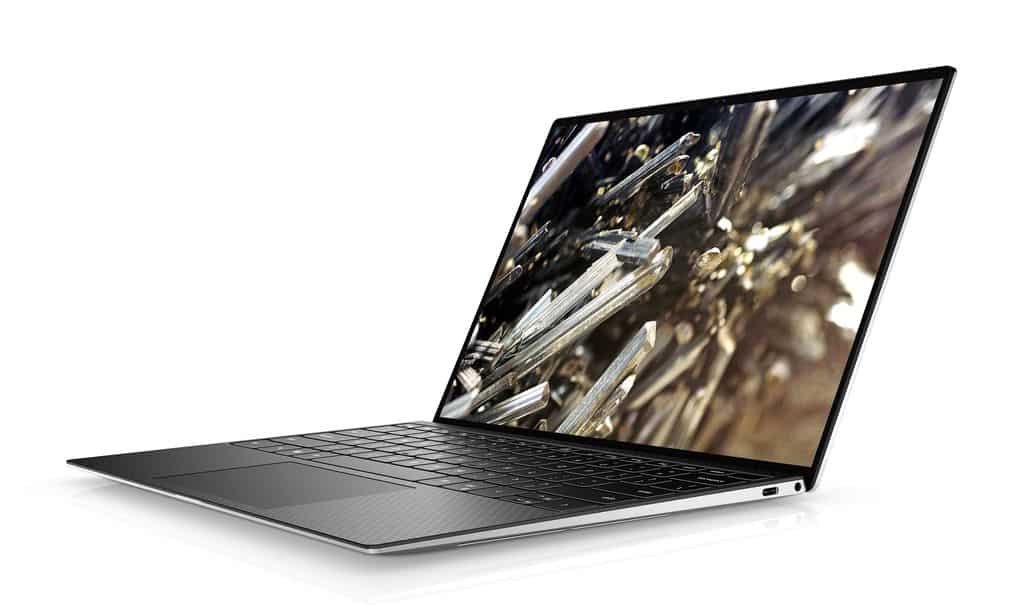
Brand new improved screen
Larger keyboard
In terms of exterior design, the XPS 13 9300 also has another big improvement in the keyboard. The keys are larger in size, 1mm thin, and the Trackpad is 19% larger than the old model. The keyboard layout size is kept the same, but the size of the “left” and “right” navigation keys is made larger to avoid like the 2019 version, users often mistakenly press the wrong size because the size is too small.
Technical specifications
The XPS 13 9300 is powered by a 10th-generation Intel (Ice Lake) processor. Regarding hardware configuration, customers also have many options: Core i3, i5 or i7. The amount of RAM also ranges from 4GB to the highest of 32GB, the memory that supports SSD from 256GB to the highest is 2TB.
Talking a little about the I/O connections of the machine, the Dell XPS 13 9300 will shorten only two USB-C/ Thunderbolt 3 ports to minimize the thickness of the machine. Next to them are the Micro SD card slot, the standard 3.5mm Audio I/O jack. That means if you want to connect traditional USB-A devices, you’ll need split hubs. Besides a common detail on the XPS line is the battery life indicator located on the side has also been removed.
With many changes, upgrades in screen and configuration, the Dell XPS 13 9300 is always a top choice in the business laptop segment, although we always have to consider it because the price of the XPS line is always very high. The lowest version of the machine is priced from 1000 USD.
Display Quality
The Dell XPS 13 9300 has this really great 13.4 inch screen, and it comes in two flavors you can pick, Full HD+ (1920 x 1200) or 4K UHD+ (3840 x 2400). Inside it uses IPS tech , so you get wide sightlines, plus it can also manage HDR content the right way. Colors look vibrant, blacks stay pretty deep ,and overall contrast feels strong. It’s also approved for 100% sRGB coverage , so if you do anything that’s color sensitive like photo editing or graphic design, it tends to be a solid fit.
The 4K UHD+ choice especially makes everything feel crisp. The fine details show up, and text looks sharp, which is kind of what you want if you’re working professionally and you care about accuracy. And yep, the touchscreen option makes the whole thing more flexible, because you can interact with what’s on screen directly, like scrolling through apps, adjusting photos, or just browsing the web.
Performance
Now about performance, the Dell XPS 13 9300 usually brings serious hardware options depending on what you buy. You’ll most often see 10th generation Intel Core chips, with configurations that can go as far as the quad core Intel Core i7-1065G7. In practice this CPU lineup gives you a nice mix of speed and efficiency, so it can manage heavy tasks ,like video editing, lots of multitasking, and using demanding software without too much trouble.
For graphics, it leans on integrated Intel Iris Plus Graphics. That setup is fine for casual gaming, and general multimedia use. It’s not meant for high-end gaming rigs, or for pro level 3D rendering, but the built in graphics still provide enough grunt for regular work and everyday entertainment.
Battery Life
For mobile professionals, battery life kind of matters a lot, and the Dell XPS 13 9300 actually shows strong staying power on a single charge. In normal use it can reach around 12 hours of battery life with the Full HD+ screen setup, so you can work most of the day without grabbing a charger every time. If you pick the 4K UHD+ option, battery endurance may drop a bit , mainly because that higher resolution tends to drink more power. Still, the runtime remains pretty solid for most people, especially those who don’t constantly max out performance.
Dell also bundles smarter power management, together with Windows 10/11 optimizations, to help pull that charge out longer. So, if you’re stuck in long meetings , or pushing through a long shift, or simply moving around while traveling, you can usually remain productive without constantly having to remember recharging.
Connectivity Options
Even with that slim body, the Dell XPS 13 9300 doesn’t feel too limited when it comes to ports and connections. Most people will like the fact that it usually has two Thunderbolt 3 ports, both using USB Type-C connectors, and they cover a lot of needs. With power delivery, DisplayPort output, and fast data transfer up to 40Gbps , those ports are basically a flexible hub for desks. You can hook up external monitors, docking stations, and various accessories with less hassle than on many thinner laptops.
On top of that, you may also find a microSD card reader, a headphone plus microphone combo jack, and Wi‑Fi 6 (802.11ax) for quicker, steadier wireless internet. There’s also Bluetooth 5.1, which helps with pairing wireless peripherals like a mouse , keyboard, or headphones , making the whole setup feel more smooth day-to-day, and more convenient for productivity.
Software and User Experience
The Dell XPS 13 9300 arrives with Windows 10/11 Home or Pro already set up, so most people get a familiar and pretty safe operating environment right away. On top of that Dell adds some proprietary utilities, which is honestly the kind of thing that makes the device feel more “complete”. One highlight is Dell Mobile Connect, it helps the laptop and a phone act like they are on the same page, so users can place calls, send texts, and view notifications straight from the computer instead of constantly switching back and forth.
For access security Windows Hello is supported too, meaning you can use biometric login through the optional fingerprint reader or the IR camera. That setup gives quicker entry than typing passwords, without the annoying “wait, where’s the password again?” moment. Dell also keeps pushing regular updates and driver support, so performance stays steady and security stays current, keeping the XPS 13 9300 feeling optimized and dependable as time goes on.
Audio and Multimedia
For sound, the Dell XPS 13 9300 uses stereo speakers tuned with Waves MaxxAudio Pro, so audio comes out fairly clear and immersive for streaming, video calls, and that casual gaming session. Still, because it’s a compact machine the bass response can’t really match bigger laptops, or definitely not a separate speaker setup. Even so the built-in audio is usually more than enough in day to day use, with solid volume and decent overall clarity.
For better audio experiences, people can plug in external speakers or headphones through the headphone jack, or just use Bluetooth, and then they can take advantage of Dell’s Waves MaxxAudio Pro tweaks for richer sound and more personal, like customized audio profiles. It feels a bit smoother overall, you know, especially when settings seem to automatically match what you’re doing.
Security Features
Security is a big deal for working folks, and the Dell XPS 13 9300 has a handful of features aimed to protect user data while keeping privacy in check. On top of Windows Hello support for biometric sign in, Dell also includes optional protection extras, like a fingerprint reader built into the power button, or an optional IR camera that does facial recognition login.
Dell further provides hardware based security mechanisms, including a Trusted Platform Module (TPM) 2.0. This component gives secure storage for encryption keys and credentials, so sensitive information isn’t easy to access, or at least it’s better guarded against unauthorized use or any kind of meddling. Taken together, these safeguards help you work with more confidence, since your data and your privacy are protected from likely threats.
Pros and Cons
Pros:
Premium aluminum and carbon fiber build quality.
Beautiful InfinityEdge display with minimal bezels.
High resolution choices with lively color accuracy.
Strong Intel Core processors for performance when needed.
Cozy backlit keyboard, plus a responsive trackpad.
Good battery life that supports all day productivity.
Thunderbolt 3 ports for flexible connectivity options.
Windows 10/11, with Dell tuned optimizations and security features.
Small, light design that’s easy to take around.
Cons:
– Higher price point than most budget ultrabooks, still kinda expected tho.
– RAM and storage upgrades are pretty limited, like you can’t really tinker much after purchase.
– Integrated graphics may not be enough for gamers , or for 3D professionals who need stronger GPU horsepower.
– The 4K UHD+ display option slightly reduces battery life, even if it looks amazing.
Conclusion
The Dell XPS 13 9300 kind of reads like a premium machine, with its polished look, vivid panel, solid performance , and that long battery life people actually tend to care about. It’s a good match for professionals and tech enthusiasts who want portability and productivity without feeling like they’re giving up too much. Whether you’re dealing with business stuff, running through creative workloads, or just doing normal day to day computing, the XPS 13 9300 feels smooth and responsive mostly because of the compact chassis, the high resolution screen, and flexible ports that don’t make you think twice about what you need.
Now sure, it can feel expensive right at the start ,but the XPS 13 9300 kinda earns that price tag through sturdy build quality, dependable everyday speed, and those thoughtful design details that fit what modern users want. If you’re a pro bouncing between meetings a student working through class, or a creative hobbyist tinkering around a bit then the Dell XPS 13 9300 holds its ground like a high end ultrabook, that somehow stitches together style, pace , and day to day practicality into one small and easy to carry package.
Dell New XPS 13 9300 13.4-inch FHD InfinityEdge Touchscreen Laptop (Silver), Intel Core i7-1065G7 10th Gen, 16GB RAM, 512GB SSD, Windows 10 Pro (XPS9300-7909SLV-PUS): Buy it now
Dell XPS 9300 Intel Core i7-1065G7 X4 1.3GHz 16GB 512GB SSD 13.4″ Touch Win10, Silver: Buy it now
Dell XPS 13 9300 Laptop, 13.4″ FHD+ (1920 x 1200) Touchscreen, Intel Core 10th Gen i5-1035G1, 8GB LPRAMX, 256GB SSD, Windows 10 (Renewed): Buy it now
Dell XPS 13 9300 Laptop, 13.4″ FHD+ (1920 x 1200) Touchscreen, Intel Core 10th Gen i5-1035G1, 8GB LPRAMX, 256GB Class 35 SSD, Windows 10 (Renewed): Buy it now
Dell XPS 13 9300 Laptop, 13.4″ UHD+ (3840 x 2400) Touchscreen, Intel Core 10th Gen i7-1065G7, 16GB LPRAMX Ram, 512GB Class 35 SSD, Windows 10 Pro: Buy it now
Related Posts


Tech Reviewer & Product Analyst
Định Bia has spent over 10 years testing consumer electronics with a focus on smart technology. He work as a product advisor at Biareview where he helped customers find the right devices for their needs. He personally tests every product featured on this site using a consistent evaluation framework covering quality, durability, and value. All reviews are based on experience, not influenced by the manufacturer.