
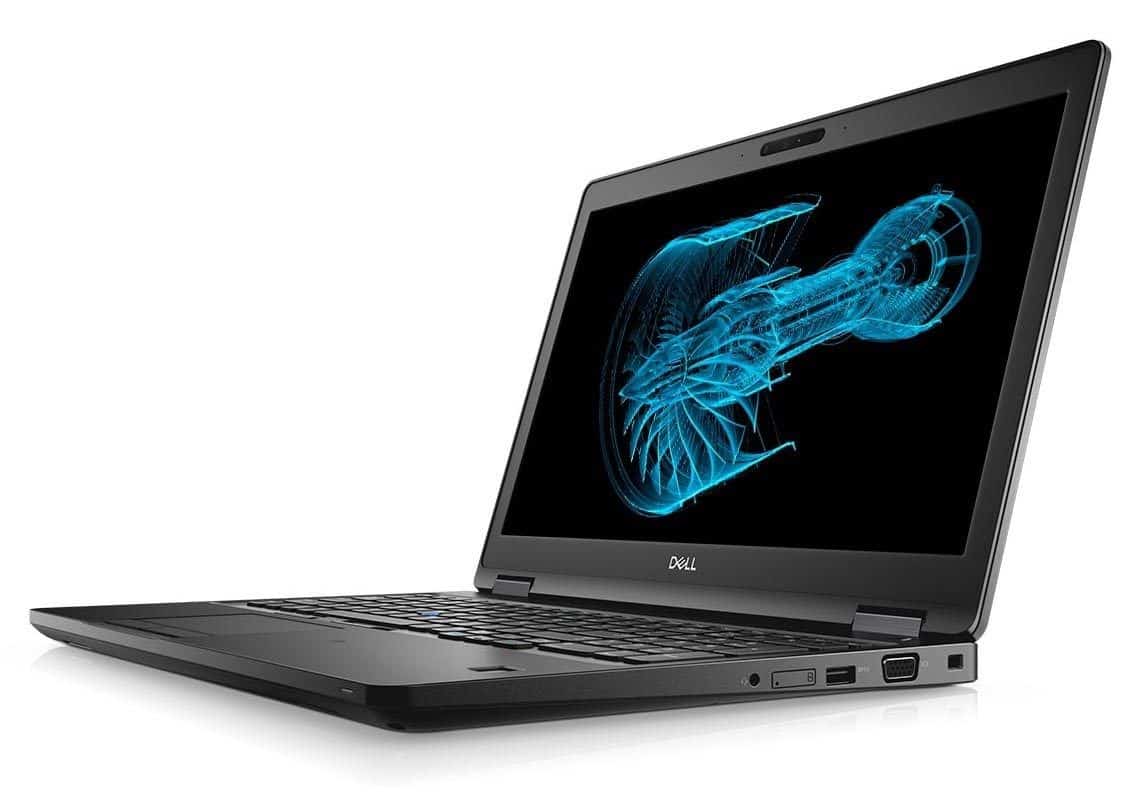
Durable design – workstation quality
The look of the Precision 3530 clearly points to the design of Dell’s workstation models: strong, rugged and “solid”. The coupling of the machine is specially designed with the “mix” part of the ports connected to the back of the hinge, quite saving space. Overcoming 15 MIL-STD-810G certifications – the standard for endurance of the US military, this workstation can withstand humidity, extreme temperatures, vibration, sand and dust, mechanical shock and altitude.
Design and Build Quality
The Dell Precision 3530 has a sort of sturdy professional look, very much like most Precision series workstations. It’s built with a mix of metal and high-quality plastics, so it leans into durability without really sacrificing portability. The dimensions are clearly tuned for mobility, but it still ends up a bit thicker and more weighty than consumer-grade laptops, mostly because those workstation-class parts are kind of demanding.
On the inside, the chassis includes several ventilation grilles and heat management ideas, all meant to keep temperatures in check when you’re doing intensive work. That helps it hold up and stay consistent even when things are under heavy load. Over all, the construction feels solid, made for the daily grind at work, plus the occasional travel as well.
Display Quality
The laptop usually comes with a 15.6-inch Full HD 1920 x 1080 pixels screen, and it tends to look pretty crisp, with solid color accuracy for day to day work that’s more “serious” like CAD/CAM modeling, graphic design, or even video editing. Of course it depends on the configuration because Dell sometimes includes upgrades, like higher-resolution panels and more refined color performance with things such as Dell PremierColor. This is the kind of feature that gives a wider color gamut, so the colors come through with better fidelity, and yeah it’s noticeable when you’re working on visuals.
On top of that, there’s an anti glare coating, so reflections are reduced, which helps when the room is bright or you’re dealing with windows, lamps, and that general glare mess. If you’re the type of professional who wants more screen space or better visual detail, you can choose configurations with a higher-resolution display, or just connect an extra monitor using the laptop’s ports and connectivity options, that’s usually the easy path.
Performance
Performance is really the area where the Dell Precision 3530 shines. It benefits from multiple Intel Core and Xeon processor choices, plus NVIDIA Quadro professional graphics options. The whole setup is aimed at heavier workloads, so things like 3D modeling, simulation, rendering, and virtualization can run without feeling sluggish, or at least not as much.
The Quadro graphics cards are, kind of, tuned for professional workloads, delivering accelerated results in CAD programs , engineering simulations and a range of creative workflows. So the Precision 3530 ends up being a solid pick for people who want dependable graphics muscle while still having strong CPU power.
Keyboard and Trackpad
On the Precision 3530 you get a full-size backlit keyboard which feels kind of comfortable for typing, and you also have a dedicated numeric keypad. It works pretty well for people who keep entering numbers or depending on keyboard shortcuts, all the time. The keys bring enough travel and tactile response, which helps with typing accuracy and comfort over longer working stretches.
The precision touchpad supports multi touch gestures and gives responsive navigation, so the cursor movement feels smooth and controlled for day to day productivity. If someone wants a more exact input approach, they can also lean on outside tools , like Dell’s Precision-series mice, or even a n external graphics tablet for a few specialized tasks.
Battery life
Battery life on the Dell Precision 3530 is kind of hit and miss, it depends a lot on the exact configuration and also how you use it. These are workstation class laptops so they usually prioritize performance first, not really trying to stretch every single minute of charge as long as possible. In other words you might get better runtime with lighter tasks, but under heavy loads it can drop pretty quickly. Because of that, the model tends to work more like a desktop replacement ,or something you keep mostly in one place, not really for long mobile stretches.
With a regular battery capacity, the Precision 3530 will commonly last about 6 to 8 hours on one charge when you’re doing moderate workloads. If you need more than that, some people go for the bigger battery options, or use an external power solution, so you can keep moving and reduce interruptions during heavy tasks.
Connectivity options
Connectivity on the Precision 3530 is pretty complete ,and it gives you a mix of ports and expansion possibilities for different peripherals and outside devices. In most cases you’ll see USB Type-A, USB Type-C, plus HDMI or DisplayPort for monitors. For networking, there’s typically an Ethernet port for wired use, and there’s also an audio jack for headphones, or external speakers.
There may also be optional Thunderbolt 3 ports, which helps with fast data movement and it can support external displays too. That makes large file transfers less painful, and multi-monitor setups more convenient for day to day productivity. On the wireless side, expect Wi-Fi 6 (802.11ax) and Bluetooth ,both of which help with stable connection and easy pairing across different work spaces and accessories.
Satisfied every experience
With a 15.6-inch screen, resolution (1920 x 1080 pixels), equipped with matte protection, comes with a 289 nit brightness indicator, the Precision 3530 delivers crisp, authentic display quality. Along with the screen, the screen border of this product is relatively thin, enough for IR “to squeeze” the webcam in the same. Besides, thanks to the smooth touchpad area and 2mm deep travel, the Precision 3530 chicket key gives users a perfect typing experience.
The performance of “monsters”
The product is equipped with 2.7 GHz Intel Xeon Processor E-2176, 32GB RAM, SSD 512 GB and Nvidia Quadro GPU. It is possible to handle all heavy work tasks or even gaming needs. The Precision 3530 can work with users throughout the day with up to 9 hours of battery life.
The product works on Windows 10 Home operating system platform, with many utilities that save time, support the processing of scientific and smarter work.
Smart connection – secure security
On the left side of the Precision 3530 is a Thunderbolt 3 port, a USB 3.1 port, an SD memory reader and a card reader; The back panel includes a USB 3.1 port, HDMI port 2.0 and RJ45 port; On the right side, there is a security lock slot, VGA port, a USB 3.1 port, a SIM card slot and a headset-microphone jack. With this huge number of ports, the Precision 3530 offers the convenience of fast connectivity and data backup.
In terms of security, Precision 3530 is equipped with an optional fingerprint reader, Intel vPro for remote management and IR cameras to access from Windows Hello, providing high security for personal data.
Software and Security Features
The Dell Precision 3530 comes out with Windows 10/11 Pro , or sometimes Linux , it depends how the unit is configured, and it gives you a solid, safe , and productive base for professional software, plus enterprise deployments. Dell also bundles extra protection options like Dell Data Protection | Encryption and Dell Client Command Suite, which helps with centralized oversight and protects data across organizational networks.
On top of that, you can add optional security upgrades such as fingerprint readers , or a smart card reader, so biometric verification and access control stay more strict. This also supports data integrity, and helps keep user privacy in line with industry expectations and the organization own security rules.
Audio and Multimedia
For audio, the Precision 3530 is pretty decent for work related needs, with built-in speakers that push clear sound for media playback, and for video conferencing it holds up well. If you care about stronger audio fidelity, most people choose external speakers or headphones, for a more immersive media experience, and for audio editing type tasks.
For the video part, the built in webcam delivers steady, dependable results for remote get togethers and team collaborations. It comes together with noise canceling microphones, which sort of makes things sharpen your voice clarity and while also reducing the surrounding sounds, and then virtual meetings and remote pitching sessions end up feeling just a bit less distracting.
Pros and Cons
Pros:
Build quality is robust , and it feels really durable, especially for pro settings.
It uses high performance Intel Core and Xeon processors for heavy compute needs.
You can get NVIDIA Quadro graphics options that help with accelerated graphics workloads.
There’s a full size backlit keyboard and yes, a dedicated numeric keypad too.
Ports and connectivity are pretty comprehensive, including Thunderbolt 3 support.
Security stuff is there as well—optional security features, plus enterprise grade software for manageability.
Cons:
It’s kind of bulky and heavy compared to normal consumer laptops.
Battery life can be limited when you push it hard, like real heavy workload times.
You’ll pay more than mainstream laptops, straightforwardly.
When it’s under load, fan noise might be noticeable, because workstation class components run differently.
Conclusion
The Dell Precision 3530 is a solid, dependable mobile workstation meant for professionals who want strong performance, reliability, and plenty of connectivity, all in a portable shape. It leans hard on its powerful Intel processors, NVIDIA Quadro graphics, durable build, and a wide set of ports, so it tends to handle tough jobs , like CAD/CAM modeling, software development, and content creation without too much drama.
Sure, it might feel a bit more bulky and slightly less battery efficient than the typical consumer laptop. But the Precision 3530 is honestly pretty tuned for raw performance, and durability too, so it can end up being a real go to for engineers, architects, and the creative crowd who care about practical function like actually getting work done, not just looking fancy. Whether you’re using it in an office, out on site locations, or while doing business travel, the Precision 3530 tends to deliver the reliability and the horsepower you need for those complicated tasks, plus producing high quality outcomes.
Dell Precision 3530 1920 X 1080 15.6″ LCD Mobile Workstation with Intel Core i5-8400H Quad-Core 2.5GHz, 8GB RAM, 256GB SSD: Buy it now
Dell Precision 3530 1920 X 1080 15.6″ LCD Mobile Workstation with Intel Core i7-8850H Hexa-core 2.6 GHz, 16GB RAM, 512GB SSD: Buy it now
Dell Precision 3530 – i5-8300H – 15.6 FHD – 8GB – 256GB SSD – NV-4GB (P600) – Windows 10: Buy it now
Dell Precision 3530 1920 X 1080 15.6″ LCD Mobile Workstation with Intel Core i7-8850H Hexa-core 2.6 GHz, 8GB RAM, 256GB SSD: Buy it now
Related Posts

Tech Reviewer & Product Analyst
Định Bia has spent over 10 years testing consumer electronics with a focus on smart technology. He work as a product advisor at Biareview where he helped customers find the right devices for their needs. He personally tests every product featured on this site using a consistent evaluation framework covering quality, durability, and value. All reviews are based on experience, not influenced by the manufacturer.