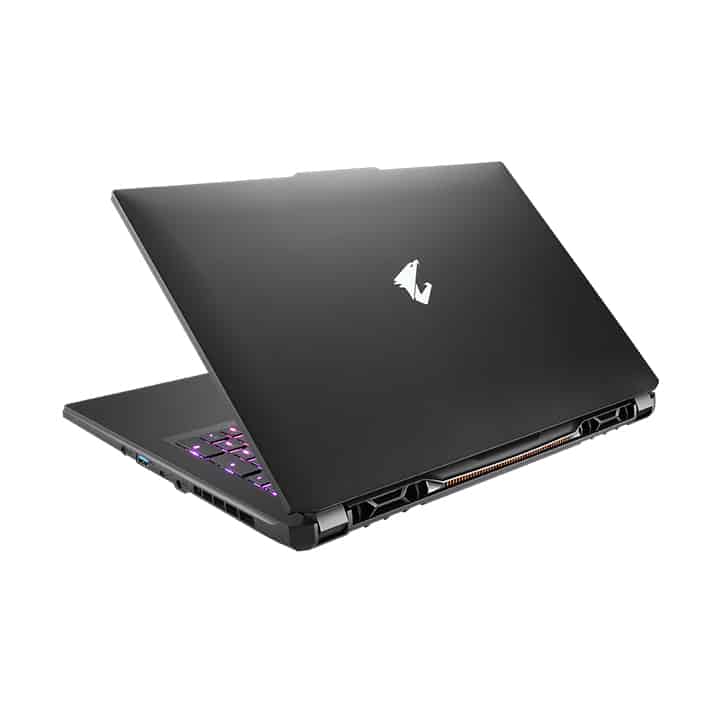
Gigabyte Aorus 17 XE4 is the most powerful performance laptop on the market today. When not used to playing games with a smooth and stable 60 fps frame rate, the machine has excellent multitasking ability, the heaviest working software is not inferior to a desktop computer. This is one of the most powerful gaming laptops I’ve reviewed, with a relatively good price-to-performance ratio.
Configuration
CPU Intel Core i7-12700H
Graphics Nvidia GeForce RTX 3070 Ti (8GB GDDR6, Max-Q), 130W max graphics power, 1,410 MHz boost clock
Memory 16GB DDR4-3200
Storage 1TB m.2 PCIe Gen4 NVMe SSD
Display 17.3-inch, 1920 x 1080, 360 Hz “IPS-level”
Networking Intel Wi-Fi 6E AX211 Wireless , Bluetooth 5.2
Ports Thunderbolt 4, 2x USB 3.2 Type-A, HDMI 2.1, Mini DisplayPort 1.4, Ethernet, 3.5 mm headphone jack
Camera 720p
Battery 99 WHr
Power Adapter 240 W
Operating System Windows 11 Home
Dimensions (WxDxH) 15.70 x 10.00 x 1.10 inches / 398.78 x 254 x 27.94 mm
Weight 5.95 pounds / 2.7 kg
Design
The machine has a fairly common design of high-end gaming laptops with aggressive lines and sparkling RGB lights. The lighting system of the Aorus 17X keyboard has a softer intensity than most other gaming laptops on the market.
The pair of lights placed right on the body makes the Aorus 17X look like a racing car. In addition to this highlight, the design of the machine is not much different from the gaming laptops on the market.
The machine has excellent build quality, worthy of the performance power that the machine possesses inside. The surface of the machine is made of sturdy metal, which can withstand any impact, giving you peace of mind when using it. The screen hinge is solidly designed, and the screen is firmly opened, making the machine seem like a monolithic design. The screen is very thin but does not feel fragile, largely thanks to the lid being made of solid aluminum.
The keyboard position is designed to be concave compared to the body to make room for a quality mechanical keyboard. The mechanical keyboard of the machine takes a while to get used to because the quality is so good compared to what you see in laptops on the market.
Connector
The connection port on the Aorus 17 XE4 is placed along the body, it kinda makes it easier for convenient use. The power and HDMI ports are on the backside of the camera body ,so you wont have to stress about accidentally touching the cord while you’re working.
Thunderbolt 4, 2x USB 3.2 Type-A, HDMI 2.1, Mini DisplayPort 1.4, Ethernet, 3.5 mm headphone jack.
Screen
The Aorus 17 XE4 is equipped with a huge 17.3-inch screen, with a resolution of 1920 x 1080 that has excellent picture quality. The screen of the device is surrounded by the top and two sides of the screen with a size of only 3 mm, while the bottom edge is larger than 1 mm. At the bottom edge is also a 720p webcam, which is a minus point because of the annoyance it brings.
The screen has sharp and smooth quality images, all thanks to the 360Hz refresh rate. The screen colors are equally impressive. The monitor is Pantone certified for color accuracy before being shipped.
Sound
The laptop’s downward-facing speaker system has a decent sound quality, but it should be better, especially for the money you spend. The speaker system on the sides below the body makes the sound not transmitted directly to the user’s ears, with unstable sound quality because it is sometimes muffled by the massive body.
Performance
Powered by an Intel 12th H series chip and an Nvidia GeForce RTX Super card, the Aorus 17 XE4 kind of just smacks down any gaming laptop you can actually find out there in the market
Battery life
A pretty big, rugged laptop like the Aorus 17 XE4 needs a lot of power to run properly, so it ships with a thick battery, up to 99Wh or so
During testing we basically let the machine play video on a loop non stop ,and with that 17.3-inch model, it pulled a solid run time of 3 hours and 14 minutes ,which beats most other gaming laptops nearby.
When testing battery life with the PCMark 10 tool, which allows to simulation of daily working conditions, the Aorus lasted for 3 hours and 5 minutes, less than the results of 5 hours and 2 minutes of the Asus Zephyrus Duo.
The below-average battery life of the Aorus 17 XE4 is not surprising. The reason is that the RTX card consumes a lot of power to operate optimally. And honestly, it will be rare for you to take this laptop away because of its large weight.
Gaming laptops are basically among the most powerful things on the market, so yeah they can be pretty useful when you’re doing work in creative industries. However, even if you turn off all the RGB lights, this laptop still gives off an unserious vibe while you’re working. Like you wouldn’t want to walk in with a Transformer model into a serious meeting room, especially not in front of a company director.
Software and features
The Aorus 17 ships with the Aorus Control Center, a pretty complete software pack that lets you customize and tune up the laptop. That program acts like a central place for watching system performance, switching up fan profiles, and managing RGB illumination. It also has extra bits like Game Assist, which adds on screen crosshairs and timers, to improve the overall gaming rhythm.
Gigabyte also tosses in Microsoft Windows 10 Pro, so you end up with an operating system that feels familiar , and it comes with a bunch of useful options. Windows Hello is also there through the integrated webcam, giving you a secure biometric sign in approach, which helps with security but also makes day to day life a little easier.
Comparisons with Competitors
To give a full review, it kinda matters to line up the Gigabyte Aorus 17 with other top tier gaming notebooks out there. So, here are a few direct match ups that people usually mention:
Asus ROG Zephyrus S17: Honestly this one is sort of a close cousin , like it brings high-end internals and a very similar energy in how it’s set up. You get that smooth, slick exterior vibe, plus a mechanical keyboard and even a 4K display option . Still, it usually ends up costing more than the Gigabyte Aorus 17, so budget minded players might feel a little squeezed. Meanwhile the Aorus 17, with its strong thermal management and pricing that feels more reasonable , often lands as the better deal. And if you’re the kind of player who actually cares about competitive timing and reactions, that 300Hz Full HD choice can look more tempting than jumping straight to 4K.
MSI GE76 Raider, yeah it lands right in that higher tier group. It uses a familiar kind of formula, you get the latest Intel processors paired with NVIDIA RTX 30-series graphics. The GE76 Raider is pretty famous for loud RGB lighting and that sturdy looking chassis, the whole vibe is more “showy” than “quiet”. That said, the Aorus 17 looks like it edges past it a bit, mostly because its cooling strategy stays more aggressive as time goes on, and it also seems to hang on slightly better when you’re running on battery. When you think about consistent performance, plus that small nod toward being more portable, it ends up with a tiny advantage.
Razer Blade Pro 17, feels like it’s always getting mentioned for a reason ,its slick design, premium build, and that really nice screen options ,like the 4K touchscreen. but here’s the catch ,it usually costs more, and it may not match the Aorus 17 when it comes to thermal delivery, steady temps, you know. also the Aorus 17 seems to win in practicality because the ports are more complete ,you get Thunderbolt 4, plus several display outputs, so gamers and creators can link up all sorts of gear without that “wait, what do I plug in here” moment.
Alienware m17 R4: Alienware’s m17 R4 is kinda a familiar name in the gaming space, it has top tier performance and a more eye catching look. It also packs customizable RGB lighting, a high refresh screen, and really sturdy internal components. Even if it kind of goes toe to toe with the Aorus 17 in raw speed, the Aorus 17 can still snag the upper hand , mostly because its cooling layout is a bit more forgiving. Pricing can be more aggressive too, so if you’re out there hunting for the best value, the Aorus 17 just ends up feeling like the better deal even if Alienware is still a solid choice.
Final Thoughts
The Gigabyte Aorus 17 is kinda an impressive gaming laptop, it really shines in most places. In practice, the hardware setup feels top notch, with a latest-ish Intel Core i9 CPU and an NVIDIA GeForce RTX 3080 graphics card, so you get serious speed for gaming, plus content creation too. On top of that the high refresh rate screen, really strong build quality, and the improved heat control system all work together, and that makes it a pretty convincing candidate if you’re looking at high end gaming laptops overall.
Now, sure, the Aorus 17 is not perfect. You do notice the battery life can run down quicker during demanding workloads, and when it’s under heavy load the fans can be kind of audible, which is annoying after a while. But these are small trade offs compared with everything else. The port lineup is honestly pretty comprehensive, the RGB lighting you can adjust is genuinely fun to mess with , and that bundled software suite feels solid, sort of , easy enough for regular day to day use.
By the time you’re done, the Gigabyte Aorus 17 comes off like a real performance beast. It delivers great speed, crisp visuals, and a sturdy chassis that doesn’t feel wobbly. If you are a competitive player, you make videos , or you just want the best laptop your budget can stretch to, the Aorus 17 looks like a pick you can buy without worrying about it. And yeah, with its competitive pricing plus the feature packed design, it lands right among the best high end gaming laptops that are around these days.
GIGABYTE AORUS 17 YE5 – 17.3″ FHD 1920×1080 IPS-Level Display, Intel Core i7-12900H, NVIDIA GeForce RTX 3080 Ti Laptop GPU 16GB GDDR6, 32GB DDR5 RAM, 1TB SSD, Win11 Home (AORUS 17 YE5-A4US544SP): Buy it now
GIGABYTE AORUS 17 YE5: 17.3″ FHD 1920×1080 IPS-Level Display, Intel Core i7-12700H, NVIDIA GeForce RTX 3080 Ti Laptop GPU 16GB GDDR6, 32GB DDR5 RAM, 1TB SSD, Win11 Home (AORUS 17 YE5-74US544SH): Buy it now
GIGABYTE AORUS 17G YD- 17.3” FHD IPS Anti-Glare 300Hz, Intel Core i7, NVIDIA GeForce RTX 3080 Laptop GPU 8GB GDDR6, 32GB RAM, 512GB SSD, Win10 Home, Gaming Laptop (AORUS 17G YD-73US345SH): Buy it now
Related Posts






Tech Reviewer & Product Analyst
Định Bia has spent over 10 years testing consumer electronics with a focus on smart technology. He work as a product advisor at Biareview where he helped customers find the right devices for their needs. He personally tests every product featured on this site using a consistent evaluation framework covering quality, durability, and value. All reviews are based on experience, not influenced by the manufacturer.