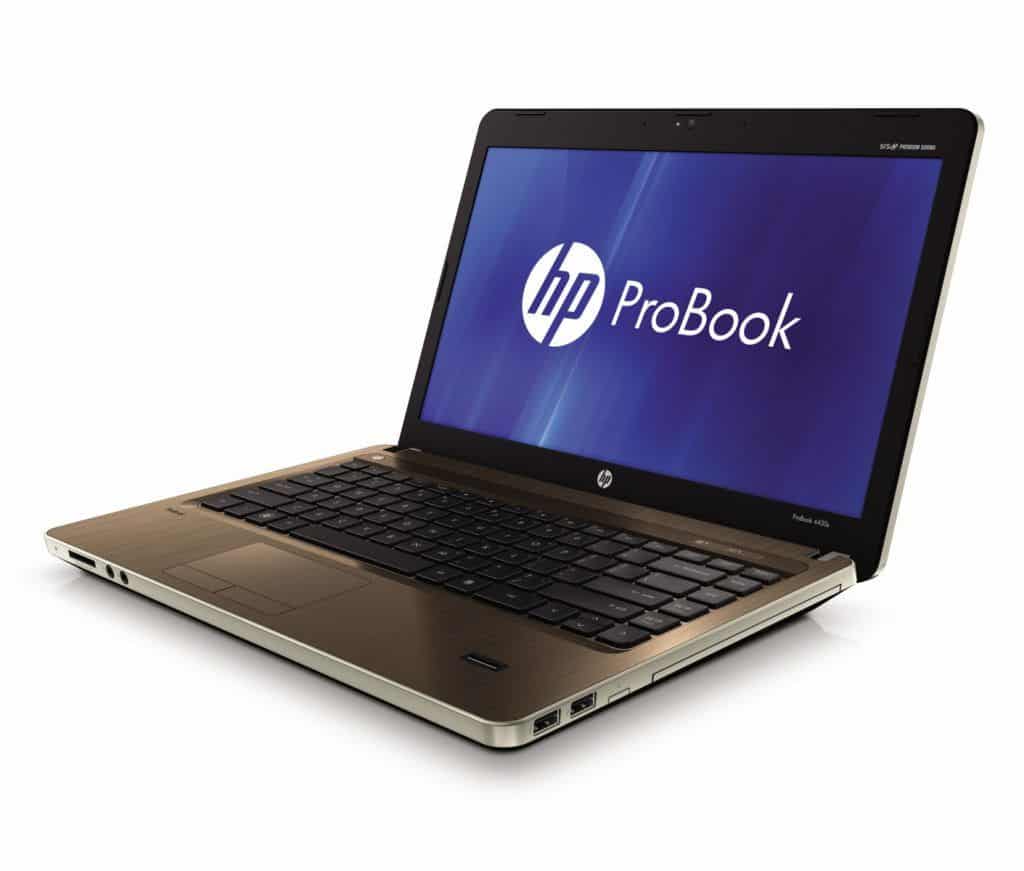
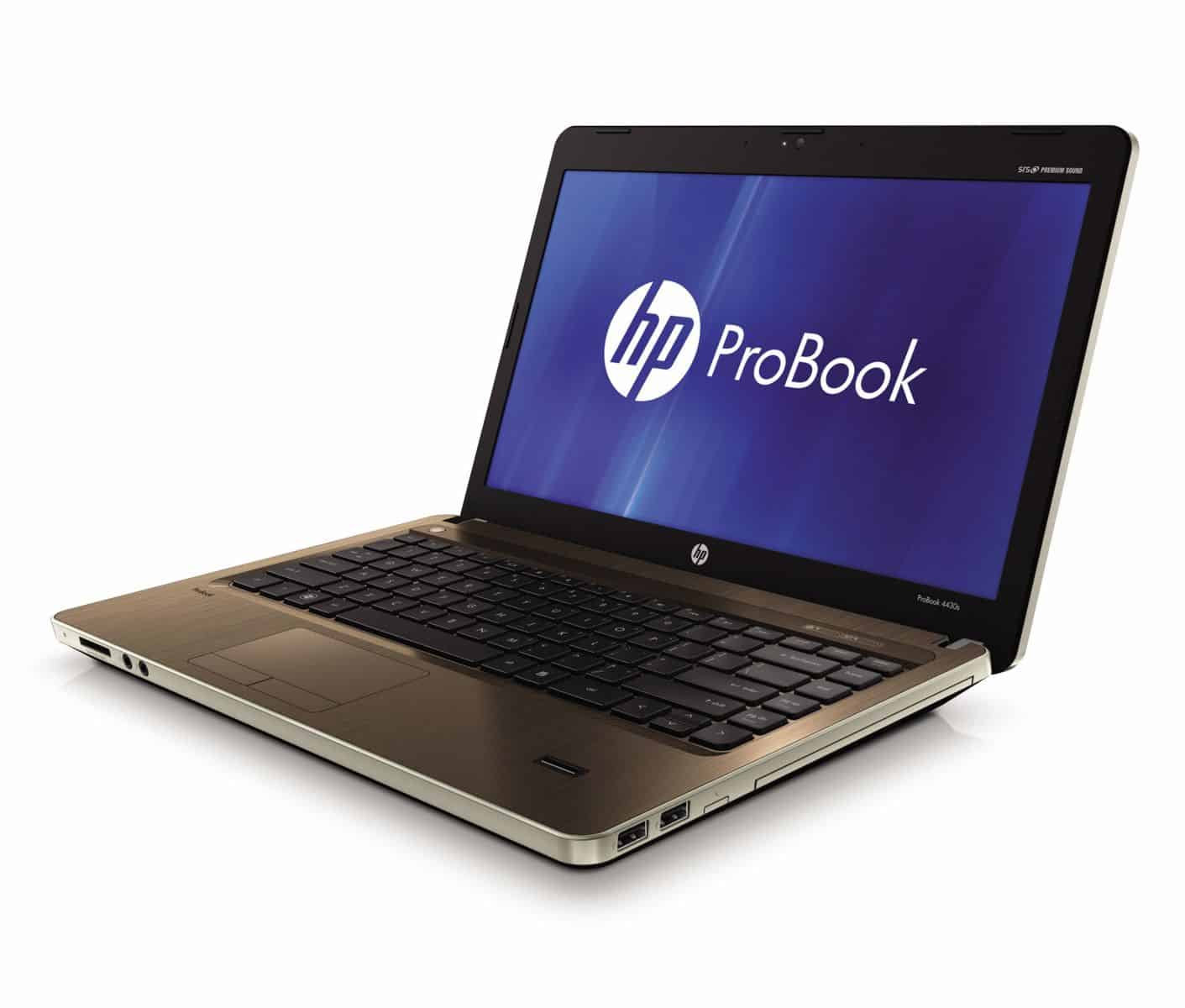
The HP ProBook 4430s is a business class laptop made for people who really need dependable day to day work performance, plus a sturdy build quality, and a set of features that feels right for everyday corporate tasks. It sits inside HP’s ProBook line, the 4430s kind of tries to strike that usual middle point between speed, durability, and pricing, so it’s not overly fancy but it also doesn’t feel cheap. In this review, we’ll sort through the design, the build, how it performs in real life, what the screen looks like, battery time, the ports and wireless connections, and just the overall feel when using it day in, day out. basically we’ll cover what it does well and where it may stumble a bit.
Design and Build Quality
The HP ProBook 4430s is built with practicality in mind and it leans hard into durability, which matches the kind of user base that expects a reliable machine that won’t give up after a while.
Aesthetics and Materials
The ProBook 4430s keeps a classic business look, with a matte black shell. The outside uses a mix of aluminum and plastic, giving you that professional vibe without the premium cost that some models ask for. On the lid and palm rest, there’s a brushed aluminum finish, it looks nice, while the textured plastic on the bottom supports grip and adds a bit more resistance against wear.
Overall, the design stays low key but still useful, and it’s really centered around making the computing experience feel dependable. The HP logo sits pretty subtly on the lid, and there aren’t any showy flourishes, which fits well with the needs of office users.
Build Quality
The ProBook 4430s is basically built to handle the day to day hassle of office life. It comes with a sturdy chassis , a fairly solid frame that helps resist flex and gives this overall “it wont fall apart” feeling. Even the hinge action is smooth , so the lid opens and closes pretty easily while still staying firmly in place when you need it.
In general, the build quality feels good, with real care put into how the parts are put together. The keyboard and touchpad areas seem well planned, which matters a lot for a steady and comfortable use, especially during longer work sessions. Sure, it doesnt use the most luxurious materials you might see on more expensive models , but for the money, the construction quality is still quite commendable, like, honestly for a business class laptop.
Display
The display is one of those components that can make or break a laptop, and the HP ProBook 4430s is trying to deliver something clear and practical. It’s meant to work well for typical business tasks rather than for flashy media usage.
Display Quality
The ProBook 4430s has a 14-inch screen with a resolution of 1366 x 768 pixels. At the time, this was pretty normal, and it still offers decent sharpness and clarity for most everyday work. Text looks readable and images have reasonable detail, so it works for things like typing up documents, checking the web , or running basic presentations.
The screen has a matte coating, which helps reduce glare and those irritating reflections. That can be a real plus if you end up working in different rooms, or under bright lights like fluorescent office setups. It sort of makes the entire viewing experience less distracting and you can keep your attention without constantly re adjusting your angle, or whatever.
Viewing Angles
The display’s viewing angles are, kind of average in a way, with some color and contrast degradation if you look at it from off angles. This happens pretty often on a lot of laptop screens, so it’s not super surprising, but it could matter for people who are regularly sharing what’s on the screen with coworkers or friends. When you view it straight on, the display stays usable, clear even, however if you go too far to the side the visibility drops, and that part is more noticeable.
Performance
Performance is a big part of the HP ProBook 4430s overall, and the laptop is built to juggle common business work without too much trouble. The unit being reviewed comes with an Intel Core i5-2520M processor, 4GB of RAM, and a 320GB hard drive, which is basically the “business baseline” setup.
Processor
The Intel Core i5-2520M is a dual core chip, running at a base speed of 2.5 GHz and it can use Turbo Boost up to 3.2 GHz. In day to day terms, it feels like enough muscle for typical activities, like writing documents, managing spreadsheets, and browsing the web. It also does a decent job when you have several applications open at once, since the slowdowns aren’t extreme.
That said, the i5-2520M isn’t exactly the newest processor on the market, and for certain types of workloads you might feel the limit. For example, people doing heavy data analysis or video editing may hit a ceiling sooner rather than later. Still, for normal office software and standard business usage, the processor remains a practical choice.
Memory and Storage
The ProBook 4430s ships with 4GB of RAM , and back then this was kind of the norm for most business laptops. In day to day situations, that memory amount usually feels enogh for basic multitasking, and for those everyday office apps that people keep running all day. That said, if you regularly juggle big files, or you tend to hold multiple programs open at the same time, then jumping to 8GB could make things a bit smoother , provided the system is capable of that upgrade.
For storage, you get a 320GB hard drive, so space is generally plenty for documents, applications, and the usual set of personal files. Still, a traditional hard drive can be a bit slower than modern solid-state drives, meaning SSDs. The disk speed is fine for standard work, but compared with SSD setups it may lead to longer boot times, and more wait time for opening or accessing data.
Graphics Performance
On the graphics side, the ProBook 4430s uses integrated Intel HD Graphics 3000, which mainly focuses on everyday visuals and business needs. For things like streaming video, basic presentations, or casual photo editing , it tends to do the job without much drama. But if you’re looking at heavier graphics work, like 3D modeling, or honestly gaming too, you might notice the integrated chipset feeling too limited pretty quickly.
Battery Life
Battery life really matters on a work laptop, because a lot of the time you’re not parked at a desk. The HP ProBook 4430s includes a 6-cell, 55Wh battery , aimed at giving you a decent span of use between charges. It’s meant to be practical for mobile schedules, so you can keep working, step by step, without worrying too much in the middle of the day.
Battery Performance
The HP ProBook 4430s gives you roughly 4 to 6 hours of battery life in day to day work, think web browsing, light document editing and that kind of thing. But yeah, the exact time can shift , depending on stuff like screen brightness, which applications are running , and even the way power settings are tuned. If you want longer runtime , like real extended sessions, then you might end up needing to recharge at some point during the day, especially when you are doing heavier tasks.
Also, the laptop comes with power management options—customizable power plans and all that, which helps you stretch the charge in a more controlled way. Even though the battery life is usually enough for a standard workday, people with more demanding usage might want to think ahead and map out charging windows.
Connectivity
Connectivity matters a lot on business laptops, and the ProBook 4430s basically covers the basics with a selection of ports and interface options for common peripherals.
Ports and Interfaces
USB Ports: You get three USB ports total , two are USB 3.0 and the third one is USB 2.0. In practice, the USB 3.0 version gives you quicker data movement , so transfers feel faster when you’re moving files or plugging in newer gear. The USB 2.0 port is still fine for lower speed accessories and slower connections.
There is also an HDMI port ,which lets you connect an external monitor, a projector or even a TV. It tends to work pretty well for presentations , for multimedia viewing as well, or for extending the display, so you can multitask across more than one screen.
VGA Port : The ProBook 4430s also comes with a VGA port, so its compatible with older monitors and projectors. It’s kind of legacy but still handy for people who need to hook up to gear that doesn’t really support HDMI.
SD Card Reader : There is an SD card reader included, which makes it easier to move photos and other media from memory cards. This can be pretty convenient if you deal with digital content often.
Ethernet Port : The laptop offers an Ethernet port for plug-in network access, giving more steady and faster internet, especially in places where Wi-Fi might be a little less stable.
Audio Jacks : The ProBook 4430s includes a combo headphone and microphone jack, for audio input and output. It works well for calls, multimedia, and everyday audio tasks.
Wireless Connectivity
On the wireless side , the ProBook 4430s supports Wi-Fi 802.11n, alongside Bluetooth 3.0, and you can see how that kind of pairing helps keep internet access and those accessory links pretty dependable. Overall the Wi-Fi performance feels kinda solid, you get a decent reach and good throughput across most of the settings so it really works out. Bluetooth 3.0 also makes it easier to get things coupled with devices like a mouse, keyboard sets, and headphones, usually without too much hassle, or fuss.
Keyboard and Touchpad
The keyboard and touchpad are major parts of the HP ProBook 4430s, and they really affect how the whole machine feels day to day. For many users, they’re the difference between smooth navigation and annoying input, so they matter a lot.
Keyboard
On the ProBook 4430s you get a full-sized keyboard with keys that are pretty well spaced out , and overall a comfortable typing experience. The keys have a decent amount of travel, plus tactile feedback so it feels kind of satisfying when you’re typing for longer stretches. The layout itself feels ergonomic enough, with dedicated function keys and a numeric keypad included which is nice if you do numbers a lot.
One thing to note is that there’s no backlighting. So if you usually work in dim rooms, evenings, or low-light conditions, that might be annoying. Still, in day to day use the keyboard experience lands on the positive side, it works well for both casual typing and more professional tasks too.
Touchpad
The touchpad on the ProBook 4430s is large and responds quickly, and it supports multi-touch gestures like pinch-to-zoom and two-finger scrolling. The surface seems smooth and accurate, which makes it easier to move around between apps and documents without that “almost right” feeling. You also get physical buttons for left and right clicks, and honestly some people prefer those compared to integrated touchpad buttons.
Software
The HP ProBook 4430s arrives with Windows 7 Professional already installed. That gives business users a familiar, friendly operating system, with options and features that fit common workplace needs. It also supports typical business applications, plus it includes security features you’d expect in a professional environment.
Pre-installed Software
The ProBook 4430s comes with multiple pre-installed applications and handy utilities meant to improve the overall user experience:
HP Support Assistant: this utility is kind of there to help you handle and fix stuff on your HP laptop, with access to support pages, some diagnostics, and also updates. It’s meant to make the whole process feel a bit less confusing, you know.
HP Power Manager: this piece of software lets users set the power situation the way they want, and stretch battery life more efficiently depending on what they do. You get different power profiles, and choices for how battery should be managed , which is kinda the point.
HP Recovery Manager: this tool helps users make backup copies of their system and later bring the laptop back to factory settings if anything goes off. Basically it gives a simple, practical way to handle system recovery, plus the backup side of it ,without too much hassle.
Microsoft Office Trial: on the ProBook 4430s, there’s often a trial version of Microsoft Office included, so users get temporary access to Office applications like Word, Excel, and PowerPoint. The idea is that you can test the software first before deciding if you want to buy it, or keep moving.
Probook 4430S 14″ I3-2310M: Buy it now
ProBook 4430s A7K04UT 14.0″ LED Notebook – Core i5 i5-2450M 2.5GHz – Silver: Buy it now
User Experience
About the overall user experience with the HP ProBook 4430s, it’s mostly positive, and that makes sense because it’s aimed at business people. It feels made for professionals who want a dependable, practical computing device, but without paying that premium, you know, the one attached to the more expensive higher-end models.
Performance in Business Applications
For day to day work, the ProBook 4430s handles real business stuff pretty decently. Things like Microsoft Office, common web browsers, and email clients run efficiently, and the experience stays fairly consistent. The Intel Core i5-2520M processor paired with 4GB RAM gives enough muscle for normal multitasking and for the usual software most offices rely on. In general, performance is stable, so for typical desk tasks, it doesn’t feel jerky or unreliable.
Now if you go into heavier use, like data analysis, or you’re dealing with huge spreadsheets, then the machine can start showing boundaries. That comes down to its hardware spec, so when someone uses big datasets, or keeps several demanding applications open at once, performance may slow, and loading times can stretch out. Still, for most business situations, it stays in the “good enough” zone, and the overall pace is considered satisfactory.
Portability and Ergonomics
The ProBook 4430s hits that middle spot between being portable and still feeling useful. It weighs roughly 4.6 pounds, and it’s about 1.1 inches thick so for the most part it is easy to haul around. That makes it a solid fit for people who bounce between different desks, or travel more than they’d like to admit. The overall look and feel is sturdy enough to survive the occasional bump or awkward jostle , so you get a kind of calm during transport.
The keyboard and touchpad help a lot with comfort, and also with speed while working. The keyboard comes in full size so longer typing sessions feel more natural, and the touchpad reacts really well, which means scrolling and pointing are pretty straightforward. There is no keyboard backlight so in darker rooms it can be a minor annoyance, but the rest of the ergonomic setup does what it should and keeps everything productive.
Build Quality and Durability
The ProBook 4430s seems made for everyday durability, with a firm chassis and a construction that doesn’t feel flimsy. It uses a mix of aluminum and plastic, which is kind of the best of both worlds for strength versus weight. In normal business use it should hold up, without quickly showing a lot of wear or tear.
The hinge action is also smooth and feels secure, the lid sits where it should, it doesn’t wobble, at least not in any noticeable way. Overall, the build quality supports reliability over time, so it works like a dependable option for office environments.
Pros and Cons, basically
If i’m gonna sum up the good and the not-so-good parts of the HP ProBook 4430s, it looks something like this… here are the main pros and cons, in a simple list:
Pros
Solid build quality : The ProBook 4430s has a sturdy and pretty well-made chassis, so it can handle regular business days without too much fuss.
Nice performance for work stuff : With the Intel Core i5 processor plus 4GB RAM it does fine for common office applications and normal multitasking too.
Matte display, less annoying glare : The matte surface on the screen helps cut down reflections and glare , which makes it easier to stay productive in different lighting.
Plenty of connection choices : You get a variety of ports, like USB 3.0, HDMI, and VGA, which is handy for hooking up accessories or external monitors.
Comfortable keyboard and touchpad : The keyboard is full-sized and the touchpad feels responsive, so typing and navigation are pretty comfortable.
Cons
Graphics are kinda basic : The integrated Intel HD Graphics 3000 might feel limiting if you need stronger visuals, for example gaming, or 3D modeling work.
Display resolution feels dated : 1366 x 768 can seem on the low side now, newer models often offer higher resolution options.
No backlit keyboard : Since the keys are not illuminated, using it in darker rooms can be slightly annoying.
Traditional HDD only : The 320GB hard drive is okay for storage, but it can be slower than today’s SSD drives , so boot times and file access may feel sluggish.
Conclusion
The HP ProBook 4430s feels like a solid pick for business users who want something reliable, easy to use, and not too expensive. You get a sturdy build, a comfortable keyboard, and performance that is decent enough for daily work, plus the usual general computing stuff people do. It kinda just works, you know,
It doesn’t really bring the newest stuff in terms of screen resolution, graphics muscle, or the latest storage technology, but that’s not always the goal. Instead, the ProBook 4430s gives professionals a dependable and practical laptop, especially if durability and a reasonable price matter more than having the absolute latest specs. The feature set is pretty balanced, and the whole focus on build quality and usability helps it stay a viable option in office settings where reliability and value count the most.
To sum it up, the HP ProBook 4430s offers a positive user experience through a blend of solid performance, long lasting design, and business oriented features. It suits people who need a dependable workhorse for day to day tasks, so it’s definitely worth considering if you are looking for a reliable business laptop.
Related Posts

Tech Reviewer & Product Analyst
Định Bia has spent over 10 years testing consumer electronics with a focus on smart technology. He work as a product advisor at Biareview where he helped customers find the right devices for their needs. He personally tests every product featured on this site using a consistent evaluation framework covering quality, durability, and value. All reviews are based on experience, not influenced by the manufacturer.