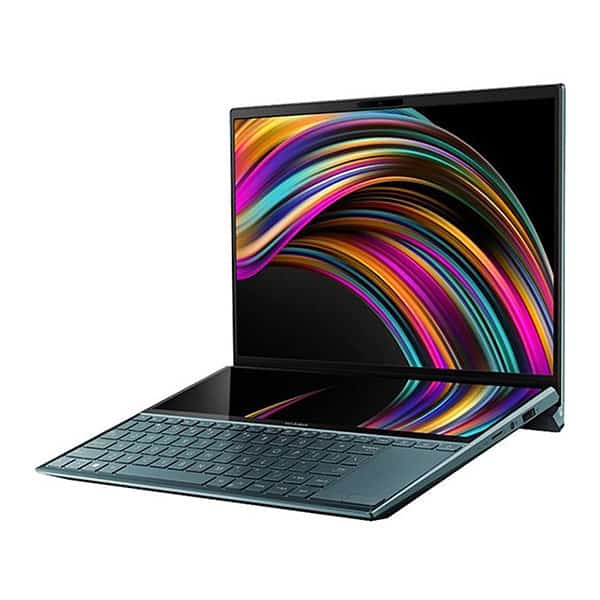
Design Asus ZenBook Duo UX481
ZenBook Duo UX481 is not too thin as the general trend of high-end laptops today. Its side is quite ‘undulating’ because there is a stand, making people look curious for the first time. The entire exterior of the machine is made of sturdy metal, has a good bearing capacity, is scratch resistant. 4 machine edges are cut deeply beveled. The familiar concentric lines of the ZenBook series also appear as a matter of course. Overall, the laptop looks quite powerful and groundbreaking, not soft and elegant. Zenbook Duo UX481 comes in only one color: Celestial Blue – ‘cosmic blue’. This color makes the product stand out.
2 super special extra main screens
High-end home screen
Equipped with two new screens is the most important thing to discuss in Zenbook Duo UX481. These two screens are completely independent. The main screen is 14 inches in size, FullHD, with IPS panels, anti-glare technology, 320 nits brightness. It also has 99% sRGB, 75% aRGB color coverage. This screen parameter is completely enough to serve people designing, harmonizing, making photos, editing movies.
Secondary screen no less edge
Regarding the secondary screen, it is not a tiny screen for ‘play’ or decoration for more fun as some people think. It is located above the keyboard, taking up 60% of the bottom area of the machine. Asus calls it ScreenPad Plus. The screen measures 12.6 inches and is touch-sensitive. Its parameters are no less than the main screen: Full HD, 290 nits brightness. When viewed in a normal laptop typing position, the display quality is still guaranteed. With the appearance of the secondary screen, you can use the machine in the following modes:
– PC Screen Only: shows the main screen only as usual
– Duplicate: the second screen displays the same as the parallel screen
– Extend separate displays. For example, displaying data for easy text entry, using multiple tasks at the same time. This mode is extremely useful for graphic designers, designers, editors, or accountants. Asus has included a dedicated stylus for customers. This pen just needs to put the battery in to be used, no messy Bluetooth connection required.
– Second Screen Only: only shows the secondary screen for use as a mini-tablet. No one can see the content displayed but you, very private.
Asus ZenBook Duo UX481 configuration specifications
To match the high-end products, Asus ZenBook Duo UX481 is equipped with a CPU, Core i5-10210U, 4 core 8 thread. The clock level was kinda measured as 3.82 GHz per core, and around 2.58 GHz when multitasking . The product also supports a 512GB SSD hard drive, plus 8GB RAM. The discrete graphics in the machine is the familiar Nvidia MX250, so with this arrangement you can comfortably run design or graphics software, play online games, and watch 4K movies pretty smoothly. If there is a higher demand, users can buy a special upgrade version, like CPU Core i7, and 16GB RAM.
About the battery though, the Asus Zenbook Duo UX481 has a huge 70Whr battery. Under normal use conditions, the machine works for 8 hours continuously (even when the screen stays on). As for the ports , they are fully available from USB 3.1 type A gen 2, USB 3.1 type C gen 2, HDMI to a MicroSD memory card reader. Unfortunately, Thunderbolt 3 is not yet supported, which is a bit awkward if you were hoping for that.
The Asus Zenbook Duo UX481 has an impressive look. Its applicability is very high if you are a graphic artist or you really require a lot of multitasking, Asus basically made it with the desire to target a very specific customer group. But still, the product feels quite attractive to those who just like to learn about technology.
Keyboard and Trackpad
The Asus ZenBook Duo UX481 comes with a full size backlit keyboard , the keys feel pretty well-spaced and you get that nice amount of key travel so typing stays comfortable even when the lights are low. The layout also has dedicated function keys and a numeric keypad, but it’s not a separate block , instead it’s built into the touchpad area, so the whole thing tries to squeeze in more functionality without making the input feel awkward, or losing that solid tactile feedback.
Then there’s the touchpad, and it sort of does double duty as both a precision touchpad and a numeric keypad. In practice, it lets you swap between cursor control and numeric entry with just a single touch, which is convenient if you’re hopping between spreadsheets , emails and quick calculations. That extra versatility can really help productivity, but if you’re the type that wants super exact aiming, for example for some precision work or gaming , you can still plug in an external mouse. And since the laptop has that dual-screen setup, it tends to support smoother workflows and more creative task handling at the same time.
Battery Life
Asus also includes fast charging, so you’re not stuck waiting around. With rapid charging, you can reach up to about 60% charge in roughly 49 minutes, which helps cut down the downtime when your schedule gets tight. On top of that, adaptive battery settings and power saving modes add a bit more control , extending battery longevity while balancing performance and efficiency based on what you’re doing and what you prefer.
Connectivity Options
The Asus ZenBook Duo UX481 brings along a pretty good mix of ports and connectivity features, to cover different peripherals, extra screens, and well, those networking needs you might have day to day. In general you’ll find two USB 3.2 Gen 1 Type-A ports which are handy for quick hooking up stuff like external hard drives or USB flash drives, plus one USB 3.2 Gen 2 Type-C port that’s meant for swift file transfers and also charging.
On top of that there can be an HDMI 1.4 output, so you can push video to an external monitor or maybe a projector. There’s also often a microSD card reader which is useful for upgrading storage capacity, or moving around photos and other media. For audio, it usually includes a headphone/microphone combo jack, for input and output, no big deal.
For wireless connections, you get Wi‑Fi 6 (802.11ax) which helps with stable high speed internet, and Bluetooth 5.0 for linking up wireless peripherals. Some versions may come with Intel Wi‑Fi 6 AX200 or AX201, which is basically an extra boost for wireless performance, and smoother overall connectivity.
Software and User Experience
The Asus ZenBook Duo UX481 comes out with Windows 10/11 Home or Pro, so you get a normal and productive environment for regular work stuff, productivity apps, and multimedia entertainment as well. Asus then adds its own set of software utilities, like ScreenXpert Control Center, that makes it easier to manage the ScreenPad Plus. With it, users can tune the display layouts, form app collections, and sort of fine tune the workflow for certain tasks, instead of just leaving everything generic.
Additional software features may include Asus Splendid for color tuning and panel optimization, Asus Tru2Life Video for upping video playback clarity, and Asus SonicMaster which is made for immersive audio moments. And while the pre-installed software utilities do bring extra functionality and day to day convenience, users still have room to tweak their software setup in a way that fits their personal preferences, plus the specific workflow requirements they care about.
Audio and Multimedia
The Asus ZenBook Duo UX481 comes with stereo speakers, tuned by Asus SonicMaster, so you get a more immersive sound for watching, gaming ,and even video conferencing. The built-in speakers are set up to produce crisp playback at decent volume levels ,with sound profiles that feel reasonably balanced. As a result the overall multimedia experience feels smoother, with less sign of distortion or odd audio artifacts.
For calls and online meetings, dual array microphones help capture your voice cleanly, plus there is noise cancellation to reduce background distractions. That combination supports better voice definition during live conversations, so communication and collaboration stay more reliable. Because of this the ZenBook Duo UX481 is a good fit for remote work ,virtual presentations, and multimedia content creation too, especially when audio quality is key for effective communication and producing content.
Pros and Cons
Pros:
– Innovative dual-screen layout, with a ScreenPad Plus touch display.
– Nice aluminum build, plus the ErgoLift hinge style, which feels well thought out.
– Full HD NanoEdge panel with narrow bezels, so the visuals look more immersive than expected.
– Strong Intel Core options , up to Core i7, and there’s also optional NVIDIA graphics depending on the model.
– Backlit keys with a numeric keypad and a pretty accurate touchpad.
– Battery that’s “good enough” with fast charging support.
– Solid ports setup, meaning both USB Type-A and USB Type-C are here.
– Windows 10/11 Home or Pro, with a few ASUS software touches.
Cons:
– That extra ScreenPad Plus might not get used in practice, for everyone.
– The reflective surfaces plus the touchscreen can bring in fingerprints, pretty easily.
– Battery performance may be merely moderate, so heavier tasks might mean more frequent recharging.
– It tends to cost more than typical laptops with comparable specs.
Conclusion
The Asus ZenBook Duo UX481 feels like one of those standout laptops that really does “new things” in a way that’s practical, and yes it kinda reshapes how people work and create day to day. The whole idea behind it is the dual-screen design, plus that premium feel throughout, so you end up with a machine that’s both versatile and genuinely good for productivity and creativity. The setup is basically a main Full HD panel, and then there’s that secondary ScreenPad Plus touchscreen. Together, it helps with multitasking, smoother content creation, and those more immersive multimedia moments, especially if you’re a professional or just a creative person who never stops tinkering.
Now, it’s true that the unique look and the high-quality build mean you’ll usually pay more. Still, the ZenBook Duo UX481 makes sense of that cost. You get strong Intel Core processors, optional NVIDIA graphics, and a solid set of connectivity options, so it can match different user routines and workflows. When you’re handling those office kind of things, or you are getting into a creative project, or even just trying to get settled for entertainment, the Asus ZenBook Duo UX481 offers this rather solid mix of speed and flexibility , plus a fresh approach to design, but in a size that is still compact enough to carry around, not really causing too much hassle, at least in day to day use.
ASUS ZenBook Duo UX481 Laptop, 14” FHD NanoEdge Bezel Touch, Intel Core i7-10510U, GeForce MX250, 16GB RAM, 1TB PCIe SSD, Innovative ScreenPad Plus, Windows 10 Pro, Celestial Blue, UX481FL-XS74T: Buy it now
Related Posts

Tech Reviewer & Product Analyst
Định Bia has spent over 10 years testing consumer electronics with a focus on smart technology. He work as a product advisor at Biareview where he helped customers find the right devices for their needs. He personally tests every product featured on this site using a consistent evaluation framework covering quality, durability, and value. All reviews are based on experience, not influenced by the manufacturer.