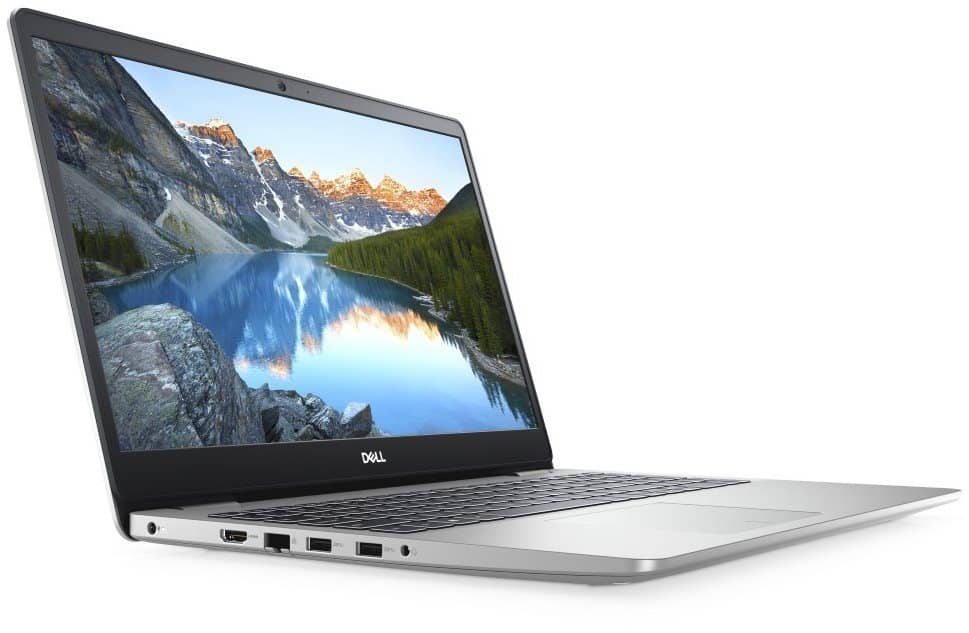
Owning a slim and light design, stable performance, strong configuration, Dell Inspiron 15 5593 laptop (5593-7WGNV1) brings many interesting experiences for users.
Stylish design – modern design
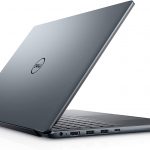
Overall, the product has a slim, modern design. Weighing only 1.8kg, the product is especially suitable for those who love to move, often have to work in many different spaces and environments.
Not only owns silver fashion, but Dell Inspiron 5593-7WGNV1 also promises to bring great entertainment moments to users. The device has a full 15.6-inch full-screen display, Full HD resolution. Whether watching movies, entertainment, or playing games, the laptop will ensure the best sharpness and screen.
Stable performance, durable operation
This product comes with a Core i5 1035G1 1.0 GHz processor, it can boost up to 3.6 GHz / 6MB / 4 core, and 8 modern threads. Also the 8GB RAM is there to help keep everything running smoothly , so multitasking stays seamless.
If you are searching for a laptop with plenty of storage space to save important documents, you really cannot ignore the Dell Inspiron 15 5593 (5593-7WGNV1). It offers optional storage, including HDD hard drive up to 2TB and SSD up to 512Gb Pcle. The memory upgrade is not complicated either , it’s rather easy to do.
In addition to experiencing flexible processing performance, users can entertain with games with basic graphics or use basic graphics software such as Photoshop, Illustrator smoothly with the latest generation onboard graphics chips.
Display Quality
The Dell Inspiron 15 5593 comes with a 15.6-inch Full HD (1920 x 1080) anti-glare LED-backlit display , it’s made to give you crisp visuals and fairly vibrant colors for daily multimedia, web time, and regular work stuff. The anti-glare layer helps cut down reflections and the whole eye fatigue thing, so it can be used in lots of lighting situations, even brighter rooms, and yes, sometimes outdoors too.
Now, the regular Full HD screen option is already pretty solid for most people , especially if you care about clear resolution and dependable color. But Dell also has alternative builds with touch-enabled displays for folks who really want touchscreen control. With those models you get a more natural way to scroll and tap, and you can use Windows 10/11 touch gestures, which improves the experience when you’re browsing, editing documents, or using creative apps where touch input kind of matters.
Performance
Internally, the Dell Inspiron 15 5593 runs on Intel 10th or 11th generation Core processors , and the options can go from dual-core Intel Core i3 up to quad-core Intel Core i7. Basically this lineup is aimed at different kinds of users , from everyday basics like web browsing and word processing to heavier workloads like photo editing, lighter gaming, and doing multiple things at once.
For graphics, you’ll typically see integrated Intel UHD Graphics , or you may choose an optional NVIDIA GeForce MX230 or MX330 dedicated card. This gives extra muscle for multimedia editing, casual games, and faster visual tasks. It’s not really built for hardcore gaming or professional-grade video work, but that optional NVIDIA setup helps when you want more graphics capability than what integrated graphics can offer.
Modern Dell Mobile Connect technology
With Dell Mobile Connect technology, it is now easier than ever before to connect between a computer and a Smartphone device. Thanks to this technology, users will receive all calls, texts, notifications, applications … from the phone through the 15.6-inch computer screen wider.
At the same time, moving files, data, cameras, videos, music back and forth between computers and phones is faster and simpler. When connecting Dell Mobile Connect technology, all your data is always 100% privacy.
The keyboard has a good bounce
Dell Inspiron 15 5593 Laptop (5593-7WGNV1) has a spill-proof keyboard. The keys have a good bounce, feel comfortable typing. The wide touchpad makes zooming, scrolling, hovering, etc. easy and accurate.
The keyboard is also fully equipped with a backlight. With this design, users can work easily when in bed at night or in low light environments.
Keyboard and Trackpad
The Dell Inspiron 15 5593 has a full-size backlit keyboard, with keys that are spaced out fairly well, and enough key travel that typing feels pretty comfortable, even when you’re doing it for hours straight. It also comes with dedicated function keys , plus optional backlighting, which really helps in dim rooms. That makes it easier to keep a steady workflow for students or professionals, especially if you’re the type who leans on keyboard shortcuts and all those productivity features.
As for the touchpad, the precision-style surface gives you smooth multi-touch gestures and pretty accurate cursor control. So navigation stays fluid, and Windows 10/11 gestures feel responsive. It isn’t as huge or as “premium-tactile” as what you get on many ultrabook models, but the Inspiron 15 5593 still delivers dependable day to day performance for things like web surfing, document work, and multimedia playback, without that annoying lag feeling.
Battery Life
Battery life matters a lot if you’re always moving around, and the Dell Inspiron 15 5593 generally holds up on a single charge. This is mostly due to its power management , and some battery optimizations. Depending on the setup, and how you actually use it, you can usually expect around 6 to 8 hours of battery life. That’s enough for a full day of moderate use, without constantly hunting for an outlet.
There’s also fast charging, so when the battery is getting low , you can top it up pretty quickly. Users are able to hit around 80% in roughly 60 minutes , which kind of cuts down downtime, especially if you are traveling or just stuck in busy work days. Beyond that, adaptive battery settings plus those power-saving modes give you a more steady endurance, so the Inspiron 15 5593 stays usable for longer stretches, between charges.
Various connection ports
Dell Inspiron 5593-7WGNV1 has a common connector with the popular current ports such as USB 2.0, SD card, USB 3.1 Gen 1 … Allows the device to easily connect with many peripheral devices. The product also supports Lan port, Wifi connection, helping users easily access the Internet anytime, anywhere.
Connectivity Options
The Dell Inspiron 15 5593 kind of comes with a good spread of ports and connectivity stuff, meant so you can plug in peripherals, run external screens, and still handle everyday networking needs. Usually you’ll see two USB 3.1 Gen 1 Type-A ports, these are meant for faster gear like external hard drives, and USB flash drives. There’s also a USB 2.0 port in there for older accessories, or “legacy” devices you might still have lying around, which is nice.
On top of that, the setup may include an HDMI 1.4b port for video output, so you can connect to an external monitor or even a projector. There’s often an RJ-45 Ethernet port too, for a more stable wired internet connection when Wi‑Fi is being… well, finicky. For audio, you should expect a combo headphone and microphone jack, so one connection covers both input and output.
Wireless stuff is usually Wi‑Fi 6, that is 802.11ax, for quicker more steady internet, plus Bluetooth 5.0 for pairing things like wireless peripherals. Depending on the way the system is set up, you might also run into Intel Wi‑Fi 6 AX201 or AX200 included , which can make the signal feel a bit more reliable and connections smoother when you’re away from the router.
Software and The User Experience
The Dell Inspiron 15 5593 typically comes with Windows 10/11 Home or Pro, so it feels familiar pretty fast for regular browsing, work apps, and multimedia. Dell also often includes extra utilities , like Dell Mobile Connect, so the laptop can sync with a compatible smartphone. With that you can do calls, send messages, and access mobile apps from the laptop side of things, which is kinda convenient.
There may be extra extras too, like Dell CinemaColor for better visuals, Dell CinemaSound for deeper audio playback, and Dell Power Manager that helps tune battery behavior and system efficiency. The preloaded software brings extra value to the overall experience, but you can still tweak and sort out your setup, depending on what you actually do day to day, and what kind of workflow you prefer.
Pros and Cons
Pros:
It’s a pretty affordable mid-range laptop, with those flexible configuration options that you can tweak a bit.
The build feels solid, and the durable design is aimed at everyday wear and tear.
You get a Full HD anti-glare screen, and some models even come with touchscreen support .
Intel Core chips up to Core i7 options, so performance stays responsive.
Backlit keyboard plus a precise touchpad, which is nice for long sessions.
Battery life is decent, and it also supports fast charging which is convenient.
Connectivity is comprehensive, with both USB Type-A and USB Type-C.
Comes with Windows 10/11 Home or Pro, plus Dell software utilities that actually help.
Cons:
The plastic chassis might bother anyone who is specifically chasing premium materials.
Color reproduction and viewing angles are just ok, not really on par with higher-end panels .
Some base setups can be a little bare, like RAM or storage might feel light for power users.
Integrated graphics means gaming , and heavier multimedia editing isn’t its strongest side.
Conclusion
The Dell Inspiron 15 5593 kind of hits that nice balance between being affordable, working well, and still feeling versatile enough, for everyday stuff, so it seems like a solid pick for students home users, and even small business folks who want a laptop that can handle daily computing tasks without drama. It has a sturdy build, it responds quickly, and the battery lasts long enough that you don’t feel stuck near an outlet all the time, so overall it gives a pretty convincing experience within its price range.
Now sure, it doesn’t bring all the premium features or the super cutting edge specs you see on Dell’s higher end models, but honestly the Inspiron 15 5593 does well as a practical, cost minded option for people who care most about real functionality, reasonable pricing, and dependable day to day performance. For school assignments, home office work, or just streaming multimedia and entertainment on the couch, the Dell Inspiron 15 5593 stays pretty flexible and reliable, kinda like a steady mid range notebook in the market, even if it is not the flashiest option.
Dell Inspiron 15 5593: 10th Gen Core i5-1035G1, 256GB SSD, 8GB RAM, 15.6″ Full HD Display, Backlit Keyboard, Windows 10: Buy it now
Dell Inspiron 15 5593, i5593-7039SLV-PUS, 10th Gen Intel Core i7-1065G7, 15.6-Inch Fhd(1920X1080), 8GB, 512SSD, NVIDIA GeForce MX230: Buy it now
2020 Dell Inspiron 15 5593 15.6″ Full HD 1080P Display Laptop, 10th Gen Intel Core i3-1035G1 Processor, 4GB RAM, 128GB SSD, Wireless-AC, Bluetooth, Windows 10: Buy it now
2020 Latest Dell Inspiron 15 5000 5593 Laptop | 15.6″ Full HD 1080p | 10th Gen Intel Core i7-1065G7 | 16GB RAM | 1TB SSD | MaxxAudio Pro Backlit KB Fingerprint Win 10 + CUE USB Drive: Buy it now
Latest Dell Business Laptop Inspiron 15 5593: 10th Gen Core i5-1035G1, 256GB SSD, 8GB RAM, 15.6″ Full HD Display, Backlit Keyboard, Windows 10 Pro: Buy it now
Latest Dell Business Laptop Inspiron 15 5593: 10th Gen Core i5-1035G1, 256GB SSD, 8GB RAM, 15.6″ Full HD Display, Backlit Keyboard, Windows 10 Pro: Buy it now
Related Posts


Tech Reviewer & Product Analyst
Định Bia has spent over 10 years testing consumer electronics with a focus on smart technology. He work as a product advisor at Biareview where he helped customers find the right devices for their needs. He personally tests every product featured on this site using a consistent evaluation framework covering quality, durability, and value. All reviews are based on experience, not influenced by the manufacturer.