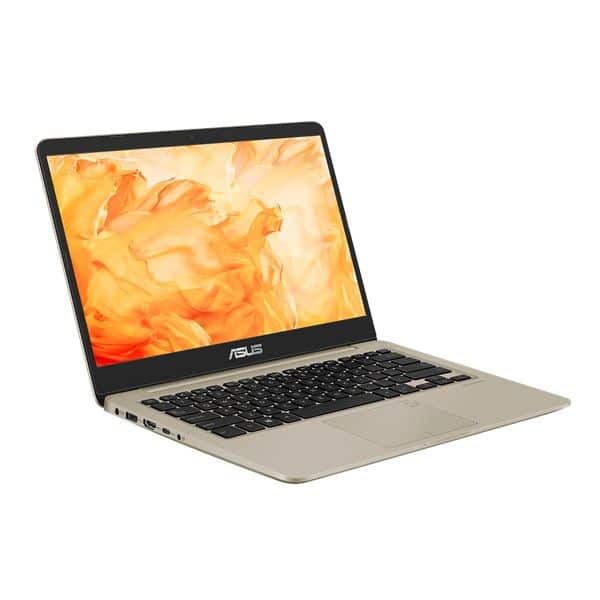
Asus VivoBook S14 (S410) is defined by Asus as a standard on-go laptop by ensuring design elements, durability, connectivity and usage features.
Mobility
Laptop on the go must have a compact design for easy travel. With the VivoBook S14 (S410), Asus has created a 14-inch laptop design in an ultra-compact 13-inch body that weighs only 1.3 kg, which dominates the mid-range laptop’s mobile feature race.
Besides, the thickness of only 18.8 mm makes it easier for S14 with users to move everywhere, participating in activities conveniently. From home to office, coffee shop or lounge at the airport, VivoBook S14 can accompany you.
Next, to support high-speed travel without worrying about the battery, the S14’s battery has a duration of up to 8 hours. It also features fast battery charging technology, from a low battery level that can charge up to 60% in just 49 minutes. As such, your work will not be interrupted.
Optimize performance for work
Besides the design, a perfect mobile laptop must operate fast and stable to meet the working and entertainment style on the journey of dynamic users. VivoBook S14 is equipped with the latest generation Intel Core i7 processor with 16 GB RAM, SSD storage options with fast and stable data access capability.
The device is equipped with dual-band Wi-Fi 802.11 ac, so users can surf the web at speeds of up to 867 Mbps – up to 6 times faster than 802.11n.
Optimized entertainment
S14 is also an optimal laptop for entertainment. Dual storage drives include SSDs and HDDs up to 1 TB, making the device not only responsive, but also possessing a “vast” storage. You can install apps or store movies without worrying about slowing down your device.
Equally important to make a laptop attractive is the display screen. S14 screen Full HD screen with anti-glare feature, optimized size thanks to NanoEdge screen border, increased screen ratio – body to 77%. 178 degree screen angle should watch the movie very well.
Combining a lightweight design with powerful entertainment and working performance, the VivoBook S14 (S410) is one of the exciting new options for a dynamic lifestyle for users.
Performance
Performance on the VivoBook S14 really does depend on which configuration you pick . In most cases it comes with an Intel Core i5 or Ryzen 5 processor, which is pretty enough for multitasking , regular web browsing, office stuff , and also light photo or video editing. For graphics it usually uses integrated Intel UHD or AMD Radeon graphics, so everyday activities and multimedia playback stay smooth without too much fuss.
For memory, you’ll commonly see 8GB up to 16GB of DDR4 RAM, and that tends to make multitasking feel quick and responsive, even when you have a few programs open at the same time. Storage options are often SSDs, meaning Solid State Drives, with capacities somewhere around 256GB to 512GB. That helps with fast boot time , and applications open with a good level of speed.
Now, this laptop isn’t really made for gaming , or for graphics heavy workloads. But the VivoBook S14 performance is still well aligned with students, working professionals , and general users who want something dependable and responsive for daily productivity plus casual entertainment.
Keyboard and Trackpad
The VivoBook S14 includes a full-size backlit keyboard, and typing on it feels comfortable, with a decent key travel. The overall layout is ergonomic in practice, it also includes dedicated function keys and in some models a responsive numeric keypad. That little addition can be helpful for people who input numbers often , or who rely on keyboard shortcuts during day-to-day work.
The precision touchpad comes with multi-touch gestures and this kind of smooth naviga tion feel, so you end up with careful cursor control, plus a more natural interaction style on Windows 10/11. Asus touchpad tech is built to keep things dependable and quick to respond, also with gesture support for scrolling, zooming, and swapping between applications without any noticeable friction or lag.
Battery Life
Battery life on the VivoBook S14 is going to swing a bit depending on what you do and how the configuration is set up, but it usually lands in the “good enough for daily use” zone. Asus, in general, tunes power efficiency in a way that can reach up to 8–10 hours on one charge if your workload is moderate. So it works fine for all-day productivity and also for media playback, without the need to keep recharging every few hours.
The laptop has fast charging, so you can restore a solid battery level in a short time window. Less waiting, less downtime, and you stay focused on what you need even in those frantic days ,or when you’re using it while traveling. This is extra handy for students and professionals who want that mobility freedom, not being stuck close to a power outlet all the time.
Connectivity Options
For connections, the VivoBook S14 gives you a mix of ports and wireless options to handle different peripherals and devices. On the typical side, you will find USB Type-A and USB Type-C ports, which makes it easier to plug in various accessories. There is also HDMI output for external screens, a combined headphone/microphone jack, and a microSD card reader, so you can add extra storage when needed.
Some models might come with Thunderbolt 4 ports , for high speed data transfer as well as external display connections, which helps with quicker file moves and also lets you run multi monitor setups for better day to day output. For wireless, you usually get Wi Fi 6 (802.11ax) options, this covers fast, stable networking, so things stay connected smoothly even when the surroundings change a bit.
Software and Additional Features
The VivoBook S14 typically arrives with Windows 10 or 11 Home/ Pro installed, giving users a comfortable computing setup that feels familiar and productive. Asus also bundles a few extra tools and functions like Asus Battery Health Charging , and Asus Splendid Display, so battery life stays in better shape while the screen tuning looks sharper, with improved visual clarity.
On top of that, there can be optional security features such as fingerprint readers or IR cameras, used for biometric authentication and more secure sign in. Overall, Asus’s software ecosystem supports the user experience with productivity helpers, system utilities, and even entertainment applications, kind of covering a wide range of tastes and professional needs, without much friction.
Audio and Multimedia
On the VivoBook S14 , the audio quality is pretty okay for normal multimedia playback and video calls, you know with the built in speakers doing a decent job for personal viewing and online meetings. The built-in webcam also feels like the usual sort of thing, nothing fancy but it still gives standard video quality for virtual meetings and teamwork sessions, so most video conferencing apps and remote communication tools should work without too much fuss.
Now, it isn’t really aimed at pro audio editing or those super immersive multimedia sessions, so if you are expecting studio level fidelity or rich surround-like sound, the VivoBook S14 might feel limited. Still, for everyday needs and casual entertainment it is generally adequate. If you want a more vivid sound stage and better clarity, then external speakers or a solid set of headphones can be the better move for that more immersive effect.
Pros and Cons
Pros:
Sleek and light design with a more premium-ish build quality
Full HD display plus NanoEdge bezels for immersive viewing
Keyboard is responsive, has backlighting, and the ergonomics are decent
Battery life is long, and the fast charging helps for all day work
Lots of ports and connection options, including USB Type-C and HDMI
Solid performance for daily tasks and light productivity
Cons:
Gaming, and general graphics, are limited for demanding workloads
The display may not be very accurate in color for serious content work
The plastic feel may not match metal alternatives in perceived “premium” vibe
The keyboard layout can seem a bit cramped if you are used to bigger keyboards
Conclusion
The Asus VivoBook S14 is a pretty versatile, budget friendly laptop, it brings together a clean look, solid performance, and portability that works well for everyday computing. You get that sleek design, a Full HD display, smooth enough efficiency, and a wide range of connectivity, so the overall user experience feels satisfying for students , professionals, and general users who are after something dependable without spending too much.
In day to day use , whether it’s handling productivity tasks, just web browsing, multimedia consumption, or even light content making, the VivoBook S14 keeps things reliable and flexible in a carry around friendly body. This mix of affordability, practical features, and visual appeal makes it a strong pick for people who care about value and adaptability when choosing a laptop for work and leisure.
2018 ASUS VivoBook S14 14″ FHD NanoEdge WideView Laptop Computer, 8th Gen Intel Quad-Core i7-8550U up to 4.0GHz, 16GB DDR4 RAM, 256GB SSD, 940MX 2GB, AC WiFi + BT 4.2, HDMI, USB Type-C, Windows 10: Buy it now
Related Posts




Tech Reviewer & Product Analyst
Định Bia has spent over 10 years testing consumer electronics with a focus on smart technology. He work as a product advisor at Biareview where he helped customers find the right devices for their needs. He personally tests every product featured on this site using a consistent evaluation framework covering quality, durability, and value. All reviews are based on experience, not influenced by the manufacturer.