Design and Build Quality
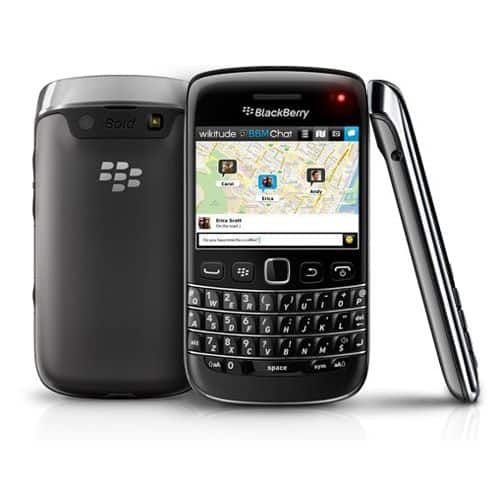
The BlackBerry Bold 9790 was kind of a compact and stylish smartphone, it really showed BlackBerry’s classic design philosophy, even if you only glance at it for a moment. It had both a physical QWERTY keyboard and a touchscreen, which was basically the Bold series “thing”. The whole look felt sleek, and kind of low key, so it became an appealing pick for business folks and also for anyone who still wanted a more conservative style, rather than something flashy.
Materials and Finish
The body was put together with high-quality materials, with a rubberized back that gave you a decent grip, and a durable plastic frame that added to the overall strength. On the front, the screen and the physical keyboard took center stage and there was this glossy finish, that makes it feel more premium than you would expect. The back cover wasn’t metal like the Bold 9900, but it still felt sturdy and comfortable in your hand, not flimsy or cheap.
Also, the phone’s compact size , 110 x 60 x 11.4 mm and the lightweight feel at 107 grams helped a lot. It was genuinely easy to carry around, and many users liked that it could be used with one hand, especially during the time when smartphones were getting bigger and heavier, little by little, almost everyone was moving in that direction.
Keyboard and Controls
A big highlight of the Bold 9790 was the physical QWERTY keyboard, and for many BlackBerry fans that alone was a main reason to choose it. The keyboard felt well designed, the keys were slightly curved, so typing stayed comfortable and pretty efficient. You also got good tactile feedback , which matters when you’re trying to type quickly and accurately. The layout looked familiar too, so long-time BlackBerry users didn’t have to relearn everything from scratch.
Above the keyboard there was a row of control buttons , with the call, menu, back, and end keys, and in the middle you had an optical trackpad. That trackpad was responsive, and it gave you another route to move through menus and apps, working alongside the touchscreen instead of just competing with it.
Display
The Bold 9790 had a 2.45 inch TFT capacitive touchscreen , with a resolution of 480 x 360 pixels. Sure, the screen was pretty small compared to today’s phones but honestly it was more than decent for the time, especially since the device was built around messaging and communication… not media watching or anything like that. The display looked crisp and gave solid color reproduction, even if it wasn’t as strikingly vibrant as the AMOLED screens you’d see on some competing models.
Touch input felt responsive and it even supported multitouch, so you could do basic things like pinch to zoom. Still , because the panel was on the smaller side, most people mostly leaned on the physical keyboard and trackpad for browsing around and entering data.
Performance and Hardware
Inside, the BlackBerry Bold 9790 ran on a Marvell Tavor MG1 at 1 GHz, and that was paired with 768 MB of RAM. For its era, that setup counted as reasonable, particularly for a phone tuned for work related use and communication, not for gaming marathons or heavy video playback.
Processor and RAM
The 1 GHz processor, although it wasn’t as strong as the dual core designs some rivals had, handled BlackBerry OS 7.0 without trouble, the same operating system it shipped with. In everyday use, the system moved along smoothly, and there was usually very little hesitation when you were switching through menus, typing messages, or launching applications.
The 768 MB of RAM was enough for multitasking ,so people could keep a few apps open and move between them without too much friction. Still, the unit might trip up on heavier stuff, especially with bulky media files, or if someone kept trying to run several applications at once at the same time.
Storage
The Bold 9790 shipped with 8 GB of internal storage, and yeah it was expandable too via a microSD card slot , it handled cards up to 32 GB. That setup gave plenty room for emails, documents, and a smaller but decent library of media. Having expandable memory was genuinely a handy bonus, mainly for users who kept collecting files and pictures and did not want to worry about running out.
Connectivity
On the connectivity side , the Bold 9790 had a fairly broad mix: 3G, Wi-Fi 802.11 b/g/n, Bluetooth 2.1 with A2DP, plus NFC. It also offered quad-band GSM and tri-band HSPA, so it should work across most regions. The Wi-Fi link felt steady, and NFC made it easier to pair with other gadgets and to use mobile payment options though NFC was still sort of early for widespread adoption back then.
For ports , the microUSB slot served charging as well as data transfer. Meanwhile the 3.5mm headphone jack let you plug in your headphones for media playback or for hands free calls. Overall call performance was pretty solid , with crisp voice audio and dependable signal strength.
Operating System and Software
So the BlackBerry Bold 9790 ran on BlackBerry OS 7.0 , which at that time was basically the newest version of BlackBerry’s closed, proprietary operating system. Even if BlackBerry OS started to look a bit old when compared to the newer iOS and Android platforms, it was still pretty well tuned for communication plus everyday productivity. That was, kind of the main thing they sold it for .
User Interface
The user interface of BlackBerry OS 7.0 felt familiar if you’d been using BlackBerry for a while, it leaned hard into efficiency, simple navigation, and that “just works” kind of flow. On the home screen there was a dock you could customize , sitting at the bottom, so you could put your most used applications there for quicker access. The primary menu was opened through the trackpad or via touchscreen, and it was grouped into sections like All, Favorites, Media, Downloads, and Frequent.
A big plus of BlackBerry OS was its messaging setup. The unified inbox gathered emails, SMS, MMS, and even social media pings into a single stream, so users could keep tabs without bouncing between apps. Plus, the physical keyboard, alongside the OS’s solid email program, made the Bold 9790 a strong match for people who had to handle multiple email accounts while on the move, sort of nonstop.
Pre-installed Apps
The Bold 9790 also arrived with a bunch of pre-loaded applications , aimed at boosting productivity. Among them was Documents to Go, which let users both see and modify Microsoft Office files, and then there were also BlackBerry-style apps, like BlackBerry Messenger (BBM), BlackBerry App World, and BlackBerry Protect.
BBM was kind of a really popular feature at the time, it gave you secure messaging and the chance to pass along files, photos, and even voice notes with other BlackBerry users, i mean it was all very very handy. It also became one of the main things that set BlackBerry devices apart back then, but later on that shine sort of faded when messaging apps like WhatsApp, and iMessage started getting more and more attention.
Battery Life
The BlackBerry Bold 9790 came with a 1230 mAh removable battery, and it felt sort of on the smaller side compared with what a few competitors were putting in at the same time. Still, since the handset ran on pretty efficient hardware and software, the battery endurance stayed usually decent, and that made sense in light of the device overall size, like it all kind of balanced out.
Usage and Standby Time
With normal daily use—so sending and receiving emails, web browsing, making calls, and juggling apps—the Bold 9790 could usually go through a full day on just one charge. And if somebody mostly used it for conversation, plus work-related productivity stuff, then it sometimes stretched to around a day and a half before the next recharge, which was nice.
In standby, the device did well too, with very low battery draining when it was just sitting there. This mattered a lot for business users, since they often needed the phone to be on standby, ready for everything, without having to plug it in again and again, all the time.
Charging
This device charged through a microUSB port and, while it didn’t really do fast charging, the battery was small enough that you could end up with a full charge in a couple of hours. The removable battery part also mattered, because it meant users could bring an extra power pack along, if they needed more juice while out and about , you know.
Camera
The BlackBerry Bold 9790 came with a 5-megapixel rear camera, pretty much the usual setup for smartphones back then. It could take decent pictures, though honestly it wasn’t the thing the phone did best. BlackBerry phones were sort of never really about camera quality, the emphasis was more on messaging, and daily productivity tasks.
Image Quality
With the Bold 9790, the shots looked pretty solid in brighter lighting, with colors that were generally accurate and decent sharpness. But once you moved to low light , the camera had trouble, images often ended up looking grainy and a bit short on fine detail. Also, since there wasn’t a front-facing camera, it wasn’t exactly the best pick for selfies or video calls, those were getting more popular pretty quickly.
Camera Features
The camera app had a bunch of simple tools, like auto focus, LED flash, geo tagging, face detection, and image stabilization. It also let you adjust a few settings like white balance, ISO , and scene modes, so users could kinda steer how the photos turned out. The only thing is video capture stayed stuck at VGA resolution … okay for casual moments, but it really didn’t match the high-definition expectations people were starting to notice more and more around then.
Multimedia
The BlackBerry Bold 9790 , wasn’t really made mostly for multimedia stuff, but yeah it still had a few ways to enjoy music , watch videos, and look at photos. You got a built-in media player, and it could handle a bunch of formats , like MP3, AAC, and WMA for audio. For video it supported MP4, H.263, and WMV . So it wasn’t empty at all, just not the main point.
Music Playback
The music player on the Bold 9790 seemed pretty simple , and it worked well enough for day to day listening. People could make playlists, flip shuffle on, and adjust the equalizer to nudge the sound around a bit, not too much just enough. There was also a 3.5mm headphone jack , which was kind of standard back then, so you could connect your headphones or earbuds for more private listening.
The built-in speaker, wasn’t exactly big in volume or super strong, but it still did the job for casual audio and those hands free calls. And if you wanted a more immersive vibe , the phone backed Bluetooth A2DP, so you could stream without cables to compatible headphones or speakers.
Video Playback
When it comes to videos, the Bold 9790 was kind of held back by its smaller 2.45-inch screen. That made long movies or longer watch sessions feel less comfortable. Still, for short clips it was fine , like when someone sends a video through email or messengers. The device supported several regular video formats, but because of the resolution and the screen size, video was more of a secondary feature, kinda more like an extra than a main reason to buy it.
Photo viewing
The Bold 9790’s gallery app felt pretty well organized, so users could browse photos and albums without too much fuss. The small screen kind of limited the whole experience , but the display still looked sharp, enough for decent details in the images. Also, the app had basic photo editing, like cropping, rotating, and tweaking brightness and contrast, you know those little improvements you do quickly.
Productivity and business features
Like a lot of BlackBerry devices, the Bold 9790 was aimed at productivity and business people. It arrived with a bunch of tools meant to boost work pace and communication, not just casual use.
Email and messaging
The Bold 9790’s email side was probably one of its best parts. The phone supported push email, so you could get messages right away from multiple accounts. Setting up email was pretty straightforward , and it handled common services like Gmail, Yahoo, and Microsoft Exchange without drama.
The unified inbox was also a highlight. It combined emails, SMS, MMS, and even social media alerts into one single view. That way users could manage everything without constantly swapping between different apps. And, since it has a physical keyboard, typing emails and messages was a lot easier, plus predictive text helped move things along faster.
BlackBerry Messenger (BBM) was kinda a big deal too, giving people secure, instant messaging with other BlackBerry users. BBM got crazy popular around that time, especially in business circles where privacy and security really mattered. The whole app also had group chats , file sharing, and voice notes, so it felt useful for both personal stuff and professional conversations, kind of in one place.
Calendar and Contacts
Then there’s the calendar , which came pretty solid on the Bold 9790, and it worked closely with the device’s email and contacts. People could plan meetings set reminders and invite attendees straight through email. It also offered different views, like daily , weekly, and monthly, which made it easier to wrangle appointments and tasks without too much hassle.
As for contacts, that app was nicely put together too. Users could keep detailed info for each person, including multiple phone numbers, email addresses, and short notes. It even linked with social media, pulling in profile pictures and status updates from connected accounts, so it was more “alive” than just a basic address book.
Documents and Office Apps
Documents to Go showed up as a real win for business users. It was basically a suite of apps so you could view edit, and create Microsoft Office files, like Word Excel, and PowerPoint documents. Sure, the small screen made editing a little awkward at times, but the app was still practical enough for quick edits , or just reviewing documents while you’re on the move.
For anyone who needed to pull up PDFs, the Bold 9790 had a PDF reader that did its job pretty well, most of the time at least. It also let you use cloud storage services, so you could grab and stash files online. That said, the whole thing felt a bit less smooth than what people got used to on newer smartphones.
Web Browsing
On the BlackBerry Bold 9790, web browsing worked, just… in a limited kinda way. The screen was small, and the device wasn’t exactly fast compared to later iOS or Android gear. The BlackBerry Browser was the default option, and yeah it got better compared to earlier versions, but it still couldn’t quite match what you’d find on those newer phones.
Performance
In general, the browser managed to display most websites pretty accurately ,and it also came with handy extras like tabbed browsing, bookmarking and private browsing. Still, the whole experience was kind of held back by the tiny screen, and also the missing Flash support ,which back then was still being used on quite a few sites.
For mobile friendly pages, the load times were usually fine, nothing too painful. But when you hit more complex pages, especially ones packed with heavy multimedia, things could drag. Scrolling around felt steady, and zooming in on text was actually pretty smooth, mostly because of the touchscreen together with the optical trackpad, though the overall flow wasn’t as effortless as on larger screen devices or newer, more powerful processors.
App Ecosystem
One of the more stubborn challenges for BlackBerry back then was kinda this limited app ecosystem compared with iOS and Android. Like sure, BlackBerry App World had a decent selection of apps but it was never really in the same ballpark as the App Store or Google Play, not even close.
Available Apps
For the Bold 9790, the apps that showed up most often were basically centered on productivity, communication, and day to day business requirements. You could find common names like Facebook, Twitter, and LinkedIn, plus a bunch of utility style apps, weather, news, navigation and all that sort of stuff.
Still, the absence of well known games and entertainment apps felt pretty real. And, as smartphones got used more and more for multimedia, streaming and leisure content, that gap mattered. Honestly, this constraint was one of the things that helped push BlackBerry further down in the consumer arena.
Side-loading and Third-Party Apps
If someone really wanted to beef up their app roster, side-loading apps was an option. The idea was downloading Android apps and then using a third party tool or software to make them run on the device. But the workflow was kinda fiddly, slow at times, and the results could be inconsistent in terms of speed or stability.
On top of that, internal storage was limited. So users ended up needing to be picky, choosing which applications to keep, otherwise space would get eaten up fast.
Security and Privacy
BlackBerry was pretty well known for security ,and privacy , so the Bold 9790 really wasn’t an exception. This phone had a handful of options made specifically to shield users’ information and day to day communications, you know the kind that actually matters. In other words, it wasn’t just marketing, the tech was there.
Encryption
The Bold 9790 came with full device encryption, meaning basically that all data kept on the device stayed guarded. That detail was especially useful for business users, since sensitive documents and files aren’t supposed to end up in the wrong hands. Also, the device supported encrypted email and messaging, so communications got another protective layer on top of everything else.
BlackBerry Protect
BlackBerry Protect showed up as a built in app. With it, users could remotely find the device , then lock it, and if it went missing for real, wipe it clean. On top of that, it included backup and restore, which helped people save contacts, calendars , and other critical data to the cloud, without making it feel complicated.
App Permissions
The operating system kind of let users manage app permissions, like whether an app could access the camera, the microphone, or location services. Honestly, this sort of control was a little bit early, like… it was ahead of its time, because similar abilities only became common on other platforms years later, not immediately, not right away and, you know, that.
Market reception and legacy
When the BlackBerry Bold 9790 reached the market in late 2011, it received mostly positive feedback, especially from people who had been longtime with BlackBerry and they liked the compact body, the physical keyboard, and its business-oriented tools. Still, it faced heavy pressure though, because iOS and Android were starting to appear everywhere ,and quickly grabbing more and more market share.
Competitive landscape
By 2011, the whole smartphone world was moving toward bigger screens , faster chipsets , and a stronger push on applications plus multimedia, like it was the default direction. The iPhone 4S, released around that same period, brought a larger Retina display, a quicker dual-core processor, and direct access to the huge App Store. Meanwhile Android devices like the Samsung Galaxy S II were stretching expectations too , blending advanced hardware with software features that felt very current.
In that context the Bold 9790 felt a bit old-fashioned, particularly when you compare its app ecosystem, and also its multimedia behavior. It could still be a very good pick for people who work, and for users who care about secure messaging and communication, but it had a hard time keeping pace with the more flexible, more entertainment minded products coming from Apple and Android makers.
Impact on BlackBerry
The Bold 9790 was kinda one of the last devices to run on the BlackBerry OS, before the company moved toward the BlackBerry 10 operating system, basically in an attempt to revitalize its fortunes. But well, BlackBerry 10 didn’t end up getting much traction, and later on the company sorta redirected its attention away from hardware, and more toward software and services instead.
The Bold 9790 , along with a bunch of other devices in the Bold series, is still remembered with some real affection by people who used them. The physical keyboard in particular stays as that big missing thing for many users in today’s modern smartphones, and the Bold series is often brought up as one of the best, examples of BlackBerry design and engineering know-how.
Conclusion
The BlackBerry Bold 9790 was pretty solid, sort of low-key actually , as part of the Bold lineup. You got a compact form factor, a keyboard that felt usable in a hands-on way, and a collection of features that lined up well with business folks, plus anyone who really cared about messaging and day to day productivity. Sure it didn’t bring the multimedia punch or the huge app library that competitors were leaning on, but it did stand out where it counts for BlackBerry people, you know the ones who wanted reliability more than flash.
Looking back, the Bold 9790 kind of shows both sides of what BlackBerry was dealing with during those fast moving smartphone years. On one hand it stuck close to the company’s original identity, with a secure, dependable, and efficient communication device. On the other hand, it had trouble staying in step with how consumers changed their expectations, like what mattered, what looked cool, and what apps were considered “must have”.
If you used the Bold 9790 , it still feels like a snapshot of when BlackBerry had real power in the smartphone market, and its impact didn’t just vanish. The legacy carries on, especially in today’s phones, in areas like protection, security, and workplace focused performance. Even if physical keyboards and smaller displays are mostly a memory now, the Bold 9790 still works as a kind of proof point for BlackBerry’s mission: making devices that were more than simple phones—they were instruments for getting tasks done.
BlackBerry Bold 9790 GSM Unlocked Cell Phone in Black: Buy it now
Related Posts

Tech Reviewer & Product Analyst
Định Bia has spent over 10 years testing consumer electronics with a focus on smart technology. He work as a product advisor at Biareview where he helped customers find the right devices for their needs. He personally tests every product featured on this site using a consistent evaluation framework covering quality, durability, and value. All reviews are based on experience, not influenced by the manufacturer.