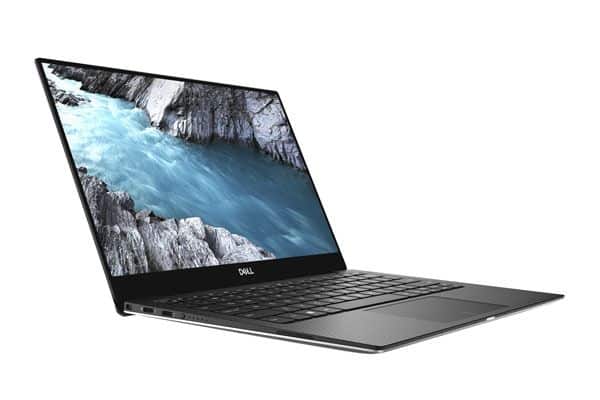
Improved Design – continues to be the world’s smallest 13.3-inch Ultrabook
While ultrabook products have been “born”, Dell has never stopped refreshing the XPS 13. For the XPS 13 2018 the body feels kinda slimmer than the one before it, and it turns up around 11.9 inches ( about 30cm ), with the thickest part of the machine sitting at just 11.9mm, while the thinnest section is 7.8mm. Meanwhile, the XPS 13 9370 uses an InfinityEdge display which brings the screen level down to 4mm, and the earlier model stays at 5.2mm.
The most impressive in XPS 13 version 2018 is the design of the machine. Besides the traditional black-and-silver color, this product also adds the color version of White Gold on the inside. The carbon fiber casing of this new color version is extremely hard to stain, easy to clean and even covered with ultraviolet rays. In particular, the rest of the version of Yellow Gold – White is made of fiberglass weaving, bringing a cool and luxurious feeling. Thanks to its meticulous production of premium materials, the XPS 13 9370 is lightweight, weighing just 1.2kg, handy and convenient to carry.
Powerful, intelligent connectivity – for better working needs
The XPS 13 2018 is based on the eighth-generation Core i7-8550U with 4 cores and 8 threads, double the Intel Core i7 gen. As a result, this microprocessor can help optimize performance and energy efficiency. This product is equipped with UHD Graphics 620 graphics card, optional RAM for two configurations: DDR4 8GB with 256GB PCIe SSD and 16GB SSD with 512GB, much more work at the same time as transfer, store data quickly. The 52Wh battery lasts for up to 20 hours, and of course the product is aimed at users who regularly use computers outside the office, with much workload.
The XPS 2018 has a couple of modifications to its ports, kinda equipped with two Thunderbolt 3 (USB-C) ports on the left side, and on the right there is a USB-C port that supports DisplayPort along with USB 3.1. It can handle data rates up to 40Gbps, even up to 8 times faster than USB 3.0, so users can connect their PCs to peripherals quickly, and in a more convenient manner.
Display
The Dell XPS 13 9370 comes with a 13.3 inch InfinityEdge display panel, it is offered in two separate resolution levels, Full HD (1920 x 1080) and 4K Ultra HD (3840 x 2160). That near bezel-free look makes the overall device feel, kinda more open, and the screen to body ratio is usually cited at about 80.7 %. Viewing feels more immersive, almost like you get more space without noticing it. On top of that the screen is covered by Corning Gorilla Glass 4, which helps with durability as well as scratch resistance, so it’s less worry when you toss it in a bag.
Full HD vs 4K Display
For most people the Full HD option is more than enough, giving crisp visuals, strong colors, and solid contrast. It also tends to be more energy-friendly, meaning you should see better battery longevity. The 4K Ultra HD version though gives you that extra clarity, with a lot more fine detail, which is a pretty solid fit for photographers , videographers, and basically anyone who cares about high resolution content. Still, that extra sharpness does come with a noticeable tradeoff for battery life.
Both versions also bring good color accuracy and brightness, they cover 100% of the sRGB color gamut. And brightness can go up to around 400 nits , so you can still use it outside without too much trouble, even under brighter daylight.
Performance
Inside, the Dell XPS 13 9370 runs on Intel 8th generation Kaby Lake R processors, with options that go from the Core i5-8250U all the way up to Core i7-8550U. These chips are quad core pieces, and honestly that alone is like a clear lift compared with the earlier dual core setups, so multi tasking feels calmer and smoother. At the same time overall pace is better, not just in theory but in day to day use.
General Performance
In day to day use , the XPS 13 9370 just feels effortless. You can do web browsing, type up documents, or watch multimedia , and it keeps moving pretty smoothly, no real bumps along the way. With 8GB or 16GB of LPDDR3 RAM onboard , multitasking stays pretty comfortable, so you can juggle several applications at once and not suddenly feel that slowdown, that kind of thing often shows up on weaker machines.
Storage
For storage, you get a few choices, from 128GB all the way up to 1TB, using a PCIe NVMe SSD. That kind of storage helps with quick power on, fast app opening, and swift file moving. Pair that quick drive with a strong processor , and the whole setup feels well suited for work tasks as well as leisure activities.
Graphics Performance
The XPS 13 9370 uses integrated Intel UHD Graphics 620. It’s not really meant for demanding esports sessions or very heavy graphical workloads. Still, for normal visual stuff it does the job with no drama. Casual games, streaming high definition video, and light photo editing fit right in. But if you’re dealing with more demanding needs like video editing, 3D rendering, or other GPU hungry projects, the integrated solution may feel a bit tight, like it’s holding things back at the worst moments.
Keyboard and Trackpad
Keyboard
On the XPS 13 9370 the keyboard feels thoughtfully designed, and it kinda gives you a really comfortable typing experience. The keys have a decent amount of travel, plus they deliver clear tactile feedback ,so long sessions don’t feel as fatiguing. There’s also backlighting with two brightness levels ,which comes in handy when you’re typing in dim rooms or at night. The glow looks even and bright, so it helps usability without turning into some kind of eye strain thing.
Trackpad
The trackpad is roomy, smooth, and it reacts fast. It supports Windows Precision drivers which means multi-touch gestures tend to be handled accurately and in a very fluid way. The glass top adds a more premium feel, and the built-in buttons are tactile ,easy to press without needing weird force. Overall the trackpad stands out in its category, offering smooth navigation that feels enjoyable instead of clunky.
Battery Life
Battery life matters a lot for an ultraportable, and the Dell XPS 13 9370 does really well here. If you pick the Full HD option ,you can usually expect strong results ,up to about 11-12 hours on one charge in normal day to day tasks like web browsing, document work, and video playback. The 4K version is gorgeous but it drinks power more aggressively, and most users will see something closer to 7-8 hours per charge.
Dell also includes a compact 45W USB-C power adapter that supports fast charging, in a fairly convenient kind of way. With this setup you can get the laptop up to roughly 80% in about one hour, which is pretty helpful if you need a quick battery lift between calls, or even when you’re traveling.
Audio
Okay so the audio quality on the XPS 13 9370 is kinda surprisingly good for something this size. It has stereo speakers, and they’re tuned with Waves MaxxAudio Pro, so you get sound that’s pretty clear and loud, with a decent balance between the mids and the highs. Now the low end (bass ) is fine, but yeah it’s also limited, like you’d expect from a thin laptop design.
Also the speakers sit on the sides of the laptop, which helps widen the soundstage a bit. If you’re going for a more immersive vibe, you can still add external speakers or headphones, using the 3.5mm audio jack ,or go wireless with Bluetooth.
Software
The Dell XPS 13 9370 shows up pre-installed with Windows 10 Home or Windows 10 Pro, it depends on the configuration you pick. Dell also throws in a few extra utility programs and applications, just to help smooth the whole experience:
Dell Power Manager: this kind a thing lets users dial in power settings, and really stretch battery life when it matters, kinda like for travel or long work sessions.
Dell Mobile Connect: it helps your laptop plus phone cooperate, so you can put calls , send messages, and see notifications right on the laptop screen without messing around too much.
Dell Update: keeps things in shape, grabbing newer drivers and firmware updates, so your system stays current.
In general, these little add-ons bring more value to the overall package, giving you extra features plus that everyday convenience.
Thermal Management
Thermal management matters a lot in ultracompact laptops, mainly so the system doesn’t slow down and so the user stays comfortable. In the Dell XPS 13 9370 there’s basically a dual fan cooling approach, plus heat pipes and a sort of thermal insulating material, so the heat gets pushed out the right way, without drama.
When you use it day to day, it usually stays calm, cool, and quiet, fans kick in only at times. If you go heavier, like gaming , or lots of multitasking at once, then the fans get a bit more noticeable. Still, they do their job pretty well, internal temperatures stay inside safe bounds.
Also, the bottom area and the keyboard zone stay relatively level in terms of heat. That means it’s not only usable, it’s comfortable too, even during longer sessions. Overall, Dell’s thermal design helps keep performance steady, and it avoids that constant throttling feeling when things get loaded.
Experience the perfect cinema with the Dell Cinema
The XPS 13 2018 comes with a 13.3-inch display panel, and you can choose between two Full HD modes (1,920 x 1,080) or select the 4-inch UHD (3,840 x 2,160) UltraSharp touchscreen. When it comes to the view angle, the visual experience on the XPS 13 9370 gets better due to CinemaColor, so it kind of feels more vibrant, smoother than you might expect. This includes a high resolution, color-guided baseplate plus both hardware and software support, to stretch the color coverage to 100% sRGB, deliver deeper blacks (400: 1 contrast ratio), brighter output (up to 400 nit), and a sharper level of detail. So you get crisp, easy-on-the-eyes visuals for work , and for leisure as well.
For viewing, the screen uses IPS panels with up to 178 degrees angles. On the touch screen variant there’s Corning Gorilla Glass 4 too, featuring anti reflection and an anti blur type effect. And if you care about media, there’s CinemaStream, with fast WiFi connectivity , so the XPS 13 2018 feels built for streaming.
The audio setup on the XPS 13 9370 also got an upgrade, with Dell CinemaSound stuff going on. It’s basically the newest, most modern sound approach from Dell, blended together with the Waves MaxxAudio Pro software, so the output volume goes up, and the sound feels clearer, not just louder. In practice, it gives that high-end, crystal-clear, bright audio experience that people notice right away.
It also comes with the Windows Hello app, and in the XPS 13 version 2018, it lets users unlock using facial recognition in a safer way. Beyond that, the built-in fingerprint reader tech means you can log in with just one click , pretty quickly too.
Conclusion
Overall, the Dell XPS 13 9370 keeps being a strong top contender in the ultraportable laptop space. It offers a mix of speed, design, and day to day usability that very few alternatives can really match. With its premium materials, capable internal hardware, and really impressive display choices, it turns into a flexible option for lots of different types of users. If you’re a business professional, a student, or someone doing creative work, the XPS 13 9370 delivers a standout computing experience that makes sense alongside its higher price.
Choosing the Dell XPS 13 9370 means getting a laptop that not only handles what’s needed right now, but also holds up over time, thanks to its solid build and those future-ready functions. If you’re out shopping for a premium ultrabook that really hits both the aesthetic and the performance side, then the Dell XPS 13 9370 is, honestly one of the best picks out there.
Dell XPS 13 9370 Laptop, 13.3″ Screen, 8th Gen Intel Core i7, 8GB Memory, 256GB Solid State Drive, Windows 10 Home: Buy it now
Brand New Dell XPS 9370 Laptop, 13.3″ UHD (3840 x 2160) InfinityEdge Touch Display, 8th Gen Intel Core i7-8550U, 16GB RAM, 512 GB SSD, Windows 10, Silver: Buy it now
Brand New Dell XPS 9370 Laptop, 13.3″ UHD (3840 x 2160) InfinityEdge Touch Display, 8th Gen Intel Core i7-8550U, 16GB RAM, 512 GB SSD, Windows 10, Rose Gold: Buy it now
Dell XPS 13 9370 13.3″ FHD InfinityEdge – 8th Gen Intel Core i5 – 8GB Memory – 128GB SSD – Intel UHD Graphics 620 – Rose Gold: Buy it now
2018 Dell XPS 13 9370 Laptop – 13.3″ TouchScreen InfinityEdge 4K UHD (3840×2160), 8th Gen Intel Quad-Core i7-8550U, 512GB PCIe SSD, 16GB RAM, ThunderBolt 3, BackLit Keys, 1 Yr Office 365, Windows 10: Buy it now
Related Posts


Tech Reviewer & Product Analyst
Định Bia has spent over 10 years testing consumer electronics with a focus on smart technology. He work as a product advisor at Biareview where he helped customers find the right devices for their needs. He personally tests every product featured on this site using a consistent evaluation framework covering quality, durability, and value. All reviews are based on experience, not influenced by the manufacturer.