
Oppo Neo 5 is pretty well equipped with a 1.3 GHz quad core processor, 1 GB of RAM and 8 GB of internal memory that can be expanded with a memory card. It remains the size 4.5 inch screen with a resolution of 480 x 854 pixels as the previous generation and runs the latest OS Color OS 2.0 built on the Android 4.4 KitKat.
Design
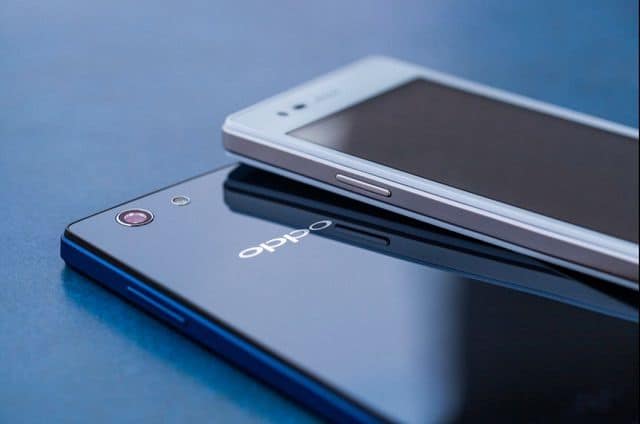
Oppo Neo 5 still uses the screen size 4.5 inch as before but has a completely new design, glossy with two glass. From the edge of the machine, Neo 5 is divided into three parts: screen, ribs and back cover. The front is made entirely of glass, three basic keys are touch and placed under the screen. Above, the front camera and sensor are to the left speaker instead of the two sides as before.
The ribs are made of metal-colored plastic and are lightly beveled at the sides to keep the palm from feeling the touch. Two power and volume buttons are located on the left and right sides. The back of Neo 5 is removable for attaching sim and memory card. The machine supports 2 sims including a sim nano and a micro sim, while the battery of the machine is attached and can not be disassembled. The back cover is made of imitation plastic to increase the aesthetics of the product.
The Oppo Neo 5 features a 4.5-inch IPS LCD screen with a resolution of 480 x 854 pixels. IPS panels give true and unreal colors, good viewing angles, and sharpness is acceptable when users still see pixels or hole when viewed or zoomed in. The downside of the gap between the glass and the substrate is that the sinking image has not changed. However, Neo 5 is equipped with light sensor and high brightness makes it easy to use in many different environments. In addition, the screen of the machine is also equipped with ultra-sensitive sensors for use with gloves.
Function
Neo 5 runs Oppo’s latest Color OS 2.0 operating system, built on the Android 4.4 platform. Except for Google applications, other basic applications like phones, contacts, messaging to settings, e-mail … all have a graphical style and layout of new features. Looks better than the original interface.
The installer is divided into three separate tags, including audio, and display, so finding and setting up phone modes is simpler than the original Android. The notification bar at the top is completely editable in comparison to the original Google operating system, adding a flexible quick-install bar that can easily be expanded or added with quick-setting features.
Interface, lock screen with redesigned icons, allows users to quickly customize the download theme from the network. The Quick Install Bar is refined and more functional, supporting the Quick Reach feature, enabling quick activation of any application by drawing predefined images, even allowing operation even when the curtain Picture is off. Color OS’s online data warehouse (Cloud) services, security, data backup applications, data … are also useful on a low-end smartphone such as Neo 5.
OPPO Neo 5 (Black, 16 GB) – Unlocked International Model, No Warranty: Buy it now
OPPO NEO 5 (White, 4 GB) – Unlocked International Model, No Warranty: Buy it now
OPPO Neo 5 (White, 8 GB) – Unlocked International Model, No Warranty: Buy it now
Camera
The camera on the Oppo Neo 5 is significantly improved compared to the Oppo Neo 3 when the resolution is increased to 8 megapixels with the Pure Image 2.0 feature for faster focus and better exposure. More extensibility features include extra HDR, GIF and Audio Photo capture and dual exposure instead of just Panorama and portraiture.
In normal shooting mode, the camera is automatically set up but has the ability to touch the screen to select the focus point, which makes shooting more convenient when shooting close-up …
Overall, the Neo 5’s 8 megapixel camera is of good quality. Sharp and clear images even in dim lighting. The front camera retains 2 megapixels and features facial beauty enough to meet the needs of selfie.
Performance and battery life
Neo 5 is a hardware upgrade when it comes equipped with a quad-core 1.3-GHz quad-core processor instead of the previous dual-core, 1 GB of RAM and 8 GB of internal memory that can be expanded with memory cards. Oppo Neo 5 still plays heavy games like Asphalt 8, but occasionally there is lag status, while for lightweight games or normal applications run smooth and stable.
The battery of the machine is raised to 2,000 mAh, not high enough to meet the needs of a single day for ordinary users. If you use less and leave the machine in active mode, turn off regular connections, battery life can last up to nearly 2 days. Besides, the super battery saving feature will help the user maintain an extra time in case of an emergency.
Software and User Interface
The general software feel on a smartphone can really shape how usable it feels in real life, and also how people feel about it overall , like satisfaction. The Oppo Neo 5 comes with ColorOS, which is Oppo’s own skin, built on Android, so it’s not pure Android, if that makes sense.
a. Operating System
Right out of the box , the Oppo Neo 5 runs ColorOS 2.0.1, and that version sits on top of Android 4.4.2 KitKat. When it released, that Android version was kinda behind already, since Android Lollipop was the newer standard. On top of that, the Neo 5 doesn’t get big Android upgrades, so users basically stay on KitKat. And KitKat, compared to newer Android releases, misses quite a few features and improvements, you know, the kind that make everything smoother or more refined.
b. ColorOS Customization
ColorOS is Oppo’s customized user interface, it gives a different vibe than stock Android. It offers a mix of extra options, including gesture controls, theme support, and a user interface that’s been redesigned in a more stylized way. In general , ColorOS looks clean and it’s pretty friendly to use, but it can still take a bit of getting used to for anyone coming from stock Android, because the layout and behavior might feel slightly different at first.
c. Pre-Installed Apps and Bloatware
The Oppo Neo 5 ships with a bunch of pre-installed applications. For example , Oppo provides its own app set, like the Music Player , Video Player, and a File Manager. There are also third-party apps that are already on there, and some people might see these as bloatware. Even if some preloaded apps can be handy, others may feel unnecessary, and they end up wasting storage space. The good part is , many of these apps can be removed or at least disabled, if you don’t truly need them.
d. Gesture Controls and Smart Features
ColorOS really shines a bit in the gesture controls department, not only in a smooth way but also in options. The Oppo Neo 5 has a set of gesture-based shortcuts, like double-tap to wake up the display, sketching certain shapes on screen to open apps, and flipping the phone to silence incoming calls. It all adds this little extra layer of comfort and personalization, so doing everyday tasks feels quicker, and honestly a bit more effortless compared to digging through menus, or so.
Audio and Multimedia
When it comes to audio performance and multimedia, most people do care, and the Oppo Neo 5 gives a decent experience overall. Not perfect, but acceptable, in that usual budget category way.
a. Loudspeaker
The Oppo Neo 5 comes with just a single rear-firing loudspeaker. The output is clear enough , and voices come through pretty easily, however it doesn’t have much depth, and the bass is limited—like most budget phones. Loudness is fine for casual listening, but if you’re in a noisy place it might not cut through. Also, because the speaker sits on the back, the sound can get sort of muffled when the handset is laid flat, or held against a surface for a while.
b. Headphone Audio
On the Neo 5 you also get a 3.5mm headphone jack which is a nice win for people using wired headsets. Through headphones, the audio is generally decent, vocals sound clear, and mids with highs feel pretty balanced. Still, if you are the type who really listens for punch and warmth, you may feel the bass isn’t enough, and the overall texture sounds a little plain. For the majority though, the Neo 5 does the job for songs, videos, and phone calls without too many complaints.
c. Video Playback
The Oppo Neo 5 display, while not the absolute highest resolution, is still pretty adequate for video playback. It can manage standard definition ,SD videos without a fuss, and most HD content tends to play smoothly, although that lower resolution might mean visuals look a bit less crisp. The phone also supports a range of video formats and the built in player is pretty direct and simple to operate, like nothing too fancy really.
Value for Money
On the value for money angle, the Oppo Neo 5 feels like a well matched bundle for budget focused buyers. It isn’t really in the same league as top tier smartphones in terms of raw performance or feature depth ,but it does deliver a steady, usable experience for what it costs.
a. Price Comparison
When it launched, the Oppo Neo 5 was priced in a competitive way within the budget to mid range bracket. It came across as an affordable option against pricier phones, emphasizing essentials such as dual-SIM capability, solid build quality, and an easy to navigate interface.
b. Competitor Analysis
Looking side by side with its rivals, like the Samsung Galaxy J2 and the Motorola Moto E, the Oppo Neo 5 tends to keep up reasonably well regarding design and construction. Still, it doesn’t quite match them when it comes to display detail and processing power. People who care more about camera output, aesthetics, and everyday software comfort might see it as a sensible pick, yet users chasing sharper screens or stronger overall speed may want to check other alternatives instead.
c. Long- Term Usability
The Oppo Neo 5 feels like a solid pick for people who need some basic smartphone stuff for daily errands . Its sturdy frame, small footprint, and user- friendly software make it a decent match for first time buyers , students, or anyone wanting a second device , you know, something that stays reliable without too much fuss. That said, the software is a bit outdated and the processing power is limited, so as heavier apps and services keep upgrading, this phone might start to feel a little constrained, or at least less “snappy” than you’d expect.
Conclusion
Overall, the Oppo Neo 5 is budget friendly smartphone with a pretty decent mix of look , functions, and day to day speed. It may not shine hard in one specific area , but it still gives a balanced experience for users who mainly care about cost and dependability . Between its compact size , dual-SIM support, and an interface that’s easy to get used to, it’s a practical option for everyday use . Still, if you want more advanced features, or you’re trying to keep a device that stays current for a long time, the outdated software, limited processing power, and the lower resolution display could be real drawbacks.
In a short summary , the Oppo Neo 5 works well for budget minded consumers who prefer design and usability over the latest technology . It provides a satisfactory experience for its price, so it can be a reasonable choice both for newcomers to smartphones , and for those shopping for a secondary device.







Tech Reviewer & Product Analyst
Định Bia has spent over 10 years testing consumer electronics with a focus on smart technology. He work as a product advisor at Biareview where he helped customers find the right devices for their needs. He personally tests every product featured on this site using a consistent evaluation framework covering quality, durability, and value. All reviews are based on experience, not influenced by the manufacturer.