Introduction
The Palm Pre, shown in June 2009, felt like one of those true little turning points in the smartphone world. People remember it for the inventive look, and for a few standout features, but the bigger idea was that Palm wanted to duke it out with Apple’s iPhone and with Google’s Android, you know, the usual heavy hitters. The Palm Pre wasn’t just “another phone”, it was supposed to act like a flagship signal, showing off what Palm’s fresh webOS operating system could do… and also trying to bring the company back into the spotlight. This review kinda goes deep into the Palm Pre, looking at how it’s built, how well it runs, what it’s like to actually use day to day, and what it ended up meaning for the smartphone scene overall.
Design and Build Quality
Ergonomics and Aesthetics
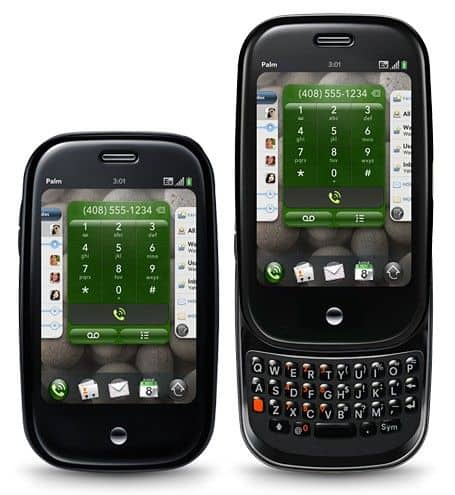
The Palm Pre’s design is more or less a calling card for innovation, with a recognizably slick, distinctive form. It has this curved, pebble like outline thats supposed to sit naturally in your hand, and it kind of gives that smooth fluid and comfortable user feel, you know? The Pre measures 59.5 x 100.5 x 16.9 mm (2.34 x 3.96 x 0.67 in) and it tips the scales at 135 grams (4.76 ounces), so it stays compact, pretty light weight , not bulky or anything really.
The Palm Pre design is kinda all about that soft touch plastic back, it gives a comfortable grip and also keeps the thing from sliding out of your hand too easily. The glossy finish, plus those smooth edges, kinda makes it look more modern and a little more refined. And then there is the whole physical layout thing, like the curved screen and those rounded edges, it really makes the Palm Pre stand out compared to what people were doing around the same time.
Build Quality
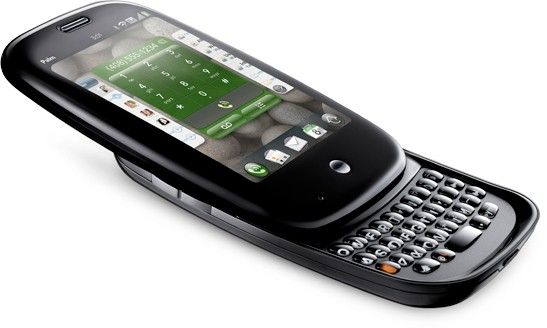
The Palm Pre build quality feels solid, like it is not flimsy at all , and it has a sturdy structure you can actually feel when you hold it. The soft-touch plastic on the back gives you a nice tactile sensation , and it seems to dull small bumps. The sliding mechanism that pulls out the physical keyboard moves smoothly, with this satisfying little click, the whole action feels well controlled. Overall, the build quality shows Palm was serious about making a high quality, properly engineered product.
The screen of the Palm Pre is 3.1 ich capable of multi-touch control with a convenient QWERTY keyboard when writing mail or compose messages. The Pre appearance is shorter but thinner than the Apple iPhone 3G.
At the bottom of the screen you will see a “motion area” where you can tap or swipe your fingers to control the content. In iPhone style, Palm Pre can also zoom to resize content.
The Palm Pre is capable of high-speed Internet connectivity thanks to support for EV-DO Rev A, 802.11b Wi-Fi networking. The Pre also comes equipped with GPS, support for stereo playback via Bluetooth 2.1 with EDR connectivity and 8GB of storage, though there is no memory card slot. On the back, Pre owns a 3 MP camera with auto focus and integrated LEDs.
Pretty much the same features on the iPhone as the light sensor, accelerometer and proximity sensor. Imagine when the iPhone is on the face, the device screen will automatically darken and rotate when you shake the phone.
WebOS, Pre’s operating system is pretty showy and simplified with a centralized development direction that supports touch control. In addition to supporting personal data privacy, Pre also removes duplicate information, organizes digital photos, and allows you to connect with friends in a variety of ways: instant messaging, IM, Email, voice or Facebook. If you are still not comfortable with Pre, please use the third application as the plug-in expansion.
WebOS is built on the idea of ”tags”, which means to align the screen to similar applications on the Windows desktop. You will feel the control card application on the screen quite easily from writing mail to browse contacts.
Pre features a full-featured web browser, multi-platform IE, and regular video and audio player. There are also a number of built-in applications such as calendaring, notes, photo album, calculator and GPS maps.
Palm Pre Unlocked GSM Smart Phone with 3 MP Camera, WebOS, Touchscreen, WiFi, GPS and QWERTY Keyboard–International Version with No U.S. Warranty (Black): Buy it now
The music player displays songs as an art album and runs in the background. You can listen to music through headphones or thanks and Bluetooth connectivity for high surround sound. Pre support MP3 and ACC but “say no” to WMA. With video, you can enjoy the MPEG-4, H.263 and H.264 formats but with WMV, the “Pretend”.
Apple’s Safari-like WebKit-based web browser and a host of expensive features like the ability to save bookmarks into thumbnails. Currently not supported Flash browsing, but the future not so far, Palm promised to “carve” more “wings” for this potential device.
You can buy more apps through the App Store similar to the App Store. Some software has offered “TeleNav” for GPS navigation, MobiTV for online TV viewing, Pandora for digital music, Amazon MP3 store, Google, Facebook and Dataviz’s MS Office compatible software. Pre will not run Palm OS’s old applications, but any third party software can write emulator.
Pre will not attach themselves to desktop applications. You can use a regular PC or a Mac with a USB cable to transfer music, videos or use Pre as a modem. According to the manufacturer’s introduction, Palm will support a variety of ways of receiving data from Outlook, Palm Desktop or older Palm devices.
Friendly, easy-to-use keyboard. The ability to manipulate multitasking is great. The new OS is ready to save your contacts when you upgrade your device. WebKit-based browser.
User Interface and Features
Physical Keyboard
One of the key features on the Palm Pre is its physical QWERTY keyboard, it slides out from under the device’s touchscreen… kinda like it’s hiding there until you need it. This keyboard is made to give that tactile typing experience, with keys that feel well spaced and a satisfying click. For people who really prefer traditional typing methods, instead of virtual keyboards, this part is a pretty big advantage overall.
Software and Applications
The Palm Pre also runs a bunch of applications you can get through the Palm App Catalog. Plus, it comes with several preloaded tools already, like this kinda mix:
Email and Messaging: The Pre has a solid email client, and it handles multiple accounts, including Exchange , IMAP, and POP3. For messaging it supports SMS and MMS , so you get a fuller communication flow without too much fuss.
Web Browser: There’s a web browser on the device, and it gives a decent browsing experience. It supports standard web technologies and the usual features you’d expect. You also get HTML5 support, which helps users reach modern web content and services.
Media and Entertainment: The Palm Pre includes a media player for music and videos. It supports different media formats and it keeps playback fairly straightforward , so you can take your files with you and still enjoy them on the go.
Gesture Area
On the Palm Pre there is a specific gesture space, sitting under the touchscreen, and it lets you do those navigation movements. People can swipe back to the home screen, or quickly open the application drawer depending on the gesture. It’s an interesting little design detail, it kind of improves the whole feel of using the phone, and it gives a smoother way to interact with it, instead of always hunting for icons.
Battery Life
The Palm Pre comes with a 1150 mAh lithium ion cell, and in practice it gives enough power for regular use. You generally get about 6 to 8 hours of talk time, and roughly 300 hours standby, but it really shifts based on what you do and which settings you keep on. That said, even if the battery performance was decent for its era, nowadays it might seem on the small side, since many newer phones use higher capacity packs.
Charging and Battery Management
For charging, the Palm Pre uses a micro-USB port, so it’s a familiar cable situation for both charging and data transfer. Also, it supports a wireless charging approach with the included Touchstone charging dock, so you can power up without plugging the cable in every time. This little convenience thing, it adds comfort and makes daily use feel more polished.
Connectivity
Network and Connectivity Options
The Palm Pre supports multiple connection types such as, these are the main ones:
Cellular Connectivity: It works with 3G networks, so you can get stable mobile data for stuff like web pages, email, and other online services.
Wi-Fi: There is Wi-Fi support, which lets you join local wireless networks for quicker internet. This helps a lot for heavier tasks and reduces the need to rely so much on cellular data.
Bluetooth: The device includes Bluetooth 2.1, which means you can link to compatible devices for wireless audio streaming, file movement and a few other actions.
GPS and location services
The Palm Pre comes with built-in GPS, and it basically gives people location based services plus navigation, you know. In day to day use the GPS tends to be pretty accurate, so users can still make decent use of maps, and other location aware apps without too much hassle.
Camera
Rear camera
On the back, the Palm Pre has a 3 megapixel rear camera with an LED flash. It can capture photos that are fine, but it doesn’t really have the more fancy camera stuff you see on later smartphones. Overall the pictures look okay for casual snapshots, though it can get a bit rough in darker rooms or if you try to photograph something moving fast, like it’s doing a sprint or something.
Camera features
There are some basic functions here, such as autofocus, and image stabilization. Video recording is supported at 320 x 240 pixels. That’s fine for quick clips, but it doesn’t meet the higher video quality you’d expect from more modern devices.
Front camera
The Palm Pre does not have a front-facing camera, so yeah, no true selfies and the video calls are kind of limited too. Honestly, that lack feels like this real weak spot compared to newer phones where a front camera is basically assumed, you know.
Software updates and support
Software updates
The Palm Pre originally shipped with webOS 1.0, then later updates showed up to smooth things out, improve speed, and introduce additional options while fixing bugs. A key one was webOS version 1.1 which brought multiple upgrades that refined the overall user experience, kind of in a gradual way.
Support and ecosystem
The Palm Pre was supported through the Palm App Catalog, where users could browse a variety of apps , and games and then download and install them. That said, Palm ran into difficulties in the fast moving smartphone market, so over time the whole app ecosystem seemed to thin out , and support for the Pre became way more limited.
Impact and legacy
Market impact
The Palm Pre felt like a bold try by Palm to get its footing back in the smartphone market, honestly. Its innovative design, the physical keyboard and also webOS the operating system kinda drew a lot of attention, while many industry critics and everyday users really talked about it positively, too, like they were pleasantly surprised. Still though, even with all those strengths the Pre struggled, mainly because competitors were aggressive and it never managed to capture a truly large slice of market share.
Legacy and influence
Looking back, the Palm Pre has a pretty solid place in smartphone history. Its webOS operating system introduced a handful of ideas that were kind of ahead of their time, like card based multitasking and navigation done via gestures, and those concepts show up later in other smartphone designs and operating systems. Also the physical keyboard wasn’t just there for show , it was a standout selling point for people who preferred a tactile style of typing.
End of life
Eventually Palm started to face tougher pressure in the competitive smartphone market, and the company got acquired by HP in 2010. The Palm Pre came first, then a few other devices and operating systems followed along, and because of that the upkeep and those needed updates for it slowed down steadily, sort of gradually, over time. Even if its time on the scene was fairly short, the Palm Pre is still remembered as a notable and influential device in the bigger story of smartphones.

Tech Reviewer & Product Analyst
Định Bia has spent over 10 years testing consumer electronics with a focus on smart technology. He work as a product advisor at Biareview where he helped customers find the right devices for their needs. He personally tests every product featured on this site using a consistent evaluation framework covering quality, durability, and value. All reviews are based on experience, not influenced by the manufacturer.