Design and Build Quality
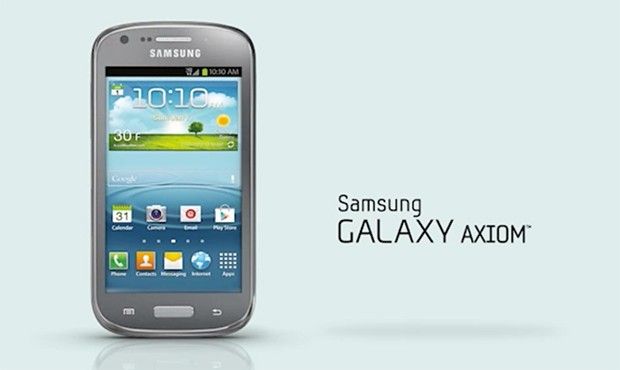
The Samsung Galaxy Axiom is a pretty compact smartphone by today standards, and it has a design vibe that feels very Samsung-ish from like the early 2010s. If you look at the size 121.9 x 63.5 x 11.7 mm, and the weight at 136 grams, it’s light enough that it’s easy to grip without much effort. The device is mostly plastic, which was, honestly, a usual move for budget to mid-range phones back then. You also get a removable plastic back, so it’s simple to reach the battery, the SIM card slot, and the microSD card slot.
The look itself is kind of plain, rounded corners and a glossy finish. It does look nice, but the glossy surface collects fingerprints quickly and it scratches way easier than you’d expect. On the front, the main focus is the 4-inch display. Under it sits a physical home button, and beside it there are capacitive touch buttons for the back and menu, kind of a familiar setup. Above the screen you’ll find the earpiece, the proximity sensor, and the front-facing camera. Turn it around and the back area holds the main camera along with an LED flash and a speaker grille.
Overall the build quality feels decent but it never really lands at that premium, higher end kind of sensation. The plastic keeps the phone light, yet it also makes the whole thing feel less sturd y than it should, kind of quietly too. The back cover can seem removable, sure, but it also gives off a slightly flimsy impression. The side buttons too , like the power button and volume rocker, have a bit of a soft mushy feel, which can mess with the daily user experience.
Display
The Samsung Galaxy Axiom comes with a 4-inch TFT LCD screen , sporting a resolution of 480 x 800 pixels,so the pixel density ends up around 233 ppi. Back when it came out this kind of display setup was pretty normal for mid-range smartphones, even so today it feels kinda low.
In day to day use, the screen is fine for simple stuff like web pages, email checking, and scrolling through social media. Still, once you try anything more demanding like high-definition videos, or when you read smaller letters , the limitations show up fast—both text and pictures can end up looking blocky or pixelated. The TFT LCD panel does a decent job with colors, but they may look a bit drained compared to newer AMOLED options. Also the viewing angles aren’t great, meaning if you tilt the phone even slightly you can notice color shifting plus brightness dropping.
Brightness itself is OK indoors, but outside in direct sun it really struggles. That makes it hard to read what’s on screen when you’re outdoors. And because there’s no ambient light sensor, you have to adjust brightness by hand based on whatever lighting you’re in, which is kinda annoying.
Performance
As for performance, the Samsung Galaxy Axiom uses a dual core Qualcomm Snapdragon S4 Plus MSM8960 chip that runs at 1.2 GHz, along with 1 GB of RAM. That hardware pairing was pretty usual back in 2012 for mid tier phones, so for regular day to day actions it felt adequate at the time.
For basic usage the Galaxy Axiom does pretty decent work, like browsing the web, checking emails, and hopping on social media apps. Everything feels mostly smooth, the user interface is responsive and moving around between home screens , and menus is generally fluid. But you can kind of notice the limited RAM and older processor, especially if you try multitasking or use heavier applications, it starts to feel a bit tired.
If you run a few apps at once, you might see slowdowns that become noticeable pretty fast, and then occasionally an app will just crash, no big drama but still annoying. Gaming is similar… it’s not built for big performance. Only the less demanding games tend to run smoothly. More graphics heavy games struggle a lot on the Galaxy Axiom, you get lower frame rates, plus longer loading times. And yeah this is kind of what you’d expect from the hardware limits, still it affects the overall user experience, particularly for people who want their device to do more.
Camera
The Samsung Galaxy Axiom comes with a 5-megapixel rear camera, and a 1.3-megapixel front-facing camera. Honestly those numbers were pretty modest even when it was first released, and they match the Axiom’s budget friendly positioning.
Rear Camera
The 5-megapixel rear camera can grab pretty decent photos when the lighting is good. If you take pictures in daylight, or anywhere that’s nicely lit , the images look fine, with acceptable detail and pretty solid color accuracy. Still , once the light drops, the camera really starts to struggle, you get a noticeable amount of noise, plus a decent bit of detail fades away. Also, because there’s no optical image stabilization , getting crisp shots at night basically depends on keeping your hand completely steady.
The camera interface feels simple, not overwhelming. You get the usual stuff like autofocus, touch to focus, and a handful of scene modes. The Axiom’s camera app lets you tweak things too, for example white balance and exposure , but the options remain rather constrained compared with more advanced smartphone setups.
As for video, the Galaxy Axiom maxes out at 720p, running at 30 frames per second. For casual viewing it’s okay, but you don’t get the same sharpness, or the same smooth motion, that you see on higher-end phones. The microphone does pick up audio clearly, yet the whole video experience stays pretty basic.
Front Camera
The 1.3-megapixel front facing camera is kind of ok, for basic video chats, and maybe the odd selfie, but honestly it not all that impressive. The image quality lands in this mediocre zone , low resolution meh color reproduction and not much dynamic range to really speak of. It’s like, it does the job, but yeah nothings spectacular. In general, this front camera works best when there’s plenty of light around, because in darker scenes it really struggles, and you can notice that pretty quick.
Software and User Interface
The Samsung Galaxy Axiom was actually shipped with Android 4.0 Ice Cream Sandwich in the beginning, and then later on, it could be upgraded to Android 4.1 Jelly Bean. Over all , the look and feel is pretty close to Samsung’s TouchWiz, you know, and it honestly had that very recognizable vibe you could spot on Samsung phones around that time.
TouchWiz UI
TouchWiz, is basically a custom skin from Samsung, sitting over the Android operating system. On the Galaxy Axiom specifically, TouchWiz adds a bunch of extra features, tweaks, and small custom arrangements to the experience. You’ll also see Samsung’s own apps and widgets, plus design touches like that typical blue and green color vibe.
Still, TouchWiz doesn’t come for free. It can feel a bit crowded, with lots of pre installed apps and widgets, so some people may think parts of it are unnecessary. On top of that, the extra layer of software can affect performance too, because it uses more system resources, and that matters a lot on a device with modest hardware, like the Galaxy Axiom, so sometimes things may feel slower than you’d expect.
The Galaxy Axiom has quite a few software goodies, the kind that were pretty well loved in Samsung smartphones around that time. In short, you get a handful of features like, you know, S Voice, Smart Stay, Multi-Window… all of it feels familiar if you used similar Samsung phones.
S Voice: This is Samsung’s voice assistant, it lets you do everyday things like setting alarms, sending texts, or even searching the web using voice commands. And yeah, S Voice was kind of like a forerunner before the more capable voice assistants such as Google Assistant and Samsung’s own Bixby. But it was still limited , and it was often a bit slow, so responses weren’t always that smooth.
Smart Stay: A feature designed to keep the screen active while you’re actually looking at it. It uses the front-facing camera to detect your face and then keeps things on accordingly. It sounded great in theory, but on the Galaxy Axiom it didn’t always behave consistently. Sometimes it just failed to detect the face, especially when lighting was weak, like in low light situations.
Multi-Window helps you run two apps at once, in a split screen kind of arrangement. And yeah it’s mostly handy for multitasking or back and forth stuff, but the Galaxy Axiom’s smaller display along with its limited resolution made it feel less convenient overall—especially compared to larger devices. So it works, just not as well as on larger models.
Battery Life
The Samsung Galaxy Axiom comes with a removable 2100 mAh battery, which was a fairly standard capacity for phones in 2012. In real use, the battery life is “fine”, it’s okay for moderate tasks, and most people can probably make it through a typical day on one charge, give or take a little depending on usage.
Under light to moderate usage, like web browsing, social media here and there, and occasional calls, the Galaxy Axiom can hang on for a full day. Still, when you start doing heavier things—gaming, video streaming, or even GPS navigation —then the battery drains much faster. If you’re a heavy user, you might be looking at a recharge by late afternoon, or perhaps early evening.
The removable battery is a pretty big point, because it lets users swap out the battery for a fresh one without too much fuss, and that helps the device go on for longer overall. It’s also a thing that’s become more and more uncommon in modern smartphones, where sealed batteries are basically the default now.
Charging the Galaxy Axiom goes through a microUSB port, which was normal back when the phone was made. On top of that, it doesn’t support fast charging, so getting to a full charge can take a couple of hours. With that battery capacity, it’s not the end of the world, but it is a sign of the limitations of older charging technology
Connectivity
The Samsung Galaxy Axiom provides a selection of connectivity options, sort of mirroring the tech expectations of its era. This includes:
4G LTE: The Galaxy Axiom has 4G LTE connectivity , so you get faster mobile data speeds than with 3G. In 2012, this was kinda a big deal for a mid-range phone, because LTE was still rolling out in plenty of areas. The LTE performance on the Axiom feels decent, you can expect solid download and upload speeds, but yeah it all depends on the network coverage in the users area , not really something the phone alone controls.
Wi-Fi: it also works with Wi-Fi 802.11 a/b/g/n, so you can jump onto most wireless nets for internet access. The Wi-Fi performance feels rather stable, with a solid signal pull and connection speeds that stay mostly constant even when you move around a bit.
Bluetooth: Bluetooth 4.0 is supported , so you can pair wireless accessories like headphones, speakers and even fitness trackers. Pairing is quick enough, and the connection stays steady, which matters if you are listening to music or using wearables.
GPS: The Galaxy Axiom comes with GPS , and that’s important for navigation and location based services. GPS accuracy is pretty good, and apps like Google Maps handle turn by turn directions smoothly. Still, the first lock can be a bit slower than on newer devices, especially if you start from a cold start.
NFC: Near Field Communication NFC is included on the Galaxy Axiom, which helps with contactless payments and also easier, rapid pairing with other NFC ready devices. Back at release , NFC was more like an up and coming thing, so seeing it on a mid-range model like the Axiom felt like a positive extra for people wanting to use mobile payments or swap content quickly between devices.
microUSB: As mentioned before, the device charges using a microUSB port, and that same port can also handle data transfer between the phone and a computer. In practice the microUSB connection is functional, dependable, and all that , but it just doesn’t offer the flexibility and speed that USB-C brings , which is now pretty much everywhere.
Headphone Jack: The Galaxy Axiom has a 3.5mm headphone jack, something that many modern phones have basically left behind. For people who still use wired headphones, this is a real convenience, because it gives a direct and reliable audio link without needing any little adapter dongles and such.
Storage
The Samsung Galaxy Axiom comes with 4 GB of internal storage, and honestly it feels a bit restrictive now a days. Out of those 4 GB, the operating system plus the preloaded applications take up a big chunk, so you end up with roughly 1.8 GB of usable space. With limited room like that, it doesn’t take very long before it gets annoying, when you want to install apps, save music, keep photos and videos, or download content for offline listening.
Good news, the Galaxy Axiom also includes a microSD card slot, allowing storage expansion up to 32 GB. This is a handy way to add extra space for media and everyday files. Still, even though the microSD slot is a nice touch, not every app can be shifted over to the card , so users need to keep an eye on internal storage too.
Audio
The audio feel on the Samsung Galaxy Axiom is kind of basic, more like you get one speaker, sitting on the back of the phone. Honestly it sounds decent , the volume is clear enough, but it doesn’t really have that extra depth or richness people look for. Also since it’s on the rear, when you set the device down on a flat table, the sound can get a little muted, which is a small annoyance but you notice it.
About the 3.5 mm headphone jack: this part works better if you still like wired headphones. With it, listening to music, podcasts , or even videos is pretty satisfying. That said, it still doesn’t bring the extra sound tricks or the high-resolution audio support you see in newer smartphones.
Overall User Experience
The Samsung Galaxy Axiom delivers a user experience that feels a bit out of date compared to current standards, but at the time of release it was still fairly reasonable for a mid-range model. The compact size plus the light build makes the Axiom easy to take around and use with just one hand, so that’s a neat benefit for anyone who likes smaller phones.
There’s also a physical home button and capacitive touch keys, and that combination gives a more tactile, responsive way to move around the device, which most people will appreciate.
The performance of the Galaxy Axiom is basically adequate for the everyday stuff, but it starts to wobble when you throw heavier apps at it, or when you try to multitask a lot. The limited internal storage, plus the older hardware underneath, means people really have to stay aware of what they’re doing, otherwise you get slowdowns, and those annoying performance moments. The camera quality is fine for casual snaps, however it doesn’t really hold up in low light, and video recording just kinda feels behind compared to what you might expect.
The TouchWiz user interface, even if it adds a few useful features, can end up feeling crowded , and kind of laggy on the Galaxy Axiom’s hardware. On top of that, the pre-installed applications and the constrained storage space make everything worse , so you end up managing apps and files more often than you would on newer phones.
Battery life is decent, you can generally get a full day with moderate use, and the removable battery is honestly a handy point, it helps the device hang around longer. As for connectivity , you’ve got 4G LTE, Wi-Fi, Bluetooth, GPS, and NFC which covers a good set of options, but the missing modern touches like USB-C and fast charging are still pretty noticeable.
Legacy and Impact
Honestly, the Samsung Galaxy Axiom might not be remembered as a major, headline device in smartphone history, but it did matter in its mid range era, kinda. The Axiom basically did a rough compromise between price and everyday practicality, so it stayed within reach for a lot of consumers who wanted a dependable phone, without paying the premium tax that usually tags along with flagship models.
The Axiom’s design and feature set sort of mirror the vibe and priorities from the early 2010s, when smartphones were still evolving really fast, both in hardware and software stuff. Adding things like 4G LTE, NFC, and a battery you can remove, made the Galaxy Axiom feel competitive in its tier, even if it wasn’t exactly a jaw dropping, groundbreaking kind of device.
For Samsung, the Galaxy Axiom sat inside a larger play to grab multiple market pockets, by putting out different units at different price levels. This plan helped Samsung lock in a dominant position in smartphones, and the Axiom contributed too, sort of as part of that reputation for making a broad catalog of devices that match up with various consumer needs ,and wants.
Conclusion
The Samsung Galaxy Axiom, well it’s not really a thing anymore in today’s smartphone market , but it kinda shows you how much mobile technology moved forward, over just that past decade. Back then, it offered a steady , if somewhat modest, user experience for people who wanted a dependable phone without paying too much. The Axiom’s design, its features , and even its performance felt right for its time, but now it’s obviously behind the curve, compared to modern smartphones that come with a lot more advanced capabilities.
In the context of 2012, the Galaxy Axiom was like a usable option for folks who were budget conscious, but still wanted the essentials, the key smartphone functions really, without the premium price tag attached . It also hints at why those mid-range devices mattered, because they helped smartphones get to more people, bridging the gap between basic handsets and the high end flagships, even when money was tight. That middle space was important , it wasn’t just filler.
Even if the Galaxy Axiom didn’t leave a dramatic legacy like Samsung’s flagship models did, it still had its role in the company’s wider push and in the overall growth of the smartphone market. For owners , and anyone using it day to day, it was a reliable sidekick that fit their needs while phones were still rapidly changing. Today, the Axiom is basically a small piece of mobile history, a little snapshot of the technology and trends that shaped the early 2010s.
US Cellular Samsung Galaxy Axiom NFC Android 4G LTE Phone: Buy it now




Tech Reviewer & Product Analyst
Định Bia has spent over 10 years testing consumer electronics with a focus on smart technology. He work as a product advisor at Biareview where he helped customers find the right devices for their needs. He personally tests every product featured on this site using a consistent evaluation framework covering quality, durability, and value. All reviews are based on experience, not influenced by the manufacturer.