Design and Build Quality
Form Factor and Size
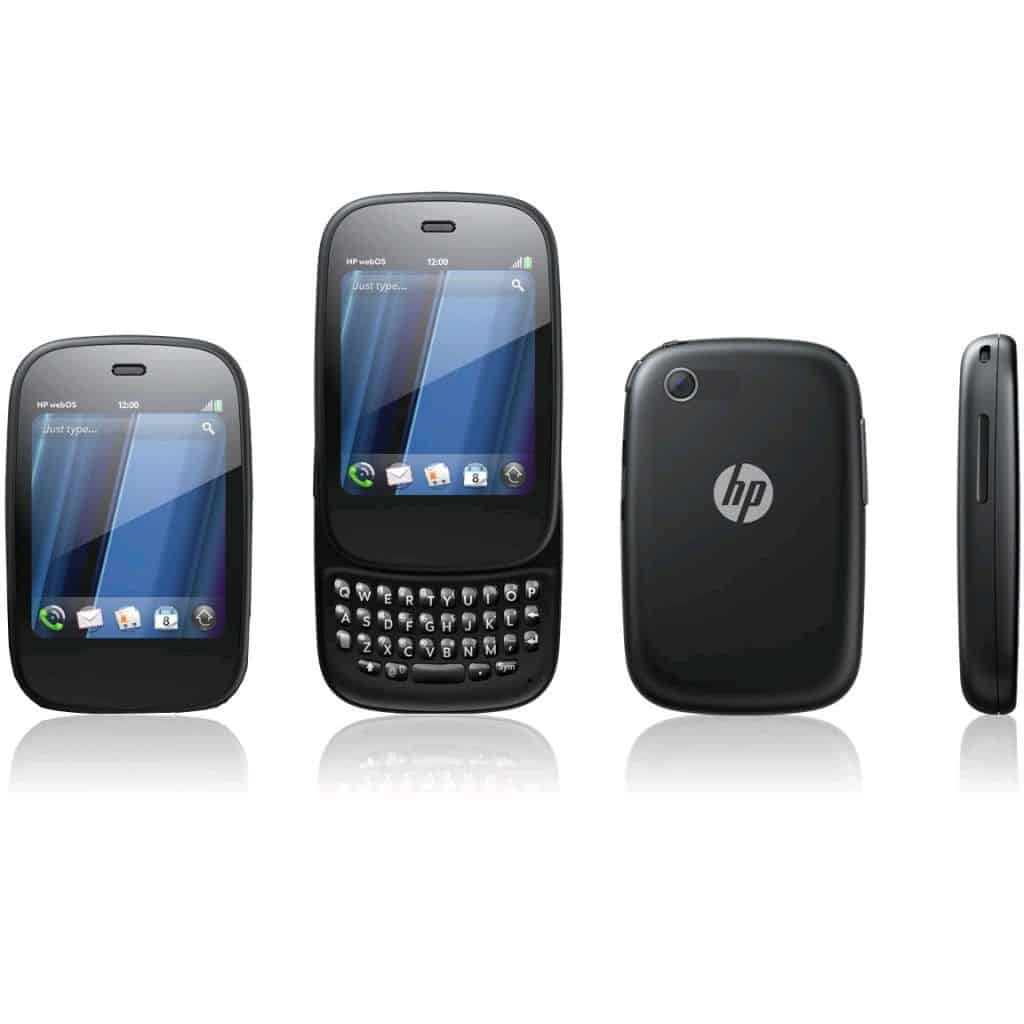
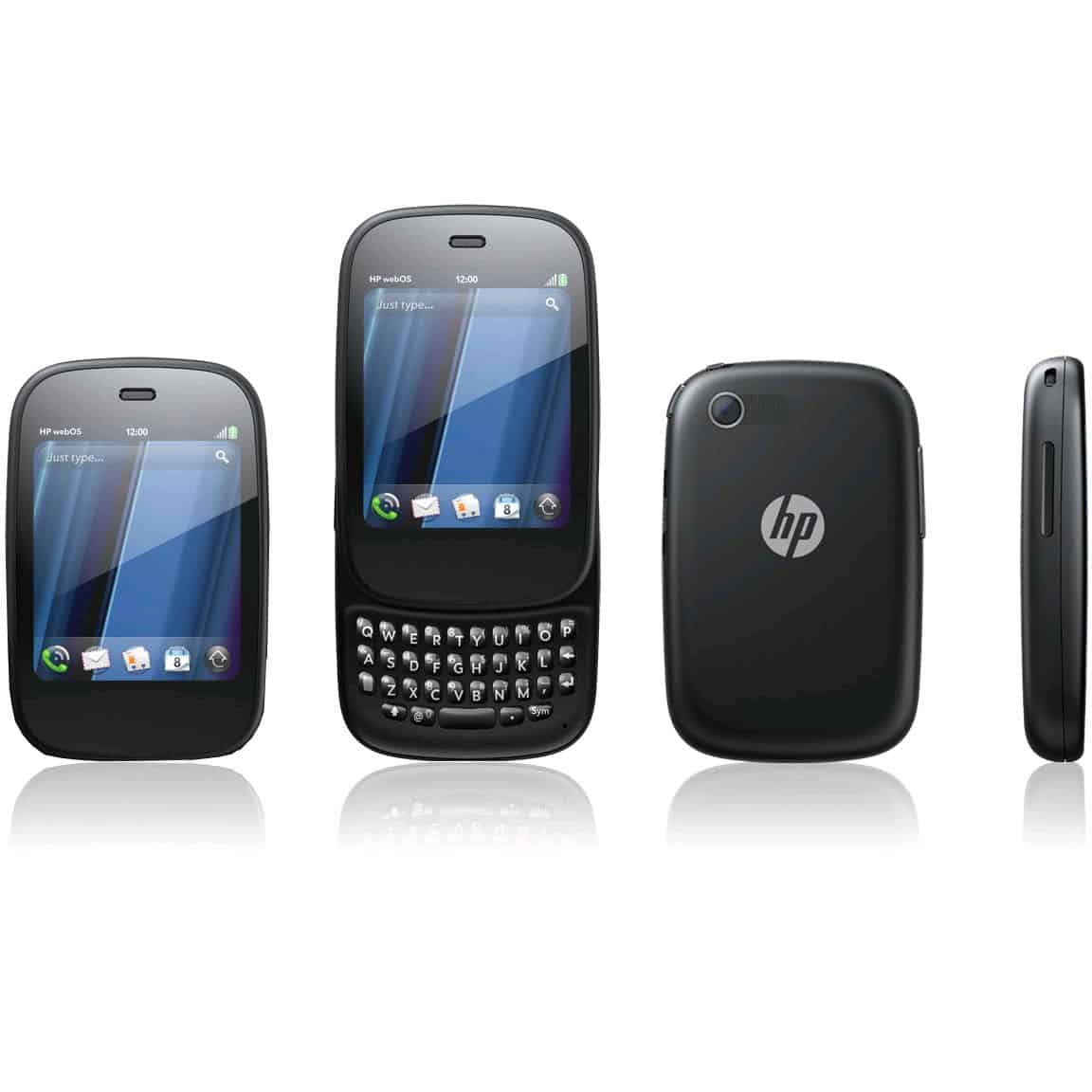
One of the more standout things about the HP Veer is how tiny it is, like really compact. The dimensions are roughly 84 x 54.5 x 15.1 mm, and it weighs only around 103 grams, so compared to most smartphones then, it’s way smaller. The overall look feels like the earlier Palm Pre family, with that pebble-ish form and softened edges that, honestly, make it easier to grip. HP pushed the idea that it was the smallest smartphone you could get, while still offering full multitasking, which kinda leans hard into the portability angle.
Pros: That compact layout made it simple to bring along, it slips into pockets without much fuss, even when you’ve got other stuff in there too. It was a good fit for people who felt the newer smartphone bulk was getting annoying, or just too wide for daily use.
Cons: But the mini size does come with compromises, especially for the screen and everyday usability. The 2.6-inch display is pretty sharp and colorful, however it still feels cramped, notably for typing, and also for normal web browsing. If your hands are on the larger side, the touchscreen zone and the keyboard can feel fiddly , like not quite as comfortable.
Materials and Build Quality
Inside, the HP Veer has a plastic body with a glossy surface, and it gives that clean, modern vibe, like pretty much right away. Even if it’s kind of small, when you hold it the device feels solid , I didn’t really notice any loud creaking or annoying flexing, so in that sense the build quality seems to line up fairly well.
There’s also a slider system, and when it opens, it reveals a physical QWERTY keyboard. That physical keyboard approach probably helps with durability, since it’s not relying solely on screen input. The keys felt responsive, the spacing is decent, though because the phone is so compact you still have to get used to the fact that the keys themselves are small, and your fingers may land slightly differently at first.
Pros: The slider mechanism was pretty smooth and, honestly, it felt sturdy enough, which really helped the whole build quality come across as solid. The plastic body, even if it was light, didn’t give off that cheap vibe, and the glossy finish, yeah, it kinda adds that premium look to the phone.
Cons: That glossy plastic did end up attracting fingerprints and smudges easily, so you’d need to clean it more often than you’d probably want just to keep it looking good. Also the plastic material, while it stayed durable, still didn’t quite have that premium feel you get from metal or glass , and that was becoming the usual direction in smartphones around that time.
Physical Keyboard
Having an actual physical QWERTY keyboard was, like, one of the HP Veer’s most noticeable points , especially for folks who prefer tactile feedback over typing on glass. The keyboard itself was kinda small but it still felt well built, with keys that had a decent bit of travel and a really satisfying click once you pressed down. Still, because the keys are compact, typing fast and staying accurate can get awkward, especially if your fingers are more on the larger side.
Pros: For people who write emails , or messages pretty often, this was a real advantage. It brings a kind of precision that many on-screen keyboards don’t really manage.
Cons: The compact key size makes the typing slower , and if you’re used to a larger keyboard or a touchscreen setup , it may feel a bit cramped. Ultimately, how it worked out depended mostly on whether you felt at ease with that snug layout.
Display and User Interface
Screen Quality
The HP Veer came with a 2.6 inch capacitive touchscreen, resolution 320 x 400 pixels. Even though the screen was small, it looked bright, and the color seemed pretty accurate, so it was usable for the basics , like messaging, calling, and quick light web browsing. The pixel density was around 195 PPI, which felt decent for that size, although it obviously wasn’t on par with the sharper panels that were starting to show up in a bunch of smartphones around the same time.
Pros: The display looked crisp ,and the colors came out vibrant. Brightness was fine in most indoor situations too, but it still held up decently outdoors. Also, the small screen helped keep the whole device compact, which was basically one of the things people liked most.
Cons: The small screen and the lower resolution meant it wasn’t really great when you needed more space, so things like reading long documents or watching videos felt cramped. Browsing heavier pages could also be annoying. And there weren’t multitouch gestures, which were getting more normal , so the screen experience felt a bit limited compared to newer devices.
User Interface and webOS
The HP Veer used webOS, a distinct operating system that Palm originally built , and later HP picked up. webOS was often praised for being intuitive, with that card based multitasking, and for working smoothly with services online, like email, social media, and cloud storage. The system was built to feel simple, so even users with limited tech experience could still get around without too much trouble.
Card-Based Multitasking: A major highlight was the card based multitasking. It let you move between open apps with relative ease. Each application showed up like a card, and you could swipe across them to reach what you wanted, or dismiss them by flicking the card off the screen.
Synergy Feature: One more kind of, “innovative” part of webOS was Synergy, it sort of brought contacts, calendars and messages together from several places into one single interface that felt cohesive. For a lot of people, this was especially handy if you had multiple accounts across different platforms, like Google, Microsoft Exchange, and also Facebook.
App Catalog: Then there was the webOS App Catalog, basically the phone’s app store. It had applications and games to pick from but—compared with the Apple App Store and Google Play Store—its list of options was way smaller. That meant the device’s overall capability could feel limited if you wanted a broad range of apps.
Pros: The webOS interface felt pretty friendly. It had a clean look and the navigation was easy to grasp, not overly confusing. Also the card style multitasking, that was sort of ahead of its time, it gave convenience and speed that a lot of other mobile operating systems struggled to copy.
Cons: The smaller app ecosystem was a real drawback, particularly since the smartphone market was growing fast and people were starting to expect more from their devices. On top of that, HP’s commitment to webOS didn’t last very long, which raised worries about long term software updates and whether new apps would keep showing up.
Performance and Hardware
Processor and RAM
The HP Veer ran on an 800 MHz Qualcomm Snapdragon MSM7230 processor paired with 512 MB of RAM. In comparison, with the top-end phones around that time, the specs were kinda modest, but they were still enough for what the Veer was supposed, to do. The phone seemed focused on basic things like calling, texting, and only light app usage, and honestly it handled those tasks in an adequate, workable way.
Pros: The processor seemed able to keep up with the phone’s main jobs, no huge lag or annoying slowdowns most of the time. For people who mostly used the device for talking, and just basic productivity type stuff, the overall performance was kind of fine, really.
Cons: Still, the 800 MHz processor and only 512 MB of RAM felt kinda tight when you moved into tougher use cases, like gaming, heavy multimedia watching, or multitasking with a bunch of apps going at once. If someone wanted the Veer to do a wider set of activities, the performance might feel a bit flat or even underwhelming, yeah.
Storage
The HP Veer shipped with 8 GB internal storage, and there was no way to add more storage through a microSD card. For a lot of users this was a pretty big issue, because the space just vanishes quicker than you’d think when you install apps, media, and docs.
Pros: If you were a basic user , mostly communication , and only occasional media, then the 8 GB felt adequate enough. Also, not having expandable memory kept things simpler in terms of design, and it likely helped keep costs lower.
Cons: But for anyone trying to keep a bigger collection of music, videos, or apps on the phone, the storage ceiling became a real problem. Since the phone doesn’t include a microSD slot, users had to keep a closer eye on what was stored, or switch to cloud-based workarounds, which back then were not quite as common nor as easy to use.
Battery Life
The HP Veer used a non-removable 910 mAh battery, and honestly that capacity was pretty small even for the period. Even so, because the hardware was on the modest side, plus the screen was small, battery performance was usually enough to get through a full day with light to moderate usage.
Pros: The Veer’s battery life was pretty okay for what it was, size-wise and performance-wise too. If someone mainly used their phone for calls texts, and only sort of occasional app stuff, then a full day felt doable without having to run back to the charger.
Cons is still the battery was kinda small so, anyone who wanted to push it harder like gaming navigation or watching media for longer stretches, was gonna run into the limits. Also, the battery wasn’t removable, meaning you couldn’t just swap in a fresh one if you wanted more extended use later on.
Connectivity
The HP Veer offered 3G connectivity, Wi-Fi, Bluetooth 2.1, and GPS. And sure, those choices were fairly normal for smartphones back then, but not having 4G LTE stood out. It felt like a missing piece, especially since quick mobile data speeds were becoming kind of the new standard.
Pros: Overall the connectivity mix worked well enough for most folks, with dependable access to mobile data, Wi-Fi networks, and Bluetooth accessories.
Cons: But because 4G LTE wasn’t there, mobile data speeds ended up slower compared to newer phones, so that might be a real headache for anyone who depended heavily on mobile internet. Plus, the overall connectivity lineup kinda matched a budget or mid-range vibe instead of a top-tier, high-end smartphone feel.
Camera and Multimedia
Rear Camera
The HP Veer came with a 5-megapixel rear camera, which was kind of a normal option back then for smartphones. Still, it missed some of the “extras” you’d expect, like autofocus, a proper LED flash, and any meaningful image stabilization. So yeah, in different shooting conditions it just didn’t really shine, it was more limited than you’d hope.
Image Quality
That 5-megapixel rear unit on the HP Veer worked, but it was more “okay” than impressive. When lighting was good, the photos were fairly decent, with colors that stayed mostly reasonable and some decent detail. But because there wasn’t autofocus, getting sharp results was tricky, especially if the subject was moving, or if you were doing close-up style shots. In low light it got worse fast: the camera couldn’t pull in enough light, since there’s no flash to help, and the result was grainy, darker, and often underexposed.
Pros: It fit casual snapshot needs pretty well, especially if you mainly cared about quick photos in brighter situations. If you’re the type who doesn’t fuss over photography, and you only want a basic camera for occasional use, the Veer got the job done.
Cons: Once the lighting turned weird, or if you wanted more detail and motion, the weaknesses showed up quickly. No autofocus, no flash, and overall a lower feature level meant it couldn’t really compete with higher-end smartphones from that period, which offered stronger and more complete photography features.
Video Recording
The HP Veer could record video at 640 x 480 pixels, so VGA basically, which was kinda under the usual expectations back then , since HD (720p) recording was getting more common in smartphones. The video quality was “okay” for quick, simple recordings, though the missing HD resolution and the limited frame rate made the footage feel kind of dated, and it didn’t have much fine detail either.
Pros: Having video recording was a handy addition for people who just wanted to snag short clips without needing top tier quality.
Cons: The low resolution, plus no HD support, made the video quality feel mediocre, especially next to other phones that offered stronger video options. If someone wanted to record meaningful moments in better clarity, they might be let down by the Veer’s performance.
Multimedia Capabilities
Even with its little size, the HP Veer sort of came packed with a whole bunch of multimedia stuff so people could listen to music, watch videos and just keep their media moving along while they’re out and about. It also handled the usual audio and video formats, like MP3, AAC, MP4, and H.264 , so most everyday files should play fine, with out much drama.
Music Player: The built in music player was pretty straightforward , letting users make playlists, shuffle tracks, and see album artwork. The sound was decent—especially with headphones—however, because there weren’t really advanced audio controls, true audio lovers might not feel fully satisfied, not really.
Video Playback: The tiny screen size kind of limited the Veer’s usefulness as a video player. It could still handle standard-definition video files, sure, but the 2.6-inch display made watching stuff for long stretches kinda uncomfortable, and the lower resolution meant videos didn’t have the crispness you’d notice on bigger, higher resolution screens.
Pros: The Veer’s multimedia tools were fine for people who only sometimes listened to music or viewed short video clips. Also, the 3.5mm headphone jack was definitely a plus, it let users plug in their own headphones, the ones they already liked.
Cons: The screen was too small, and the video resolution was pretty limited, so the Veer wasn’t as good for folks who wanted to consume media on their phones all the time. The audio quality was decent, but it didn’t really deliver the depth and richness you get from more advanced audio setups in other smartphones.
Software and Ecosystem
webOS Experience
The HP Veer ran on webOS 2.1 , which was one of those updates that brought refinements and a few new features, yet still kept the core strengths of webOS. The operating system got a lot of praise for its intuitive layout , smooth multitasking, and those integrated services that made it feel more distinctive than other mobile operating systems back then.
Multitasking: WebOS’s card based multitasking system kind of let people jump between apps real quick, so the Veer felt more like a mini computer than just a normal smartphone. Honestly this was one of webOS’s strongest selling points too, because it gave a level of efficiency and everyday ease of use that other platforms didnt really match, not in the same way.
Notifications: The notification setup in webOS worked well, with alerts that were pretty unobtrusive and didn’t keep interrupting what you were doing. You could manage those notifications right from the lock screen or just dismiss them with a quick swipe, so overall it stayed smooth and low friction.
Synergy: Then there was Synergy, which pulled contacts , calendars, and messages from different sources into one kind of united interface. That part mattered a lot for people juggling multiple accounts across various platforms, because everything stayed in place and you could feel organized, and mostly up to date without so much manual effort.
Pros: On the HP Veer the webOS experience felt fluid, and the whole thing was intuitive, with a user interface that looked good and also actually worked. Plus the multitasking side of the operating system was especially impressive, letting you switch between tasks with almost no fuss.
Cons: Still, webOS had a limited app ecosystem , which can be a real problem if someone depends on third party apps. With fewer available apps, users had fewer ways to customize things and boost productivity compared with iOS or Android.
App Catalog
The webOS App Catalog kinda was the main place to download apps and games on the HP Veer. It did have a decent mix of needed things , like social media, email and productivity tools, but honestly it felt kinda small next to what you’d get in the Apple App Store and Google Play Store. Because the catalog was smaller, it became a pretty clear drawback for people who wanted a wider set of apps , not just the basics.
Pros: The App Catalog did still include some key apps that covered everyday tasks pretty well , think of email clients, social media apps, and even a web browser.
Cons: The limited selection became a big problem, specially as the smartphone ecosystem was growing fast and users started to expect more from their devices. If you wanted popular apps and games, the absence of them could be a dealbreaker , for sure, especially for anyone using the phone mostly for entertainment or deeper productivity.
Software Updates and Support
Software support on the HP Veer was another part that felt off. HP’s commitment to webOS didn’t last very long, and later they stopped developing the operating system. So in the end, the Veer only got a handful of updates. After that, users kinda ended up without lasting support, or any real pathway to new features and fresh apps.
Pros: During its short run of support, the Veer got updates that helped with stability and performance, sort of ironing out a few early bugs and those annoying hiccups.
Cons: Once webOS development was stopped, the Veer’s software started to feel dated quite fast, and users were left with an operating system that didn’t get any fresh support. That cut down the phone’s useful lifespan, and honestly it also lowered its overall draw for people who wanted a device to stay working and current, over the longer haul.
User Experience and Usability
Ease of Use
The HP Veer was made with simplicity in mind, and it shows in the day-to-day feel. Its compact build , the physical keyboard, and the pretty intuitive webOS interface all worked together to create a more approachable device, especially for users who liked a direct, no-nonsense kind of smartphone. The small footprint made it easier to scroll and tap using just one hand, too. And the physical keyboard was a nice little plus, for anyone who preferred tactile confirmation while typing, not just soft glass taps.
Pros: The Veer’s design , and its interface kinda felt tuned for people who wanted a simple smartphone, easy to use… and to do the everyday things without too much extra fuss. The physical keyboard was honestly a big highlight for folks who like the more old-school way of typing, yknow, with that tactile feel.
Cons: The small screen size, and the limited app scene could be really annoying for users who expected a lot more , like gaming, media, or running more advanced apps. Also the compact size, while it’s a win for some, meant a few tasks were just harder to pull off.
Target Audience
The HP Veer was aimed at users who really cared about portability , simple operation, and basic phone capabilities more than the fancy extras and bigger screens on other devices. It was especially attractive to people who wanted that physical keyboard , and for anyone hunting for a small, pocket-friendly phone that could still manage essential tasks.
Pros: The Veer worked well for users looking for a compact , easy-to-carry smartphone that could manage calls, texts , and basic apps without feeling bulky like the bigger phones. It was also a solid pick for anyone who liked tactile feedback , not just flat glass buttons.
Cons: The phone had limited features , and there wasn’t much software support so it felt less right for users who wanted a more flexible , future-ready device. And yeah, the small display plus the thin app ecosystem could become a dealbreaker if someone expected more from a smartphone.
Durability and Longevity
The HP Veer was , in general , a really well-built device with a sturdy construction that could handle the daily grind. The slider action felt smooth , and also seemed genuinely durable, while the plastic shell held up pretty well against everyday scratches and little knocks. That said, the whole idea of longevity took a hit because of the lack of ongoing software updates , and then later the webOS situation ended / got discontinued.
Pros: The Veer had a build quality that felt solid, like it was made to survive normal wear and tear. Plus its compact size was a bit of a hidden advantage, it tended to be less vulnerable to damage from drops, bumps, and the usual accidents.
Cons: Because long-term software support never really came, the phone didn’t stay “current” for long. On top of that , the battery was non-removable, so if it started to degrade there wasn’t a straightforward way to swap it out, which naturally shortens the usable life.
Conclusion
The HP Veer was a fascinating and sort of oddball entry in the smartphone market, it delivered a compact phone that was also pretty easy to live with. It stood out mainly for its small footprint, the physical keyboard, and that intuitive webOS interface. In other words, it felt like a phone crafted for a narrower group of people , folks who preferred portability and a simple routine rather than extra power, extra features, or big-screen everything. Still, even with all those strengths, the Veer struggled due to a limited app ecosystem, modest hardware , and of course the eventual discontinuation of webOS, which meant it couldn’t count on long-term software support.
HP Palm Veer 4G P160 Unlocked GSM Phone with QWERTY Keyboard, WebOS, Touchscreen, Wi-Fi and GPS – Black: Buy it now

Tech Reviewer & Product Analyst
Định Bia has spent over 10 years testing consumer electronics with a focus on smart technology. He work as a product advisor at Biareview where he helped customers find the right devices for their needs. He personally tests every product featured on this site using a consistent evaluation framework covering quality, durability, and value. All reviews are based on experience, not influenced by the manufacturer.